读 PDF 元数据 Make获取文档信息
PDF4me 获取文档信息是 Make 读取模块 PDF 它会返回 11 个元数据字段,包括标题、作者、页数、文件大小等等,而不会修改源文件。你可以使用它按关键字路由文档、在转换前阻止上传过大的文件,或者自动将归档文件编目到电子表格中。
本模块的功能
PDF4me 获取文档信息 读取任何对象的元数据和结构属性。 PDF 无需修改源文件。它返回 11 个独立字段 - 标题、作者、主题、关键词、创建者、制作者、创建日期、修改日期、页数、文件大小和 PDF 版本 - 作为可映射的令牌,您可以将其直接连接到 Make 过滤器、路由、数据库模块或通知步骤。可利用此功能在转换步骤之前预先筛选文档大小,按作者或部门关键字路由文件,自动将存档上传内容编入 Airtable 或 Google Sheets,或在审批电子邮件中显示页数,以便审阅者了解他们正在审核的内容。
验证您的身份 API 要求
每一个 PDF4me 模块 Make 需要有效 联系创建或选择一个可以容纳您的 PDF4me API 关键在于确保场景能够安全地调用元数据服务。
您不容错过的重要事实
该模块读取文件结构并返回数据。原始文件中没有字节。 PDF 文档会被写入、重新排序或删除。您映射的文档与下游传递的文档完全相同——可以安全地用于生产文件,不会对源文件造成任何更改。
标题、作者、主题、关键词、创建者、制作者、创建日期、修改日期、页数、文件大小和 PDF 版本均可作为单独的可映射标记在输出包中提供 - 无需解析步骤或自定义函数即可提取单个值。
直接将页面计数、作者或关键词映射到 Make 根据文档属性筛选或路由以分支您的场景。将过大的文件路由到拒绝路径,或按部门发送。 PDFs 将文件归档到匹配的文件夹,或者跳过已编目的文件并进行重复检查。
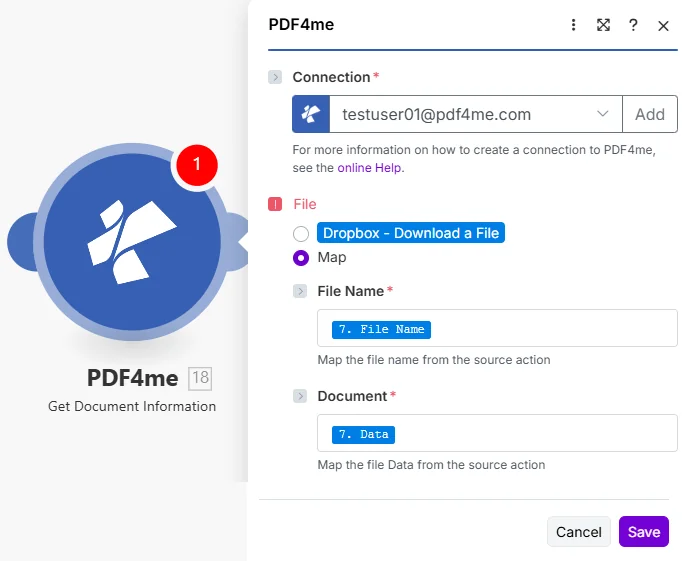
选择 地图 在“文件”下,然后选择“映射”。 文件名 和 文档 从下载步骤开始 PDF。
参数
必需的: 联系, 文件名, 和 文档。 放 文件 到 地图 首先,确保两个输入框都可见。文档需要二进制文件字节,单独使用 URL 字符串或文件名是行不通的。
| 范围 | 必需的 | 它的作用 | 示例映射 |
|---|---|---|---|
| Connection | Required | PDF4me API connection used by the scenario to authenticate metadata requests. Click Add and paste your API key if connecting for the first time. | Your PDF4me connection |
| File | Required | Determines how the PDF is supplied. Choose Map to wire File Name and Document from a prior module's output - the most common setup for multi-step scenarios. | Map |
| File Name | Conditional | Filename with .pdf extension from the source module, required when File is set to Map. Map from the file name field of your Dropbox, Drive, or OneDrive step. | 7. File Name |
| Document | Conditional | Binary PDF content from the download step, required when File is set to Map. Must be actual file bytes - not a URL or a filename string. Map from the Data field of Dropbox or the File Content field of SharePoint. | 7. Data |
我该如何阅读 PDF 元数据 Make?
- 添加 PDF4me → 获取文档信息 针对你的情况。
- 选择 联系 (或点击) 添加 用你的 API 钥匙)。
- 在下面 文件, 选择 地图。
- 地图 文件名 在下载步骤中,将文件名字段包含在内。
.pdf扩大。 - 地图 文档 从同一步骤(通常是)到二进制数据字段 数据 在 Dropbox 或 文件内容 在 SharePoint/OneDrive 模块中)。
- 节省 点击 运行一次展开 文件信息 输出包 - 11 个元数据字段中的每一个都是一个单独的可映射令牌,随时可以连接到任何后续模块。
此模块返回哪些元数据字段?
该模块返回一个 文件信息 包含 11 个独立元数据字段的捆绑包——每个字段都可以独立映射。标题、作者、主题、关键词、创建者和制作者均来自…… PDF文档信息词典 (第 14.3.3 节) PDF 32000-1:2008 规范),而创建日期和修改日期如下 ISO 8601 时间戳格式设置。
| 场地 | 类型 | 它包含什么以及如何使用 |
|---|---|---|
Title | String | Document title as stored in the PDF metadata dictionary. Empty string if not set. Map into an Airtable record or email subject line. |
Author | String | Name of the person or system that created the document. Use in a Router to send files to department-specific folders based on creator. |
Subject | String | Subject or description field from the document properties dialog. Often populated by enterprise document management systems. |
Keywords | String | Comma-separated keyword tags embedded by the author. Filter on this field in a Make Filter to route to the correct team or project. |
Creator | String | Application that originally created the document - for example, Microsoft Word, Adobe InDesign, or a PDF library name. |
Producer | String | PDF conversion library or printer driver that generated the final PDF bytes. Different from Creator when a Word file was later exported to PDF. |
Creation Date | DateTime | ISO 8601 timestamp of when the document was first created. Use in a Filter to process only documents created within a target date range. |
Modification Date | DateTime | ISO 8601 timestamp of the last save. Compare to a stored baseline date to detect documents that have changed since last processing. |
Page Count | Integer | Total number of pages. Use in a Filter to block files over a page limit or route short vs. long documents to different processing branches. |
File Size | Integer | File size in bytes. Gate on this before a conversion or email step - reject oversized files and notify the submitter to re-upload a compressed version. |
PDF Version | String | PDF specification version (e.g. 1.4, 1.7, 2.0). Verify conformance before routing to a PDF/A archive that requires a specific version. |
何时应该使用“获取文档信息”功能?
典型配置Common Make scenario patterns that use Get Document Information to drive routing, validation, or cataloging.
- 新的 PDF 文件落入共享的 Dropbox 收件箱文件夹,并触发该场景。
- 获取文档信息 提取 Keywords 元数据字段。
- A Make 路由器将关键字值与部门名称(财务、法务、人力资源)进行比对。
- 每个分部将文件上传到 Google 云端硬盘中对应的团队文件夹。
- Slack 通知会提醒目标团队文档标题和页数。
- 表单提交会触发该场景,并附带一个文件。 PDF。
- 获取文档信息 返回页数和文件大小。
- 过滤器会阻止大于 50 MB 或小于 1 页的文件继续处理。
- 有效文件将继续进入转换或电子签名模块。
- 被拒绝的文件会触发一封电子邮件回复,要求提交者重新上传较小的版本。
- 计划场景会遍历新场景。 PDFs 位于 OneDrive 存档文件夹中。
- 获取文档信息 提取每个文件的全部 11 个元数据字段。
- Airtable 模块会创建一个新记录,其中包含标题、作者、创建日期和页数。
- 该记录链接回 OneDrive 文件 URL,可一键检索。
- 过滤器会跳过已经存在匹配的 Airtable 记录的文件,以防止重复。
实用技巧
速查表
| 场地 | 价值 |
|---|---|
| File | Map |
| File Name | 7. File Name |
| Document | 7. Data |
| Always populated | Page Count, File Size, PDF Version |
| Can be empty | Title, Author, Subject, Keywords, Creator, Producer |