PDF 提取超链接 Make
本模块的功能
PDF4me, PDF 提取超链接 读取每个可点击的超链接 PDF 并以结构化数据的形式返回它们。 URL无需修改文档,即可为每个链接添加锚文本和页码。完全无损。而像……这样的平台 n8n 需要单独执行 PDF.co 操作才能获取此数据。 PDF4me 以单个原生方式交付。 Make 没有额外功能的模块 API 或需要服务。
相关博客文章
目前尚无关于此功能的博客文章——敬请期待。
在此期间,您可以浏览 PDF4me 博客,查看适用于各平台的教程和工作流程。
访问博客 →
验证您的 API 请求
每一个 PDF4me 模块 Make 需要有效 联系创建或选择一个可以容纳您的 PDF4me API 关键在于让场景能够安全地调用链接提取服务。
您不容错过的重要事实
每个链接三个字段
输出数组中的每个元素都提供了目标位置。 URL可见的 Link Text 读者会点击,然后 Page Number 它出现在……上。将其中任意或全部三个映射到下一个模块。
完全无损
此模块仅读取数据,不返回修改后的值。 PDF您在 Dropbox、Google Drive 或任何其他位置的源文档将完全保持不变。您可以在任何链接管理工作流程的开头自由使用它。
在删除超链接之前运行它
首先提取文件以准确记录所有链接,然后将同一文件传递给“删除超链接”工具进行删除。这样可以获得每个已删除链接的完整审计跟踪记录,这对于合规性和变更审查非常有价值。
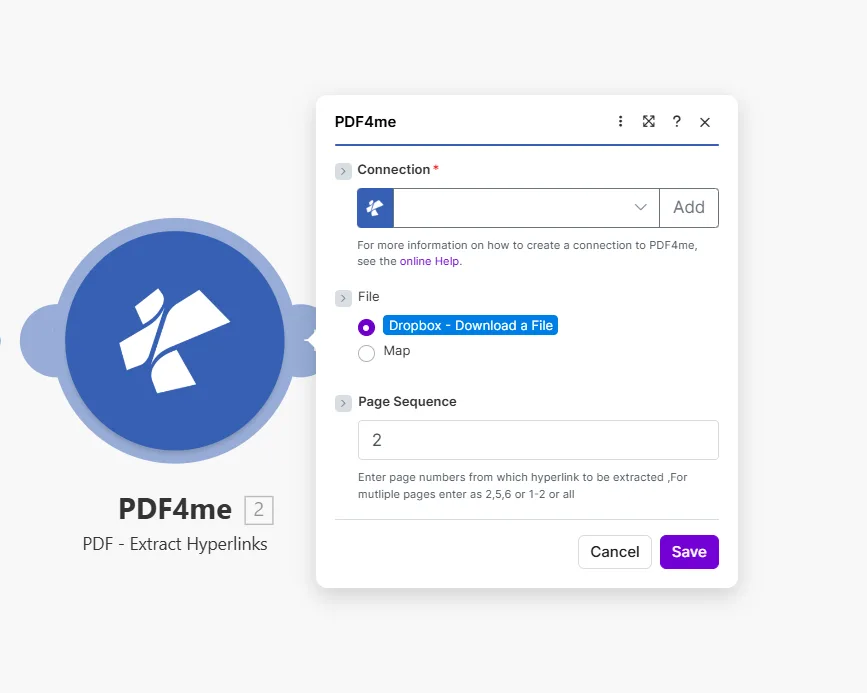
输入单个页面、以逗号分隔的列表、范围或 all 扫描整个文档中的每个链接。
参数
必需的: 所有三个参数 Connection, File, 和 Page Sequence必须提供该模块才能运行。
| 范围 | 必需的 | 它的作用 | 例子 |
|---|---|---|---|
| Connection | Yes | PDF4me API connection used to authenticate extraction requests. Click Add to create one with your API key. | Your PDF4me connection |
| File | Yes | Source PDF to scan. Choose Dropbox - Download a File for a direct Dropbox trigger, or Map to supply the filename and binary content from a prior module. | Dropbox - Download a File |
| Page Sequence | Yes | Which pages to scan for hyperlinks. Accepts a single page, comma-separated list, a range, or all to read the entire document at once. | 2 or 2,5,6 or 1-2 or all |
输出
该模块返回一个 Hyperlinks 数组。数组中的每个元素包含:
| 场地 | 类型 | 描述 |
|---|---|---|
| Hyperlinks | Array | The full collection of link objects returned by the module: one item per hyperlink found. |
| URL | String | The destination address of the hyperlink: a web URL or mailto address. |
| Link Text | String | The visible anchor text the reader would click on in the document. |
| Page Number | Integer | The page in the PDF where the link appears. |
将这些字段中的任何一个映射到 Google 表格行或 Airtable 记录中。 HTTP 请求或筛选条件 Make 设想。
快速设置
- 添加 PDF4me → PDF 提取超链接 致你 Make 设想。
- 选择 Connection (或点击) 添加 用你的 API 钥匙)。
- 放 File 到 Dropbox - 下载文件 或者 地图 来自先前模块的输出 PDF 二进制。
- 请输入要扫描的页面。 Page Sequence: 使用
all一次性读取文档中的所有链接。 - 节省 点击 运行一次输出包含一个 Hyperlinks 数组:添加一个 迭代器 此模块之后将逐个循环遍历每个链接。
工作流程示例
工作流程示例Common Make scenario patterns that use PDF - Extract Hyperlinks for auditing, cataloguing, and link management.
检测文档库中的失效链接
- 当以下情况发生时,Google 云端硬盘会触发此场景: PDF 已添加到“报告”文件夹。
- PDF - 提取超链接 扫描 Page Sequence 设置为 all。
- 迭代器循环遍历 Hyperlinks 大批。
- HTTP 制造 HEAD 请求每个 URL 过滤器会检查非 200 响应。
- Slack 发布了一个故障警报 URL 以及找到它的页面。
根据上传的PDF文件构建可搜索的链接目录
- 当新文件进入“共享文档”文件夹时,Dropbox 会触发通知。
- PDF - 提取超链接 读取每个页面上的所有链接。
- 迭代器循环遍历 Hyperlinks 大批。
- Google 表格会为每个链接、文档名称添加一行, URL, Link Text, Page Number并提取日期。
删除链接前,请创建审计跟踪记录。
- 当文档获准对外发布时,会触发 webhook。
- PDF - 提取超链接 记录所有指向 Google 表格的链接, URL, Link Text, Page Number以及时间戳。
- PDF - 删除超链接 然后删除每个页面上的所有链接。
- Gmail 发送的是经过清理的信息。 PDF 向收件人提供移除物品的永久记录。
常见问题解答
相关模块
创建超链接
添加可点击的超链接 PDF 按搜索词搜索文本,当您需要添加链接而不是阅读链接时,它是很好的补充。
删除超链接
从特定页面中删除所有可点击链接,先运行 Extract 来审核现有内容,然后运行 Remove 来清理。
获取文档信息
检索页面计数和元数据,这在您的场景中扫描链接之前对于条件路由很有用。