数字标牌 PDF 在 Make
数字标牌 PDF 是一个 Make 将基于 X.509 证书的数字签名嵌入到模块中的 PDF 直接从场景中调用。提供文档、.pfx 或 .p12 证书文件以及密码;模块将进行签名并返回结果。无需编写代码即可配置可见或不可见的签名模式、页面位置、签名者姓名、位置和原因元数据。
本模块的功能
PDF4me数字标牌 PDF 将基于 X.509 证书的数字签名嵌入到 PDF 直接来自 Make 场景由你提供。 PDF模块接受 .pfx 或 .p12 证书文件和密码,对文档进行签名并返回结果。无需编写任何代码,即可配置可见或不可见的签名模式、页面位置、签名者姓名、位置和原因元数据。
验证您的身份 API 要求
每一个 PDF4me 模块 Make 需要有效 联系创建或选择一个可以容纳您的 PDF4me API 关键在于确保场景能够安全地调用数字签名服务。
您不容错过的重要事实
将 .pfx 文件存储在安全的位置(Make 数据存储(例如,具有受限访问权限的 Google 云端硬盘),并将证书密码保存在加密的云端硬盘中。 Make 变量,切勿在模块字段中以纯文本形式输入。
可见模式会添加一个读者可见的图形签名域。不可见模式则仅将加密证明嵌入文件元数据中。两种模式的可验证性相同,但选择哪种模式会影响文档对收件人的显示方式。
数字签名与签名时文档的精确字节状态绑定。如果文件被更改,包括元数据, PDF 查看者会将签名标记为无效。请在工作流程中最后签名。
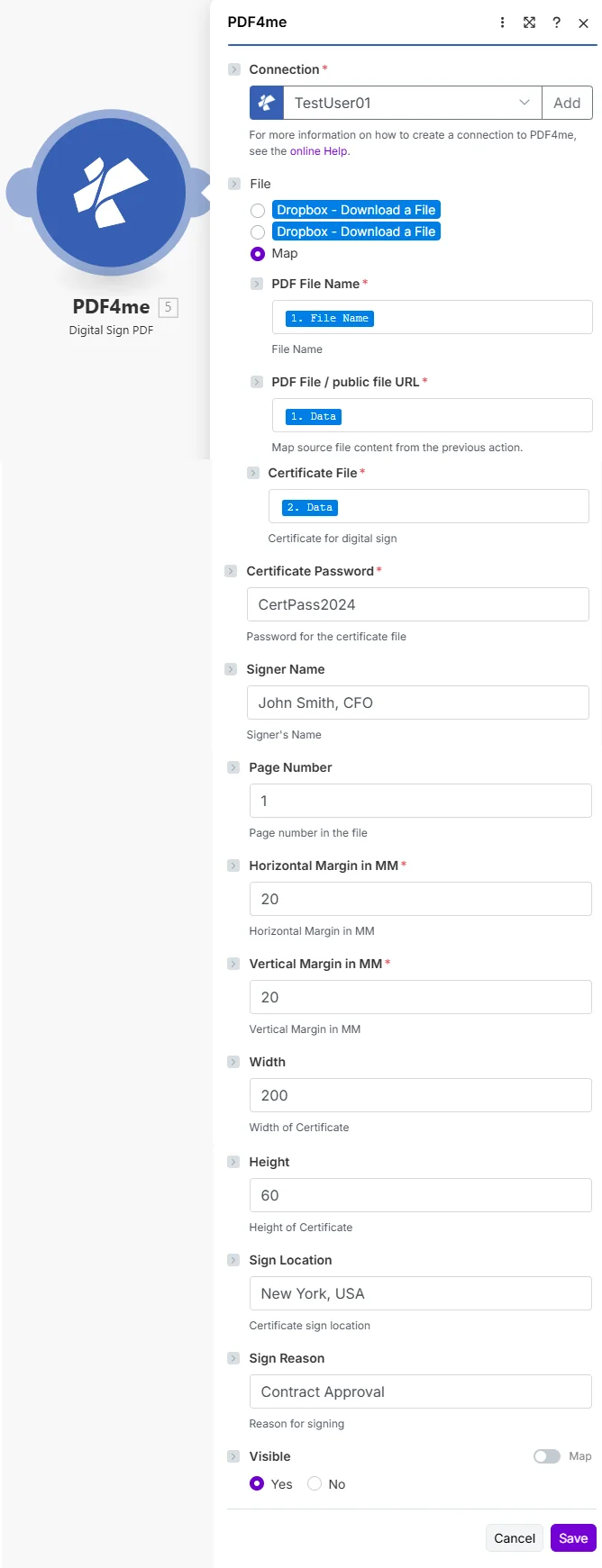
将先前步骤中的 PDF 和证书进行映射,安全地输入证书密码,然后进行配置。 可见的页面位置和签名者元数据。
参数
必须: 联系, PDF 文件名, PDF 文件, 证书文件, 证书密码, 可见的。 水平边距 和 垂直边距 当“可见”设置为“是”时,也需要这些参数。
| 范围 | 必需的 | 它的作用 | 例子 |
|---|---|---|---|
| Connection | Required | PDF4me API connection used by the scenario to authenticate signing requests. | Your PDF4me connection |
| File | Required | Determines how the PDF is supplied. Choose Map to wire filename and binary content from a prior module. | Map |
| PDF File Name | Required | Filename with .pdf extension from the source module. Used to name the signed output file. | 1. File Name |
| PDF File / public file URL | Required | Binary PDF content from the download step that produced the document to sign. | 1. Data |
| Certificate File | Required | Binary content of the .pfx or .p12 certificate file containing the private key and X.509 certificate. | 2. Data |
| Certificate Password | Required | Password that unlocks the private key in the certificate file. Store in an encrypted Make variable. | CertPass2024 |
| Signer Name | Conditional | Human-readable name of the signer, embedded in the signature properties visible in PDF viewers. | John Smith, CFO |
| Page Number | Conditional | Page on which to render the visible signature field. First page is 1. Only relevant when Visible = Yes. | 1 |
| Horizontal Margin in MM | Conditional | Distance from the left edge of the page in millimeters. Controls the horizontal position of the signature field. | 20 |
| Vertical Margin in MM | Conditional | Distance from the bottom edge of the page in millimeters. Controls the vertical position of the signature field. | 20 |
| Width | Conditional | Width of the visible signature field in points. Increase for wider signature appearances. | 200 |
| Height | Conditional | Height of the visible signature field in points. Adjust to fit the signature image or text. | 60 |
| Sign Location | Conditional | Geographic location where the document is being signed. Embedded as metadata in signature properties. | New York, USA |
| Sign Reason | Conditional | Purpose of the signature (for example, Approval or Authorization). Embedded in signature metadata. | Contract Approval |
| Visible | Required | Yes renders a visible signature field at the configured position. No embeds the signature in metadata only with no visual element. | Yes |
如何设置电子标牌 PDF 在 Make
- 添加 PDF4me → 数字签名 PDF 针对你的情况。
- 选择 联系 (或点击) 添加 用你的 API 钥匙)。
- 在下面 文件, 选择 地图。
- 地图 PDF 文件名 和 PDF 文件 从生成该文档的步骤开始。
- 地图 证书文件 从下载 .pfx 或 .p12 文件的步骤开始(将其存储在 Google 云端硬盘或安全来源中)。
- 进入 证书密码使用加密 Make 用于将该值从纯文本场景日志中排除的变量。
- 放 可见的 到 是的 或者 不如果是,请填写。 页码, 水平边距, 垂直边距, 宽度, 和 高度 确定签名栏的位置。
- (可选) 签名人姓名, 标志位置, 和 符号原因 用于元数据。 节省 点击 运行一次 核实签名 PDF 缓冲区出现在输出包中。
输出
该模块返回两个字段,您可以将其映射到任何下游步骤:
| 场地 | 类型 | 它包含什么 |
|---|---|---|
Document Name | String | Filename of the digitally signed PDF, derived from the PDF File Name you supplied. |
Document Data | Buffer | Binary content of the signed PDF. Map this into an upload, email attachment, or archive module. |
可见数字签名和不可见数字签名有什么区别?
可见的数字签名(可见 = 是)会在屏幕上放置一个图形字段。 PDF 收件人打开文档时可以看到的页面。不可见签名(可见 = 否)仅将加密证明嵌入文件元数据中,页面上没有任何视觉元素。两种模式在任何情况下都同样可验证。 PDF 观众支持 PDF数字签名 以及 PKCS#12 标准选择取决于呈现方式:发票通常采用隐形签名;而需要清晰签署记录的合同则采用可见签名。
工作流程示例
工作流程示例Common Make scenario patterns that use Digital Sign PDF for contract execution, compliance, and credential issuance.
- 您的审批状态发生变更 CRM 或者 Airtable 触发了该场景。
- 最终合同 PDF 从谷歌云端硬盘下载。
- 公司 .pfx 证书是从受限的云端硬盘文件夹中检索的。
- 数字签名 PDF 在最后一页上加盖显眼的签名,并注明签名人姓名、地点和原因。
- 已签署 PDF 已上传至已执行合同存档,并通过电子邮件发送给所有相关方。
- 您的计费模块会生成一张新的发票。
- 数字签名 PDF 如果将 Visible 设置为 No,则页面上不会显示任何标记。
- 签名将公司标识和时间戳嵌入到文件元数据中。
- 收件人可以随时验证其真实性。 PDF 查看器显示文档内容未发生任何更改。
- 签字后的发票将通过电子邮件发送给客户,并录入会计数据库。
- 课程完成事件会触发您 LMS 集成中的相应场景。
- A PDF 证书上会显示学生姓名和课程名称。
- 机构的 .pfx 证书是从安全数据存储中加载的。
- 数字签名 PDF 在右下角区域放置一个显眼的机构标志。
- 签字后的证书将通过电子邮件发送给毕业生,并存档于档案中。