跳到主要内容

PDF 删除超链接 Make

本模块的功能

PDF4mePDF - 删除超链接 从特定页面中移除所有可点击的超链接注释 PDF 无需修改可见文本。您可以一步指定单个页面、页面范围或整个文档。像 UPDF 和 Adobe Acrobat 这样的工具需要手动逐个文件编辑,而此模块可以自动完成所有操作。 Make 针对每份经过的文件,都制定了相应的方案。

相关博客文章
目前尚无关于此功能的博客文章——敬请期待。
在此期间,您可以浏览 PDF4me 博客,查看适用于各平台的教程和工作流程。
访问博客

验证您的 API 请求

每一个 PDF4me 模块 Make 需要有效 联系创建或选择一个可以容纳您的 PDF4me API 关键在于确保场景能够安全地调用超链接删除服务。

您不容错过的重要事实

文本内容保留,仅移除链接注释。

原本作为可点击链接的锚文本位置保持不变,字体和颜色也未改变。读者可以阅读文本,但点击后没有任何反应。

目标页面上的所有链接将立即被删除。

您指定的页面上的所有超链接都会在一次操作中被移除,不会出现任何问题。 URL层级筛选。如果需要选择性删除,请先运行“提取超链接”来规划要目标的页面。

PDF 书签和目录链接不受影响。

内部的 PDF 书签导航和目录锚点完全保持不变。仅外部链接会发生变化。 URL 超链接和页面内可点击的 href 注释将被移除。
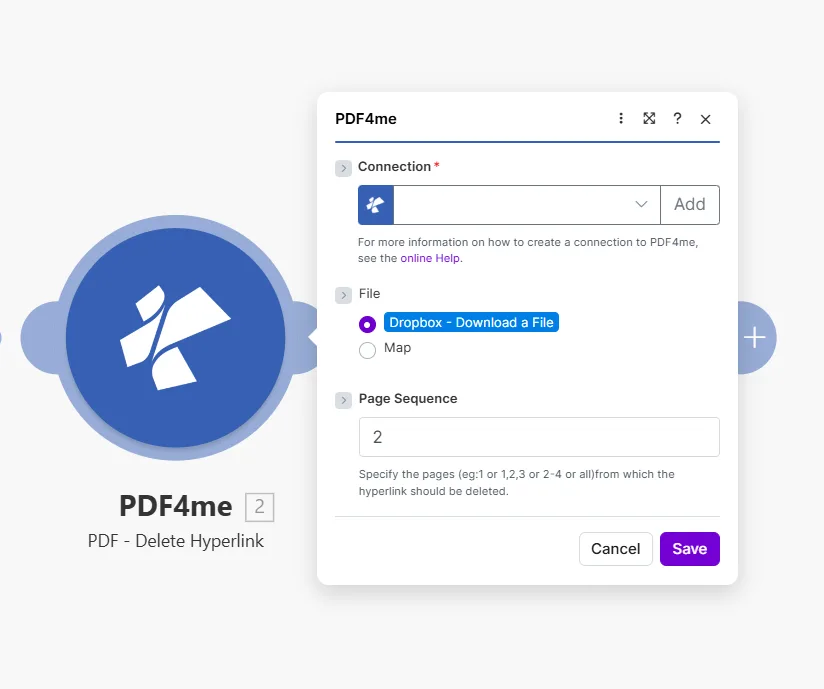
使用 PDF4me 的 PDF 删除超链接模块时,“连接”字段为空,并带有“添加”按钮;“文件”设置为“Dropbox - 下载文件”,下方带有“地图”选项;“页面顺序”字段设置为 2,并提示“指定要删除超链接的页面,例如 1、1,2,3、2-4 或全部”。

输入单个页面、以逗号分隔的列表、范围或 all 从整个文档中删除所有链接。

参数

必需的: 所有三个参数 ConnectionFile, 和 Page Sequence必须提供该模块才能运行。

范围必需的它的作用例子
ConnectionYesPDF4me API connection used to authenticate hyperlink deletion requests. Click Add to create one with your API key.Your PDF4me connection
FileYesSource PDF. Choose Dropbox - Download a File for a direct Dropbox trigger, or Map to supply the filename and binary content from a prior module.Dropbox - Download a File
Page SequenceYesWhich pages to strip of hyperlinks. Accepts a single page, comma-separated list, a range, or all to clean the entire document at once.2 or 1,2,3 or 2-4 or all

快速设置

  1. 添加 PDF4mePDF - 删除超链接 致你 Make 设想。
  2. 选择 Connection (或点击) 添加 用你的 API 钥匙)。
  3. FileDropbox - 下载文件 或者 地图 来自先前模块的输出 PDF 二进制。
  4. 输入要清理的页面 Page Sequence: 使用 all 一次性删除所有页面上的链接。
  5. 节省 点击 运行一次输出结果包含 Document NameDocument Data: 这 PDF 移除指定页面上的所有超链接。

工作流程示例

工作流程示例Common Make scenario patterns that use PDF - Delete Hyperlink to sanitize, prepare, and archive documents.
在发送给客户之前,请对文件进行清理。
  1. 一份完整的提案 PDF 已放置在 Google 云端硬盘的“Ready for Client”文件夹中。
  2. PDF - 删除超链接 跑步 Page Sequence 设置为 all
  3. 返回的无链接 PDF 以附件形式添加到 Gmail 邮件中并发送给客户。
  4. 源文件夹中的原始工作副本保留了所有内部链接。
自动生成可打印版本
  1. Typeform 提交会将合同标记为已批准,并触发该场景。
  2. PDF - 删除超链接 删除所有页面上的所有链接。
  3. 无链接 PDF 已上传至 Dropbox 中的“打印队列”文件夹。
  4. Gmail 会通知印刷团队有新的作业已准备就绪。
每月存档快照,无实时链接
  1. 每月1日都会运行一个预定场景。
  2. Google 云端硬盘会下载当前活动文档。
  3. PDF - 删除超链接 删除所有页面上的所有链接。
  4. 静态快照已上传至“存档/[月份]”文件夹,无死链接,无过期重定向。

常见问题解答

Does removing a hyperlink also delete the visible text?+
No. The module removes only the URI annotation: the invisible clickable layer, while leaving all visible text completely intact. The anchor text stays in its original position with the same font, size, colour, and formatting. Readers can still read the text; it just no longer responds to clicks or open a URL. This makes the module safe for sanitizing documents before print or client distribution, since the content itself is not altered. If you also need to remove or replace the visible text, add a Find and Replace module before or after Delete Hyperlink.
Can I target just one specific link and keep others on the same page?+
The module removes all hyperlinks from the pages you specify: there is no URL-level or text-level filter within a single Page Sequence value. If a page contains five links and you want to remove only one, this is straightforward only when the link you want to keep is on a different page. For more granular control, run Extract Hyperlinks first to get a full list of links and which pages they appear on, then decide which pages to pass to Delete Hyperlink. If links you want to keep share a page with those you want to remove, use Create Hyperlinks afterward to re-add the ones you want to preserve.
What page formats does Page Sequence accept?+
Page Sequence accepts four formats: a single page number like 1, a comma-separated list like 1,2,5, a hyphenated range like 3-7, or the word all to process every page in the document at once. For a 40-page report where you want to strip links from the cover and the appendix only, enter 1,35-40. Using all is the safest default when you want a fully link-free PDF in one step, since it covers every page regardless of total page count. The module returns an error if you specify a page that does not exist in the document, so use Get Document Information first when the total page count is unknown.
Does it affect internal bookmark links or the table of contents?+
No. The module only removes URI annotation objects: the clickable external URL links embedded in the PDF. Internal PDF bookmarks in the outline navigation panel, named destination anchors, and table-of-contents click-through links that jump to another page within the same document are stored as different annotation or action types and are completely unaffected. Readers can still navigate long documents using the table of contents after external links are sanitized. Cross-reference links pointing to headings within the document also remain intact.
Is my original source file changed in any way?+
No. PDF4me processes a server-side copy and streams the result back to Make as a new binary document in the Document Data output field. Your source file: whether in Dropbox, Google Drive, OneDrive, SharePoint, or passed as an email attachment binary, is never written to or modified. The original remains exactly as it was before the scenario ran. If you want to replace the source file with the sanitized version, add an upload module after Delete Hyperlink and explicitly overwrite the original path, that is a deliberate action your scenario takes, not something the PDF4me module does on its own.

相关模块

获取帮助