创造 ZUGFeRD 发票 Make
创造 ZUGFeRD 发票 是一个 Make 模块 PDF4me 产生混合 ZUGFeRD/Factur-X 来自电子发票 CSV, JSON, 或者 XML 发票数据。用它来生成 PDF/A-3 机器可读文档 XML 嵌入内部,与……对齐 EN 16931 欧洲电子发票标准。选择符合性级别和规范版本,以匹配您的买家或 ERP 系统需要。
本模块的功能
PDF4me创建一个 ZUGFeRD 发票 直接在您的系统中生成混合电子发票 Make 场景。提供发票数据作为 CSV, JSON, 或者 XML该模块产生一个 PDF/A-3 包含机器可读文件的文档 ZUGFeRD XML 文件嵌入其中或者一个 XML仅输出 ERP 能够自行处理渲染的系统。结果与此一致。 EN 16931 欧洲电子发票标准,并被广泛接受。 Factur-X 在法国和整个欧盟市场均有销售。符合性级别和规范版本均可配置,以精确满足您的买家或公共部门接收方的要求。
验证您的身份 API 要求
每一个 PDF4me 模块 Make 需要有效 联系创建或选择一个可以容纳您的 PDF4me API 关键在于确保场景能够安全地调用发票生成服务。
您不容错过的重要事实
混合输出是 PDF/A-3 文件。 ZUGFeRD XML 以合规附件的形式嵌入到文件中。 ERP 系统提取 XML 自动运行;人类仍然可以打开和阅读。 PDF 在任何标准查看器中设置 以 PDF 格式渲染发票 同意,希望在页面上以图形方式绘制发票明细项目。
版本 1.0 支持 基本款、舒适款、加长款版本 2+ 扩展为 最低,BASICWL,BASIC, EN16931,扩展版, XRECHNUNG。 XRECHNUNG 和 EN16931 在德国,公共部门开票必须使用此功能。请务必确保版本和级别与买方系统的要求相符。
选择 XML 显示了 发票 XML 数据 场地; JSON 显示发票 JSON 数据; CSV 显示发票 CSV 数据。仅填充与您选择的格式匹配的字段。使用时 XML 该模块还公开了一种格式。 文件 收音机,这样你就可以拉动它 XML 直接从 Dropbox 下载,或者从之前的模块映射。
哪个 ZUGFeRD 我应该使用哪个版本?
该模块支持两个规范版本。大多数新的集成应使用 2.0 或更高版本;1.0 版本保留用于旧版互操作。
ZUGFeRD 2.0+ 受到推崇的
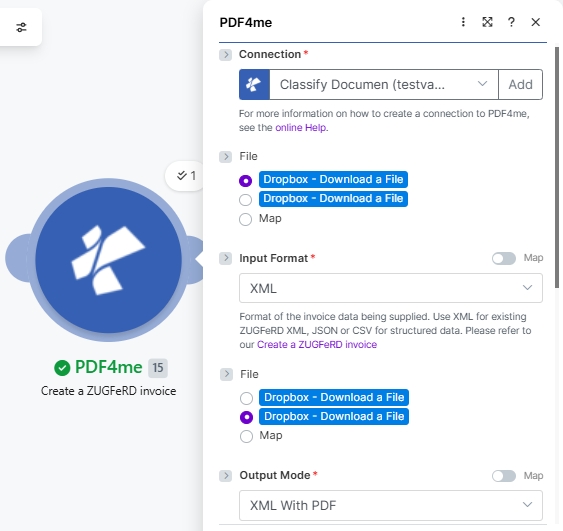
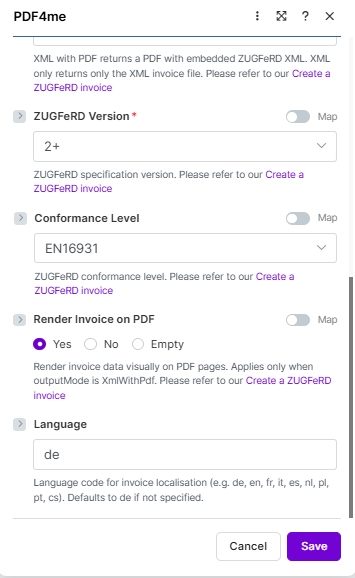
当前规范符合性级别: 最低限度, 基本工作流, 基本的, EN16931 (舒适货币,德国法定默认货币) 扩展, XRECHARGE与以下系统兼容 Factur-X与……搭配 2.0 XML 样本, 2.0 EN16931 JSON 样本, 或者 2.0 CSV 样本下面的截图展示了 2.0+ 版本的用户界面,与目前渲染的效果完全一致。
ZUGFeRD 1.0 遗产
预EN 16931 规范符合性级别: 基本的, 舒适, 扩展仅当收件人 ERP 或者买家系统明确要求版本为 1.0(2022 年之后很少见)。与……搭配使用 1.0 XML 样本, 这 基本的 JSON 样本或者 1.0 CSV 样本其他所有字段的功能都相同;只有合规级别下拉菜单会发生变化。
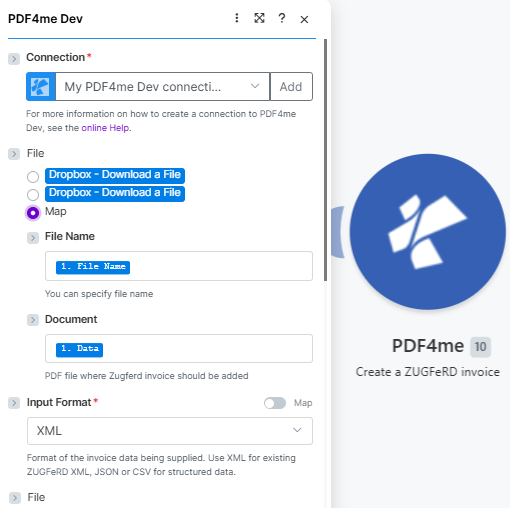
首先 联系然后绘制基地地图 PDF (文件名, 文档)并设置 输入格式 (这里 XML)。
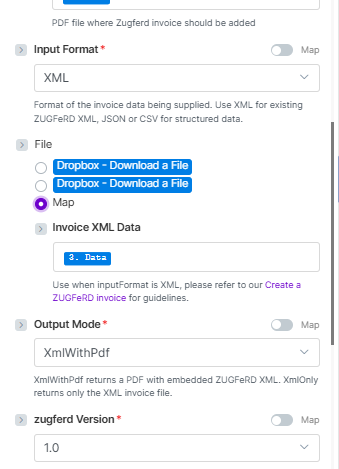
和 文件 = 地图, 地图 发票 XML 数据, 放 输出模式 (XmlWithPdf 或者 XmlOnly),然后选择 zugferd 版本 (这里 1.0)。
参数
必需的: 联系, 输入格式, 输出模式, ZUGFeRD 版本发票数据字段(发票 XML 数据, 发票 JSON 数据, 或者 发票 CSV 数据)会根据您选择的输入格式动态显示。只需填写匹配的字段即可。
为什么 文件 在 2.0 及更高版本的截图中出现了两次? 输入格式为 XML 文件设置为 地图该模块会渲染第二个文件选择器,以便您可以映射两个文件:(a)基础文件 PDF 这 ZUGFeRD 发票应嵌入到源中,并且(b)源 ZUGFeRD XML 文件。两个选择器都显示相同的单选按钮选项。当输入格式为 JSON 或者 CSV 第二个选择器被相应的 发票 JSON 数据 或者 发票 CSV 数据 文本框。
| 范围 | 必需的 | 它的作用 | 示例/选项 |
|---|---|---|---|
| Connection | Required | PDF4me API connection used to authenticate invoice generation requests. Click Add and paste your API key if connecting for the first time. | Your PDF4me connection |
| File | Conditional | Source of the base PDF where the ZUGFeRD invoice will be embedded (when Output Mode is XmlWithPdf). Radio button with two options: Dropbox - Download a File (pulls directly from a Dropbox account without a prior download step) or Map (supplies the PDF from a prior module. Dropbox, Google Drive, OneDrive, HTTP, etc.). Choose Map for the most flexible workflow. When Map is selected, the two sub-fields below appear. | Map |
| File → File Name | Conditional | Sub-field of File (visible when Map is selected). Filename of the base PDF including the .pdf extension. Map from the prior module's filename output. for example, the File Name field of a Dropbox or Google Drive Download module. | 1. File Name |
| File → Document | Conditional | Sub-field of File (visible when Map is selected). Binary PDF content where the ZUGFeRD XML will be embedded. Map from the prior module's binary data field. typically the Data field of Dropbox, Google Drive, or OneDrive download modules. Hint shown in module: "PDF file where Zugferd invoice should be added". | 1. Data |
| Input Format | Required | Format of the invoice data being supplied. Use XML for existing ZUGFeRD XML; JSON or CSV for structured data. Hint: "Format of the invoice data being supplied. Use XML for existing ZUGFeRD XML, JSON or CSV for structured data." | XML sampleXML 2.0 sampleJSON 2.0 EN16931 sampleJSON (basic)CSV sampleCSV 2.0 sample |
| Invoice XML Data | Conditional | The ZUGFeRD XML invoice content to embed. Appears when Input Format = XML and File = Map. Hint: "Use when inputFormat is XML, please refer to our Create a ZUGFeRD invoice for guidelines." Map from a prior Dropbox download or HTTP module output. | XML sampleXML 2.0 sample3. Data (mapped) |
| Invoice JSON Data | Conditional | Structured invoice data in JSON format. Appears when Input Format = JSON. Map a JSON string from a Google Sheets, Airtable, or HTTP module. See sample JSON below. | JSON 2.0 EN16931 sampleJSON (basic)(mapped JSON string) |
| Invoice CSV Data | Conditional | Invoice row data in CSV format. Appears when Input Format = CSV. Map a CSV row from an iterator, Google Sheets, or file download module. See sample CSV below. | CSV sampleCSV 2.0 sample(mapped CSV row) |
| Output Mode | Required | XML With PDF (a.k.a XmlWithPdf in API requests) returns a PDF/A-3 file with the ZUGFeRD XML embedded inside, the standard hybrid e-invoice. XML Only (XmlOnly) returns just the XML invoice file without a PDF wrapper. Hint shown in module: "XML with PDF returns a PDF with embedded ZUGFeRD XML. XML only returns only the XML invoice file." | XML With PDF |
| ZUGFeRD Version | Required | ZUGFeRD specification version. Set to match what the recipient ERP or buyer system expects. Latest is 2+; legacy 1.0 also supported. The two have different conformance level sets (see table below). | 2+ |
| Conformance Level | Optional | ZUGFeRD conformance profile. Available levels differ by version. For 2+, EN16931 (Comfort) is the default for German legal e-invoicing compliance. See the Conformance Level Reference table below. Defaults to BASIC if not specified. | EN16931 |
| Render Invoice on PDF | Optional | When set to Yes, invoice line items are drawn visually on the PDF pages. Applies only when Output Mode is XmlWithPdf. Options: Yes, No, Empty. Hint: "Render invoice data visually on PDF pages. Applies only when outputMode is XmlWithPdf." | Yes |
| language | Optional | Two-letter locale code for invoice label localisation. Supported: de, en, fr, it, es, nl, pl, pt, cs. Hint: "Language code for invoice localisation (e.g. de, en, fr, it, es, nl, pl, pt, cs). Defaults to de if not specified." | de |
一致性等级参考
可用的合规级别因以下因素而异: zugferd 版本始终将级别与买家或 ERP 系统需要。
| 等级 | 使用时 |
|---|---|
BASIC | Mandatory EN 16931 fields only. Widest compatibility, safe default. |
COMFORT | Adds optional fields for line-item detail and additional references. |
EXTENDED | Full field set for complex B2B invoices with delivery, allowances, and charges. |
| 等级 | 使用时 |
|---|---|
MINIMUM | Absolute minimum fields. Buyer reference and totals only. |
BASICWL | BASIC without line items. Header-level data only. |
BASIC | Mandatory EN 16931 fields. Recommended starting point. |
EN16931 | Full EN 16931 compliance for cross-border and public sector. |
EXTENDED | Full field set including German-specific extensions. |
XRECHNUNG | German public-sector e-invoice mandate (XRechnung profile). |
发票样本文件
在连接实际数据源之前,请使用这些示例文件测试模块的每种输入格式。对于德国 B2B 生产工作流程,请从以下示例开始: sample-invoice-zugferd-2.0-en16931.json (ZUGFeRD 2.0, EN16931 符合性)。
ZUGFeRD-invoice-sample.xmlZUGFeRD-invoice-sample-2.0.xmlsample-invoice-zugferd-2.0-en16931.json示例发票.json测试发票.csvzugferd-invoice-2.0.csvCSV 列参考
这 CSV 输入内容必须严格按照此列顺序排列。每一行生成一张发票。
| 柱子 | 描述 | 例子 |
|---|---|---|
InvoiceId | Unique invoice identifier | INV-2025-001 |
IssueDate | Invoice issue date (YYYY-MM-DD) | 2025-01-15 |
SellerName | Seller company name | Test Company |
SellerStreet | Seller street address | 123 Main St |
SellerCity | Seller city | Test City |
SellerPostalCode | Seller postal / ZIP code | 12345 |
SellerCountry | ISO 3166-1 alpha-2 country code | DE |
SellerVatId | Seller VAT registration number | DE123456789 |
BuyerName | Buyer company or person name | Customer Inc |
BuyerStreet | Buyer street address | 456 Oak Ave |
BuyerCity | Buyer city | Customer City |
BuyerPostalCode | Buyer postal / ZIP code | 67890 |
BuyerCountry | ISO 3166-1 alpha-2 country code | DE |
ProductName | Line item product or service name | Test Product |
Quantity | Quantity of the line item | 10.0 |
UnitPrice | Net unit price | 9.90 |
TaxPercent | VAT / tax percentage | 19.0 |
Currency | ISO 4217 currency code | EUR |
PaymentReference | Payment reference string | PAY-REF-001 |
IBAN | Payee IBAN for bank transfer | DE08700901001234567890 |
BIC | Payee bank BIC / SWIFT code | GENODEF1M04 |
JSON 发票结构
使用时 输入格式:JSON有效载荷必须包含以下顶级键。所有嵌套对象和数组均遵循示例文件中所示的结构。
| 钥匙 | 类型 | 描述 |
|---|---|---|
InvoiceId | String | Unique invoice number, e.g. "471102" |
IssueDate | String (ISO 8601) | Invoice date, e.g. "2013-03-05T00:00:00" |
InvoiceType | String | Document type label, e.g. "RECHNUNG" |
TypeCode | String | UN/EDIFACT document type code. 380 for standard invoice |
IsTest | Boolean | true for test runs, false / omit for production |
Notes | Array of strings | Free-text notes shown in the invoice header (payment terms, GLN, etc.) |
Seller | Object | Seller party: Name, Address (Street, City, PostalCode, Country), TaxId, VatId, GLN |
Buyer | Object | Buyer party: Name, Address (Street, City, PostalCode, Country, LineTwo), GLN |
Payment | Object | Payment details: PaymentReference, Currency, IBAN, BIC |
DeliveryDate | String (ISO 8601) | Actual delivery date, e.g. "2013-03-05T00:00:00" |
LineItems | Array of objects | Invoice lines. each with Quantity, UnitCode, UnitPrice, LineTotal, ProductName, GTIN, SellerProductId |
Totals | Object | Monetary totals: LineTotal, ChargeTotal, AllowanceTotal, TaxBasisTotal, TaxTotal, GrandTotal, TaxPercent, Currency |
我该如何创建一个 ZUGFeRD 发票 Make?
- 添加 PDF4me → 创建一个 ZUGFeRD 发票 针对你的情况。
- 选择 联系 (或点击) 添加 用你的 API 钥匙)。
- 选择 输入格式。 XML, JSON, 或者 CSV显示的数据字段取决于此选择。
- 放 文件 到 地图 并连接上一个模块输出中的发票数据字段(发票 XML 数据/JSON 数据/CSV 数据)。或者选择 Dropbox - 下载文件 直接从 Dropbox 获取文件。
- 放 输出模式 到 XmlWithPdf 对于混合动力车 PDF/A-3 发票,或 XmlOnly 为了 XML 仅有的。
- 放 zugferd 版本 (1.0 或 2+)然后选择 符合性级别 从版本合适的集合中开始。 基本的。
- 如果使用 XmlWithPdf:设置 以 PDF 格式渲染发票 到 是的 以可视化的方式绘制项目清单,并进行设置 语言 到您的目标区域(例如
de,en,fr)。 - 节省 点击 运行一次. 路由 文档数据 输出到 Dropbox、Google Drive 等。 ERP webhook 或电子邮件模块。
输出字段
| 场地 | 类型 | 它包含什么 |
|---|---|---|
Document Name | String | Filename of the generated invoice file. e.g. invoice-471102.pdf or invoice-471102.xml. |
Document Data | Buffer | Binary content of the ZUGFeRD hybrid PDF/A-3 or XML file. Map into an upload, email attachment, or ERP HTTP module for the next step in your scenario. |
工作流程示例
工作流程示例Common Make scenario patterns using Create ZUGFeRD Invoice for automated e-invoicing.
- 您的订单已被标记为已发货。 ERP 或 Airtable。场景触发。
- 提取并汇总明细项目、定价、买家地址和税务数据。 JSON 有效载荷。
- 创造 ZUGFeRD 发票 使用输入格式运行 JSON输出模式 XmlWithPdf, 版本 2+符合性级别 基本的, 语言
的。 - 混合型 PDF 发票会通过 Gmail 以电子邮件形式发送给买家,同时副本会上传到 Google 云端硬盘的发票存档中。
- 会计部门 CSV 将每月发票文件上传到 Dropbox。
- “监视文件”触发器会检测到新文件,然后迭代器会处理每一行。
- 创造 ZUGFeRD 发票 每行运行次数及输入格式 CSV生成一个混合体 PDF 按发票金额。
- 全部 PDFs 文件会被上传到结构化的存档文件夹,并且完成摘要电子邮件会发送给财务团队。
- 政府合同发票由 Airtable 记录触发。
- 创造 ZUGFeRD 发票 使用输入格式运行 JSON输出模式 XmlOnly, 版本 2+符合性级别 XRECH。
- 这 XML 文件将直接通过 POST 方式发送到买家的 Peppol 兼容设备。 ERP API 通过 HTTP 模块。
- 成功或错误响应都会记录到 Google 表格中,供财务团队审核。