图片 - 按以下方式旋转 EXIF 数据 - 自动方向 Make
旋转 EXIF 数据 是一个 Make 模块 PDF4me 读起来像是 EXIF 方向标签 JPG 或者 PNG 它可以自动将图像旋转到正确的竖直位置。在将智能手机拍摄的照片上传到图库、打印或进行其他操作之前,可以使用此功能来校正照片的横屏方向。 PDF无需手动旋转角度。
本模块的功能
PDF4me 旋转 EXIF 数据 提供基于以下内容的自动图像旋转 EXIF 方向元数据 Make 场景。它读取 EXIF 从图像中提取方向标签(智能手机和相机照片中常见),并应用正确的旋转,从而实现正确的照片显示、打印准备、网络发布和自动方向校正工作流程。
相关博客文章
目前尚无关于此功能的博客文章——敬请期待。
在此期间,您可以浏览 PDF4me 博客,查看适用于各平台的教程和工作流程。
访问博客 →
我如何验证我的身份 Make 设想?
要访问 PDF4me 网站 API 通过 Make每个请求都必须包含一个有效的 联系 握着你的 PDF4me API 密钥。这实现了您与他人之间安全、经过身份验证的通信。 Make 场景和 PDF4me的图像旋转服务。
您不容错过的重要事实
无需旋转角度
该模块读取 EXIF 方向标签 直接旋转,因此可以根据每张图片进行调整,而无需像手动旋转模块那样设置固定的角度值。
图像类型必须与实际格式匹配
将图像类型设置为 JPG 或者 PNG 为了与实际文件匹配。声明的类型与实际格式不匹配会导致无法正确处理。
不包含 EXIF 数据的图像将保持不变。
屏幕截图、扫描文档或已去除元数据的图像没有 Orientation 标签可供读取,因此该模块会保留其原有方向。
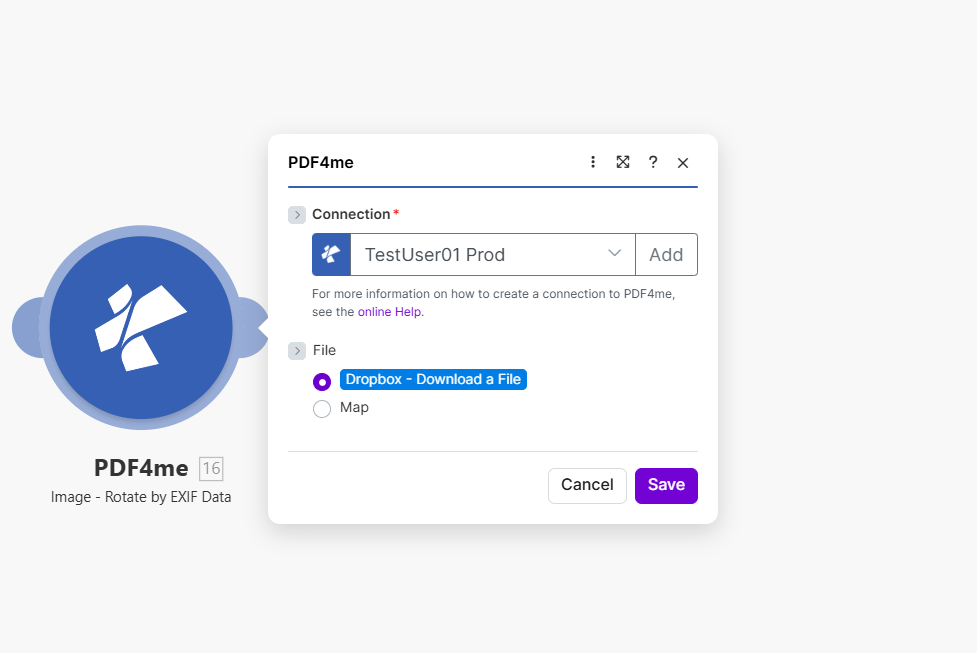
映射源图像,设置图像文件名和图像类型。该模块读取 EXIF 方向标签,自动旋转图像。
旋转的参数有哪些 EXIF 数据需求?
必需的: 必须提供连接信息、文件、图像文件名和图像类型。
| 范围 | 必需的 | 它的作用 | 例子 |
|---|---|---|---|
| Connection | Required | PDF4me API connection. Click Add and paste your API key the first time. Reused automatically across all PDF4me modules in your scenarios. | My PDF4me connection |
| File | Required | Binary content of the source image. Map from Dropbox, Google Drive, HTTP, or any previous module that outputs image binary data. | 1. Data |
| Image File Name | Required | Filename of the image with extension. Map from the previous module output or set explicitly. | photo.jpg |
| Image Type | Required | Format of the source image. Must match the actual file: JPG for JPEG images, PNG for PNG images. | JPG |
输出
| 场地 | 类型 | 它包含什么 |
|---|---|---|
Image Name | String | Output image filename with corrected orientation. |
Image Data | Buffer | The image with EXIF-based rotation already applied, ready for upload or downstream processing. |
典型配置
工作流程示例Common Make scenario patterns using Rotate by EXIF Data.
Dropbox 新上传内容 → 自动更正照片库
- 当上传文件夹中有新照片时,Dropbox 监视文件触发器会触发。
- 如果上传是批量操作,则迭代器会处理每个新上传的图像。
- 通过 EXIF 数据旋转可利用图像自身的 EXIF 标签校正图像方向。
- Dropbox 上传步骤会将更正后的图像保存到主照片库文件夹。
- 目录索引更新步骤会使用更正后的文件刷新图书馆列表。
产品照片上传 → 方向校正 → CDN 发布
- 当店铺上传新的产品照片时,会触发一个事件。
- 通过 EXIF 数据旋转可在后续进行任何调整大小或压缩之前校正方向。
- 压缩图像步骤可以选择性地减小文件大小,从而加快页面加载速度。
- 上传到 CDN 步骤会发布已更正、优化的图像。
- 产品记录更新步骤会将更正后的图片 URL 链接到产品列表中。
扫描的检验照片 → 正确方向 → PDF 报告
- 一款移动巡检应用程序会将现场拍摄的照片上传到共享文件夹。
- 通过 EXIF 数据旋转可校正在场地周围移动时拍摄的任何横向或倒置的照片。
- 使用文档生成模块将校正后的图像嵌入到 PDF 报告中。
- 最终报告将上传至共享的检查档案库。
- 邮件通知会提醒审核经理报告已准备就绪。
实用技巧
Image Type must match the real file format
Setting Image Type to PNG for a file that is actually a JPG (or vice versa) can prevent correct processing. Confirm the format before mapping it in.
Run this before resizing or compressing
Apply EXIF rotation first in your scenario, then resize or compress. Correcting orientation after a resize can compound cropping issues on non-square images.
Re-saved images may have lost EXIF data
If a photo has already passed through another editor or platform that strips metadata, there may be no Orientation tag left to read, and the image will pass through unrotated.
Different phone models write different orientation values
The EXIF Orientation tag can be any value from 1 to 8, not just "rotated 90 degrees." The module handles all standard EXIF orientation values, including mirrored orientations.
This does not read GPS or camera-model EXIF fields
Rotate by EXIF Data uses only the Orientation tag. Use Image - Extract Metadata if your workflow also needs GPS coordinates, camera model, or capture timestamp.
Screenshots typically have no orientation tag
Screenshots and many desktop-generated images never carry an EXIF Orientation tag, so this module has nothing to correct on them and will pass them through unchanged.
速查表
| 场地 | 价值 |
|---|---|
| Module | Rotate by EXIF Data |
| Connection | PDF4me API key |
| File | Binary image content from a previous module |
| Image File Name | filename.jpg or filename.png |
| Image Type (JPEG) | JPG |
| Image Type (PNG) | PNG |
| Rotation angle input | None needed, read from EXIF tag automatically |
| Output fields | Image Name, Image Data |
常见问题解答
行业应用案例及应用
- Photography & Media
- E-Commerce & Retail
- Real Estate & Property
- Document Processing
- 图片库:照片集中正确的方向
- 库存照片为图库准备图片
- 活动摄影修复活动照片批次中的方向问题
- 肖像校正确保正确的纵向方向
- 产品图片:正确的商品图片方向
- 目录图片准备产品目录图片
- 房源照片:修复市场商品列表的朝向
- 图库图片确保在展厅中正确展示
- 房产照片: 正确的商品图片方向
- 虚拟游览修复游览图像方向
- 检查照片准备检查图像
- 营销材料:正确的营销照片方向
- PDF 创造:校正图像之前 PDF 嵌入
- 报告图片修复报表图形的方向
- 演示图形准备演示文稿所需的图片
- 文档:更正屏幕截图和图表
相关操作
图片 - 旋转
应用您选择的固定旋转角度,这在以下情况下很有用: EXIF 数据缺失,或者您需要特定角度,而不需要方向元数据。
消除 EXIF 图片标签
条 EXIF 旋转后保留元数据以保护隐私,这在公开分享照片时非常有用,因为照片不应泄露位置或设备数据。
图像 - 提取元数据
读 GPS相机型号和拍摄时间戳均来自同一相机。 EXIF 此模块使用的数据用于定位。
在其他平台上执行相同任务
n8n旋转图像 EXIF 数据
相同的 EXIF基于 -的自动旋转节点 n8n 工作流程,将其连接到自托管或云平台 n8n 实例而不是 Make。
PDF4me API旋转图像 EXIF 数据
同名 EXIF 旋转操作直接通过 REST API 用于在无代码平台之外进行自定义集成。
API 测试员:旋转图像 EXIF 数据
试试 EXIF 直接在浏览器中使用旋转端点 API 在将其连接到实际场景之前进行测试。