生成文档 Make
PDF4me 生成文档 是一个 Make 合并模块 JSON 或者 XML 数据输入到 Word 或者 HTML 模板并返回成品 PDF, Word, 或者 Excel 文件放置 {{fieldName}} 模板中的占位符提供匹配的键值数据,模块会在服务器端执行替换操作。这是旧版文档生成模块;对于具有复杂条件逻辑的新场景,请改用“生成单个文档”模块。
本模块的功能
PDF4me生成文档 合并 JSON 或者 XML 数据输入到 Word 或者 HTML 模板并返回结果(已完成)。 PDF, Word 文件,或 Excel 文件已准备好通过电子邮件发送、存储或继续处理。放置 {{fieldName}} 模板中的占位符提供匹配的键值数据,模块会在服务器端完全执行替换操作。 遗留文档生成模块对于具有复杂条件逻辑或循环结构的新场景,请使用 生成单个文档 相反,它支持全部 PDF4me LINQ 模板语法。
验证您的身份 API 要求
每一个 PDF4me 模块 Make 需要有效 联系创建或选择一个可以容纳您的 PDF4me API 关键在于确保该方案能够安全地验证文档生成请求。
您不容错过的重要事实
发票模板.docx),映射自 Dropbox、Google Drive 或 OneDrive 下载步骤中的文件名输出。它不是模板 ID。 PDF4me 仪表板,实际的模板二进制文件是通过单独提供的。 文档数据文件。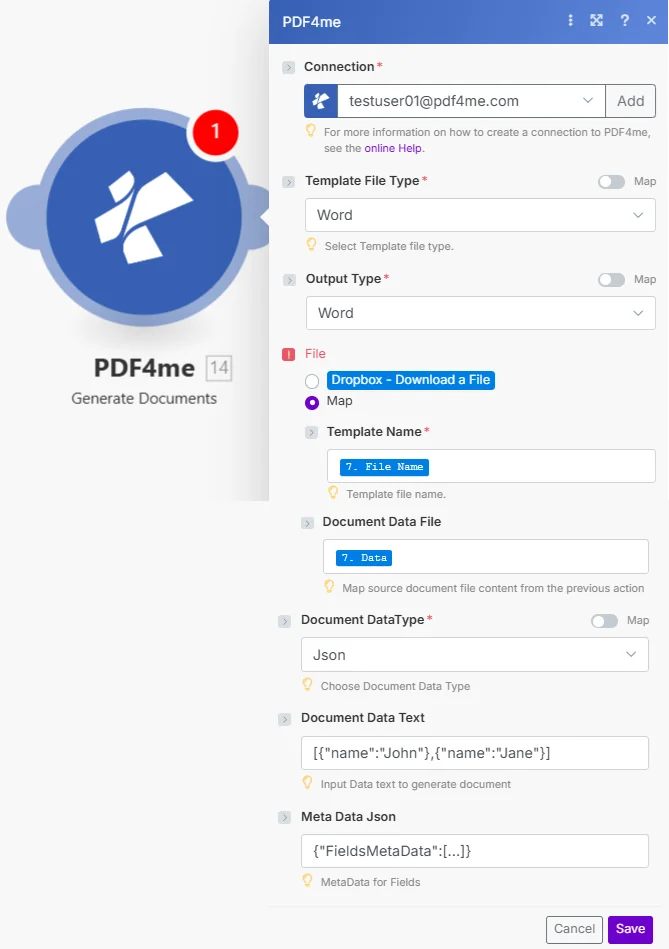
放 模板文件类型 和 输出类型 先接线,然后接线 模板名称 和 文档数据文件 从下载模板的步骤开始。通过以下方式提供合并数据 文档数据文本 或者 文档数据文件。
参数
必需的: 联系, 模板文件类型, 输出类型, 模板名称, 和 文档数据类型。 放 文件 到 地图 首先显示模板名称和文档数据文件。
| 范围 | 必需的 | 它的作用 | 例子 |
|---|---|---|---|
| Connection | Required | PDF4me API connection. Click Add and paste your API key to create one. | [email protected] |
| Template File Type | Required | Format of the template file. Options: Word (DOCX) or html. Has a Map toggle for dynamic scenarios. Hint: "Select Template file type." | Word |
| Output Type | Required | Format of the generated output. Options: Pdf, Word, or Excel. Has a Map toggle. Choose based on the recipient's needs. | Pdf |
| File | Conditional | How the template is supplied. Choose Map to wire Template Name and Document Data File from a prior module. Choose Dropbox, Download a File for a direct Dropbox trigger. | Map |
| Template Name | Required | Filename of the template including extension (e.g. invoice_template.docx). Hint: "Template file name." Map from the File Name output of your download step. | 7. File Name |
| Document Data File | Conditional | Binary content of a JSON or XML data file from a storage module. Hint: "Map source document file content from the previous action." If both this and Document Data Text are supplied, this file takes precedence. | 7. Data |
| Document DataType | Required | Format of the data source. Options: Json or Xml. Has a Map toggle. Hint: "Choose Document Data Type." | Json |
| Document Data Text | Conditional | JSON or XML data as a text string: paste a literal payload or map from a prior module output. Hint: "Input Data text to generate document." Example: [{"name":"John"},{"name":"Jane"}] | [{"name":"John"}] |
| Meta Data Json | Conditional | Optional JSON for field formatting. Use FieldType 2 for date fields, FieldType 0 for checkboxes, FieldType 1 for HTML content. Hint: "MetaData for Fields." | {"FieldsMetaData":[...]} |
输出字段
| 场地 | 类型 | 它包含什么 |
|---|---|---|
Name | String | Filename of the generated document. Map into the file name field of your storage upload or email step. |
Doc Data | Buffer | Binary content of the generated PDF, Word, or Excel file. Wire directly into a Create file action in SharePoint, Google Drive, Dropbox, or OneDrive, or attach it to a Gmail send action. |
如何在设置中生成文档 Make
- 添加 PDF4me → 生成文档 致你 Make 设想。
- 选择 联系 (或点击) 添加 用你的 API 钥匙)。
- 放 模板文件类型 到 Word 或者使用与您的模板格式相匹配的 HTML 代码。
- 放 输出类型 转换为PDF格式 Word或者使用 Excel 生成所需结果。
- 放 文件 到 地图然后接线 模板名称 输出文件名 文档数据文件 模板下载步骤中的二进制内容。
- 放 文档数据类型 转换为 JSON 或 XML。输入或映射您的数据。 文档数据文本如果数据已通过文档数据文件传输,则将其留空。
- 节省 点击 运行一次。 这 文件日期 输出文件保存最终文档:将其连接到存储上传或电子邮件步骤。
生成文档和生成单个文档有什么区别?
生成文档 是使用 Mustache 风格的旧模块。 {{fieldName}} 占位符 JSON 或者 XML 数据支持 PDF, Word, 或者 Excel 输出。 生成单个文档 建议用全套配件进行替换。 LINQ 报表引擎语法: <<foreach>> 循环, <<if>> 条件语句,以及 <<var>> 变量。使用“生成文档”功能为现有的 Mustache 模板生成文档,或 XML 数据源;对于具有复杂逻辑的新模板,请使用“生成单个文档”功能。请参阅 Make PDF4me 一体化 和 PDF4me API 文档 详情请见下文。
工作流程示例
工作流程示例Common Make scenario patterns using Generate Documents.
- 当 Shopify 或 WooCommerce 中确认新订单时,会触发 webhook。
- Google 云端硬盘下载
发票模板.docx存储在团队云盘中。 - 生成文档 将订单有效负载(客户名称、订单项、总计、到期日)合并到模板中,并将模板文件类型设置为 Word 输出类型设置为Pdf。
- 文档数据 PDF 随附于立即发送给客户的 Gmail 邮件中。
- 第二个 Gmail 会将副本上传到 Google 云端硬盘中的“发票/2026”文件夹,用于会计记录。
- 每周一早上,系统会按计划触发一个场景,并查询 Google Sheets 获取上周的 KPI 数据。
- A Make 文本模块将工作表数据组装成一个 JSON 包含与报表模板占位符匹配的字段的对象。
- 生成文档 合并 JSON 进入 Word 输出类型设置为的报告模板 Word。
- 文档数据 Word 文件会在早上 9 点站会之前以可编辑附件的形式通过电子邮件发送给管理团队。
- Typeform 培训完成表单会触发该场景,其中包含参与者姓名、课程和日期。
- Dropbox 下载 HTML 团队账户中存储的证书模板。
- 生成文档 将参与者数据合并到 HTML 模板,模板文件类型设置为html,输出类型设置为Pdf。
- 证书 PDF 通过电子邮件发送给参与者并上传到 SharePoint 用于合规记录的“证书”库。