使用模板在 Make 中生成文档
使用模板生成文档 这是一个适用于 Make 的 PDF4me 模块,它将 PDF4me 存储库中保存的模板与 JSONXML 或 CSV 处理数据并返回最终文档。按名称选择模板,将数据直接映射或以文件形式映射,即可生成发票、合同和信函,无需每次运行都上传模板文件。
本模块的功能
PDF4me 使用模板生成文档 通过将存储在 PDF4me 存储库中的模板与您以 JSON、XML 或 CSV 格式提供的数据合并来生成文档。与基于文件的生成模块不同,您可以从下拉列表中按名称选择模板,无需上传模板或进行映射。通过以下方式内联提供数据 文档数据文本 或者通过映射文件的方式 文档数据文件,添加可选字段格式 元数据 JSON并将生成的文档通过管道传递给“上传文件”、“发送电子邮件”或任何下游的 Make 模块。
验证您的 API 请求
Make 中的每个 PDF4me 模块都需要一个有效的 联系创建或选择一个包含您的 PDF4me API 密钥的密钥,以便该方案可以安全地验证文档生成请求。
您不容错过的重要事实
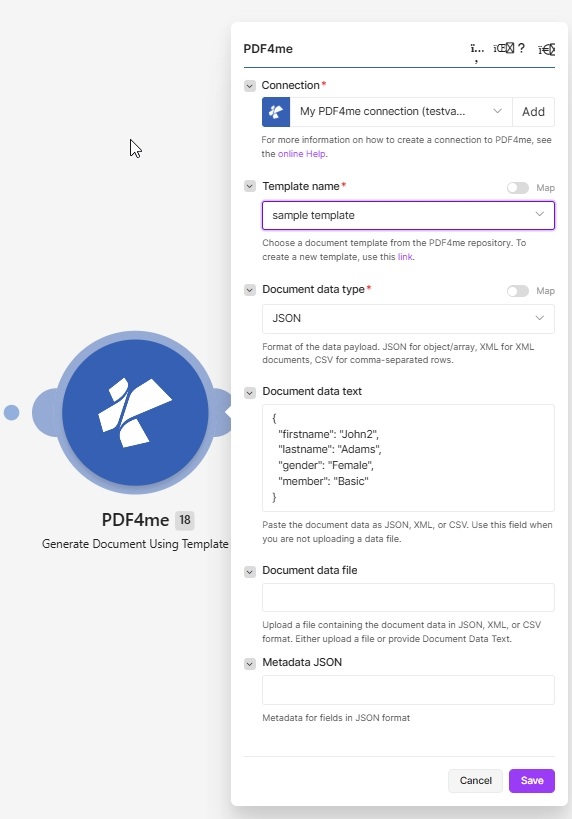
在“选择已保存的模板”中 模板名称, 放 文档数据类型并通过以下方式提供数据 文档数据文本 或者 文档数据文件必填项以红色星号标记。
这些模板来自哪里?
这 模板名称 下拉菜单的内容来自 文档模板 PDF4me 控制面板区域。模板存储在您的帐户中,而不是“创建”场景中,因此您只需创建一次,即可在所有场景、流程和 API 调用中重复使用。
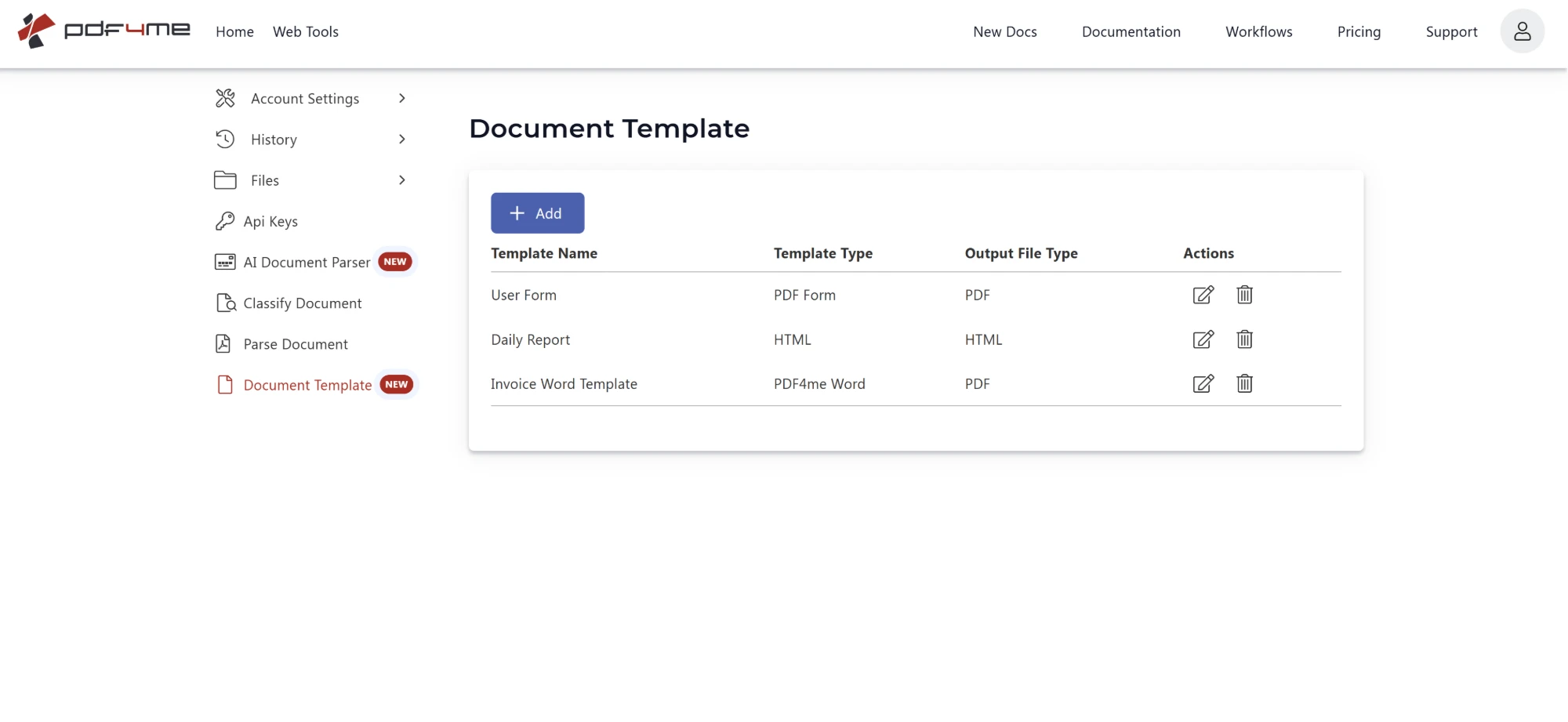
您在此处保存的每个模板都会显示在 模板名称 在“制造”下拉菜单中单击。 添加 点击铅笔图标可以创建新模板,点击铅笔图标可以编辑现有模板。
此表中的每一行都对应“制造”下拉菜单中的一个选项:
| 柱子 | 在《制造》中这意味着什么 |
|---|---|
| 模板名称 | 您在下方选择的确切文本 模板名称给模板赋予不同的名称,以便下拉菜单在大规模运行时仍然清晰易读。 |
| 模板类型 | 例如,您创建模板时使用的源格式。 PDF Form, HTML, 或者 PDF4me Word这是模板中固定的设置,所以 Make 永远不会再向您询问。 |
| 输出文件类型 | 生成的文档格式如下,例如 PDF 或者 HTML。 |
| 行动 | 编辑或删除模板。重命名模板会更改“创建”下拉菜单中显示的值,因此请更新所有引用旧名称的方案。 |
提示:这就是为什么该模块没有“输出类型”字段的原因。
模板格式和输出格式都是在模板本身中决定的。这就是原因。 使用模板生成文档 它只需要模板名称和您的数据。如果您需要将相同的内容输出为不同的格式,请另存一个模板,并使用不同的模板名称。 输出文件类型。 :::
:::注意:重命名时请谨慎
该模块存储模板 姓名,不是 ID。如果您在控制面板中重命名模板,任何仍然指向旧名称的“创建”场景都会失败,直到您重新选择它为止。请使用 地图 开启 模板名称如果需要动态传递名称的话。 :::
Make 中的“使用模板生成文档”功能使用了哪些参数?
必需的: 连接、模板名称和文档数据类型。 条件: 文档数据文本或文档数据文件(二者必须包含数据有效载荷)。 选修的: 元数据 JSON。有关数据格式标准,请参阅 RFC 4180 用于 CSV 以及 官方 JSON 规范。
| 范围 | 必需的 | 它的作用 | 例子 |
|---|---|---|---|
| Connection | Required | PDF4me connection for the scenario. Click Add to create one with your API key, or select an existing connection. | My PDF4me connection |
| Template name | Required | Document template chosen from your PDF4me repository. Pick a saved template from the dropdown. Use the click here link to open the repository and create a new template. Has a Map toggle for dynamic selection. | sample template |
| Document data type | Required | Format of the data payload. JSON for object/array, XML for XML documents, CSV for comma-separated rows. Has a Map toggle. | JSON |
| Document data text | Conditional | Map the fields from a CRM or prior steps as JSON, XML, or CSV text. Use this field when you are not uploading a data file. | { "name": "John" } |
| Document data file | Conditional | Map a file containing the document data in JSON, XML, or CSV format. Use this instead of Document data text when the data comes from a download or upload module. | 2. Data |
| Metadata JSON | No | Optional JSON that controls field formatting during the merge, for example date formats or checkbox and HTML field types. Leave empty for plain text substitution. | {"FieldsMetaData":[...]} |
输出
该模块每次运行返回一个包含所生成文档的捆绑包,可供下游 Make 模块使用。
| 场地 | 类型 | 它包含什么 |
|---|---|---|
Document | File (binary data) | Content (binary data) of the resulting generated document, returned on docData. Map it together with File Name into the next module, for example Upload a File or Send Email Attachment. |
File Name | File name | File name of the resulting generated document, returned on name. Map it together with Document into the next module, for example to upload or email the file. |
如何在 Make 中设置使用模板生成文档?
- 添加 PDF4me 并选择 使用模板生成文档。
- 选择 联系 (或点击) 添加 使用您的 API 密钥创建一个)。
- 打开 模板名称 从下拉菜单中选择一个已保存的 PDF4me 模板库模板。如果列表为空,请先创建一个。 文档模板 在仪表板中,或使用 点击这里 字段旁边的链接。
- 放 文档数据类型 到 JSON, XML, 或者 CSV 与您的数据匹配。
- 提供数据:粘贴或映射数据到 文档数据文本或者将数据文件映射到 文档数据文件。
- (可选) 元数据 JSON 用于日期、复选框或 HTML 字段格式设置。
- 点击 节省 并运行。映射生成的 文档数据 输出到上传文件、发送电子邮件或归档模块。
工作流程示例
工作流程示例Common Make scenario patterns using Generate Document Using Template.
- 当交易达成时,CRM webhook 会触发。
- 使用模板生成文档会选择已保存的发票模板,并将交易字段以 JSON 格式读取到文档数据文本中。
- 生成的发票将通过电子邮件发送给客户,并存储在交易记录中。
- 定时触发器会从云存储下载 CSV 导出文件。
- 文档数据类型设置为 Csv,文件映射到文档数据文件。
- 已保存的信函模板将被合并,生成的每个文档将被归档到按日期排序的文件夹中。
- 表单提交会以 JSON 格式提供合同数据。
- 元数据 JSON 在合并过程中将生效日期字段设置为 yyyyMMdd 格式。
- 已生成并保存的合同模板,并提交进行电子签名。