在 Make 中使用 Word 模板
PDF4me Word 模板 是最灵活的模板系列 Make 生成单个文档。它采用标准格式。 .docx 包含与您的模板占位符匹配的文件 JSON 或者 XML 密钥,并输出个性化信息。 PDF 或者 Word 文档。无需手动邮件合并,即可用于发票、合同、证书和信函。
相关博客文章
目前尚无关于此功能的博客文章——敬请期待。
在此期间,您可以浏览 PDF4me 博客,查看适用于各平台的教程和工作流程。
访问博客 →
开始之前
Word 带有模板占位符的 .docx
样本
template.docx 包含与数据文件中的键对应的占位符。占位符名称必须与您的数据文件名称匹配。 JSON 或者 XML 字段名称必须完全正确,包括嵌套。匹配数据文件
使用
data.json (受到推崇的), 测试.xml, 或者 测试.csv无论格式如何,模板中填充的值都相同。PDF4me 连接 Make
创建一个 PDF4me 连接 Make 并粘贴你的 API 密钥。同一个密钥适用于所有…… PDF4me 在您的场景中,该模块。
示例文件包
请下载以下文件。 Word 模板加上匹配数据 JSON, XML, 和 CSV。
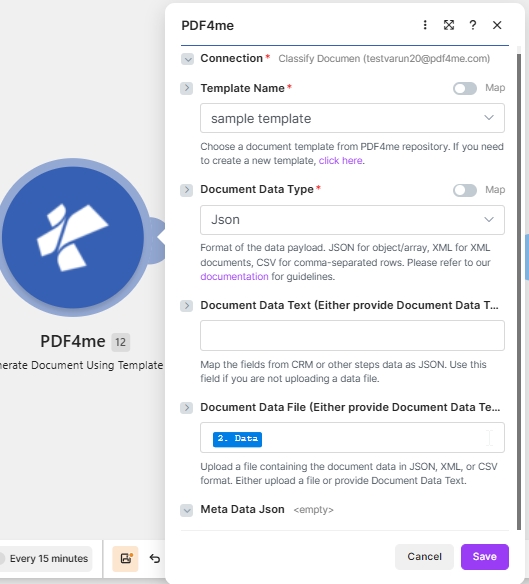
目标配置: PDF4me Word 模板 + JSON 在 文档数据文本 + PDF 输出。
什么是 PDF4me Word 模板中的模板 Make?
这 PDF4me Word 模板家族合并了一个 Microsoft Word .docx 运行时包含数据的文件。 .docx 该模块提供完整的布局设计(包括徽标、表格和样式),并将占位符替换为数据文件中的值。如果您的文档需要精确的格式和可重复使用的品牌标识,那么它是您的理想之选。
我该如何配置 PDF4me Word 模板 Make?
请按如下方式设置模块字段。必填字段标有红色星号。 Make 用户界面。
| 范围 | 必需的 | 它的作用 | 例子 |
|---|---|---|---|
| Connection | Required | PDF4me connection for the scenario. Click Add to create one with your API key. | My PDF4me connection |
| Template File Type | Required | Set to PDF4me Word Template for this template family. | PDF4me Word Template |
| Output Type | Required | Format of the generated document. Word for editable output, PDF for a locked layout (most common). | PDF |
| Template Name | Required | Template file name including extension. Map from the prior module file name output. | template.docx |
| Template | Required | Template file binary. Map from the prior module data output (for example 1. Data from Dropbox Download a File). | 1. Data |
| Document DataType | Required | Choose Json for JSON payloads (most common) or Xml when the upstream system returns XML. | Json |
| Document Data Text | Conditional | Inline JSON or XML data. Use when Document Data File is empty. | data.json |
| Document Data File | Conditional | Mapped data file from a prior module. Use when Document Data Text is empty. | 1. Data |
输出
该模块每次运行返回一个捆绑包。生成的文件放置在…… 文件日期 输出字段。
| 场地 | 类型 | 它包含什么 |
|---|---|---|
Doc Data | Binary | The generated PDF document. Map into a downstream Upload File or Send Email Attachment module. |
File Name | String | Output filename based on Template Name with the extension matching Output Type. |
Mime Type | String | MIME type of the generated document. |
生产模式
Word模板的常用制作模式Replace the manual test with these once the sample works.
来自云存储的模板
- Dropbox 或 Google Drive 存储
template.docx。 - 下载文件会将模板以二进制形式加载。
- 生成文档单张地图模板名称和模板。
- 数据来源于表格或网络钩子。 JSON。
已交付的 Webhook PDF
- Webhook 接收记录有效负载。
- 生成单个文档会将其与模板合并。
- 输出类型为 PDF。
- 发送电子邮件或上传文件即可发送文档数据。
从数据源批量处理
- 搜索记录会返回多行数据。
- 迭代器每次循环处理一条记录。
- 生成文档:每个记录运行一次。
- 每个文件都上传到对应的记录文件夹中。
常见问题解答
相关指南
有关底层模板引擎,请参阅 Aspose Words for .NET 文档 以及 Make 数据结构参考。