邮件合并模板 Make
邮件合并系列 是一个 Make 生成文档:单个选项,用于填充经典文档 Word 使用 MERGEFIELD 标签的邮件合并模板,包含您的数据和输出。 PDF 或者 Word 这是迁移现有文档的最快途径。 Microsoft Word 将邮件合并成一封自动化的、无需代码的信件 Make 设想。
相关博客文章(4)
开始之前
Word 带有 MERGEFIELD 标签的模板
样本
simple_mail_merge_template.docx 使用标准 Word 邮件合并字段。每个合并字段名称都对应于数据文件中的一个键。匹配数据文件
使用
sample_mail_merge_data.json (受到推崇的), 测试.xml, 或者 测试.csv合并字段名称与数据键匹配。PDF4me 连接 Make
创建一个 PDF4me 连接 Make 并粘贴你的 API 密钥。同一个密钥适用于所有…… PDF4me 在您的场景中,该模块。
示例文件包
请下载以下文件。包含一个邮件合并模板及匹配数据。 JSON, XML, 和 CSV。
simple_mail_merge_template.docx
Word 邮件合并模板
sample_mail_merge_data.json
匹配 JSON 数据
测试.xml
相同的数据 XML
测试.csv
扁平化 CSV
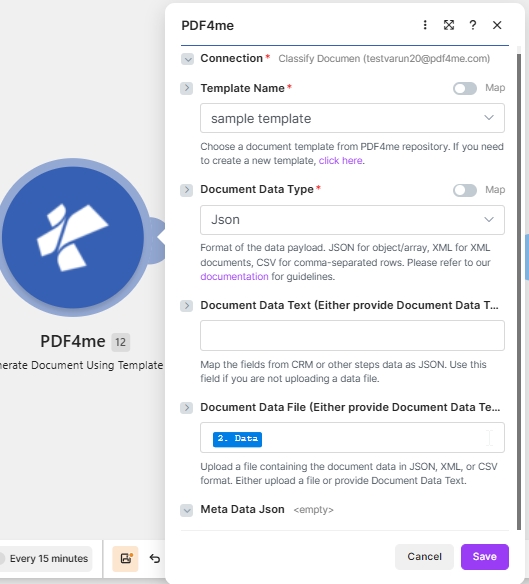
目标配置: Word 邮件合并模板 + JSON 在 文档数据文本 + PDF 输出。
什么是邮件合并模板? Make?
邮件合并家族正在阅读 Word .docx 它使用经典的 MERGEFIELD 标签构建,并将每个字段替换为您数据中的一个值。因为它是一个 .docx你选择 PDF4me Word 模板作为模板文件类型 Make如果您要搬迁现有住所,请选择这个家庭。 Word 将邮件合并文档导入自动化流程。
如何在邮件合并中配置邮件合并模板? Make?
请按如下方式设置模块字段。必填字段标有红色星号。 Make UI。
| 范围 | 必需的 | 它的作用 | 例子 |
|---|---|---|---|
| Connection | Required | PDF4me connection for the scenario. Click Add to create one with your API key. | My PDF4me connection |
| Template File Type | Required | Set to PDF4me Word Template for this template family. | PDF4me Word Template |
| Output Type | Required | Format of the generated document. PDF for a locked file or Word for an editable one. | PDF |
| Template Name | Required | Template file name including extension. Map from the prior module file name output. | simple_mail_merge_template.docx |
| Template | Required | Template file binary. Map from the prior module data output (for example 1. Data from Dropbox Download a File). | 1. Data |
| Document DataType | Required | Choose Json for JSON payloads (most common) or Xml when the upstream system returns XML. | Json |
| Document Data Text | Conditional | Inline JSON or XML data. Use when Document Data File is empty. | sample_mail_merge_data.json |
| Document Data File | Conditional | Mapped data file from a prior module. Use when Document Data Text is empty. | 1. Data |
输出
该模块每次运行返回一个捆绑包。生成的文件放置在…… 文件日期 输出字段。
| 场地 | 类型 | 它包含什么 |
|---|---|---|
Doc Data | Binary | The generated PDF document. Map into a downstream Upload File or Send Email Attachment module. |
File Name | String | Output filename based on Template Name with the extension matching Output Type. |
Mime Type | String | MIME type of the generated document. |
生产模式
邮件合并模板的常用制作模式Replace the manual test with these once the sample works.
来自云存储的模板
- Dropbox 或者 Google Drive 商店
simple_mail_merge_template.docx。 - 下载文件会将模板以二进制形式加载。
- 生成文档单张地图模板名称和模板。
- 数据由……构建而成 Sheets 或者使用 webhook 作为 JSON。
已交付的 Webhook PDF
- Webhook 接收记录有效负载。
- 生成单个文档会将其与模板合并。
- 输出类型为 PDF。
- 发送电子邮件或上传文件即可发送文档数据。
从数据源批量处理
- 搜索记录会返回多行数据。
- 迭代器每次循环处理一条记录。
- 生成文档:每个记录运行一次。
- 每个文件都上传到对应的记录文件夹中。
常见问题解答
相关指南
有关底层模板引擎,请参阅 Aspose Words for .NET 文档 以及 Make 数据结构参考。