在“生成单个文档”中 Make
生成单个文档 是一个 PDF4me 模块 Make 它将一个模板与一组数据合并,每次运行返回一个最终文档。它支持五种模板系列(Word, HTML, PDF 表单、邮件合并和 Google Docs)和两种数据格式(JSON 和 XML),以及输出 PDF, Word, Excel, 或者 HTML无需编写代码,即可用于生成发票、合同、证书和个性化信函。
本模块的功能
PDF4me 生成单个文档 合并 Word, HTML, PDF邮件合并,或 Google Docs 带有模板 JSON 或者 XML 数据并生成个性化结果 PDF, Word, Excel, 或者 HTML 一个文件中 Make 该模块将多步骤邮件合并流程替换为单个可配置操作。映射来自任何云存储模块的模板文件(Dropbox, Google Drive, OneDrive您可以直接以内联方式或以映射文件的形式提供数据,并通过管道传输生成的数据。 文件日期 直接输出到“上传文件”、“发送电子邮件”或任何下游操作 Make 模块。
选择您的模板类型
选择适合您的指南 模板文件类型每页都列出了确切的示例模板、数据文件(JSON, XML, CSV)、推荐字段值以及快速测试场景 Make。
.docx 带有胡子占位符。输出 PDF 或者 Word包括 template.docx + data.json。模板.pdf + formdata.json。simple_mail_merge_template.docx。.docx。 输出 PDF 或者 Word包括 google-docs-template.docx。验证您的身份 API 要求
每一个 PDF4me 模块 Make 需要有效 联系创建或选择一个可以容纳您的 PDF4me API 关键在于确保该方案能够安全地验证文档生成请求。
您不容错过的重要事实
.docx 用……映射 HTML 所选类型在运行时失败。请打开上方的匹配指南,查看每个模板系列使用的确切占位符语法。文件日期 输出字段。将其直接通过管道传递给上传文件(Dropbox, 驾驶, OneDrive)、发送电子邮件附件,或任何接受二进制文件的下游模块。文件名将保留自“模板名称”字段。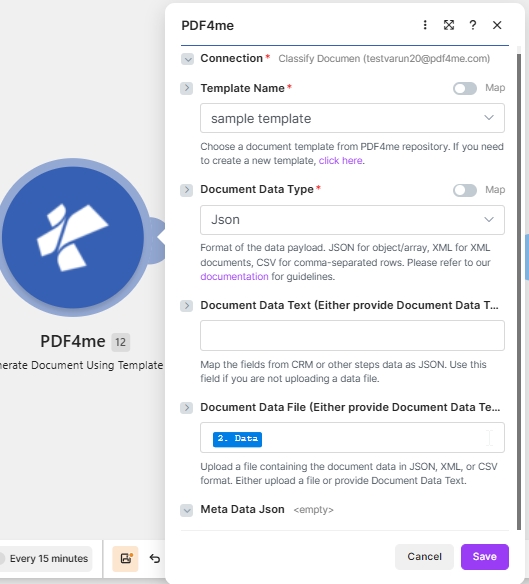
选择一个 模板名称 来自你的 PDF4me 存储库,设置 文档数据类型 转换为 JSON,并进行映射 文档数据文件 从之前的下载步骤(或粘贴) JSON 进入 文档数据文本 反而)。
“生成单个文档”使用了哪些参数? Make?
必需 Make UI: 连接、模板文件类型、输出类型、模板名称、模板和文档数据类型(均标有红色星号)。 条件: 文档数据文本或文档数据文件(两者之一必须承载数据有效载荷)。 选修的: 元数据 JSON。
| 范围 | 必需的 | 它的作用 | 例子 |
|---|---|---|---|
| Connection | Required | PDF4me connection for the scenario. Click Add to create a connection with your API key, or select an existing connection from the dropdown. | My PDF4me connection |
| Template File Type | Required | Select the template family: Word Template (.docx), HTML (.html), Pdf Form (fillable .pdf), Mail Merge (.docx merge fields), or Google Docs export (.docx). Open the matching guide for placeholder syntax. | PDF4me Word Template |
| Output Type | Required | Format of the generated document. Word for editable .docx, PDF for print-ready locked layout (most common), Excel for .xlsx, HTML for web embedding. | PDF |
| File Selection | Required | How the template file is supplied. Choose a storage module shortcut (for example Dropbox Download a File) or select Map to wire Template Name and Template from any prior step. | Map |
| Template Name | Required | Template file name including extension. Map from the previous module filename output (shown as 1. File Name when Dropbox Download a File is upstream). | 1. File Name |
| Template | Required | Template file binary for document generation. Map from the previous module data output (shown as 1. Data when Dropbox Download a File is upstream). | 1. Data |
| Document Data File | Conditional | Map source document file content from a previous action when your data payload is a file rather than inline text. Use when Document Data Text is empty. | 1. Data |
| Document DataType | Required | Choose document data type. Json for JSON payloads (most common), Xml when the upstream system returns XML. | Json |
| Document Data Text | Conditional | Input data text to generate the document. Paste JSON or XML inline or build it with Make expressions. Use when Document Data File is empty. | { "Name": "John", "Age": 16 } |
| Meta Data Json | No | Optional metadata for template fields (title, author, subject, custom properties). Shown without an asterisk in the Make UI. Leave empty for most templates. | |
如何在输出类型中选择? Make?
选择与下游要求相匹配的格式。 Make 模块期望的输出格式与模板类型无关,因此 Word 模板可以生成 PDF。
PDFPrint-ready, locked layoutWordEditable .docx outputExcelSpreadsheet .xlsx outputHTMLWeb-ready HTML输出
该模块返回一个 捆 每次执行生成的文件都放置在 文件日期 输出字段,可供下游模块通过标准方式获取。 Make 数据映射。
| 场地 | 类型 | 它包含什么 |
|---|---|---|
Doc Data | Binary | The generated document in the format chosen under Output Type. Map this into a downstream Upload File, Send Email Attachment, or any module that accepts binary input. |
File Name | String | Output filename based on Template Name with the extension matching Output Type. |
Mime Type | String | MIME type of the generated document (application/pdf, application/vnd.openxmlformats-officedocument.wordprocessingml.document, and so on). |
场景示例
常见制造场景模式Typical ways to chain Generate Document Single into a Make flow.
- Webhook 接收 JSON 用于开具新发票。
- Dropbox 下载文件即可加载发票 Word 模板。
- 从单个映射模板名称和模板生成文档单页映射模板名称和模板 Dropbox 该步骤将 DataType 设置为 Json,并读取 webhook。 JSON 转换为文档数据文本。
- 发送电子邮件,将文档数据作为附件发送给客户。
- 每天上午 9:00 定时触发。
- Airtable 搜索记录获取最新的课程完成信息。
- 迭代器遍历每条记录。
- 生成单个文档合并 Word 包含记录数据和输出的证书模板 PDF。
- Google Drive “上传文件”功能会将每个证书保存到以收件人命名的共享文件夹中。
- 每月1号安排消防活动。
- Google Sheets 搜索行提取每月汇总数据。
- 转换模块将行转换为 JSON 模板所需的结构。
- 生成单个文档会使用数据渲染报表模板,输出类型为 PDF。
- OneDrive 上传文件存档 PDF 和 Slack 发送消息即可发布下载链接。
常见问题解答
相关行动
获取帮助
有关驱动所有模板系列的模板引擎和 Mustache 语法,请参阅: Aspose Words for .NET 文档 以及 Make 数据结构参考。