填写 PDF 以 Make使用以下方式自动填充字段 PDF4me
PDF4me 填写 PDF 形式 是一个 Make 用于填充可填写表单交互式字段的模块 PDF 带有映射值的模板或 JSON 有效载荷,无需打开 Acrobat用它来生成合约 CRM 数据,从某个来源颁发证书 LMS或者将表单提交内容转换为已填写的内容。 PDF 自动记录。
本模块的功能
PDF4me 填写 PDF 形式 需要一个可填写的 PDF 模板会将值写入其交互式字段,既可以通过 Map 字段一次写入一个字段,也可以通过 JSON 有效负载一次性写入所有字段。 PDF 可编辑性决定了最终文档是保留其交互式字段,还是被扁平化为可以发送或存档的静态内容。
相关博客文章(2)
我如何验证我的身份 Make 设想?
每一个 PDF4me 模块 Make 需要有效 联系创建或选择一个可以容纳您的 PDF4me API 关键在于确保该场景能够安全地验证表单填写请求。
您不容错过的重要事实
该模板需要真正的 AcroForm 字段
填写 PDF 表单仅在以下情况下有效 PDF 已经包含交互式可填写字段。一个扁平的、不可填写的字段 PDF 没有可以映射值的字段,请先构建字段 PDF4me 添加表单字段 PDF 或者类似这样的工具 Acrobat。
发送数据的两种方式
选择输入类型,可以在 Map 字段(每个表单字段一个字段名称/字段值对)或 JSON(涵盖所有字段的单个有效负载)之间进行选择。当数据已来自数据库时,请选择 JSON。 API 以对象形式调用。
保持 PDF 可编辑状态默认为“否”
如果选择“否”,已填写的字段将被扁平化为静态的、不可编辑的内容,这对于最终文档来说是更安全的选择。只有当后续步骤或收件人仍需要编辑这些字段时,才应将其切换为“是”。
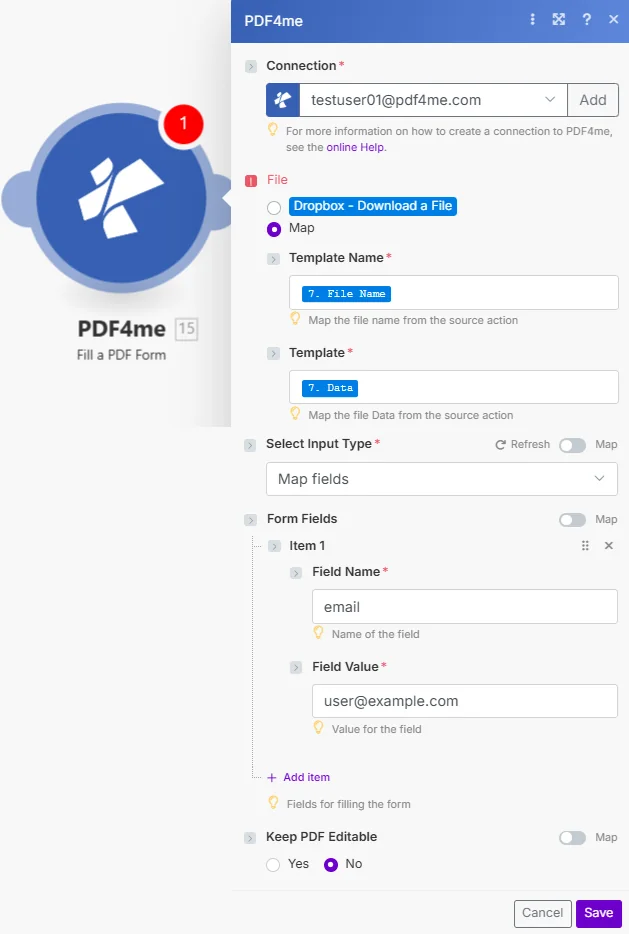
将文件设置为映射,连接上一个模块中的模板名称和模板,选择“选择输入类型”,然后添加表单字段或 JSON 有效负载并设置“保留”。 PDF 可编辑。
参数
必需的: 必须始终提供“连接”、“文件”和“选择输入类型”。当“文件”为“地图”时,“模板名称”和“模板”为必填项。当“选择输入类型”为“地图字段”时,“表单字段”为必填项。
| 范围 | 必需的 | 它的作用 | 例子 |
|---|---|---|---|
| Connection | Required | PDF4me API connection. Click Add and paste your API key if connecting for the first time. | My PDF4me connection |
| File | Required | Radio button picking how the fillable template arrives. Pick a quick storage option (Dropbox - Download a File) or choose Map to bind Template Name and Template from any prior module. | Map |
| Template Name | Conditional | Sub-field of File, shown when Map is selected. Filename of the fillable PDF template including the .pdf extension. | contract_template.pdf |
| Template | Conditional | Sub-field of File, shown when Map is selected. Binary content of the fillable PDF template, mapped from the prior module Data or buffer output. | [Buffer from Get File] |
| Select Input Type | Required | Chooses how field values are supplied: Map fields for individual Form Fields entries, or Json for a single JSON payload. | Map fields |
| Form Fields | Conditional | Shown when Select Input Type is Map fields. Repeatable list of Field Name / Field Value pairs, one item per form field to populate. | [{Name: "email", Value: "[email protected]"}] |
| Keep PDF Editable | Optional | Yes leaves the filled fields interactive for further editing. No (default) flattens them into static, non-editable content. | No |
输出字段
| 场地 | 类型 | 它包含什么 |
|---|---|---|
Document Name | String | Output PDF filename with the filled form fields. |
Document Data | Buffer | The filled PDF form in buffer format, ready to upload, email, or archive. |
如何设置填充 PDF 以 Make?
- 添加 PDF4me → 填写 PDF 形式 致你 Make 设想。
- 选择 联系 (或点击) 添加 用你的 PDF4me API 钥匙)。
- 在下面 文件, 选择 地图 电线 模板名称 和 模板 来自之前的模块(Dropbox, Google Drive, 或者 HTTP)。
- 放 选择输入类型 到 地图字段 并添加一个 表单字段 每个字段都输入一个条目,或者将其设置为 JSON 并提供一个 JSON 有效载荷。
- 放 保持 PDF 可编辑 到 是的 仅当字段必须在下游保持交互时才如此。运行该方案,填充 PDF 返回一个缓冲区。
典型配置
工作流程示例Common Make scenario patterns using Fill a PDF Form.
合同生成 CRM
- A CRM 当交易进入最后阶段时,触发器就会触发。
- 该场景从以下位置检索客户名称、金额和条款: CRM 记录。
- 获取文件功能从文件中检索可填写的合同模板。 Google Drive。
- 填写 PDF 形式地图 CRM 将“选择输入类型”设置为“映射字段”的字段。
- 填妥的合同已上传至 Dropbox 并通过电子邮件发送给了客户。
课程证书颁发
- 当学生完成课程时,触发器会触发。 LMS。
- 该场景会构建一个包含学生姓名、课程名称和完成日期的 JSON 有效负载。
- 获取文件功能可检索可填写的证书模板。
- 填写 PDF 表单填充方式为:选择输入类型,设置为 Json,保留 PDF 左侧可编辑。
- 最终证书将通过电子邮件发送给学生,并存档。 Google Drive。
表格提交至已填写 PDF
- 新的 Google Forms 提交操作会触发该场景。
- 该场景会读取响应中提交的每一个答案。
- 获取文件功能可检索可填写申请模板。
- 填写 PDF 表单会将每个答案映射到与其匹配的表单字段条目。
- 已填妥的申请 PDF 存储在 Dropbox 并通过电子邮件向申请人发送确认信息。
实用技巧
Confirm the template has real fillable fields first
Open the PDF in Acrobat or a form viewer and check for clickable fields. A flat scan or a print-to-PDF export has nothing for this module to fill.
Match Field Name exactly, including case
The Field Name in Form Fields must match the internal field name defined in the PDF, not just the visible label. Mismatched names are silently skipped.
Use Json for large or dynamic field sets
When the number of fields varies per document or comes straight from an API response, Json input is far less fragile than maintaining dozens of Map fields entries by hand.
Flatten before sending externally
Leave Keep PDF Editable at No for anything you send outside your organization, otherwise recipients can alter the values you just filled in.
Reuse one template across an iterator
Map the same Template Name and Template on every run and loop Form Fields or Json through a Make Iterator to fill dozens of contracts or certificates from one source template.
速查表
| 场地 | 价值 |
|---|---|
| Module | Fill a PDF Form |
| Connection | PDF4me API key |
| Template source | File = Map (Template Name + Template) |
| Input type options | Map fields / Json |
| Map fields shape | [{Name: "field", Value: "value"}, ...] |
| Default Keep PDF Editable | No (flattened) |
| Output | Document Name + Document Data (buffer) |
常见问题
行业应用案例及应用
- Sales & Business Development
- Human Resources
- Education & Training
- Healthcare & Medical
- 合同生成填写销售合同 CRM 数据
- 提案撰写:填写包含商机详情的提案表格
- 报价生成填写报价单,提供价格信息
- 协议处理生成已填写的协议文件
- 录用通知书:用候选人数据填写招聘启事
- 入职表格自动填写新员工入职文件
- 绩效考核填写包含员工数据的审核表
- 终止文件生成包含员工信息的离职文件
- 证书签发填写包含学生信息的证书
- 报名表:将学生数据填写到入学文件中
- 成绩单生成填写成绩单表格及学业记录
- 评估表将结果填写到评估表中
- 患者表格填写包含患者数据的登记表
- 保险索赔填写索赔表格,包含医疗信息
- 处方单填写包含患者详细信息的处方模板
- 同意书生成包含患者信息的知情同意书
相关操作
添加表单字段 PDF
构建可填充 AcroForm 平坦的田野 PDF 首先,在填写之前使用此方法 PDF 如果您的模板还没有任何字段,请填写表单。
压平 PDF
将现有已填写表单的字段展平。 PDF保持 PDF 上游设置中已将“可编辑”选项保留为“是”。
符号 PDF
在填写好的文档上添加签名,自然地与“填写”之后搭配使用。 PDF 合同和协议表格。
在其他平台上执行相同任务
n8n填写 PDF 形式
相同的表单填充节点 n8n 工作流程,将其连接到自托管或云平台 n8n 实例而不是 Make。
Power Automate填写 PDF 形式
相同的表单填写操作 Microsoft Power Automate 流动,契合 SharePoint 以及 Dataverse 工作流。
Zapier填写 PDF 形式
相同的表格填写步骤 Zapier将其连接到 Google Sheets, Airtable, 或者 CRM Zap 中已包含触发器。
PDF4me API填写 PDF 形式
直接通过以下方式调用同一个表单填写端点 REST 对于外部的自定义集成 Make。