添加表单字段 PDF 为了 Make
添加表单字段 PDF 是一个 Make 该模块可将交互式表单字段(文本输入框、复选框、单选按钮、下拉列表和签名框)精确地放置在任意位置的 X/Y 坐标处。 PDF 页面。使用它来自动创建可填写表单,用于合同、人力资源入职、调查以及任何需要收件人填写的流程。 PDF 数字输出。输出是 Base64已编码并准备填充 PDF 表单模块或直接上传。
本模块的功能
本模块的功能: 这 PDF4me 添加表单字段 PDF 该模块将交互式表单字段(文本输入框、复选框、单选按钮、下拉列表和签名框)放置在页面任意位置的精确 X/Y 坐标处。 PDF 在你里面 Make 场景。给它喂食 PDF 缓冲区 Google Drive, Dropbox或者,在更早的模块中,定义字段名称、类型和位置,并接收返回值。 Base64-编码可填充 PDF 准备上传、通过电子邮件发送或传递给 Fill PDF 表单模块。使用 Make的 迭代器 遍历字段定义列表,并在单次场景运行中添加数十个字段——无需手动操作 PDF 需要编辑。
验证您的身份 API 要求
每一个 PDF4me 模块 Make 需要有效 API 密钥。连接 PDF4me 一旦进入 Make连接管理器 - 您的密钥将被安全存储并在所有连接中重复使用 PDF4me 模块会自动添加到您的所有场景中。
您不容错过的重要事实
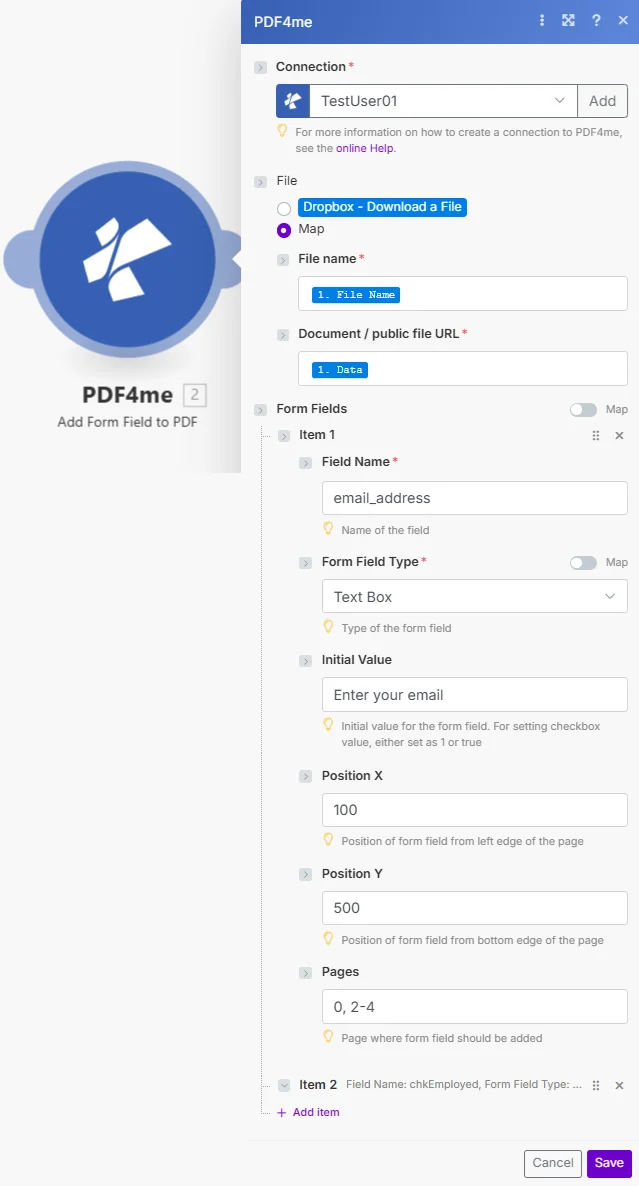
参数
⚠️ 文件名、文档、字段名称和表单字段类型均为必填项。 可选参数控制字段位置、默认值和页面定位。
| 范围 | 必需的 | 它的作用 | 例子 |
|---|---|---|---|
| File Name | Required | Filename of the source PDF including the .pdf extension. Map from the previous module's file name output or enter a static name. Used for output identification and file format validation. | application_form.pdf |
| Document | Required | The PDF file content as a binary buffer. Map from a Get File module (Google Drive, Dropbox, OneDrive, HTTP) or from the Document Data output of a previous PDF4me module. This is the base PDF that will receive the new form field. | [Buffer from Google Drive Get File] |
| Field Name | Required | Unique identifier for the form field. Used for field recognition when filling the form programmatically or with the Fill PDF Form module. Use descriptive names without spaces (e.g. FirstName, EmailAddress, AgreeToTerms). Must be unique within the document. | email_address |
| Form Field Type | Required | The type of interactive field to add. Text - single or multi-line text input. Checkbox - boolean tick box (true/false). Radio - radio button selection (group via shared Field Name). Dropdown - drop-down list selection. Signature - digital signature field. | Text |
| Initial Value | Conditional | Default value pre-populated in the field. For Text fields: any string (appears as placeholder text). For Checkbox: "1" or "true" to pre-check, "0" or "false" for unchecked. Leave empty for blank fields that the recipient fills in. | Enter your email address |
| Position X | Conditional | Horizontal position of the field from the left edge of the page, measured in PDF points (72 points = 1 inch). Default: 0 (left edge). Use a PDF ruler or coordinate tool to determine the exact X value for your layout. | 100 |
| Position Y | Conditional | Vertical position of the field from the bottom-left corner of the page, measured in PDF points (72 points = 1 inch). Y = 0 is the bottom edge. For A4 (842 pt tall), Y = 770 places the field approximately 1 inch from the top. | 500 |
| Pages | Conditional | Target pages for the field using 0-based indexing. Use comma-separated indices for specific pages (e.g. "0,2,4"), ranges with hyphen (e.g. "0-3" for first four pages), or leave empty to apply to all pages. | 0 |
输出字段
| 场地 | 类型 | 它包含什么 |
|---|---|---|
Document Name | String | Output PDF filename with the form field added |
Document Data | Base64 | The updated PDF with the new form field encoded as Base64; map directly to the next module's Document input or a storage upload field |
如何设置“添加表单字段” PDF 模块 Make
- 创建或打开 Make 设想 并添加一个提供源的触发器或模块。 PDF - Google Drive 观看文件, Dropbox 手表文件夹,或一个 HTTP 模块。
- 添加一个“获取文件”模块 (Google Drive, Dropbox, 或者 OneDrive)检索二进制文件 PDF 如果触发器仅返回元数据,则使用缓冲区。
- 添加 PDF4me 添加表单字段 PDF 模块 - 搜索 PDF4me 在模块列表中选择它。
- 认证 你的 PDF4me API 如果尚未连接,请输入密钥(在密钥中输入密钥)。 Make 连接对话框)。
- 地图文件名 从上一个模块的文件名输出中获取。
- 地图文件 从前一个模块的文件缓冲区或二进制数据输出。
- 输入字段名称 - 一个唯一的、描述性的标识符(例如,
ApplicantName,SignatureField)。 - 选择表单字段类型 - 文本、复选框、单选按钮、下拉菜单或签名。
- 设置 X 和 Y 位置 在 PDF 精确定位要点。
- 设置页面 选择特定页面(从 0 开始),或留空以选择所有页面。
- 连接下游模块 - 将文档数据映射到填充 PDF 表单模块,或上传到 Google Drive/Dropbox。
您可以向表单添加哪些字段类型? PDF 在 Make?
PDF4me 支持五种交互式字段类型: 文本 适用于单行或多行输入, 复选框 对于布尔选择, 收音机 按共享字段名称分组的按钮, 下拉菜单 选项列表,以及 签名 数字签名字段。所有职位均使用 PDF 从左下角原点开始的坐标点(72 pt = 1 英寸)。完整信息 PDF 表单字段规范请参见 PDF 32000-1 标准 以及 Make PDF4me 一体化。