提炼 PDF 表单数据 Make
本模块的功能
这 PDF4me 提炼 PDF 表单数据 模块读取已填充的数据。 PDF 表单并提取每个字段名称及其值,包括文本输入框、复选框、下拉列表和单选按钮。 Make 场景:无需手动输入数据,无需从外部复制值。 PDFs提取的数据以结构化输出的形式返回,您可以将其直接导入数据库、电子表格等。 CRM或任何下游模块。
验证您的身份 API 要求
每一个 PDF4me 模块 Make 需要有效的 联系 由您支持 PDF4me API 关键步骤:在将文件映射到此模块之前,请添加或选择连接。
您不容错过的重要事实
标记为 文档/公共文件 URL 接受二进制 PDF 来自先前模块的缓冲区 和 直接指向公共 URL PDF 文件。你可以映射其中任何一个,只需确保 PDF 包含已填写的表单字段,而不是空白表单。
此模块仅读取表单字段,不会提取自由文本、注释或交互式表单字段之外的内容。如果您的 PDF 它使用打印在扫描图像上的文本,而不是真实的文本。 PDF 表单字段,请使用 PDF OCR 或者 解析文档 改为使用模块。
输出结果以键值对的形式返回每个字段。字段名称来源于任何…… PDF 创建者为它们命名,这些通常是技术 ID,例如 字段_001 而不是清晰易读的标签。用样本进行测试。 PDF 首先要映射字段名称,然后再构建下游逻辑。
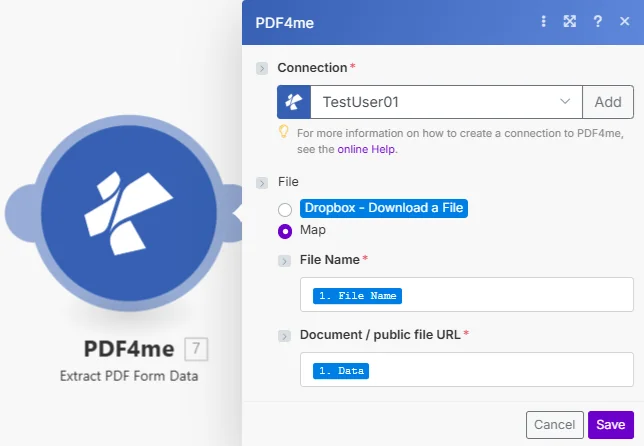
地图已选中。 文件名 和 文档/公共文件 URL 来自前一个模块的输出,通常是从 Dropbox、Google Drive 或电子邮件附件下载的步骤。
参数
必需的: 联系, 文件名, 和 文档/公共文件 URL 所有参数均为必填项,没有可选参数。
| 范围 | 必需的 | 它的作用 | 例子 |
|---|---|---|---|
| Connection | Yes | PDF4me API connection for the scenario. | Your PDF4me connection |
| File | Yes | How the PDF is supplied: Dropbox module or Map from a prior step. | Map |
| File Name | Yes | Filename of the filled PDF, mapped from the prior step. | 1. File Name |
| Document / public file URL | Yes | The filled PDF as a binary buffer or a public URL. The UI accepts both file data and a public file URL. | 1. Data |
输出
| 场地 | 类型 | 它包含什么 |
|---|---|---|
Form Fields | Array | All extracted field names and their filled values as key-value pairs. |
工作流程示例
工作流程示例Three common ways teams use Extract PDF Form Data inside Make.
收到一封包含已填写申请表的电子邮件。 PDF → 提炼 PDF 表单数据 → 映射名字、电子邮件和职位字段 → 在 Airtable 中创建一行 → 向申请人发送确认电子邮件。
Dropbox Watch 在新版本中触发 PDF 上传 → 提炼 PDF 表单数据 → 将所有字段值作为新行添加到 Google 表格 → 更新汇总仪表板 → 归档 PDF。
通过传真转电子邮件发送扫描的订单表格 PDF → 提炼 PDF 表单数据 → 验证必填字段是否已填写 → 创建订单记录 CRM → 向客户发送订单确认信息。