从附件中提取 PDF 在 Make
从附件中提取 PDF 是一个 Make 检索嵌入在某个文件中的所有文件的模块 PDF 它会在场景中自动生成文档。 PDF 标准投资组合 PDF 附件,以及 PDF/A-3 源文件,并将每个提取的文件作为返回。 Base64-已编码的项已放入附件数组中,可供迭代器单独处理。
该模块将所有附件以数组形式返回到单个输出包中。添加一个 Make 迭代器 紧接着使用模块将数组拆分成单独的捆绑包,每个附件对应一个捆绑包。每个捆绑包包含 文件名 和 文件数据 (Base64因此,您可以根据类型或名称将文件路由到不同的目标位置。
每个提取的附件都以以下形式返回: Base64 字符串中的 文件数据 领域。大多数 Make 存储集成(Google Drive、Dropbox、OneDrive)接受 Base64 直接转换。如果下游模块需要二进制输入,则使用以下方式转换: Make toBinary(FileData, 'base64') 映射前的功能。
超越标准 PDF 附件,此模块负责处理。 PDF 投资组合 (多文件容器)和 PDF/A-3 归档包含嵌入式源文件的文档。 PDF/A-3源文件(Word, Excel, XML)在归档时被提取。 PDF 根据规定,在合规存储条件下保持完好无损。 PDF/A-3 规格。
验证您的身份 API 要求
要访问 PDF4me 网站 API 通过 Make每个请求都必须包含正确的身份验证凭据。身份验证可确保您与客户端之间的通信安全。 Make 场景和 PDF4me的附件提取服务。
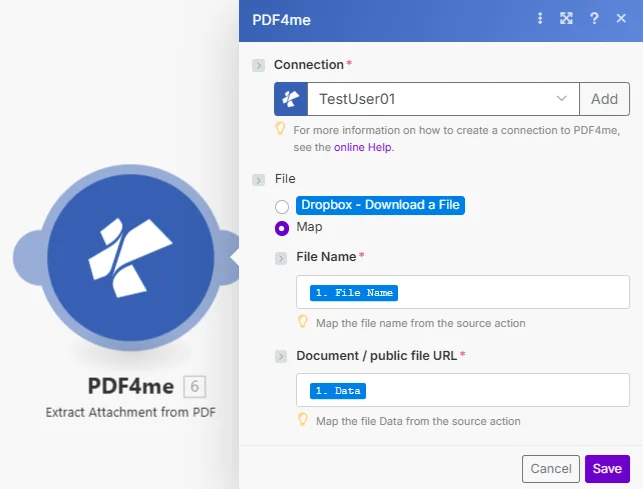
地图 文件名 和 文档 从上一步下载后,然后链接一个 Make 迭代器 处理每个提取的附件。
如何设置从文件中提取附件 PDF 在 Make
- 添加 PDF4me > 从附件中提取 PDF 针对你的情况。
- 选择您的 联系 或点击 添加 用你的 API 钥匙。
- 地图 文件名 (带有 .pdf 扩展名)来自上一个模块或输入静态名称。
- 地图 文档 (二进制) PDF 来自 Google 云端硬盘、Dropbox、电子邮件或缓冲区 HTTP 下载步骤。
- 添加一个 Make 迭代器 完成此模块后,将其映射到 附件 数组输出。
- 将下游模块连接到迭代器输出:上传到云存储、电子邮件、导入数据或按文件类型路由。
参数
| 范围 | 必需的 | 它的作用 | 例子 |
|---|---|---|---|
| File Name | Required | Filename of the source PDF including the .pdf extension. Map from the previous module's file name output or enter a static name. | portfolio.pdf |
| Document | Required | Binary PDF file content. Map from a Google Drive, Dropbox, email, or HTTP download step. The PDF must contain embedded attachments for the module to return results. | [PDF Buffer] |
输出
| 场地 | 类型 | 它包含什么 |
|---|---|---|
Attachments | Array | Collection of all extracted attachment objects. Feed into a Make Iterator to process each file individually. |
File Name | String | Filename of the individual attachment including its extension (e.g. source_data.xlsx). |
File Data | Base64 | Content of the individual attachment encoded as Base64. Map to a storage upload module or decode with toBinary() for modules that require binary input. |
您可以从 A 中提取哪些文件类型 PDF?
支持以附件形式嵌入的任何文件类型:电子表格(XLSX、 CSV),Word文档(DOCX),图像(PNG, JPG)、邮政编码或其他 PDFs这包括以下文件中的文件: PDF 投资组合 (Adobe 的多文件容器格式)和嵌入其中的源文件 PDF/A-3 根据档案 ISO 19005-3 标准该模块会在返回的文件名字段中保留原始文件格式和扩展名。
工作流程示例
- Compliance Extraction
- PDF/A Source Recovery
- Portfolio Distribution
从合规性申报中提取并整理证据文件 PDFs
- 扳机合规性提交 PDF 已收到(电子邮件附件或监视文件夹)
- 下载 PDF获取合规包
- 提取附件检索所有嵌入的证据文件
- 迭代器分别处理每个提取的附件。
- 按扩展分类:将文件路由至相应的合规文件夹(电子表格、图片、文档)
- 上传将每个文件保存到正确的文件夹中 SharePoint 或 Google 云端硬盘
- 日志将所有提取的文件记录到合规数据库中
- 通知团队:通知合规团队已处理提交内容
从中检索可编辑的源文件 PDF/A-3 档案文件
- 扳机: PDF/A-3 归档文档需要其嵌入的源文件
- 下载存档 PDF:检索 PDF/A-3 合规存储中的文件
- 提取附件:检索嵌入的 Excel 或 Word 源文件
- 证实确认提取的文件已完成
- 上传源文件保存到可编辑文件文件夹
- 通知请求者发送提取的源文件链接
展开 PDF 整理投资组合并将文件分发给合适的团队
- 扳机: PDF 从客户处收到的投资组合
- 下载作品集:检索投资组合 PDF
- 提取所有附件检索所有嵌入文件
- 迭代器处理每个提取的文件
- 按文件类型路由将每个文件发送到相应的团队文件夹
- 单独发送电子邮件将每个文件交付给指定的收件人
- 确认通知发件人作品集已处理并分发