更新行 Excel - 数据修改器 Make
PDF4me 更新行 Excel 是一个 Make 该模块使用以下方式修改 .xlsx 或 .xls 工作簿中的现有行: JSON 数组,自动将属性名称与列标题匹配。可用于同步数据库更改、刷新仪表板或更新 CRM 记录 Excel 不插入或删除行。
本模块的功能
PDF4me 更新行 Excel 使用以下方式修改现有行中的单元格 JSON 数组,不插入或删除行。每个数组中的属性名称 JSON 对象会自动与列标题匹配,并可选择自动将字符串转换为数字或日期、进行特定于区域性的解析、自定义日期/数字格式设置,以及控制如何处理空值。
相关博客文章
目前尚无关于此功能的博客文章——敬请期待。
在此期间,您可以浏览 PDF4me 博客,查看适用于各平台的教程和工作流程。
访问博客 →
我如何验证我的身份 Make 设想?
每一个 PDF4me 模块 Make 需要有效 联系创建或选择一个可以容纳您的 PDF4me API 关键在于该场景能够进行身份验证 Excel 安全地更新行。
您不容错过的重要事实
仅限就地更新
该模块不会插入或删除行。它只会覆盖已存在行中的单元格,从起始行开始,并按列标题名称匹配。
JSON 输入必须是一个数组
即使是单行更新也必须用数组括号括起来:
[{"Name":"John"}]没有括号的裸对象会导致错误。类型转换是可选的,并非自动进行。
要使日期格式、数字格式和区域性名称生效,“转换数值和日期”必须设置为“是”。如果设置为“否”,则值将按原样写入。
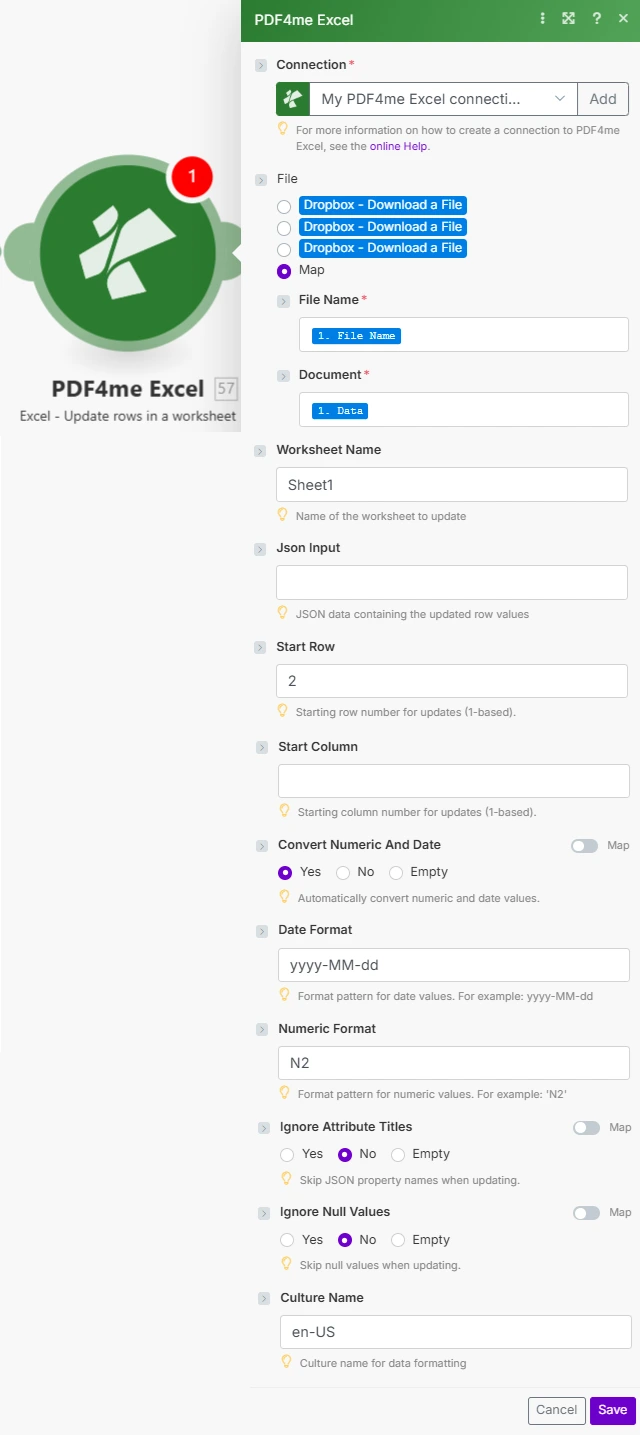
将文件设置为映射,从上一个模块连接文件名和文档,然后提供 Json 输入和行/类型转换选项。
参数
必需的: 必须提供连接号、文件名、文档和 JSON 输入。 Json Input 必须是 JSON 不支持对象数组,不支持单个对象。所有其他参数均为可选,如果留空,则使用模块默认值。
| 范围 | 必需的 | 它的作用 | 例子 |
|---|---|---|---|
| Connection | Required | PDF4me API connection. Click Add and paste your API key if connecting for the first time. | My PDF4me Excel connection |
| File Name | Required | Filename of the Excel workbook including extension, used for output file identification. | sales_data.xlsx |
| Document | Required | Excel file buffer mapped from a preceding module such as Dropbox Download a File or Google Drive. | [Buffer from Get File] |
| Worksheet Name | Optional | Name of the worksheet to update. Defaults to Sheet1 if left blank. Worksheet matching is case-sensitive. | Sheet1 |
| Json Input | Required | JSON array of objects, one object per row to update. Property names are matched to column headers automatically. | [{"Product":"Widget","Price":55.99}] |
| Start Row | Optional | 1-based row number where updates begin. Row 1 is usually the header row, so data updates typically start at row 2. | 2 |
| Start Column | Optional | 1-based column offset used for header matching, allows skipping initial columns. | 1 |
| Convert Numeric And Date | Optional | Yes converts JSON strings to Excel numbers and dates using Date Format and Numeric Format. No writes values as-is. | Yes |
| Date Format | Optional | Excel date format pattern applied when Convert Numeric And Date is Yes. | yyyy-MM-dd |
| Numeric Format | Optional | Excel numeric format pattern applied when Convert Numeric And Date is Yes. | N2 |
| Ignore Attribute Titles | Optional | Yes makes JSON property name matching case-insensitive against column headers. | No |
| Ignore Null Values | Optional | Yes skips updating any cell whose JSON value is null, preserving the existing cell content. No overwrites it as empty. | No |
| Culture Name | Optional | Culture code used to parse incoming date and number strings before conversion, important for international data. | en-US |
输出字段
| 场地 | 类型 | 它包含什么 |
|---|---|---|
Name | String | Output Excel filename, matches the File Name input. |
Doc Data | Buffer | The Excel document with the modified rows, in buffer format, ready to upload or attach. |
如何在代码中设置更新行 Make?
- 添加 PDF4me → 更新工作表中的行 致你 Make 设想。
- 选择 联系 (或点击) 添加 用你的 PDF4me API 钥匙)。
- 在下面 文件, 选择 地图 电线 文件名 和 文档 来自之前的模块(Dropbox、Google Drive 或 HTTP)。
- 放 工作表名称 如果不是 Sheet1。
- 建造 JSON 输入 数组,因此每个对象的属性名称与列标题匹配,每行更新一个对象。
- 放 起始行 到第一行数据(通常
2如果第 1 行包含标题)。 - 使能够 转换数值和日期 并设置 日期格式 / 数字格式 如果你的 JSON 值是应该变成的字符串 Excel 数字或日期。运行该方案后,更新后的工作簿将以缓冲区的形式返回。
典型配置
工作流程示例Common Make scenario patterns using Update Rows in Excel.
计划数据库到-Excel 同步
- 计划触发器按固定时间间隔运行,以获取自上次同步以来已更改的记录。
- A SQL 查询或 API 调用将更改后的记录格式化为 JSON 与工作表列标题匹配的数组。
- 获取文件功能会检索主文件。 Excel 从 Dropbox 或 Google Drive 生成报告。
- 更新行从第 2 行开始写入新值,并启用“转换数值和日期”功能。
- 更新后的工作簿将上传回原位置,替换之前的版本。
CRM 机会更新
- 当……时,webhook 会被触发。 CRM 商机记录已更新。
- 该场景构建了一个 JSON 包含该商机的最新阶段、金额和成交日期的对象。
- 获取文件功能检索商机跟踪工作簿。
- 更新行会修改匹配的行,并将“忽略属性标题”设置为“是”,以实现灵活的标题匹配。
- 更新后的工作簿将保存回销售团队的共享存储空间。
库存水平刷新
- 当一个或多个 SKU 的库存数量发生变化时,库存系统事件就会触发。
- 该方案将更改后的 SKU 和数量格式化为 JSON 大批。
- 获取文件功能从中检索主库存工作簿 SharePoint。
- 更新行会写入当前库存水平,并将“忽略空值”设置为“是”,以保留不相关的列。
- 更新后的库存工作簿已保存回 SharePoint 提高仓库可视性。
实用技巧
Json Input must be an array, always
Even a single-row update needs array brackets. A bare object like {"Name":"John"} errors, wrap it as [{"Name":"John"}].
Start Row usually means row 2
Row 1 typically holds column headers. Set Start Row to 2 to update the first data row without overwriting headers.
Type conversion needs the toggle on
Date Format, Numeric Format, and Culture Name only apply when Convert Numeric And Date is Yes. Left at No, JSON values are written verbatim as text.
Header matching is case-sensitive by default
If your JSON property names differ in case from the column headers, set Ignore Attribute Titles to Yes rather than renaming every header.
Null values overwrite by default
Without Ignore Null Values set to Yes, a null in your JSON blanks the existing cell. Enable it when you only want to update the fields you actually send.
Culture Name affects parsing, not just display
Set Culture Name to match how your source data formats dates and decimals (e.g. de-DE for comma decimals), otherwise conversion can misread values.
速查表
| 场地 | 价值 |
|---|---|
| Module | Update Rows in a worksheet |
| Connection | PDF4me API key |
| Default worksheet | Sheet1 |
| Json Input shape | [{"Column":"Value"}, ...] (array, always) |
| Typical Start Row | 2 (skips header row) |
| Type conversion toggle | Convert Numeric And Date = Yes |
| Default date/numeric format | yyyy-MM-dd / N2 |
| Default culture | en-US |
常见问题
行业应用案例及应用
- Sales & Marketing
- Finance & Accounting
- Human Resources
- Operations & Supply Chain
- CRM 最新机会修改商机行 Excel 包含最新状态、金额和结算日期
- 广告系列效果刷新更新广告系列指标行,包括当前的展示次数、点击次数和转化次数。
- 潜在客户评分更新刷新潜在客户评分数据 Excel 营销自动化跟踪表
- 客户数据库同步更新客户记录行,包含最新的联系信息和购买历史记录
- 销售预测更新使用更新后的管道数据和中标概率修改预测行
- 交易更新修改交易行,更正金额、日期或账户代码
- 账户余额刷新:使用会计系统中的当前余额更新账户余额行
- 预算跟踪更新修改预算与实际支出模板中的实际支出行
- 费用报告更新更新费用行,包括审批状态和报销金额。
- 发票状态更新从计费系统中刷新包含付款状态和日期的发票行
- 员工记录更新修改员工信息,包括晋升、薪资变动和部门调动。
- 出勤情况更新更新考勤记录,包括更正后的上下班打卡时间和休假使用情况。
- 性能评分更新:使用更新后的评分和目标进度刷新评分行
- 福利登记更新修改包含计划选择和受抚养人变更的注册行
- 培训状态更新更新培训完成记录,包括日期和认证状态
- 库存水平更新:根据仓库的实时数量更新修改库存水平行
- 订单状态更新:刷新订单行,显示当前的订单履行和发货状态
- 生产进展:使用实际产量、停机时间和质量指标更新生产运行行
- 供应商动态更新供应商信息,包括联系信息、交货时间和价格。
- 设备状态更新:刷新设备行,包含维护日期和运行状态
相关操作
提取行
在决定要更新的内容之前,先读取现有行的值,这与“更新行”功能自然搭配使用。
添加行
在工作表中插入全新行,当数据尚不存在时,请使用此方法代替“更新行”。
删除行
从工作表中删除过时的行,与“更新行”配合使用,实现完整的行生命周期管理。
在其他平台上执行相同任务
n8n更新行
原地相同 Excel 行更新节点 n8n 工作流程,将其连接到自托管或云平台 n8n 实例而不是 Make。
Power Automate更新行
Microsoft 的相同行更新操作 Power Automate 流动,契合 SharePoint 和 OneDrive Excel 工作流程。
Zapier更新行
同一行更新步骤 Zapier将其连接到 Google Sheets、Dropbox 或 CRM Zap 中已包含触发器。
PDF4me API更新行
直接通过以下方式调用相同的行更新端点 REST 对于外部的自定义集成 Make。