单独的工作表 Make
单独的工作表 是一个 PDF4me Excel 模块 Make 将每个工作表拆分成一个 Excel 工作簿会自动保存到单独的文件中,无需任何操作。 VBA 或者手动复制标签页。您可以使用它将部门特定的工作表分发给不同的团队,将单个工作表存档到云文件夹,或将每个工作表路由到不同的位置。 API 单个 Make 场景运行。
本模块的功能
PDF4me Excel单独的工作表 只需一次 Excel 工作簿将每个工作表拆分成单独的工作表。 Excel 文件在您的 Make 场景:映射来自任何先前模块的源文件,设置区域设置代码以进行本地化格式设置,并将下游模块连接起来,以便独立保存、通过电子邮件发送或发布每个单独的工作表。无 VBA 使用宏,无需手动复制制表符,无需中间转换步骤。
相关博客文章(1)
验证您的身份 API 要求
每一个 PDF4me 模块 Make 需要有效 联系创建或选择一个可以容纳您的 PDF4me API 关键在于确保该方案能够安全地验证工作表分离请求。
您不容错过的重要事实
所有工作表都单独放在一个文件中。
该模块会在一次执行过程中将工作簿中的每个工作表拆分成单独的文件。输入时无法选择特定工作表。要处理子集,请使用下游模块。 Make 使用路由器按文件名筛选输出,或者先使用“提取工作表”模块预处理工作簿。
文化名称控制日期和数字输出格式
“文化和语言设置”字段决定了日期和数字在输出文件中的格式。默认设置为 en-US,生成 MM/DD/YYYY 格式的日期,并使用句点作为小数分隔符。请将其设置为与数据源区域设置相匹配,以避免出现格式错误的值:例如,德语格式设置为 de-DE,法语格式设置为 fr-FR,依此类推。
文件源可以映射或直接从 Dropbox 获取。
“文件”字段提供两种模式:“映射”模式允许您提供来自任何先前模块输出的二进制文件,例如 Google 云端硬盘下载、电子邮件附件或 HTTP 响应。Dropbox 选项直接连接到 Dropbox 并在同一模块步骤中下载文件,从而减少了基于 Dropbox 的工作流程所需的模块数量。
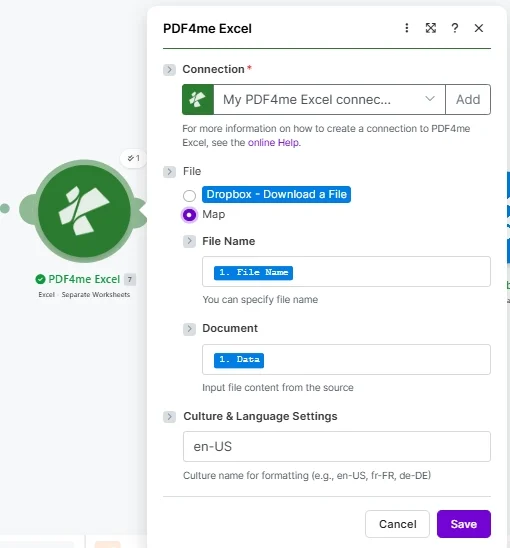
放 文件 地图,供应 文件名 和 文档 从先前的模块中设置 文化名称 运行前请先匹配您的文件区域设置。
参数
必需的: 必须提供连接号、文件名和文档。区域和语言设置是可选的,默认为 en-US。 Make 二进制数据处理,请参见 Make 数据结构文档有关 BCP 47 文化代码,请参阅 微软文化名称参考。
| 范围 | 必需的 | 它的作用 | 例子 |
|---|---|---|---|
| Connection | Required | PDF4me Excel API connection. Click Add and paste your API key if connecting for the first time. All requests are authenticated through this connection. | My PDF4me Excel connection |
| File | Required | File source mode. Choose Map to supply binary content from a prior module output. Choose Dropbox - Download a File to pull directly from Dropbox without a separate download module. | Map |
| File Name | Optional | Excel filename including the .xlsx or .xls extension. Map from the prior module file name output or enter a static name. Used to identify the workbook and name the separated output files. | quarterly-report.xlsx |
| Document | Required | Binary content of the Excel workbook. Map from a Google Drive download, Dropbox get-file, email attachment, or HTTP response module output. Must be the raw file buffer, not a URL. | 1. Data |
| Culture & Language Settings | No | BCP 47 culture code controlling how dates and numbers are formatted in the output worksheets. Defaults to en-US (MM/DD/YYYY, period decimal). Set to match your source data locale to avoid formatting mismatches. | en-US |
输出
| 场地 | 类型 | 它包含什么 |
|---|---|---|
| Split Worksheets | Array | An array containing the generated worksheet documents. Each item in the array represents one worksheet. |
| Split Worksheets[].File Name | Filename | The filename of the generated worksheet document. |
| Split Worksheets[].Document | Buffer | The binary data of the generated worksheet document. |
该模块将所有生成的工作表打包在一个输出包中返回。每个工作表都以项目的形式表示。 拆分工作表 数组,包含文件名和二进制文档数据。
如何将工作表分开 Make
- 添加 PDF4me Excel 致你 Make 场景并选择 Excel - 单独的工作表。
- 选择 联系 (或点击) 添加 使用您的设备进行身份验证 PDF4me API 钥匙)。
- 放 文件 到 地图 如果 Excel 文件来自之前的模块,或者选择 Dropbox - 下载文件 用于直接访问Dropbox。
- 地图 文件名 (.xlsx 文件名)和 文档 来自先前下载或触发模块的(二进制文件内容)。
- 进入 文化与语言环境 与您的文件区域设置匹配:保留默认设置 美国英语 对于美式英语格式,或更改为 那就是, 法语或者使用其他 BCP 47 代码来匹配您的数据。
- 点击 节省 并运行。该模块为每个工作表返回一个输出包。连接下游 Google 云端硬盘, Dropbox, 或者 HTTP 模块用于将每个分离的文件路由到其目标位置。
什么时候应该使用单独的工作表? Make?
在 Make 中,何时应该使用单独的工作表?Common Make automation patterns using Separate Worksheets.
将部门工作表分发到各个团队文件夹中
- 每周触发一次,从以下位置检索部门合并报告: SharePoint一个工作簿,每个部门一个标签页。
- 单独的工作表会将每个标签页拆分成单独的工作表。 Excel 文件。
- A Make 路由器会将每个输出文件名与正确的部门 Google 云端硬盘文件夹进行匹配。
- 每个部门都会自动收到自己的数据,无需手动复制。
将月末工作表归档为单独的文件
- 每月定时触发器会使用 Dropbox 内置的文件模式从 Dropbox 下载期末结算工作簿。
- 单独的工作表将损益表、资产负债表和现金流量表拆分为单独的文件。
- 每个输出文件都会上传到以日期命名的存档文件夹中。 SharePoint 为了合规保留。
- Slack 通知会向财务团队确认归档数量和文件夹路径。
根据需求通过电子邮件发送单独的客户工作表
- 当客户端提交数据请求表单,指定要拆分哪个工作簿时,webhook 触发器就会触发。
- “拆分工作表”功能将请求的多标签工作簿拆分为单独的客户端报告文件。
- A Make 迭代器遍历每个输出,并将相应的文件通过电子邮件发送给相应的客户联系人。
- 在 Google 表格中创建审计日志条目,记录客户端 ID、文件名和时间戳。
常见问题解答
相关模块
提取工作表
将特定工作表导出为结构化格式 JSON 按名称或索引进行有针对性的多工作表数据提取,而不是整个工作簿分离。
合并 Excel 文件
组合多个 Excel 将多个工作簿合并到一个文件中,这是工作表分离的逆操作。
安全的 Excel
分离后,在将各个工作表文件分发给外部收件人之前,先对其进行密码保护。