更新超链接 - 链接管理器 Make
PDF4me 更新超链接 是一个 Make 搜索现有模块 PDF 通过文本或超链接 URL 并批量替换它们,而不会影响文档的其余部分。可用于修复损坏的链接、迁移 URLs 网站重组后,或批量更新品牌形象后 PDFs。
本模块的功能
PDF4me 更新超链接 搜索 PDF通过其可见文本或其现有超链接 URL然后批量替换匹配项。每个超链接项都可以定位到文本或 URL替换部分或全部值,并可选择将搜索值视为正则表达式,以便一次性跨多个链接进行基于模式的匹配。
相关博客文章
目前尚无关于此功能的博客文章——敬请期待。
在此期间,您可以浏览 PDF4me 博客,查看适用于各平台的教程和工作流程。
访问博客 →
我如何验证我的身份 Make 设想?
每一个 PDF4me 模块 Make 需要有效 联系创建或选择一个可以容纳您的 PDF4me API 关键在于确保该方案能够安全地验证超链接更新请求。
您不容错过的重要事实
搜索方式选择文本或网址
每个“超链接”项要么搜索可见的链接文本,要么搜索底层 URL 值,两者不会同时搜索。请为需要更新的每个维度添加单独的项。
空白文本当前值替换整个匹配项
将“文本当前值”留空,即可将整个匹配的文本或 URL 替换为“文本新值”,而不是仅替换其中的一部分。
表达式是否启用正则表达式匹配
将“是表达式”设置为“是”,可将搜索值视为正则表达式,这对于在一个条目中匹配一系列 URL(例如,具有不同路径的旧域)而不是列出每个 URL 非常有用。
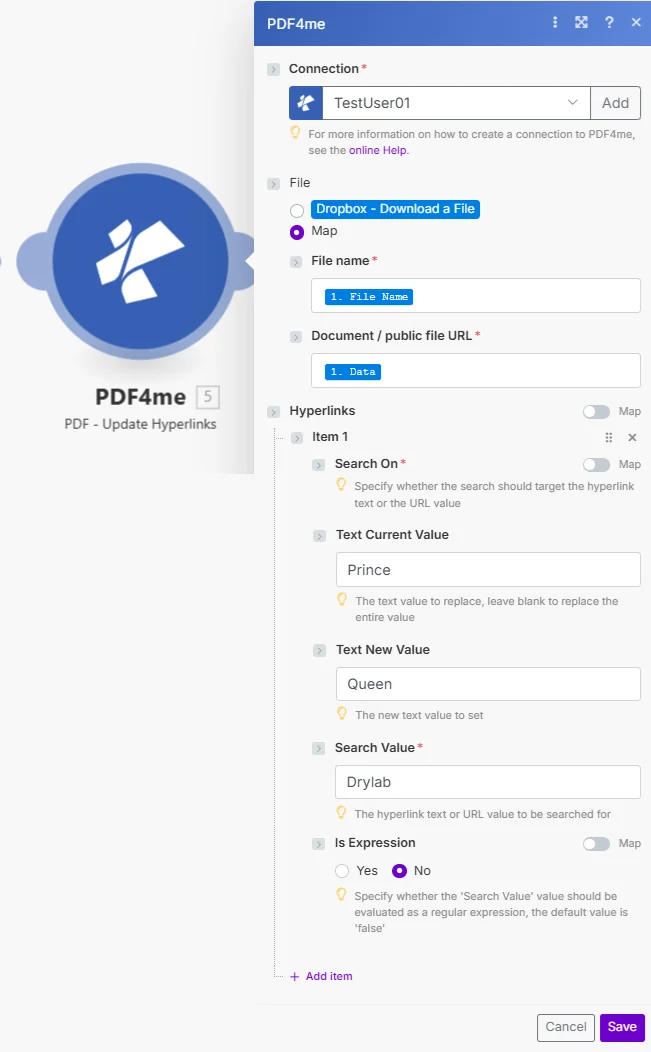
将文件设置为映射,连接文件名和文档/公共文件 URL,然后为每个要更新的链接模式添加一个超链接项。
参数
必需的: 必须提供连接信息、文件名、文档/公共文件 URL,以及至少一个包含“搜索条件”和“搜索值”的超链接项。“当前值文本”、“新值文本”和“表达式”为可选信息。
| 范围 | 必需的 | 它的作用 | 例子 |
|---|---|---|---|
| Connection | Required | PDF4me API connection. Click Add and paste your API key if connecting for the first time. | My PDF4me connection |
| File Name | Required | Filename of the source PDF including extension, used for output file identification. | brochure.pdf |
| Document / public file URL | Required | Binary PDF content mapped from a preceding module, or a public URL to the file. | [Buffer from Get File] |
| Hyperlinks > Search On | Required | Whether this item searches the hyperlink text or the URL value. | Text |
| Hyperlinks > Text Current Value | Optional | The text or URL substring to replace. Leave blank to replace the entire matched value. | Prince |
| Hyperlinks > Text New Value | Optional | The new text or URL value to set in place of the match. | Queen |
| Hyperlinks > Search Value | Required | The hyperlink text or URL value to search for in the document. | Drylab |
| Hyperlinks > Is Expression | Optional | Yes evaluates Search Value as a regular expression instead of a literal match. Defaults to No. | No |
输出字段
| 场地 | 类型 | 它包含什么 |
|---|---|---|
Name | String | Output PDF filename with updated hyperlinks. |
Doc Data | Buffer | The PDF document with modified links, in buffer format, ready to upload or attach. |
如何在更新中设置超链接 Make?
- 添加 PDF4me → PDF - 更新超链接 致你 Make 设想。
- 选择 联系 (或点击) 添加 用你的 PDF4me API 钥匙)。
- 在下面 文件, 选择 地图 电线 文件名 和 文档/公共文件 URL 来自之前的模块。
- 点击 添加项目 在下面 超链接 对于每个需要更新的链接模式。
- 放 搜索 到
Text或者URL然后填充 搜索值 要寻找什么。 - 放 文本 当前值 (或留空以替换整个匹配项) 文本新值 替换后。
- 放 是表达式 到
Yes如果搜索值是正则表达式,则运行该场景。更新后 PDF 返回一个缓冲区。
典型配置
工作流程示例Common Make scenario patterns using Update Hyperlinks.
定期清理失效链接
- 每月定期触发一次,以审查已发布的文件。 PDFs。
- 获取文件检索每个 PDF 从 Dropbox 或者 Google Drive 在迭代器循环中。
- 更新超链接,替换已知的失效或重定向链接。 URLs 每个已知无效链接使用一个超链接项。
- 更正后的 PDF 已上传回存储设备,替换先前的版本。
网站重组后的域名迁移
- 营销团队确认新网站结构上线后,将触发特定场景。
- 迭代器处理每个 PDF 它指向的是旧域名。
- 更新超链接将搜索设置为 URL,表达式为“是”,并且在单个项目中将旧域模式与新域模式进行匹配。
- 更新 PDFs 保存到文档库,并刷新搜索索引。
重新打造品牌营销材料
- 品牌重塑项目会触发对所有营销活动的批量审查。 PDFs。
- 更新超链接会运行多个项目:一个用于域名更改,一个用于社交媒体账号,一个用于联系电子邮件链接文本。
- 每个 PDF 通过迭代器中的相同超链接配置进行处理。
- 品牌重塑 PDFs 已上传至更新后的资料文件夹,准备分发。
实用技巧
Search On decides text vs URL, not both
One Hyperlinks item cannot search text and URL simultaneously. Add a separate item for each dimension if you need to update both.
Blank Text Current Value replaces everything
If Text Current Value is left empty, the entire matched hyperlink text or URL is replaced with Text New Value, not just a substring.
Regex needs Is Expression set to Yes
Search Value is treated as a literal string unless Is Expression is Yes. Forgetting this toggle is the most common reason a regex-style Search Value fails to match.
One item per link pattern, not per link instance
A single Hyperlinks item updates every matching link in the document, you do not need one item per occurrence, only per distinct search pattern.
This module edits links, it does not add them
Update Hyperlinks only modifies hyperlinks that already exist in the PDF. To insert brand-new links, use the PDF4me Create Hyperlinks module.
Test with one item before batching many PDFs
Run the scenario against a single sample PDF first to confirm Search On and Search Value match as expected before applying it to a large batch.
速查表
| 场地 | 价值 |
|---|---|
| Module | PDF - Update Hyperlinks |
| Connection | PDF4me API key |
| Search On options | Text or URL |
| Blank Text Current Value | Replaces the entire matched value |
| Is Expression | Yes = regex match, No = literal match (default) |
| Multiple updates | Add one Hyperlinks item per link pattern |
| Output | Name + Doc Data buffer |
常见问题
行业应用案例及应用
- Web Publishing & Content
- Marketing & Communications
- Documentation & Technical
- Corporate & Business
- 修复失效链接更新失效的超链接 PDFs
- URL 移民: 改变 URLs 网站重组之后
- 域名变更域名迁移后更新链接
- 重定向更新替换重定向 URLs 决赛
- 品牌重塑更新所有品牌相关链接
- 竞选最新动态:更改特定于活动 URLs
- 社交媒体链接更新社交媒体个人资料 URLs
- 联系信息修改电子邮件和网站链接
- 文档维护保持技术文档链接的有效性
- API 参考更新: 更新 API 文档 URLs
- 外部参考文献维护外部资源链接
- 版本更新:更改指向新版本文档的链接
- 政策更新更新政策参考链接
- 内网链接更改内部门户 URLs
- 资源链接更新员工资源链接
- 合作伙伴链接修改合作伙伴和供应商 URLs
相关操作
创建超链接
向一个 PDF如果链接尚不存在,请使用此功能代替“更新超链接”。
删除超链接
从 A 中完全删除超链接 PDF与 Update Hyperlinks 配合使用,可实现完整的链接生命周期管理。
提取超链接
列出所有超链接 PDF 首先要审核失效或过期的链接,然后再进行更新。
在其他平台上执行相同任务
n8n更新超链接注释
同一个超链接更新节点 n8n 工作流程,将其连接到自托管或云平台 n8n 实例而不是 Make。
Zapier更新超链接注释
相同的超链接更新步骤 Zapier将其连接到 Google Drive 或者 Dropbox Zap 中已包含触发器。
PDF4me API更新超链接注释
直接通过以下方式调用相同的超链接更新端点 REST 对于外部的自定义集成 Make。