转变 HTML 到 PDF 在 Make
PDF4me 转变 HTML 到 PDF 是一个 Make 渲染模块 HTML 内容或公共网站 URL 变成成品 PDF 无需无头浏览器或额外的渲染工具即可生成文档。使用它可以将动态报表、发票和电子邮件模板转换为专业文档。 PDF直接在你里面 Make 然后将输出传递给 Gmail、Google Drive 或其他模块。
本模块的功能
PDF4me 转变 HTML 到 PDF 变成 HTML 文件或公共网站 URL 变成一个 PDF 文档位于您的 Make 场景。把它交给 HTML 对于您动态创建的内容,例如发票、报告或证书,选择纵向或横向布局,模块将返回一个成品。 PDF 可直接通过电子邮件发送、存储或传递到下一步。无需浏览器、无头渲染器或任何其他工具。 PDF4me 它在其自有服务器上处理渲染,因此您的方案将保持简单。
相关博客文章(1)
验证您的身份 API 要求
每一个 PDF4me 模块 Make 需要有效 联系创建或选择一个可以容纳您的 PDF4me API 关键在于该场景能够进行身份验证 HTML 安全地处理转换请求。
您不容错过的重要事实
文件字段接受一个 URL 而且,不仅仅是二进制
第二个输入项称为文档/公共文件 URL不仅仅是文件缓冲区字段。您可以映射二进制内容。 HTML 文件可以是之前模块中的文件,也可以是公开可访问的网址。如果您正在处理在线托管的页面,则可以完全跳过下载步骤,直接传递以下参数: URL 直接地。
如果需要,可以使用高级设置。
该模块面板底部有一个“高级设置”切换开关,默认情况下处于折叠状态。如果您需要更精细地控制渲染,请在保存前将其展开。 PDF4me 布局字段提示中提供的文档解释了其中可用的内容。
CSS 内联或嵌入式显示效果最佳。
“布局”下拉菜单提供“纵向”或“横向”选项。其他所有设置,包括页边距、字体和页面大小,均来自…… CSS 你的 HTML内联样式和嵌入式样式块能够可靠地渲染。通过 link 标签链接的外部样式表可能无法加载。 URL 当无法公开联系时 PDF4me 渲染页面。
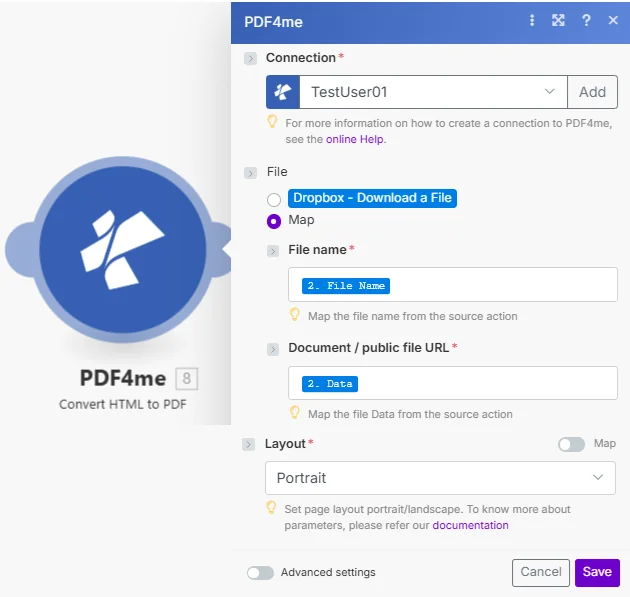
文件名和文档/公共文件 URL 使用时两者都是必需的 Map“文档”字段接受以下任一选项: HTML 二进制缓冲区或公共网络 URL高级设置可展开显示更多渲染选项。
参数
必需的: 必须始终提供连接、文件和布局信息。文件名和文档/公共文件 URL 仅当文件设置为时才需要 Map。
| 范围 | 必需的 | 它的作用 | 例子 |
|---|---|---|---|
| Connection | Required | PDF4me API connection. Click Add and paste your API key if connecting for the first time. | Your PDF4me connection |
| File | Required | Source input method. Choose Dropbox - Download a File for a direct Dropbox trigger, or Map to supply inputs from a prior module. | Map |
| File name | Conditional | Filename for the HTML source including extension, required when File is set to Map. Hint: "Map the file name from the source action." | 2. File Name |
| Document / public file URL | Conditional | Either the binary content of an HTML file from a prior module, or a public web URL to render, required when File is set to Map. Hint: "Map the file Data from the source action." | 2. Data |
| Layout | Required | Page orientation for the output PDF. Options: Portrait, Landscape. Hint: "Set page layout portrait/landscape." Has Map toggle for dynamic scenarios. | Portrait |
| Advanced settings | Optional | Additional rendering controls available when the toggle is expanded. Refer to PDF4me documentation for available options. | Expand to configure |
输出
| 场地 | 类型 | 它包含什么 |
|---|---|---|
| Name | String | Filename of the generated output PDF. |
| Doc Data | Binary (Base64) | The converted PDF file content, ready to attach in Gmail, upload to Drive or Dropbox, or pass to another PDF4me module. |
如何转换 HTML 到 PDF 在 Make?
- 添加 PDF4me 到 转变 HTML 到 PDF 你的 Make 设想。
- 选择 联系 (或点击) 添加 用你的 API 钥匙)。
- 放 文件 到 Map。 连接 文件名 和 文件/公共文件 URL 从前一个模块的输出中获取。或者传递一个实时公共 URL 直接在 文件/公共文件 URL 场地。
- 选择 布局标准文档请使用纵向模式,宽表格或仪表盘请使用横向模式。
- 保存并运行。输出结果
Doc Data你的结束了吗? PDF将其传输到 Gmail、Google Drive、Dropbox 或任何下游模块。
何时应该使用 Convert HTML 到 PDF?
典型配置Common Make scenario patterns using Convert HTML to PDF.
将每周销售报告转换为 PDF 然后通过电子邮件发送。
- 预定的触发器会在每周一早上触发。
- 数据库或 Google Sheets 模块会获取本周的销售数据。
- A Make 文本模块构建一个 HTML 字符串,包括图表、摘要标题和内联 CSS 造型。
- 转变 HTML 到 PDF 运行时布局设置为纵向。完成 PDF 输出到文档数据中。
- Gmail 会附加文档数据,并在上午 9 点站会之前将报告发送给管理团队。
生成品牌发票 PDF 每份新订单
- 当电子商务平台确认订单时,会触发 webhook。
- Google 云端硬盘下载 HTML 发票模板。
- A Make 文本模块会将占位符字段(例如客户名称、行项目和总计)替换为订单有效负载中的实时数据。
- 转变 HTML 到 PDF 生成最终发票 PDF。
- Gmail 会将发票发送给客户,同时副本会上传到 Dropbox 的“发票”文件夹中。
将重要邮件归档 PDF 记录
- 当收到带有特定标签的邮件时,Gmail 会触发通知。
- 邮件 HTML 正文被提取出来,并连同发件人、主题和日期等元数据一起包装在一个干净的文本中。 HTML 布局。
- 转变 HTML 到 PDF 将电子邮件存档。 PDF 布局设置为纵向。
- 这 PDF 已上传至 SharePoint 合规文件夹。该邮件在 Gmail 中被标记为“已存档”,以便团队知道它已被保存。
实用技巧
External stylesheets often fail silently
A link tag pointing at a CSS file only works if PDF4me can reach that URL publicly at render time. If your styling is missing from the output PDF, inline the CSS or embed it in a style block instead.
A public URL skips the HTML-building step entirely
If the page you want already exists and is publicly reachable, pass its address directly in Document / public file URL instead of fetching and rebuilding the HTML in your scenario.
Page size and margins come from CSS, not the module
Layout only controls Portrait vs Landscape orientation. Use @page rules in a style block, for example @page { margin: 20mm; size: A4; }, to control margins and dimensions.
File name still matters even with a URL
When File is set to Map, both File name and Document / public file URL are required fields, even if the Document value is a URL rather than binary content.
Advanced settings are collapsed by default
Expand the Advanced settings toggle before saving if you need finer rendering control. It is easy to miss since the panel starts closed.
速查表
输出中的页面尺寸和边距 PDF 完全来自 CSS 在你的 HTML根据 MDN CSS 分页媒体指南 以及 MDN @page 参考布局下拉菜单仅设置纵向或横向方向。
| 场地 | 价值 |
|---|---|
| File | Map |
| File name | 2. File Name |
| Document / public file URL | 2. Data (binary) or a live public URL |
| Layout | Portrait or Landscape |
| Output | Name + Doc Data (binary PDF) |
常见问题解答
相关操作
转变 URL 到 PDF
直接从其页面转换实时托管的网页 URL最佳情况是页面已公开存在,无需重新构建。 HTML 你自己。
转换为 PDF
将 Word、Excel、PowerPoint 和图像文件转换为 PDF 当你的信息来源不明的时候 HTML。
创造 PDF/一个
拿成品 PDF 并将其转换为存档格式 PDF/满足长期存储和合规要求的格式。
在其他平台上执行相同任务
n8n
相同转换 HTML 到 PDF 转换作为一种 n8n 在您的自托管或云工作流程中部署节点。
Zapier
运行相同 HTML 到 PDF 转换作为一种 Zapier 在 Zap 中执行操作。
Power Automate
转变 HTML 到 PDF 作为一步 Power Automate 云流,无需编写代码。
PDF4me API
呼吁皈依 HTML 到 PDF REST 直接通过端点即可从您自己的代码库进行完全控制。