读取 SwissQR 代码 Make
读取 SwissQR 码 是一个 Make 读取瑞士数据的模块 QR 来自代码 PDF 自动生成发票,提取全部信息 QR-账单 (QR(发票)有效载荷: IBAN金额,货币(CHF/EUR)、债权人、债务人和参考编号。使用它来自动处理瑞士发票的应付账款和付款对账。 Make 无需手动输入数据。
本模块的功能
PDF4me阅读 SwissQR 码 自动检测并解码瑞士 QR-账单 (QR-Rechnung)有效载荷来自任何 PDF 发票上的信息 Make 场景:它会返回所有结构化且可直接使用的支付字段。 IBAN金额、货币、债权人名称和地址、债务人详细信息、参考编号以及其他账单信息,以便您的应付账款、对账或付款发起工作流程无需任何人手动读取或输入发票数据即可运行。
相关博客文章(1)
验证您的身份 API 要求
每一个 PDF4me 模块 Make 需要有效 联系创建或选择一个可以容纳您的 PDF4me API 关键在于该场景能够验证瑞士身份。 QR 安全地解码请求。
您不容错过的重要事实
支持所有三种瑞士参考类型
该模块负责处理 QRR (27 位) QR 用于自动银行匹配的参考值), SCOR (ISO 11649 债权人推荐信),以及 NON (无参考信息)。输出中的“参考类型”字段会准确显示发票中发现的格式,以便后续逻辑能够正确处理每种情况。
QR 代码会自动出现在任何页面上。
你不需要告诉模块瑞士的页面是哪一页。 QR 代码出现在页面上。它会扫描每一页。 PDF 并找到 QR-无论发票是一页还是多页,系统都会自动开票。这意味着您可以处理多页发票。 PDF没有任何预先分割或页码配置。
附加信息可能包含 Swico S1 会计数据
当发票开具方在发票中包含 Swico S1 结构化计费信息时 QR 有效载荷,“附加信息”字段会将其与非结构化消息文本一起返回。Swico S1 可以包含 VAT 费率、付款条件和会计参考信息等额外数据,超出了核心付款字段的范围,对于自动化支付而言非常有价值。 AP 预订。
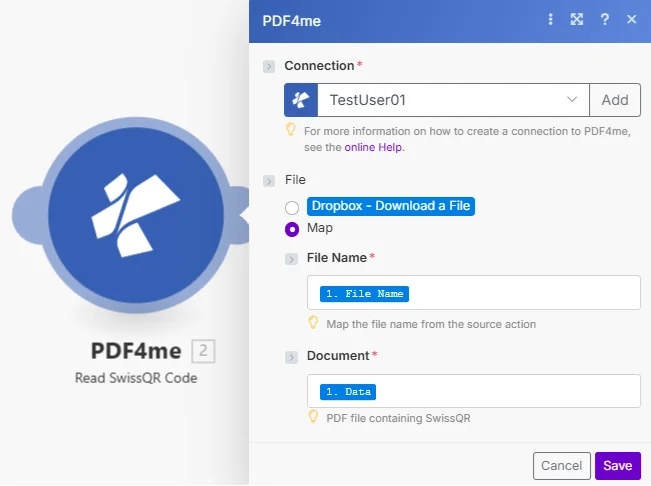
文件已设置为 Map 传递文件名和 PDF 缓冲区来自任何先前的模块。该模块扫描每一页并返回完整的瑞士标准。 QR-账单支付有效载荷。
参数
必需的: 必须提供连接号、文件名和文档。 PDF 必须包含有效的瑞士 QR-用于模块返回支付数据的账单。
| 范围 | 必需的 | 它的作用 | 例子 |
|---|---|---|---|
| Connection | Required | PDF4me API connection. Click Add and paste your API key if connecting for the first time. | Your PDF4me connection |
| File Name | Required | Source PDF filename including the .pdf extension. Map from the prior module's file name output. | swiss_invoice_2024.pdf |
| Document | Required | Binary PDF buffer from a prior module: cloud storage download (Dropbox, Google Drive, SharePoint), email attachment, or HTTP response. The PDF must contain a Swiss QR-bill on any page. | 1. Data |
| IsAsync | Conditional | Set to true for async processing. Returns a polling URL instead of waiting inline. Use for large PDFs or high-volume batch runs where Make timeout limits apply. | false |
输出
该模块返回完整的瑞士 QR-账单有效载荷作为单独的映射字段 Make 捆。
| 场地 | 类型 | 它包含什么 |
|---|---|---|
| IBAN | String | International Bank Account Number of the payee. 21-character Swiss IBAN starting with CH or LI. |
| Amount | String | Payment amount as a string (e.g. "1250.00"). Convert to Number in Make if arithmetic is needed downstream. |
| Currency | String | CHF or EUR. The Swiss Payment Standard allows only these two values. |
| Creditor | Object | Creditor name, address type (K or S), street/PO box, building number, postcode, town, and country. |
| Debtor | Object | Debtor (payer) name and address fields, same structure as Creditor. May be empty if the invoice omits debtor data. |
| Reference | String | The reference number: 27-digit QRR, ISO 11649 SCOR, or empty string for NON reference type. |
| Reference Type | String | QRR, SCOR, or NON. Identifies the reference format so your downstream logic can branch accordingly. |
| Additional Info | String | Unstructured message text and Swico S1 structured billing data (VAT rates, payment conditions, accounting codes) when included by the invoice issuer. |
如何在系统中设置读取 SwissQR 码 Make?
- 添加 PDF4me → 读取 SwissQR 码 致你 Make 设想。
- 选择 联系 (或点击) 添加 用你的 API 钥匙)。
- 地图 文件名 和 文档 来自上一个模块:电子邮件附件监视、云存储文件获取,或 HTTP 下载。
- 点击 节省 并运行该场景。输出字段如下: IBAN, 数量, 货币, 债权人, 债务人, 参考, 参考类型, 和 附加信息:均可映射到下游模块。
我应该何时使用读取 SwissQR 码? Make?
工作流程示例Common Make scenario patterns using Read SwissQR Code.
自动处理从瑞士发票中提取的应付账款
- 当收到瑞士供应商发票时,电子邮件监控功能会触发。 QR账单到了。
- 读取 SwissQR 代码摘录 IBAN金额、参考编号和债权人详情。
- 一个 HTTP 模块将支付数据发布到公司银行或 ERP API。
- 在 Google Sheets 中创建一行,记录发票编号、金额和债权人。 AP 登记。
核对收到的银行付款与未结发票。
- 系统每天定时触发程序,处理银行对账单的下载。
- 对于每一笔未匹配的付款,Read SwissQR Code 会从相应的已发送发票中提取参考编号。 PDF。
- 将参考编号与数据库中的未结发票记录进行匹配,匹配的发票将自动标记为已付款。
- 系统会向以下人员发送一封摘要邮件: AR 团队列出了当天已匹配和未匹配的付款。
按债权人名称归档发票 QR 数据
- 当收到新的瑞士发票时,Dropbox 监视文件夹会触发。 PDF 邮件已放入收件箱文件夹。
- 读取 SwissQR 码可从中提取债权人名称和参考编号。 QR 有效载荷。
- Google 云端硬盘会为债权人创建一个文件夹(如果该文件夹不存在),并将发票以参考编号作为文件名上传。
- Slack 通知提醒 AP 团队收到一份新的发票,该发票已提交,等待审批。
常见问题解答
相关模块
创建 SwissQR 账单
生成瑞士 QR-开具账单并将其添加到发票中 PDF是该阅读器的配套写入模块。
读取条形码 PDF
提炼 Code128, Code39, DataMatrix, PDF417, 和 QR 来自任何代码数据 PDF 用于文档路由和重命名工作流程。
产生 EPC QR 代码 SEPA
生成一个 SEPA 支付 QR 欧洲发票代码 EU/EEA 瑞士的对应物 QR-账单标准。