产生 EPC QR 代码 SEPA 在 Make
本模块的功能
PDF4me 产生 EPC QR 代码 SEPA 支付 创建可扫描的欧洲支付委员会 QR 这段代码可以让任何人通过他们的手机银行应用程序立即向您付款,无需任何手动操作。 IBAN 打字时务必确保无误。请填写受益人详细信息。 IBAN,金额,以及一个参考号,该模块返回一个 Base64 QR 图片已准备好插入发票电子邮件中或 PDF它适用于任何 SEPA-区域银行账户遍布 EU 和 EEA如果您的客户位于德国、法国、比利时或欧元区其他任何地方,那么这就是合适的模块。
相关博客文章
目前尚无关于此功能的博客文章——敬请期待。
在此期间,您可以浏览 PDF4me 博客,查看适用于各平台的教程和工作流程。
访问博客 →
验证您的身份 API 要求
每一个 PDF4me 模块 Make 需要有效 联系创建或选择一个可以容纳您的 PDF4me API 关键在于该场景能够进行身份验证 EPC QR 安全地生成代码。
您不容错过的重要事实
与瑞士的标准完全不同 QR 账单
EPC QR 遵循欧洲支付委员会的规范 SEPA 信用转账,适用于任何 IBAN 横跨 EU 和 EEA瑞士 QR Bill 是瑞士特有的独立标准,仅与 CH 或 LI 兼容。 IBAN适用于瑞士和列支敦士登境内。如果您的发票收件人位于德国、法国、荷兰或欧元区其他任何国家,那么这就是您需要的。
BIC 仅当您选择版本 V1 时才需要。
模块提示中明确指出:“BIC 仅对以下情况强制执行 EPC 版本 V1。“V2 是默认版本,也是新部署的推荐版本。在 V2 版本中, IBAN 仅此一项就足以完成支付路由。请留下。 BIC 清空并继续前进。
输出结果为 Base64 图片,而非修改后的图片 PDF
与创建条形码模块类似,此模块返回一个 Base64文件内容中是经过编码的图像字符串,而不是 PDF 文档。获取 QR 要将发票添加到系统中,还需要一个步骤。将其嵌入到…… HTML 转换为模板之前 PDF或者使用“添加条形码”功能 PDF 将解码后的图像盖章到现有发票上。
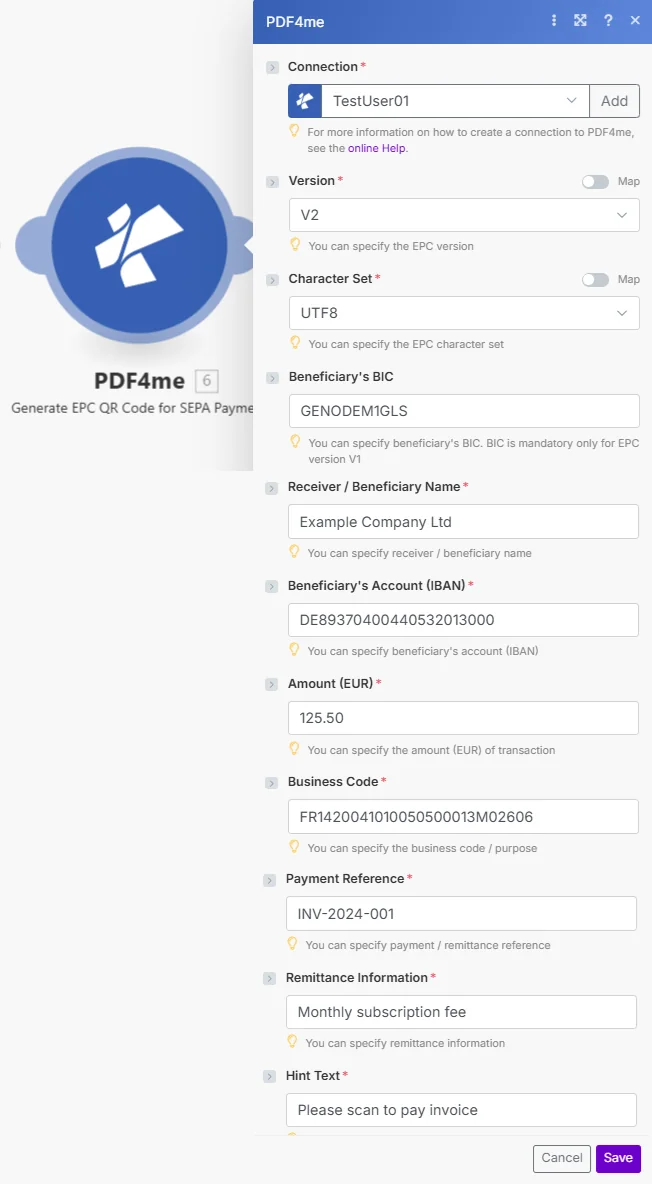
版本默认为 V2, BIC 是可选的。仅 IBAN生成可扫描的单据需要金额、受益人姓名和三个参考字段。 EPC QR 代码。
参数
必需的: 连接、版本、字符集、接收者/受益人姓名、受益人帐户(IBAN), 数量 (EUR)、业务代码、付款参考号、汇款信息和提示文本。受益人的 BIC 使用 V2 版本时是可选的。
| 范围 | 必需的 | 它的作用 | 例子 |
|---|---|---|---|
| Connection | Yes | PDF4me API connection. Click Add and paste your API key if this is your first time connecting. | Your PDF4me connection |
| Version | Yes | EPC QR code specification version. Options: V1, V2. V2 is recommended for new scenarios and BIC is optional at this version. Hint: "You can specify the EPC version." | V2 |
| Character Set | Yes | Text encoding for the QR data. Options include UTF8, ISO8859_1, ISO8859_2, and others. UTF8 handles most European characters. Hint: "You can specify the EPC character set." | UTF8 |
| Beneficiary's BIC | No | SWIFT/BIC code of the beneficiary's bank. Only mandatory when using Version V1. Can be left empty on V2. Hint: "BIC is mandatory only for EPC version V1." | GENODEM1GLS |
| Receiver / Beneficiary Name | Yes | The legal name of the payment recipient and it must match the bank account holder. Hint: "You can specify receiver / beneficiary name." | Example Company Ltd |
| Beneficiary's Account (IBAN) | Yes | The beneficiary's full IBAN. Any valid SEPA-zone IBAN is accepted and not limited to Swiss accounts. Hint: "You can specify beneficiary's account (IBAN)." | DE89370400440532013000 |
| Amount (EUR) | Yes | Payment amount in euros. Use decimal point for cents. Hint: "You can specify the amount (EUR) of transaction." | 125.50 |
| Business Code | Yes | SEPA purpose code that identifies the type of payment. Can be a structured code or reference. Hint: "You can specify the business code / purpose." | FR1420041010050500013M02606 |
| Payment Reference | Yes | Structured remittance reference used for reconciliation, typically an invoice number. Max 35 characters. Hint: "You can specify payment / remittance reference." | INV-2024-001 |
| Remittance Information | Yes | Free-text payment description shown to the payer and recipient. Max 140 characters. Hint: "You can specify remittance information." | Monthly subscription fee |
| Hint Text | Yes | Instructional text shown to the payer when they scan the QR code. Hint visible in module below the field. | Please scan to pay invoice |
快速设置
- 添加 PDF4me 到 产生 EPC QR 代码 SEPA 支付 你的 Make 设想。
- 选择 联系 (或点击) 添加 用你的 API 钥匙)。
- 离开 版本 作为 V2 和 字符集 采用 UTF-8 编码。这些默认设置适用于大多数欧洲的开票场景。
- 填写 收款人/受益人姓名, 受益人账户(IBAN), 数量 (EUR), 商业代码, 付款参考, 汇款信息, 和 提示文本。
- 保存并运行。
File Content输出结果为 Base64编码 EPC QR 图像。将其嵌入到 HTML 电子邮件正文或将其传递给“添加条形码” PDF 将其放置在发票文件上。
工作流程示例
工作流程示例Common Make scenario patterns using Generate EPC QR Code for SEPA Payment.
投放可扫描付款 QR 每封发票邮件中都会包含这些信息。
- 您的会计系统中创建了一张新发票,并触发了一个 webhook。 Make。
- 产生 EPC QR 代码映射受益人 IBAN直接从 webhook 有效负载中获取发票金额和发票编号作为付款参考。
- 这 Base64 QR 图片以内嵌方式嵌入在……中 HTML 使用数据的电子邮件模板 URI 所以 QR 渲染时不带任何附件。
- Gmail发送发票邮件。客户打开邮件,扫描发票。 QR 使用他们的银行应用程序,无需输入任何信息,即可在几秒钟内完成支付。 IBAN。
账单 EU 每月无需费一口气就能获得订阅用户
- 每月1日会触发一个预定事件。
- Airtable 返回所有活动 EU 订阅者记录及其 IBAN每个账户包含金额和唯一的发票编号。
- 迭代器处理每个订阅者。生成 EPC QR 代码创建个性化 QR 每件商品都需提供正确的数量和参考编号。
- 每位订阅用户都会收到一封个性化的账单电子邮件,其中包含他们专属的可扫描账单。 QR 代码。没有两个 QR 代码相同。
添加付款 QR 到 PDF 发送发票前
- 当有新发票时,Google 云端硬盘会触发。 PDF 邮件会进入“准备发送”文件夹。
- 产生 EPC QR 代码创建支付 QR 使用存储在与该发票关联的 Google 表格行中的付款详情。
- 添加条形码 PDF 印章已解码 QR 将图像放置在发票第一页的右下角。
- 已完成的发票,其中包含可扫描的付款信息 QR 邮件通过 Gmail 发送,副本存档于…… SharePoint。
常见问题解答
相关模块
创建 SwissQR 账单
瑞士特有的对应版本。它会将完整的付款单附在……上。 PDF 对于 CH 和 LI IBAN符合瑞士支付标准。
创建条形码
生成任何条形码或 QR 代码如下 Base64 无需支付格式,适用于跟踪代码、产品标签和通用条形码。
添加条形码 PDF
盖章 EPC QR 将图像直接复制到现有发票上 PDF 正好位于您需要的位置。这是完成本模块后的自然下一步。