创建 SwissQR 账单 Make
本模块的功能
PDF4me 创建 SwissQR 账单 附加符合瑞士标准的 QR 账单支付单已存入 PDF 该文件增加了瑞士支付标准要求的完整标准化部分(ISO 20022用于在瑞士和列支敦士登境内开具发票。请提供您的发票 PDF债权人和债务人的详细信息, IBAN模块会输入金额和参考信息,并返回附有付款凭证的同一份文档。所有瑞士银行都接受此输出结果,以便通过手机银行应用程序发起付款。
相关博客文章(2)
验证您的身份 API 要求
每一个 PDF4me 模块 Make 需要有效 联系创建或选择一个可以容纳您的 PDF4me API 关键在于该场景能够验证瑞士身份。 QR 安全生成账单。
您不容错过的重要事实
将付款单附加到您现有的 PDF 并且不会创建独立映像
与“创建条形码”不同,它返回的是一个 Base64 此模块通过附加完整的瑞士图像来修改您的源文档。 QR 账单部分 QR 直接将代码和易于理解的支付字段传输到 PDF输入您的发票模板,即可生成带有付款单的可直接发送的瑞士发票。
地址类型 S 和 K 需要不同的字段
债权人和最终债务人都有一个“地址类型”字段:S(结构化)或 K(组合)。如果选择 S,请分别填写。 PostalCode 和 City 字段。对于 K,使用这两个字段。 AddressLine 用于以自由文本形式填写完整地址的字段。您选择的类型决定了哪些地址字段会被验证,因此请仅填写与您选择的类型匹配的字段。
IBAN 必须是瑞士或列支敦士登,货币为 CHF 或者 EUR 仅有的
模块提示指出 IBAN 必须以 CH 或 LI 开头,最多 21 个字符。货币类型严格限制为: CHF 或者 EUR对于欧洲人来说 SEPA 与非瑞士公民的支付 IBANs,使用生成 EPC QR 代码 SEPA 反而。
参数
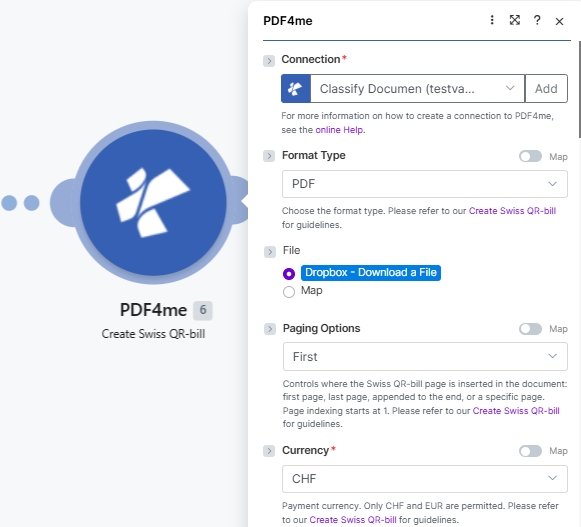
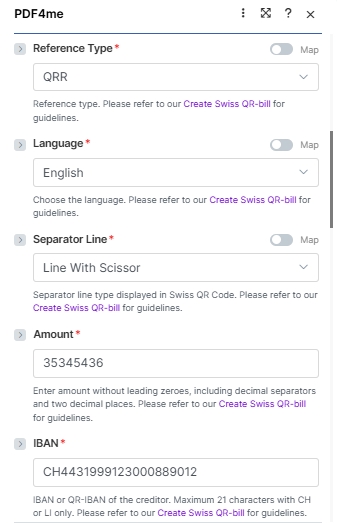
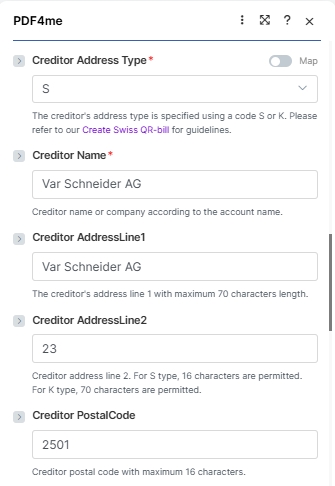
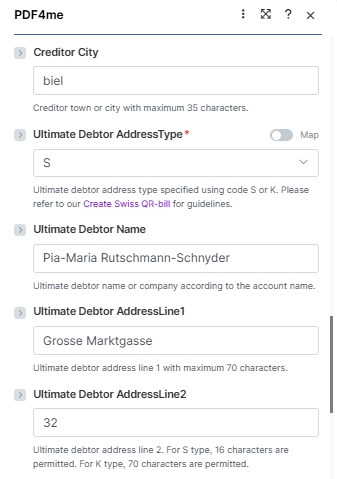
该模块公开了 26 个字段,这些字段分为四个逻辑块: 连接 + 源文件, 支付要点, 债权人阻挠, 债务人封锁, 和 付款参考号下面的屏幕截图与实际字段顺序完全一致。 Make UI。
必填项(红色星号) UI): 连接方式、格式类型、分页选项、货币、参考类型、语言、分隔符、金额 IBAN债权人地址类型、债权人名称、最终债务人 AddressType。 条件: 当文件设置为“文件名 + 文档”时 Map; 页码 仅当分页选项设置为 自定义(页码)。 选修的: 所有剩余的债权人/债务人地址字段,以及参考信息、非结构化消息、账单信息和 AV1/AV2 参数。
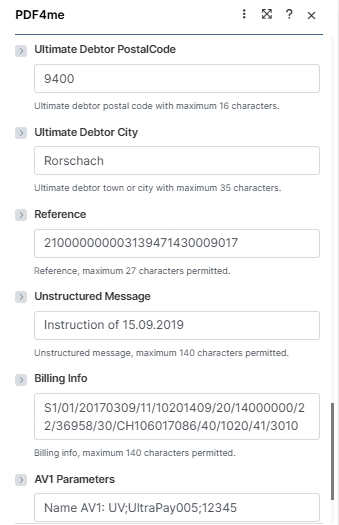
| 范围 | 必需的 | 它的作用 | 例子 |
|---|---|---|---|
| Connection | Yes | PDF4me connection. Click Add and paste your API key the first time, then reuse the connection across every PDF4me module. | test prod account |
| Format Type | Yes | Output container format. PDF for printable invoices and email attachments; PNG, JPEG, or TIFF for image output (no Paging Options applies in image modes). Empty falls back to the connector default. See the dropdown reference card below. | PDF |
| File | Conditional | How the source PDF arrives. Radio: Dropbox - Download a File (or any other storage module), PDF4me Dev - Create Swiss QR Bill (chain from a prior PDF4me action), or Map (bind File Name and Document from a prior module manually). Skip the source file entirely for a standalone payment slip. | Map |
| File Name | Conditional | Filename of the source PDF including .pdf extension. Required when File is set to Map. Mapped from the prior module File Name output. | 1. File Name |
| Document | Conditional | Binary content of the source PDF. Required when File is set to Map. Mapped from the prior module Data / binary output. | 1. Data |
| Paging Options | Yes | Where the Swiss QR-bill page is inserted (PDF Format Type only). Options: Empty (default), First (new page 1), Last (appended), Add page at the end (alias for Last), Custom (page number) (insert at the page number you supply in the Page Number field). See the dropdown reference card below. | Custom (page number) |
| Page Number | Conditional | The 1-based page number where the Swiss QR-bill is inserted. Required when Paging Options is Custom (page number); ignored for every other Paging Options value. Page indexing starts at 1. | 3 |
| Currency | Yes | Payment currency. Only CHF and EUR are permitted by the Swiss Payment Standards. | CHF |
| Reference Type | Yes | Format of the payment reference. QRR (Swiss QR Reference, 27-digit numeric, used with QR-IBAN), SCOR (ISO 11649 creditor reference), NON (no reference). | QRR |
| Language | Yes | Language for the printed QR-bill text (Payment part labels: Account / Payable to, Reference, Currency, Amount). German, French, Italian, English. | English |
| Separator Line | Yes | Separator line style displayed in the QR-bill section. Line With Scissor (line + scissor pictogram, standard print), Only Line (line, no pictogram), or No Line (eBill / e-invoice). Note: the Make UI labels the field "Seperator Line" (the engine accepts either spelling. | Line With Scissor |
| Amount | Yes | Payment amount in two decimal places without leading zeroes. Use the locale decimal separator your Culture & Language Settings expect. | 35345436 |
| IBAN | Yes | IBAN or QR-IBAN of the creditor. Maximum 21 characters with CH or LI country codes only. QR-IBAN required when Reference Type is QRR. | CH4431999123000889012 |
| Creditor Address Type | Yes | Address format for the creditor: S (Structured, separate PostalCode and City fields) or K (Combined, two free-text AddressLine fields). | S |
| Creditor Name | Yes | Creditor name or company according to the bank account. Maximum 70 characters. | Var Schneider AG |
| Creditor AddressLine1 | No | Creditor primary address line. Maximum 70 characters. | Var Schneider AG |
| Creditor AddressLine2 | No | Creditor secondary address line. 16 characters when address type is S; 70 characters when type is K. | 23 |
| Creditor PostalCode | No | Creditor postal code. Maximum 16 characters. | 2501 |
| Creditor City | No | Creditor town or city. Maximum 35 characters. | biel |
| Ultimate Debtor AddressType | Yes | Address format for the debtor: S (Structured) or K (Combined). Same rules as Creditor Address Type. | S |
| Ultimate Debtor Name | No | Debtor name or company according to the bank account. Maximum 70 characters. | Pia-Maria Rutschmann-Schnyder |
| Ultimate Debtor AddressLine1 | No | Debtor primary address line. Maximum 70 characters. | Grosse Marktgasse |
| Ultimate Debtor AddressLine2 | No | Debtor secondary address line. 16 characters (S) or 70 characters (K). | 32 |
| Ultimate Debtor PostalCode | No | Debtor postal code. Maximum 16 characters. | 9400 |
| Ultimate Debtor City | No | Debtor town or city. Maximum 35 characters. | Rorschach |
| Reference | No | Payment reference number. Maximum 27 characters. Format depends on Reference Type (QRR: 27-digit numeric with mod-10 check; SCOR: ISO 11649; NON: leave empty). | 210000000003139471430009017 |
| Unstructured Message | No | Free-text payment description shown in the Additional information block. Maximum 140 characters. | Instruction of 15.09.2019 |
| Billing Info | No | Structured billing information (Swico, etc) shown alongside the Unstructured Message. Maximum 140 characters. | S1/01/20170309/11/10201409/20/14000000/22/36958/30/CH106017086/40/1020/41/3010 |
| AV1 Parameters | No | Alternative scheme parameter 1 (e.g. eBill identifier). Maximum 100 characters. Convention: "Name AV1: UV;…". | Name AV1: UV;UltraPay005;12345 |
| AV2 Parameters | No | Alternative scheme parameter 2. Maximum 100 characters. Same convention as AV1 when a second alternative scheme is required. | Name AV2: XY;Service002;67890 |
格式类型选项
这 Make UI 显示 5 个值。选择 PDF 用于可打印发票和电子邮件附件;嵌入图片时,图像格式非常有用。 QR 滑入模板 PDF 稍后或直接在邮件正文中显示。
PDFStandard. Hybrid PDF/A-compatible page appended to the source invoice. Use with the Paging Options field below to choose where the slip lands.
PNGRaster image of the QR-bill slip alone. Useful for inline email images or web previews.
JPEGCompressed raster output. Slightly smaller than PNG; the QR code stays scannable.
TIFFLossless raster archive format. Best when the recipient needs print-grade quality.
EmptyNo value set; the connector falls back to its default (PDF).
分页选项参考
仅当格式类型为 PDF。 图像格式类型(PNG, JPEG, TIFF忽略分页选项,因为没有要插入的多页文档。
FirstInsert the QR-bill as the new page 1 of the output. The original first page becomes page 2.
LastInsert the QR-bill at the end, after the original last page.
Add page at the endFunctional alias for Last. Picks whichever phrasing matches your downstream documentation.
Custom (page number)Insert the QR-bill at a specific 1-based page index. Requires the Page Number field to be filled with the desired index (e.g. 3 inserts the slip as the new page 3).
EmptyNo value set; the connector falls back to its default (First).
快速设置
- 添加 PDF4me 到 创建 SwissQR 账单 你的 Make 设想。
- 选择 联系 (或点击) 添加 用你的 API 钥匙)。
- 放 格式类型 到
PDF(或者PNG/JPEG/TIFF用于图像输出)。设置 分页选项 到First,Last,Add page at the end, 或者Custom (page number)如果你选择 自定义(页码)也填写 页码 使用从 1 开始的索引来表示滑点应该落在哪里(例如,3)。 - 放 文件 到存储模块 Dropbox - 下载文件或者选择 Map 并绑定 文件名 和 文档 从上一步开始。对于独立文件,完全跳过文件组。 QR 滑。
- 请根据以上截图填写所需的付款字段: 货币 (
CHF或者EUR), 参考类型 (QRR), 语言 (English), 分离线 (Line With Scissor), 数量, IBAN (最多 21 个字符,CH 或 LI) 债权人地址类型 (S或者K), 债权人名称, 和 最终债务人 AddressType。 - 添加债权人和债务人地址字段,然后可选择性地填写 参考, 非结构化消息, 账单信息, 和 AV1 / AV2 参数 为了获得更丰富的支付数据。
- 保存并运行。模块输出
Doc Data包含源 PDF 与瑞士人 QR-账单页插入到步骤 3 中选择的位置(或独立页面) QR 当未提供源文件时出现错误)。
工作流程示例
工作流程示例Common Make scenario patterns using Create SwissQR Bill.
使用 Google 表格自动生成瑞士发票
- 在 Google Sheets 发票登记表中添加新行会触发此场景。
- Google 云端硬盘下载空白发票 PDF 模板。
- 创建 SwissQR 账单映射所有支付字段,包括金额、 IBAN参考信息以及债权人和债务人详细信息,直接取自表格列。
- Gmail 会将完成的发票连同瑞士的发票一起发送。 QR 账单将以附件形式发送到客户邮箱,邮箱地址可在表格中找到。
瑞士客户的月度订阅计费
- 每月1日会触发一个预定事件。
- Airtable 会返回所有有效的订阅记录。
- 迭代器会单独处理每个订阅者。创建 SwissQR 账单会生成个性化发票,其中包含订阅金额、作为最终债务人的客户详细信息以及每个记录的唯一参考编号。
- Gmail 会向每位客户发送发票。Airtable 会更新发送时间戳。
应收账款:附件 QR 法案 ERP 赞同
- 当发票获得批准时,会触发一个 webhook。 ERP 系统。
- HTTP 下载已批准的发票 PDF。
- 创建 SwissQR 账单时,会使用以下方式附加付款单: ERP提供的 IBAN金额和参考编号。
- 已完成的发票已上传至 SharePoint 应收账款文件夹,会计团队会收到通知。 Microsoft Teams。
常见问题解答
相关模块
产生 EPC QR 代码 SEPA
生成一个 SEPA 支付 QR 欧洲发票代码。这是等效的支付标准。 EU 和 EEA 瑞士境外银行业务。
创造 ZUGFeRD 发票
生成混合体 XML+PDF 这是德国电子发票的发票。这是欧洲账单的另一种结构化付款单据标准。
创建条形码
生成独立条形码或 QR 代码图像 Base64 用于在电子邮件或数据库中嵌入条形码,而无需修改现有内容 PDF。