跳到主要内容

在 Power Automate 中,将瑞士二维码钞票插入到自定义页码中(使用 PDF4me 的 4 步 Dropbox 流程)

· 阅读需 22 分钟
SEO and Content Writer

大多数瑞士二维码账单教程都将付款单放在 第1页 (或者将其附加到末尾)。正式发票通常需要这样做。 介于两者之间例如,一份 10 页的合同包,其中二维码账单应紧随摘要之后;或者一份季度报表,其中账单单应位于封面页之后。PDF4me Power Automate 连接器可以通过一个操作轻松处理这些操作。 分页选项 = 自定义 加上 页码 场地。本指南将逐步介绍画布上捕捉到的确切运行过程: /pdf4metest/sample/10 page.pdf 成为符合瑞士标准的、插入了二维码钞票的文件 第3页然后上传到 /pdf4meoutput 使用以 guid 为前缀的名称,以避免重复运行发生冲突。 4 个操作,无需编写代码,几秒钟即可完成。

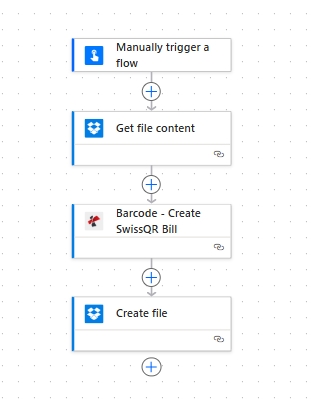
流程概览
1. Manually trigger a flow
Manual trigger for testing. Swap for any storage trigger in production.
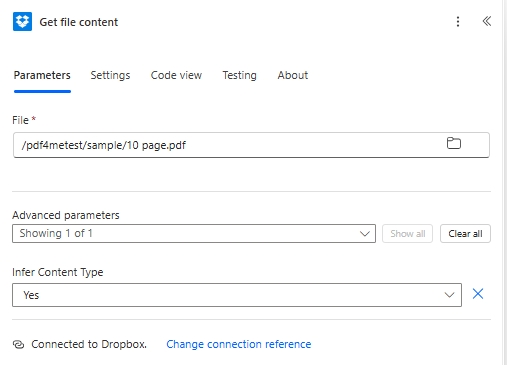
2. Dropbox Get file content
Reads /pdf4metest/sample/10 page.pdf with Infer Content Type Yes.
3. PDF4me Barcode - Create SwissQR Bill
Output Format Type PNG (try PDF for hybrid). Paging Options custom, Page Number 3. All payment fields filled.
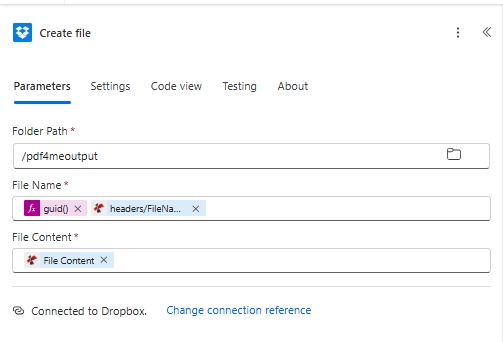
4. Dropbox Create file
Writes to /pdf4meoutput. File Name built from guid() plus headers/FileName so every run lands as a unique file.
简短版

四个 Power Automate 操作。手动触发即可启动流程。Dropbox 获取文件内容 阅读 /pdf4metest/sample/10页.pdf推断内容类型 设置为“是”。PDF4me 条形码 - 创建 SwissQR 账单 附加符合瑞士支付标准的二维码账单页面 输出格式类型 PNG (在此次运行中;选择) PDF 对于混合容器,加上 JPEG蒂芙 可用的), 国际银行账户 CH4431999123000889012数量 5253531货币 充血性心力衰竭参考类型 QRR语言 英语分离线 用剪刀画线债权人 施耐德电气股份公司 (S 地址,biel 2501),最终债务人 皮娅-玛丽亚·鲁奇曼-施奈德 (S 地址,biel 9400), 参考 210000000003139471430009017此外,还包含完整的 AV1 和 AV2 备选方案参数。在“高级参数”下: 分页选项 风俗页码 3Dropbox 创建文件 写信给 /pdf4me输出文件名 由……构成 guid() + headers/FileName 为了确保唯一性。输出:存档文件夹中包含一个瑞士银行可扫描的文件。

决定你的输出能否被银行扫描并正确显示在页面上的三个因素

首先, IBAN 必须以 CH 或 LI 开头 且最多只能包含 21 个字符。对于 QRR 参考类型,IBAN 必须为 QR-IBAN,不是标准 IBAN。其次,当参考类型为 QRR 时,参考信息为…… 27 位数字,带模 10 校验位如果没有,请切换到 得分 或者 。 第三, 分页选项和页码仅在输出格式类型为 PDF 时适用。图像格式类型(PNG、JPEG、Tiff)忽略了这两个参数,因为输出是独立的单页图像,而不是多页文档。

它解决了一些常见的现实问题

人们会用类似这样的短语搜索这个问题:

  • “如何在 Power Automate 中将瑞士二维码钞票插入到 PDF 的特定页面上?” 使用输出格式类型 PDF分页选项 custom以及页码,页码索引从 1 开始(本指南中为 3)。
  • “我可以将瑞士二维码输出为PNG图像而不是PDF页面吗?” 是的。将输出格式类型设置为 PNGJPEG, 或者 Tiff 该操作会返回单据的独立图像,而忽略分页选项。
  • 如何确保重新运行时输出文件名不会冲突? 使用 guid() 在 Dropbox 上传的“文件名”字段中使用 Power Automate 表达式,可以选择性地与以下表达式连接: headers/FileName 来自 PDF4me 输出。
  • “Power Automate 操作中的高级参数应该包含哪些内容?” 四个字段:页码、分页选项、文件内容(源 PDF)、文件名。点击 显示全部 在高级参数中显示它们。
  • “瑞士银行会扫描PNG格式的二维码账单吗?” 是的,PDF 和图像输出的二维码编码完全相同。PNG 格式适合用于电子邮件内嵌或网页嵌入的单据;PDF 格式则适合用于发送包含完整发票和单据的完整发票。

你正在构建的

一个可重复使用的四步 Power Automate 流程,用于生成带有二维码账单的瑞士银行可扫描发票。 你选择的任何页面同样的流程也适用于独立图像的情况(跳过源 PDF,将输出格式类型切换为 PNG / JPEG / Tiff),用于电子邮件嵌入式付款提醒。

Power Automate 流程画布包含四个操作:手动触发流程、Dropbox 获取文件内容、条形码 - 创建 SwissQR 账单、Dropbox 创建文件。

从上到下共四个动作。手动触发便于流程测试;生产中可替换为任何存储触发方式。


你需要什么

  • 动力自动化 账户已开通流量。 打开 Power Automate
  • PDF4me API密钥获取您的 API 密钥首次放置操作时,请登录 PDF4me Connect 连接器。
  • Dropbox/pdf4metest/样本 作为源文件夹和 /pdf4me输出 作为目标位置。任何存储介质都可以:SharePoint、OneDrive、Dataverse 的映射方式相同。
  • 发票PDF下载10页样本 根据截图完全按照步骤操作。
  • 瑞士支付数据:CH 或 LI IBAN(最多 21 个字符),金额,货币(充血性心力衰竭 或者 欧元),完整的债权人+最终债务人名称/地址栏。完整的字段参考信息 行动文件

快速参考:决定输出结果的 4 个字段

Output Format Type
PDF (hybrid), PNG, JPEG, or Tiff. Picks the container of the populated output.
Paging Options
first, last, add at end, or custom. PDF Output Format Type only.
Page Number
1-based page index. Required when Paging Options is custom; ignored otherwise. Set to 3 in this run.
File Content + File Name
The source PDF, mapped from a previous action. Skip both for a standalone QR-slip from payment data alone.

构建流程

操作 1:手动触发流程

手动触发用于测试。生产环境中替换为 Dropbox 创建文件时SharePoint 创建文件时OneDrive 当创建文件时Outlook 当收到新邮件时复发, 或者 网络钩子 取决于您的 AR 流程。

操作 2:Dropbox - 获取文件内容

从输入文件夹中提取源发票。

场地本次运行中使用的值
File/pdf4metest/sample/10 page.pdf
Infer Content TypeYes
Power Automate Dropbox 获取文件内容操作,使用文件 /pdf4metest/sample/10 page.pdf 和高级参数推断内容类型是。

操作 3:PDF4me 条形码 - 创建 SwissQR 账单

执行该操作的行动。搜索 PDF4me 在动作选择器和选择器中 条形码 - 创建 SwissQR 账单该操作在主面板中包含支付字段,并在下方包含 4 个字段。 高级参数 (分页选项、页码、文件内容、文件名)。配置:

团体场地价值
OutputOutput Format TypePNG
PaymentIBANCH4431999123000889012
PaymentAmount5253531
PaymentCurrencyCHF
PaymentReference TypeQRR
PaymentLanguage TypeEnglish
PaymentSeperator LineLineWithScissor
CreditorCreditor NameVar Schneider AG
CreditorCreditor Address TypeS
CreditorCreditor: Address Line 1Var Schneider AG
CreditorCreditor: Address Line 223
CreditorCreditor PostalCode2501
CreditorCreditor Citybiel
DebtorUltimate Debtor NamePia-Maria Rutschmann-Schnyder
DebtorUltimate Debtor AddressTypeS
DebtorUltimate Debtor: Address Line 1Grosse Marktgasse
DebtorUltimate Debtor: Address Line 233
DebtorUltimate Debtor PostalCode9400
DebtorUltimate Debtor Citybiel
Ref/MsgReference210000000003139471430009017
Ref/MsgUnstructured MessageInstruction of 15.09.2019
Ref/MsgBilling InfoS1/01/20170309/11/10201409/20/14000000/22/36958/30/CH106017086/40/1020/41/3010
Ref/MsgAV1 ParametersName AV1: UV;UltraPay005;12345
Ref/MsgAv2 ParametersName AV2: XY;XYService;54321
AdvancedPaging Optionscustom
AdvancedPage Number3
AdvancedFile ContentFile Content (from Action 2)
AdvancedFile Nameabc.pdf

操作 4:Dropbox - 创建文件

将填充后的文件保存为唯一的 guid 前缀名称,以避免重复运行时发生冲突。

场地本次运行中使用的值
Folder Path/pdf4meoutput
File Nameguid() + headers/FileName (concat expression for a unique-per-run name)
File ContentFile Content (from Action 3 dynamic content)
Power Automate Dropbox 创建文件操作,文件夹路径为 /pdf4meoutput,文件名由 guid() 和 headers/FileName 表达式构建,文件内容为来自 PDF4me 创建 SwissQR 账单操作的动态内容。

guid() 文件名中的表达式保证每次运行时文件名都唯一。连接 标头/文件名 PDF4me 输出会在新文件名中保留原始发票名称。

保存并点击 测试瑞士银行可扫描的文件落入…… /pdf4meoutput


并排显示的 4 种输出格式类型选项

PDF
Hybrid output: QR-bill page inserted into your source invoice. Most common for outgoing AR. Uses Paging Options + Page Number.
PNG
Standalone raster image of the QR-bill slip. Best for inline email embeds and web previews. Ignores Paging Options.
JPEG
Compressed raster image. Smaller file size than PNG. Still bank-scannable.
Tiff
Lossless raster archive format. Use when the recipient needs print-grade quality.

故障排除

QR-bill landed on the wrong page
Check Paging Options. custom uses Page Number. first puts the slip as the new page 1. last appends at the end. Only applies when Output Format Type is PDF.
Page Number is greyed out / ignored
Paging Options is something other than custom. Switch Paging Options to custom and the Page Number field becomes active.
QR-bill page is blank or unreadable
IBAN is invalid (must start with CH or LI, max 21 chars) or Currency is something other than CHF / EUR. Both are hard requirements of the Swiss Payment Standards.
Bank rejects a QRR reference
QRR references must be 27 digits with a mod-10 check digit. If you do not have one, switch Reference Type to SCOR (ISO 11649) or NON and leave Reference empty.
Create file writes an empty file
File Content on Action 4 is not bound to the PDF4me File Content output. Click the field and re-pick the dynamic content from Action 3.
Want a standalone QR slip without a source invoice
Skip Action 2 (Get file content). On Action 3, leave File Content and File Name empty under Advanced parameters and the action returns a standalone Swiss QR-bill in the chosen Output Format Type.

何时使用这种模式

Slip on a specific mid-document page
Quarterly statement where the QR-bill belongs right after the cover page. Contract pack with the slip after the summary.
Inline email PNG payment reminders
Output Format Type PNG, skip the source PDF, embed the slip image directly in an Outlook Send email body.
High-volume AR archival
guid()-prefixed Dropbox upload makes every run uniquely addressable for downstream search and audit.
Subscription billing
QR-IBAN plus QRR Reference identifies the customer or contract every recurring run.

接下来读什么?


常问问题

How do I insert the Swiss QR-bill on a specific page in Power Automate?+
Click Show all on Advanced parameters in the PDF4me Barcode - Create SwissQR Bill action. Set Paging Options to custom, then set Page Number to the 1-based page index where the QR-bill should land (3 in this guide). Output Format Type must be PDF for Paging Options to take effect.
What is the difference between Paging Options values first, last, add at end, and custom?+
first inserts the QR-bill as the new page 1 (everything else shifts down by one). last appends at the very end of the source PDF. add at end is a functional alias for last. custom uses the Page Number field to insert at a specific 1-based position.
Why does the QR-bill not move when I change Paging Options?+
Output Format Type is set to PNG, JPEG, or Tiff. Image formats ignore Paging Options because the output is a standalone slip image, not a multi-page document. Switch Output Format Type to PDF.
Can I generate a Swiss QR-bill image (PNG) without a source invoice?+
Yes. Set Output Format Type to PNG (or JPEG / Tiff). Skip the File Content and File Name fields under Advanced parameters. The action returns a standalone QR-bill image you can embed inline in an Outlook email or display on a web page.
Why use guid() in the Dropbox Create file File Name?+
It guarantees every run lands as a unique file in /pdf4meoutput so re-runs do not silently overwrite previous outputs. Concatenating headers/FileName from the PDF4me output keeps the original invoice name inside the new filename for traceability.
My IBAN starts with DE / FR / IT, can I still use this?+
No. Swiss QR-bills are scoped to CH and LI IBANs only. For European SEPA payments with non-Swiss IBANs use the Generate EPC QR Code for SEPA action instead.
Address Type S vs K, which one should I pick?+
S (Structured) is the modern default and the recommended choice for new integrations. PostalCode and City go in separate fields; Address Line 1 / 2 carries the street. K (Combined) puts the full address into two free-text Address Line fields and leaves PostalCode and City empty.
Same flow in Make, Zapier, or n8n?+
Yes. The same PDF4me Create Swiss QR Bill action is available on all four platforms with identical parameters. See the cross-platform comparison at the bottom of the action reference page.

开始使用