跳到主要内容

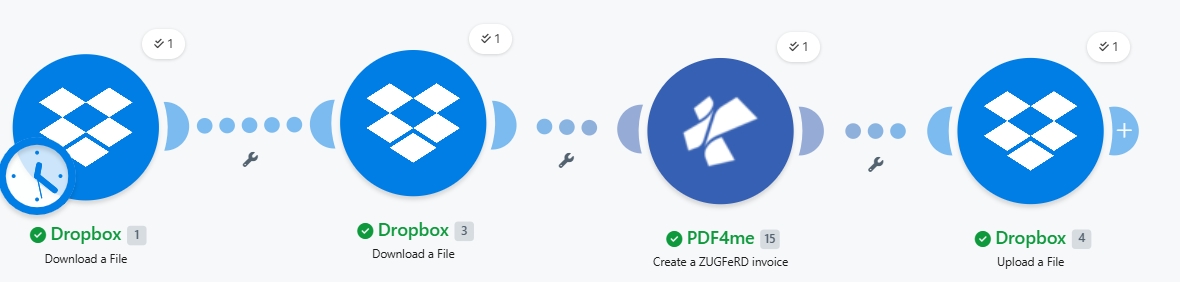
在 Make 中创建 ZUGFeRD 2.0+ 电子发票:一个包含 4 个模块的 Dropbox 工作流程

· 阅读需 22 分钟
SEO and Content Writer

ZUGFeRD 2.0+(也称为 Factur-X 在法国和 XRechnung 在德国公共部门中)是一个 混合 PDF/A-3 发票 通过将机器可读的 XML 嵌入到 PDF 中,即可生成一个既可供人阅读又可供 ERP 系统使用的混合电子发票。本指南将逐步演示屏幕截图所示的操作:将 Dropbox 中的基础发票 PDF 和 ZUGFeRD 2.0+ XML 文件合并为符合 EN16931 标准的混合电子发票。 /pdf4meoutput/, 在 4. 创建模块,零代码

情况概览
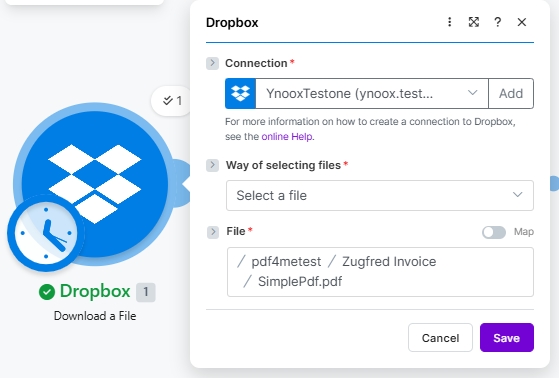
1. Dropbox Download (PDF)
Pulls the base invoice PDF (/pdf4metest/Zugfred Invoice/SimplePdf.pdf). Scheduled trigger shown.
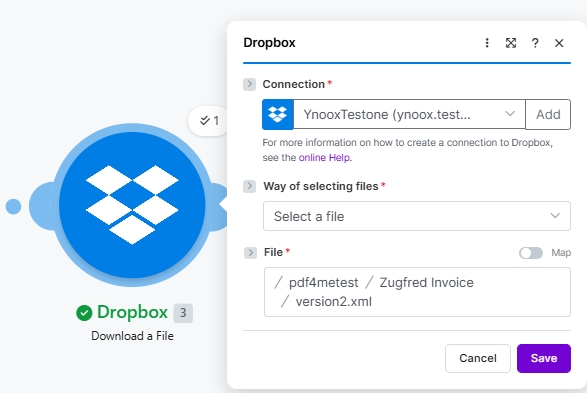
2. Dropbox Download (XML)
Pulls the ZUGFeRD 2.0+ XML invoice data (/pdf4metest/Zugfred Invoice/version2.xml).
3. PDF4me Create a ZUGFeRD invoice
Input Format XML, Output Mode XML With PDF, ZUGFeRD Version 2+, Conformance EN16931, Render Yes, Language de.
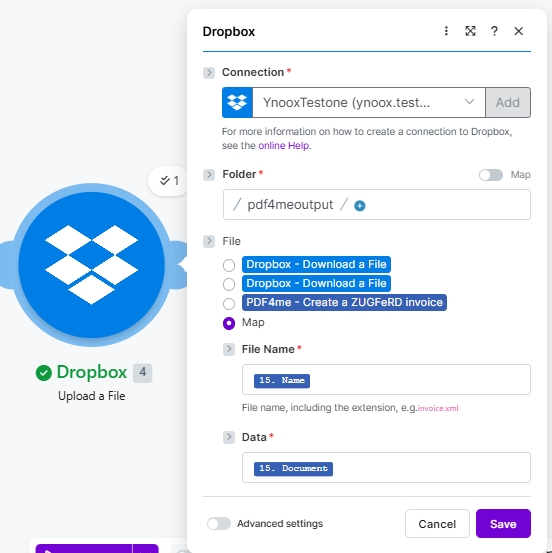
4. Dropbox Upload
Writes the hybrid PDF/A-3 e-invoice to /pdf4meoutput/ using File set to Map.
简短版

四个 Make 模块,端到端。两个 Dropbox 下载文件 步骤包括提取基础 PDF 和 ZUGFeRD 2.0+ XML(屏幕截图显示) YnooxTestone 连接加路径 /pdf4metest/Zugfred Invoice/SimplePdf.pdf/pdf4metest/Zugfred Invoice/version2.xmlPDF4me 创建 ZUGFeRD 发票 将 XML 嵌入到 PDF 中 输出模式 XML 和 PDFZUGFeRD 版本 2+符合性级别 EN16931以 PDF 格式渲染发票 是的语言 Dropbox 上传文件 写入结果 混合型 PDF/A-3/pdf4meoutput/ 文件设置为 地图, 文件名 15. 姓名, 数据 15. 文件. 输出文件可在任何 PDF 阅读器中打开,并可在任何支持 ZUGFeRD / Factur-X / XRechnung 的 ERP 系统中清晰解析。

决定您的ERP系统是否接受发票的两个因素

首先, 符合性级别 必须符合买家或收货方ERP系统的预期。 EN16931 (舒适型)是德国的法律默认选项,也是欧盟 B2B 交易的安全选择; XRECHARGE 在德国,B2G(公共部门)开票需要用到; 基本的 对大多数其他买家来说也适用。其次, ZUGFeRD 版本 必须是 2+ 适用于所有符合 EN 16931 标准的产品。旧版 1.0 使用 BASIC / COMFORT / EXTENDED 模式,与 EN 16931 接收器不兼容。选择 2+ 除非收件人明确要求 1.0。

它解决了一些常见的现实问题

人们会用类似这样的短语搜索这个问题:

  • “如何在 Make 中创建带有嵌入式 XML 的 ZUGFeRD 发票?” 这个 4 模块方案实现了端到端:输入 PDF 模板和 XML 发票,输出混合 PDF/A-3 格式。
  • ZUGFeRD 和 Factur-X 是同一回事吗? 是的。技术格式相同,只是名称不同。ZUGFeRD 2.x 文件可以被预期使用 Factur-X 的系统接受,反之亦然。
  • 我应该选择哪个符合性级别? EN16931 用于 B2B(符合德国法律默认标准和欧盟 EN 16931),XRECHNUNG 用于德国公共部门 (B2G),BASIC 用于实现最广泛的传统兼容性。
  • 我需要自己编写 XML 代码吗? 不,但在这个例子中,截图使用的是现有的 XML 发票。该模块也接受 JSON 或 CSV 输入,并自动生成 XML 文件。
  • “如果我的买家只需要 XML 文件,不需要 PDF 文件怎么办?” 设置输出模式 XML Only 该模块只返回 XML 发票文件,而不是混合格式的文件。

你正在构建的

这是一个可复用的生成场景,它能够根据基础 PDF 文件和 XML 发票文件生成完全符合 ZUGFeRD 2.0+ 标准的混合电子发票。触发方式可以是手动、定时(如图所示)、Dropbox 文件监视或 HTTP Webhook。输出结果是一个同时满足欧盟电子发票法规对人类可读 PDF 和机器可读 XML 要求的单个文件。

创建场景画布:一个 Dropbox 文件下载器(PDF,带有定时时钟标记)连接到第二个 Dropbox 文件下载器(XML),后者连接到 PDF4me;一个 ZUGFeRD 发票创建器连接到 Dropbox 文件上传器。每个模块都显示一个迭代计数器(1)和一个绿色对勾,表示运行成功。

总共四个模块。两次下载,一次 PDF4me 操作,一次上传。模块 1 上的时钟图标表示已设置定时触发;您可以根据实际使用情况切换到手动/文件监视/Webhook 模式。


你需要什么

  • 制作 已创建场景的账户。 创建 Make 帐户 如果你需要的话。
  • PDF4me API密钥获取您的 API 密钥 并连接到第一个 PDF4me 模块。参见 连接 PDF4me 以创建
  • Dropbox 带有源文件夹(例如 /pdf4metest/Zugfred 发票/包含 PDF 模板和 XML 发票,以及一个输出文件夹(/pdf4meoutput/)。
  • 基础 PDF (截图使用 SimplePdf.pdf它不需要任何布局标记。该模块会将 XML 嵌入为 PDF/A-3 附件。
  • ZUGFeRD 2.0+ XML 发票使用你自己的,或者拿一个 2.0 XML 示例 跟着做。

快速参考:每个参数的作用

Input Format
XML for existing ZUGFeRD XML, JSON for structured JSON, CSV for tabular invoice rows.
Output Mode
XML With PDF returns the hybrid PDF/A-3 (recommended). XML Only returns just the XML invoice file.
ZUGFeRD Version
2+ for EN 16931 alignment (use this). 1.0 is legacy with BASIC / COMFORT / EXTENDED only.
Conformance Level
2+ supports MINIMUM, BASICWL, BASIC, EN16931 (Comfort, default), EXTENDED, XRECHNUNG (German B2G).
Render Invoice on PDF
Yes draws the invoice line items visually on the PDF. Only takes effect when Output Mode is XML With PDF.
Language
Two-letter ISO code: de (default), en, fr, it, es, nl, pl, pt, cs. Controls label localisation on the rendered PDF.

构建场景

模块 1:Dropbox 下载文件(基础 PDF)

提取源 PDF 文件,其中 ZUGFeRD XML 将作为 PDF/A-3 附件嵌入。

场地本次运行中使用的值
ConnectionYnooxTestone (ynoox.test...). your Dropbox connection
Way of selecting filesSelect a file
File/pdf4metest/Zugfred Invoice/SimplePdf.pdf
为基础 PDF 配置 Dropbox 下载文件。连接 YnooxTestone。选择文件的方式:选择文件。文件路径 /pdf4metest/Zugfred Invoice/SimplePdf.pdf。

模块 2:Dropbox 下载文件(ZUGFeRD 2.0+ XML)

提取 ZUGFeRD XML 发票文件。XML 文件包含所有发票详情;PDF 文件只是可视化的包装文件。

场地本次运行中使用的值
ConnectionYnooxTestone (ynoox.test...). same Dropbox connection
Way of selecting filesSelect a file
File/pdf4metest/Zugfred Invoice/version2.xml
为 ZUGFeRD 2.0+ XML 配置 Dropbox 下载文件。连接 YnooxTestone。选择文件的方式:选择文件。文件路径:/pdf4metest/Zugfred Invoice/version2.xml。

模块 3:PDF4me 创建 ZUGFeRD 发票

执行实际嵌入操作。将下载的两个文件映射为输入,选择一致性设置,然后运行。

团体场地价值
AuthConnectionClassify Documen (testva...). PDF4me connection
SourceFile (PDF template)Map → Module 1 File Name + Data
SourceInput FormatXML
SourceFile (XML invoice)Map → Module 2 File Name + Data (a second File picker appears when Input Format is XML)
OutputOutput ModeXML With PDF (hybrid PDF/A-3)
OutputZUGFeRD Version2+
OutputConformance LevelEN16931
OutputRender Invoice on PDFYes
OutputLanguagede

模块 4:Dropbox 上传文件

将混合 PDF/A-3 电子发票保存回输出文件夹。

场地本次运行中使用的值
ConnectionYnooxTestone (ynoox.test...)
Folder/pdf4meoutput/
FileMap (so File Name and Data come from the PDF4me step)
File Name15. Name (dynamic content from PDF4me Module 3)
Data15. Document (dynamic content from PDF4me Module 3)
配置 Dropbox 上传文件。连接 YnooxTestone。文件夹 /pdf4meoutput/。文件类型设置为 Map。文件名绑定到 15。名称(来自 PDF4me 创建 ZUGFeRD 发票)。数据绑定到 15。文档。

保存并点击 运行一次混合型PDF/A-3降落 /pdf4meoutput/ 几秒钟之内。


示例文件(XML、JSON、CSV)

您可以将模块 2(XML)替换为这些输入中的任何一个,并进行更改。 输入格式 因此。


故障排除

Conformance Level dropdown shows different options than expected
You toggled between Versions. Version 1.0 has BASIC, COMFORT, EXTENDED. Version 2+ has Empty, MINIMUM, BASICWL, BASIC, EN16931, EXTENDED, XRECHNUNG. Pick the version first; conformance levels follow.
Second File picker did not appear when Input Format is XML
It only appears when File is set to Map. Click the File radio and choose Map; the second File picker (for the XML invoice) renders below.
Buyer ERP rejects the hybrid PDF as non-compliant
Mismatched Conformance Level. Check what the receiver expects (commonly EN16931 for B2B EU, XRECHNUNG for German B2G). Re-run with the right value.
Output is XML only when you wanted the hybrid PDF
Output Mode is set to XML Only. Switch to XML With PDF.
Rendered invoice on PDF is missing line items
Render Invoice on PDF is set to No or Empty, or Output Mode is XML Only. Set both: Output Mode = XML With PDF AND Render Invoice on PDF = Yes.
Want JSON or CSV instead of XML as the input
Change Input Format. The Invoice XML Data / second File picker is replaced by an Invoice JSON Data or Invoice CSV Data text field, which you map from a Google Sheets, HTTP, or file-download module.

何时使用这种模式

B2B invoicing in the EU
EN16931 (Comfort) covers the legal default for German and EU business-to-business e-invoicing.
B2G (public-sector) Germany
XRECHNUNG is required for invoicing public authorities. Same flow, different conformance level.
Cross-border Factur-X
France and other EU markets accept ZUGFeRD 2.x as Factur-X. No format conversion needed.
ERP integration without code
Buyer ERP extracts the embedded XML automatically; no manual data entry in accounts payable.

接下来读什么?


常问问题

What is ZUGFeRD 2.0+ and how does it differ from 1.0?+
ZUGFeRD 2.0+ aligns with the EU EN 16931 e-invoicing standard and supports the modern Conformance Level set (MINIMUM, BASICWL, BASIC, EN16931, EXTENDED, XRECHNUNG). ZUGFeRD 1.0 predates EN 16931 and uses BASIC / COMFORT / EXTENDED only. For any new integration in 2026 use 2+; 1.0 is kept for legacy buyer ERPs.
Is ZUGFeRD the same as Factur-X?+
Same technical format under different brand names. ZUGFeRD is the German designation; Factur-X is the French equivalent. Both align to EN 16931 and are cross-compatible: a ZUGFeRD 2.x invoice is accepted by Factur-X receivers and vice versa.
Which Conformance Level should I pick for a typical EU B2B invoice?+
EN16931 (also called Comfort). It is the German legal default and the safe choice for EU business-to-business invoicing. Use XRECHNUNG when invoicing German public authorities (B2G). Use BASIC only when a recipient ERP explicitly requires it.
Do I need to author the XML myself?+
No. The screenshots use an existing XML (Input Format = XML), but the module also accepts JSON or CSV. Choose Input Format = JSON or CSV and the XML is built for you. Sample JSON and CSV files are in the section above.
What if my buyer needs only the XML, no PDF?+
Set Output Mode to XML Only. The module returns just the XML invoice file without a PDF wrapper. Useful when the receiving ERP renders its own document and only consumes the structured data.
Can I render line items visually on the PDF page?+
Yes. Set Render Invoice on PDF = Yes (only effective when Output Mode is XML With PDF). The module draws the invoice items as a visual table on the PDF pages so human reviewers see the invoice content without opening the embedded XML.
Does this work in Power Automate, n8n, or Zapier?+
Yes. The PDF4me Create ZUGFeRD Invoice action is available on all four platforms with the same parameters. See the cross-platform comparison at the bottom of the Make action reference page.
Does the output PDF/A-3 work with every PDF viewer?+
Yes. PDF/A-3 is backward-compatible with all PDF readers. Human readers see the rendered invoice PDF; ZUGFeRD-aware ERPs extract the embedded XML automatically. Non-aware tools just see a normal PDF.
开始使用