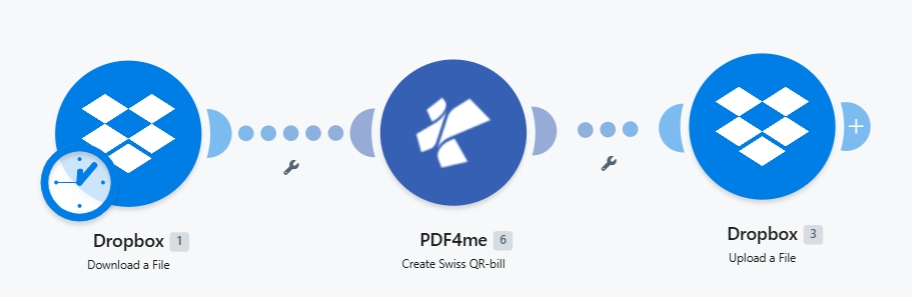
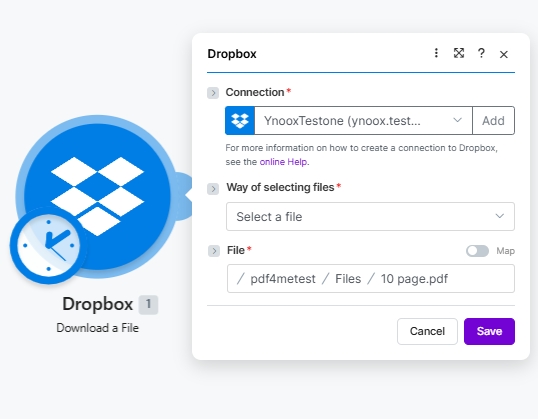
以来源命名的单个 PDF 文件(例如: 10 page.pdf)并将瑞士二维码账单页面插入到选定的位置 分页选项 (First 将其设为新的第 1 页; Last (将其附加到文件末尾)。在任何 PDF 查看器中打开文件,二维码账单部分将显示付款二维码、易于理解的待冻结账户/应付账款、金额、币种、参考信息以及债权人/债务人地址。使用瑞士银行应用程序扫描二维码,付款信息将自动填写。
QR-bill page is blank or the QR code is unreadable
The IBAN is invalid (must start with CH or LI, max 21 chars) or the Currency was something other than CHF / EUR. Both are hard requirements of the Swiss Payment Standards.
Reference Type QRR but the bank rejects the reference
QRR references must be 27 digits with a mod-10 check digit. If you do not have one, switch Reference Type to SCOR (ISO 11649) or NON and leave Reference empty.
QR-bill landed on the wrong page
Adjust Paging Options. First puts the slip as the new page 1. Last appends it after the last page. Or pass a 1-based page number to insert at that position.
Creditor or Debtor address looks wrong on the slip
Mismatched Address Type. With type S, fill PostalCode + City and use AddressLine1/2 for street. With type K, leave PostalCode + City empty and put the full address into AddressLine1 + AddressLine2.
Upload writes a zero-byte file
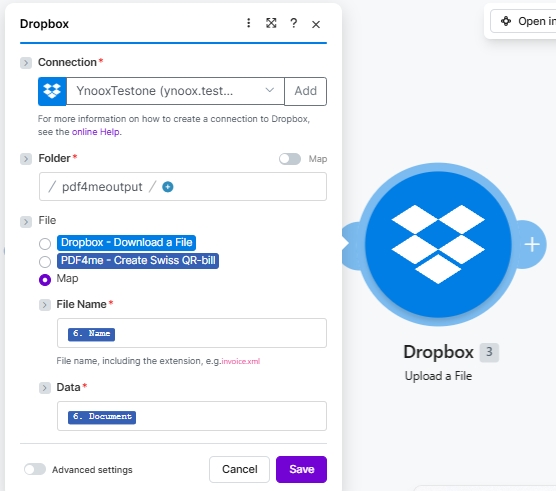
File Name or Data in the Upload module is not bound to the PDF4me Module 2 outputs. Click the field and re-pick the dynamic content from Module 6 (PDF4me Create Swiss QR-bill).
Want a standalone QR slip without an invoice
Skip the source file entirely. Remove Dropbox Module 1, or leave the File group empty in the PDF4me module. The output is a standalone Swiss QR-bill PDF.
No. The PDF4me Create Swiss QR-bill module bundles QR-code generation, the QR-bill fonts (Liberation Sans), the mod-10 reference math, and the Swiss Payment Standards layout. Configure the fields, click Run, and the output is a Swiss-compliant PDF.
What is the difference between QRR, SCOR, and NON references?+
QRR is the Swiss 27-digit numeric reference with a mod-10 check digit; it requires a QR-IBAN. SCOR is the international ISO 11649 creditor reference; it works with a standard IBAN. NON means no reference is shown on the slip. useful for ad-hoc one-off payments where the debtor adds their own reference at payment time.
Can I generate a Swiss QR-bill without an existing PDF invoice?+
Yes. Skip the File group in the PDF4me module and the output is a standalone Swiss QR-bill PDF (just the payment slip, no invoice body). Useful when the debtor only needs the slip, or when your invoice body comes from a different source.
My IBAN starts with DE / FR / IT. can I still use this?+
No, Swiss QR-bills are scoped to CH and LI IBANs only. For European SEPA payments with non-Swiss IBANs, use the Generate EPC QR Code for SEPA module instead.
Address Type S vs K. which one should I pick?+
S (Structured) is the modern default: PostalCode and City go in separate fields; AddressLine1/2 carries the street. K (Combined) puts the full address in two free-text AddressLine fields and ignores PostalCode/City. New integrations should use S unless you are importing legacy data that does not separate postal code and city.
Does the output PDF work with mobile banking apps?+
Yes. Every Swiss bank app that supports payments via QR-bill (which is all of them since 2022) can scan the output to pre-fill the payment form. Test by opening UBS, PostFinance, Raiffeisen, or any Swiss banking app and scanning the QR code on the printed or on-screen slip.
How do I change where the QR-bill page lands?+
Set Paging Options. First puts the slip as the new page 1 of the output PDF, Last appends it to the end, or pass a 1-based page number to insert it at that position. Page indexing starts at 1.
Same scenario in n8n, Zapier, or Power Automate?+
Yes. The same PDF4me Create Swiss QR-bill action is available on all four platforms with identical parameters. See the cross-platform comparison at the bottom of the Create SwissQR Bill action page.