Zapier kullanarak Word'de Metni Resimle Değiştirme
Word'de Metni Resimle Değiştirme bir Zapier eylem tarafından PDF4me Bu özellik, Word belgesi içindeki bir metin yer tutucusunu bulur ve sizin sağladığınız bir resimle değiştirir. Word'ü açmadan, sözleşme, teklif mektubu veya rapor şablonlarına otomatik olarak imza, logo veya grafik eklemek için kullanabilirsiniz. Çıktı, bir sonraki Zap adımı için hazır yeni bir .docx dosyasıdır.
Bu eylemin yaptığı şey
PDF4meWord'de Metni Resimle Değiştirme Word belgesinde tam olarak aynı, büyük/küçük harf duyarlı metin dizesini arar ve eşleşen her örneği Zap'e eşlediğiniz bir resimle değiştirir. Hangi sayfaların etkileneceğini kontrol edin. Sayfalar Ve İlk Sayfayı Atlave isteğe bağlı olarak ayarlanabilir Görüntü Genişliği Ve Görüntü Yüksekliği Eklenen görüntünün boyutunu ayarlamak için kullanılır. Yaygın kullanım alanları arasında sözleşme şablonuna imza eklemek, markalı bir mektuba logo eklemek veya dağıtımdan önce bir rapora grafik eklemek yer alır.
Kimliğimi nasıl doğrularım? API Rica etmek?
Erişmek için PDF4me Web APIHer istekte geçerli kimlik doğrulama bilgileri bulunmalıdır. Kimlik doğrulama, güvenli iletişimi sağlar ve yetkili bir kullanıcı olarak kimliğinizi doğrular.
Kaçırmamanız Gereken Önemli Bilgiler
Word Dosyası, Word Dosya Adı, Arama Metni, Ve Görüntü DosyasıBu haritayı, referans olarak gördüğünüz isimlere göre değil, bu etiketlere göre oluşturun. PDF4megenel API dokümantasyon.İlk Sayfayı Atla ayrı bir Doğru/Yanlış düğmesidir. Sayfalar. Ayar Sayfalar ile Tümü ile İlk Sayfayı Atla True olarak ayarlandığında bile birinci sayfa yine de hariç tutulur; bu, birinci sayfa kapak sayfası olduğunda kullanışlıdır.{SIGNATURE} eşleşmeyecek imza veya {Signature}Bu nedenle belge olduğu gibi iade edilir.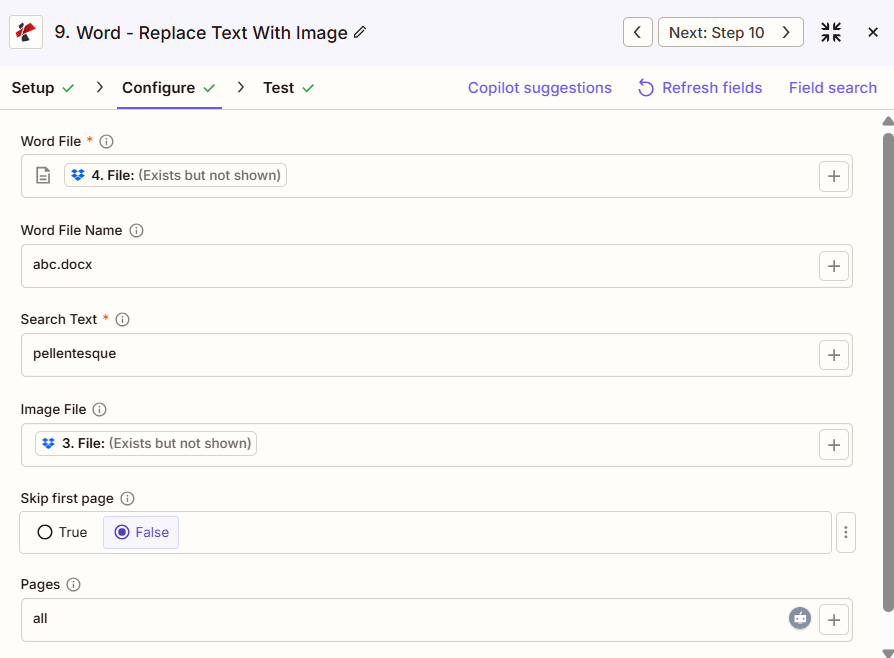
Word işlem panelinde Metni Resimle Değiştir: Word Dosyası, Metin Ara, Resim Dosyası, İlk sayfayı atla ve Sayfalar
Parametreler
Gereklidir Zapier Kullanıcı Arayüzü: Word Dosyası ve Arama Metni. Word Dosya Adı, Resim Dosyası, İlk Sayfayı Atla, Sayfalar, Resim Genişliği ve Resim Yüksekliği isteğe bağlıdır; ancak eşlenmiş bir Resim Dosyası olmadan bu işlemin eklenecek bir şeyi yoktur.
| Parametre | Gerekli | Ne işe yarar? | Örnek |
|---|---|---|---|
| Word File | Required | The Word document to process, mapped from a previous Zap step. | [Word File] |
| Word File Name | Conditional | Filename with extension for the document being processed. Used for output naming. | abc.docx |
| Search Text | Required | Exact, case-sensitive placeholder text to find. Every matching instance is replaced. | {COMPANY_LOGO} |
| Image File | Conditional | The replacement image, mapped from a previous step. No asterisk in the Zapier UI, but required for the action to insert anything. | [Logo File] |
| Skip First Page | Conditional | True/False toggle. True excludes page one from the replacement even if Pages is set to all. Default False. | False |
| Pages | Conditional | Which pages to search. Accepts all, first, last, or a comma-separated list of page numbers. | all |
| Image Width | Conditional | Width of the inserted image in millimeters, up to 500. Leave blank to use the image's original width. | 50 |
| Image Height | Conditional | Height of the inserted image in millimeters, up to 500. Leave blank to use the image's original height. | 30 |
Çıktı hangi alanları içeriyor?
| Alan | Tip | İçeriğinde neler var? |
|---|---|---|
File | URL | Direct URL to the processed Word document with the image inserted. |
File Name | String | The filename without extension. |
Full File Name | String | Complete filename including the .docx extension. |
File Extension | String | File extension of the returned document, .docx. |
Job ID | String | Unique job identifier for tracking this run. |
Trace ID | String | Trace identifier useful when contacting support about a specific request. |
Tipik Kurulumlar
İş Akışı ÖrnekleriCommon Zapier workflow patterns using Replace Text With Image In Word.
- Onay veya elektronik imza adımı, bir sözleşme Word şablonunu kullanıma hazır hale getirir.
{SIGNATURE}İçeride yer tutucu. - PDF4me Word'de Metni Resimle Değiştir özelliği, Arama Metni ayarı açıkken çalışır.
{SIGNATURE}Görüntü dosyası, imzalayanın kayıtlı imza görüntüsüne eşlenmiştir ve Sayfalar tümü olarak ayarlanmıştır. - Tamamlanan sözleşme, e-posta veya depolama alanına yükleme gibi bir sonraki Zap adımına gönderilir.
- Bir şablon içeren bir yapıdan yeni bir Word belgesi oluşturulur.
{COMPANY_LOGO}Yer tutucu. - Arama Metni yer tutucu metne ayarlanmıştır ve Görüntü Dosyası doğru marka logosunu eşleştirir; İlk Sayfayı Atla seçeneği Yanlış bırakılmıştır, böylece logo ilk sayfada da görünebilir.
- Markalı belge, dağıtım veya dosyalama aşamasına geçer.
- Planlanmış bir tetikleyici, rapor verileri yenilendikten sonra çalışır ve grafik oluşturma adımı bir grafik görüntüsü üretir.
- Word'de Metni Resimle Değiştir özelliği, resmi değiştirir.
{CHART_1}Oluşturulan grafik görüntüsü için yer tutucu, Pages aracılığıyla belirli bir sayfayı hedefliyor. - Tamamlanan rapor, paydaşlara otomatik olarak e-posta ile gönderilir.
Pratik İpuçları
Kopya Kağıdı
| Alan | Değer |
|---|---|
| Action | Replace Text With Image In Word |
| Word File | [mapped from previous step] |
| Word File Name | contract_template.docx |
| Search Text | {SIGNATURE} |
| Image File | [mapped from previous step] |
| Skip First Page | False |
| Pages | all |
| Image Width | 50 |
| Image Height | 30 |
Sıkça Sorulan Sorular
İlgili Eylemler
Diğer Platformlarda Aynı Görev
Sektör Kullanım Örnekleri ve Uygulamaları
- Legal & Professional Services
- Human Resources
- Corporate Communications
- Marketing & Sales
- Sözleşme İmzalarıSözleşmelere imza görselleri ekle
- Mektup ŞablonlarıHukuki yazışmalara imza eklemek:
- Sözleşme İşlemeSözleşmelere imza ekleme işlemini otomatikleştirin.
- Belge Kimlik DoğrulamaDoğrulama görsellerini ekleyin.
- Teklif MektuplarıTeklif mektuplarına yönetici imzalarını ekleyin.
- Çalışan El KitaplarıŞirket logolarını ve fotoğraflarını ekleyin.
- SertifikalarTamamlama sertifikalarına imza ekleyin.
- Politika BelgeleriLogo eklemeli marka belgeleri
- Antetli kağıtLogoları mektup şablonlarına ekleyin.
- TekliflerTekliflere marka unsurları ekleyin.
- RaporlarRapor şablonlarına grafik ve çizelgeler ekleyin.
- SunumlarSunum verilerini görsellerle birlikte Word'e dönüştürün.
- Teklifler: Satış tekliflerine ürün görselleri ekleyin
- Vaka ÇalışmalarıVaka inceleme şablonlarına müşteri logoları ekleyin.
- BroşürlerBroşür şablonlarına ürün fotoğrafları ekleyin.
- SunumlarWord sunumlarına dinamik görseller ekleyin.