SwissQR kodunu okuyun. Zapier
SwissQR kodunu okuyun bir Zapier eylem tarafından PDF4me İsviçre'yi deşifre eden QR-faturanın içine gömülü PDF ve alacaklıya, borçluya geri döner, IBANMiktar ve referans verileri olarak JSONFaturaları otomatik olarak yeniden adlandırmak, ödemeleri muhasebe kayıtlarıyla eşleştirmek veya belgeleri tutar veya referans numarasına göre manuel veri girişi yapmadan yönlendirmek için kullanabilirsiniz.
Bu eylemin yaptığı şey
PDF4me SwissQR kodunu okuyun bir tane alır PDF içeren bir İsviçre QR-fatura (QR-Fatura) ve yapılandırılmış ödeme verilerini bir Zap içinde döndürür. Haritala Dosyave eylem geri döner Belge Metni, A JSON dize ile IBANAlacaklı, nihai alacaklı, borçlu, tutar, para birimi ve referans alanları. Bunu bir Kod ile ayrıştırın. Zapier Faturaların yeniden adlandırılmasını, ödemelerin eşleştirilmesini veya muhasebe otomasyonunu sağlamak için atılacak adım.
Kimliğinizi Doğrulama API Rica etmek
Erişmek için PDF4me Web API başından sonuna kadar ZapierHer istekte geçerli kimlik doğrulama bilgileri bulunmalıdır.
Kaçırmamanız Gereken Önemli Bilgiler
Belge Metniçözümlenmiş yükün tamamını tutarak JSON Dize. Bir koda ihtiyacınız var. Zapier (JavaScript Çalıştır) adım JSON.parse bireysel değerleri eşleştirmeden önce, IBAN veya ud_Name.cr_ alacaklıdır, ucr_ nihai alacaklıdır (genellikle boş bırakılır) ve dışarı_ İsviçre Ödeme Standartlarına uygun olarak nihai borçludur (SPCAlan adlandırması. cr_Adı Ve ud_Name İş akışlarının çoğunun kullandığı iki alan bunlardır.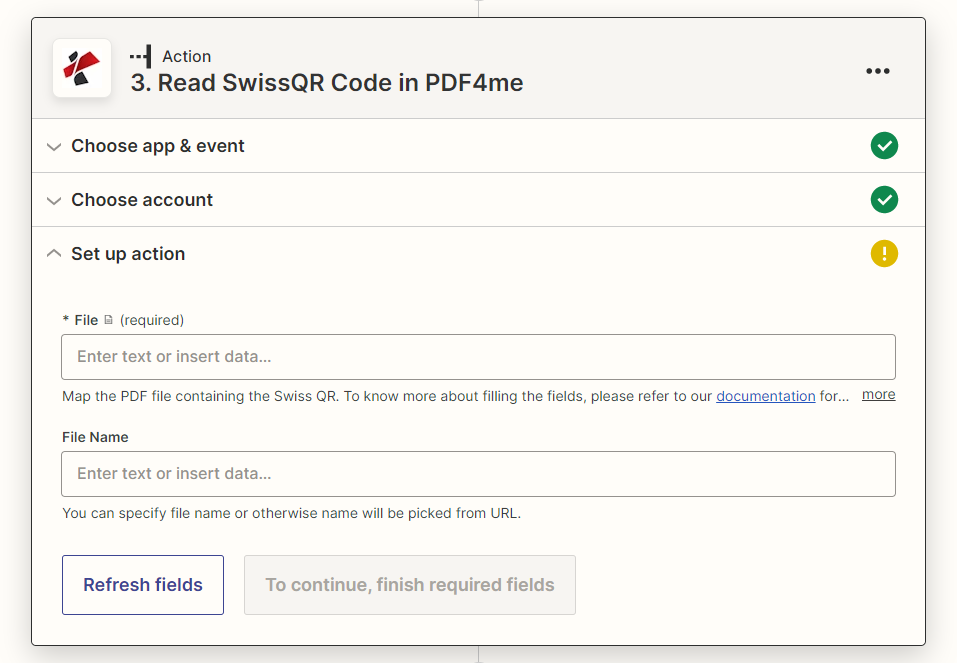
Eylem paneli kurulumu: Sadece Dosya alanı zorunludur, Dosya Adı alanı isteğe bağlıdır.
Parametreler
Gereklidir Zapier UI: Dosya. Dosya adı isteğe bağlıdır.
| Parametre | Gerekli | Ne işe yarar? | Örnek |
|---|---|---|---|
| File | Required | The PDF containing the Swiss QR-bill to decode. Map from your trigger or a previous step. | 1. File |
| File Name | Optional | Name for the response file. If left blank, the name is picked from the source URL. | invoice.pdf |
Çıktı
Bu işlem dosya meta verilerini ve bir adet veri alanı döndürür. Belge Metni, A JSON Dizeyi ayrıştırarak her bir İsviçreliye ulaşın. QR-Tablonun altında listelenen fatura alanları.
| Alan | Tip | İçeriğinde neler var? |
|---|---|---|
File Name | String | Name of the generated response file, from File Name or picked from the source URL. |
File Extension | String | Extension of the response file, .json. |
Full File Name | String | Complete filename including extension. |
File Alternate Url | String | URL to the generated JSON response file. |
Document Id | String | Unique identifier for this processing run. |
File Size | Number | Size of the response file in bytes. |
Doc Text | String (JSON) | The decoded Swiss QR-bill payload as a JSON string. Parse it to reach IBAN, creditor, debtor, amount, currency, and reference fields. |
Belge Metin Alanları (sonrasında) JSON.parse)
| Alan | İçeriğinde neler var? |
|---|---|
QRType, Version, CodingType | Swiss Payment Standards header data identifying this as an SPC QR payload and its version. |
IBAN | Creditor IBAN the payment settles to. |
cr_Name, cr_StreetOrAddressLine1, cr_PostalCode, cr_City, cr_Country | Creditor (biller) name and address. |
ucr_Name, ucr_StreetOrAddressLine1, ucr_PostalCode, ucr_City, ucr_Country | Ultimate creditor fields, populated only when the creditor differs from the ultimate payee. |
Amount, Currency | Payment amount and currency (CHF or EUR). |
ud_Name, ud_StreetOrAddressLine1, ud_PostalCode, ud_City, ud_Country | Ultimate debtor (payer) name and address. |
ReferenceType, Reference | Reference type (QRR, SCOR, or NON) and the reference number itself. |
UnstructuredMessage, BillingInfo | Free-text payment message and structured billing information, when present on the bill. |
SwissQR kodunu nasıl okuyabilirim? Zapier?
- Eklemek PDF4me Zap'ınızda eylem uygulaması olarak şunu seçin ve belirleyin SwissQR kodunu okuyun.
- Bağlantınızı kurun. PDF4me Hesabınızı açın veya mevcut bir bağlantıyı seçin.
- Harita Dosya İsviçre'ye QR-fatura PDF Tetikleyicinizden veya önceki bir adımdan. İsteğe bağlı olarak eşleme yapın. Dosya adı.
- Adımı test edin ve inceleyin. Belge Metni Veri çıkışı panelinde, bu bir JSON sicim.
- Ekle Kodlayan: Zapier (JavaScript Çalıştır) Belge metnini alan ve çalıştıran adım
JSON.parseve ihtiyacınız olan belirli alanı döndürür (ud_Name,cr_Adı,IBAN,Referans(veya diğerleri). - Ayrıştırılan değeri haritaya dönüştüren Dosya Yükle (yeniden adlandırma için), bir Filtrele veya Yollar (Yönlendirme için) bir adım veya bir elektronik tablo/muhasebe işlemi.
İsviçre nedir? QR-Bill ve Neden Özel Bir Okuyucuya İhtiyaç Duyuyor?
İsviçre QR-fatura (QR-Rechnung, 30 Eylül 2022'de eski turuncu ve kırmızı ödeme fişlerinin yerini alan ve İsviçre'de geçerli tek ödeme fişi formatı haline gelen İsviçre Ödeme Standartları formatıdır. Alacaklıyı, borçluyu, IBANmiktar ve referans verileri bir QR kod kullanarak SPC (İsviçre Ödeme Kodu) yapısı, genel bir barkodun veya QR Tarayıcı metni ham metin olarak okur ancak adlandırılmış alanlara eşleme yapamaz. SwissQR Code bu kodu çözer. SPC yapıyı oluşturur ve onu adlandırıldığı şekilde döndürür. JSON tarlalar.
Tipik Kurulumlar
İş Akışı ÖrnekleriCommon Zapier patterns using Read SwissQR Code.
- Klasörde Yeni Dosya Oluşturma tetikleyicisi (Dropbox, Google Drive, SharePointİsviçre'de yeni bir ateş açılıyor. QR-fatura PDF.
- SwissQR kodunu, tetikleyici tarafından eşleştirilen Dosya ve Dosya Adı ile çalıştırarak Belge Metni döndürür.
- Bir Kod tarafından Zapier Bu adım, Doc Text'i ayrıştırır ve ud_Name'i (borçluyu) döndürür.
- Yüklenen dosya aynı şekilde kaydedilir. PDF Dosyaların ödeme yapan kişiye göre aranabilmesi için, ayrıştırılmış isimle içerik oluşturulur.
- Bir e-posta veya klasör tetikleyicisi İsviçre usulü bir teslimat gerçekleştirir. QR-fatura PDF.
- SwissQR Code, Doc Text'ten kod özetlerini okuyarak kodu çıkarır. Zapier adım ayrıştırmaları IBANMiktar ve Referans.
- Muhasebe sisteminde (QuickBooks, Xero veya özel bir veritabanı) bir arama adımı, Referansı açık bir faturayla eşleştirir.
- Sonraki adımda fatura ödenmiş olarak işaretlenir ve işlem kaydedilir.
- SwissQR Code, gelen bir fatura üzerinde çalışır ve Belge Metni döndürür.
- Bir Kod tarafından Zapier Bu adım, Miktar ve ReferansTürü'nü ayrıştırır.
- Paths adımı, yüksek değerli ödemeleri manuel onay kuyruğuna yönlendirir ve QRR-Otomatik kayıt işlemine yönlendirilen ödemeler.
Pratik İpuçları
Kopya Kağıdı
| Alan | Değer |
|---|---|
| Action | Read SwissQR Code |
| File | Required, Swiss QR-bill PDF |
| File Name | Optional |
| Output payload | Doc Text (JSON string) |
| Common parsed fields | IBAN, cr_Name, ud_Name, Amount, Currency, Reference |
| Parse step needed | Code by Zapier, JSON.parse(Doc Text) |
| Counterpart action | Create SwissQR Bill (generates the QR-bill instead of reading it) |
Sıkça Sorulan Sorular
İlgili Eylemler
Sektör Kullanım Örnekleri ve Uygulamaları
- Swiss Banking & Financial Services
- Swiss Business & Professional Services
- Swiss E-commerce & Retail
- Swiss Government & Public Sector
- Ödeme İşlemiOtomatik ödeme işlemleri ve işlem yönetimi için SwissQR kodlarını okuyun.
- İşlem YönetimiÖdeme verilerini çıkararak kapsamlı işlem süreçlerini ve mutabakatını gerçekleştirin.
- Uyumluluk RaporlamasıÇözümlenmiş referans ve miktar verilerini dahili denetim izleme kayıtlarına aktarın.
- Müşteri HizmetleriMüşteri ödemelerini ve sorularını otomatik SwissQR kod tanıma sistemiyle işleyin.
- Fatura İşlemeOtomatik ödeme işlemleri ve muhasebe için faturalardan SwissQR kodlarını okuyun.
- Müşteri YönetimiMüşteri faturalandırması ve ödeme takibi için ödeme bilgilerini çıkarın.
- Finansal YönetimSwissQR kod okuma işlemini otomatikleştirerek kapsamlı finansal yönetimi sağlayın.
- Belge OtomasyonuSwissQR kod okuma entegrasyonu ile iş dokümanı işlemeyi kolaylaştırın.
- Sipariş İşlemeOtomatik sipariş işleme ve ödeme tahsilatı için SwissQR kodlarını okuyun.
- Ödeme Takibi: Kapsamlı sipariş ve ödeme takibi için ödeme verilerini çıkarın
- Müşteri DeneyimiOtomatik SwissQR Kod işleme ile müşteri ödeme deneyimini geliştirin.
- Envanter YönetimiÖdeme verilerini envanter yönetimi ve sipariş karşılama süreçleriyle ilişkilendirin.
- Kamu HizmetleriDevlet hizmetleri ve kamu sektörü ödeme işlemleri için SwissQR kodlarını okuyun.
- Vergi YönetimiVergi ödemeleri ve devlet harçlarının işlenmesine ilişkin ödeme verilerini çıkarın.
- Kayıt YönetimiÇözümlenmiş ödeme verilerini kamu sektörü muhasebesi için dahili kayıt tutma sistemine aktarın.
- Dijital HizmetlerSwissQR Code otomasyonu ile kamu sektörü ödeme işlemlerini modernize edin.