Yapay Zeka Destekli Sağlık Kartı Ayrıştırıcısı Power Automate
Yapay Zeka Sağlık Kartı Ayrıştırıcısı bir Power Automate eylem tarafından PDF4me Yapay zekâ kullanarak sağlık sigorta kartını okuyan ve üye kimliği, grup numarası, plan türü, kapsama tarihleri ve reçete avantajı verilerini yapılandırılmış şekilde döndüren bir uygulama. JSONBu özelliği kullanarak hasta kaydı, sigorta doğrulaması veya eczane avantaj kontrollerini manuel veri girişi olmadan otomatik hale getirebilirsiniz.
Bu eylemin yaptığı şey
PDF4me Yapay Zeka Sağlık Kartı Ayrıştırıcısı sağlık sigorta kartını okuyor (PDF, PNG, JPG, veya JPEG) ve geri dönüşler üye kimliği, grupNumarası, planType, sigorta sağlayıcısı, üye adıKapsama tarihleri ve reçete avantajı alanları bir sağlık verileri nesne, alan başına ile birlikte kendinden emin Puanlar. İsteğe bağlı olarak ayarlanabilir. Gövde/özelAlanTuşları Standart veri setinin ötesinde ek alanlar çekmek.
Kimliğimi nasıl doğrularım? Power Automate Akış?
Her PDF4me eylemde Power Automate Geçerli bir bağlantı gerektirir. Bağlantı bilgilerinizi içeren bir bağlantı oluşturun veya seçin. PDF4me API Bu sayede akış, yapay zeka sağlık kartı işlem taleplerini güvenli bir şekilde doğrulayabilir.
Kaçırmamanız Gereken Önemli Bilgiler
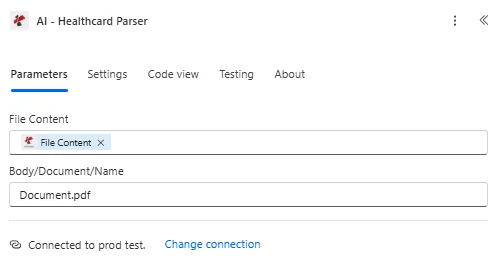
Dosya İçeriği ve Gövde/Belge/Ad alanlarını eşleştirin, ardından Gövde/customFieldKeys için Gelişmiş parametreleri genişletin.
Parametreler
Gerekli: Sağlık Kartı Dosya İçeriği ve Sağlık Kartı Adı her zaman belirtilmelidir. Body/customFieldKeys isteğe bağlı bir Gelişmiş parametredir.
| Parametre | Gerekli | Ne işe yarar? | Örnek |
|---|---|---|---|
| Health Card File Content | Required | Binary content of the health card, mapped from a previous action (Get file content, SharePoint, OneDrive, email attachment). Supports .pdf, .png, .jpg, .jpeg. | body('Get_file_content') |
| Health Card Name | Required | Filename of the health card including its extension. Used for format detection and processing. | health_card_2024.jpeg |
| Body/customFieldKeys | Optional | Advanced parameter. Array of additional field names to extract beyond the standard health card data set. | ["customField1", "customField2"] |
Çıkış Alanları
| Alan | Tip | İçeriğinde neler var? |
|---|---|---|
success | Boolean | true if the health card was processed successfully, false if extraction failed. |
message | String | Descriptive message describing the result of the processing run. |
processedData.healthData.memberId | String | The unique member identification number extracted from the health card. |
processedData.healthData.groupNumber | String | The group or policy number associated with the health insurance plan. |
processedData.healthData.planType | String | The type of health insurance plan, for example PPO, HMO, or EPO. |
processedData.healthData.insuranceProvider | String | The name of the insurance company or provider on the card. |
processedData.healthData.memberName | String | The full name of the insured member. |
processedData.healthData.dateOfBirthStr | String | The member date of birth, formatted as YYYY-MM-DD. |
processedData.healthData.effectiveDateStr | String | The date the health insurance coverage becomes effective, formatted as YYYY-MM-DD. |
processedData.healthData.rxBin | String | The Bank Identification Number for prescription drug coverage. |
processedData.healthData.rxPcn | String | The Processor Control Number for prescription drug coverage. |
processedData.healthData.rxGroup | String | The group identifier for prescription drug coverage. |
processedData.healthData.copayInfo | Array | List of copay details by service, for example Primary Care or Specialist. |
processedData.healthData.confidence | Object | Per-field confidence scores on a 0-1 scale for key extracted values. |
processedData.status | String | Overall status of the health card processing operation. |
processedData.errors | Array | Any errors encountered while processing the health card. Empty when none. |
processedData.jobId | String | Unique identifier for the AI processing job, used for tracking and debugging. |
processingTimestamp | String | ISO 8601 timestamp indicating when processing completed. |
- Sample JSON Response
- Flow Integration
{
  "success": true,
  "message": "Health card processed successfully using AI",
  "processedData": {
    "healthData": {
      "memberId": "M123456789",
      "groupNumber": "GRP001234",
      "planType": "PPO",
      "insuranceProvider": "Blue Cross Blue Shield",
      "memberName": "John Michael Smith",
      "dateOfBirthStr": "1985-03-15",
      "effectiveDateStr": "2024-01-01",
      "rxBin": "123456",
      "rxPcn": "ABC123",
      "rxGroup": "RXGRP001",
      "copayInfo": [
        { "service": "Primary Care", "copay": "$25" },
        { "service": "Specialist", "copay": "$50" },
        { "service": "Emergency Room", "copay": "$200" }
      ],
      "confidence": {
        "memberId": 0.95,
        "memberName": 0.98,
        "insuranceProvider": 0.92
      }
    },
    "status": "Success",
    "errors": [],
    "jobId": "11111111-2222-3333-4444-555555555555"
  },
  "processingTimestamp": "2024-01-15T10:30:45.123Z"
}
Çıkarılan rotayı izleyin. healthData nesneyi içine Microsoft 365 ve sağlık sistemleri:
- Hasta kayıtlarımemberId, memberName ve planType'ı bir tabloya yazın. SharePoint liste veya hasta yönetim sistemi.
- Sigorta doğrulamasıÜye kimliğini ve grup numarasını sigorta sağlayıcı ana listesiyle eşleştirin.
- Eczane işlemleri: rxBin, rxPcn ve rxGroup değerlerini eczane sağlık sigortası kontrol formuna girin.
- FaturalamaSigorta sağlayıcısı ve katılım payı bilgilerini tıbbi fatura kaydına ekleyin.
AI-Health Card Parser'ı Nasıl Kurarım? Power Automate?
- Eklemek PDF4me → Yapay Zeka Sağlık Kartı Ayrıştırıcısı senin Power Automate akış.
- Harita Sağlık Kartı Dosya İçeriği önceki bir eylemden (SharePoint, OneDrive(Dropbox veya e-posta eki).
- Ayarlamak Sağlık Kartı Adı Dosyanın uzantısıyla birlikte (.pdf, .png, .jpg veya .jpeg).
- İsteğe bağlı olarak genişletin Gelişmiş parametreler ve ayarla Gövde/özelAlanTuşları Standart setin dışındaki tüm alanlar için.
- Akışı çalıştırın. Ayrıştırılmış sonuç şu şekilde döndürülür: sağlık verileri nesnenin içine yerleştirilmiş işlenmiş verilerÜye, plan, kapsam ve reçete alanları da dahil olmak üzere kendinden emin puanlar.
Tipik Kurulumlar
İş Akışı ÖrnekleriCommon Power Automate flow patterns using AI-Health Card Parser.
- Bir hasta sağlık kartı görüntüsünü portal veya e-posta yoluyla yüklediğinde bir işlem tetiklenir.
- Yapay Zeka Destekli Sağlık Kartı Ayrıştırıcısı, memberId, memberName, dateOfBirthStr ve insuranceProvider bilgilerini çıkarır.
- Çıkarılan alanlar bir yere yazılır. SharePoint liste veya hasta yönetim sistemi.
- Bir koşul, güvenilirlik nesnesini kontrol eder ve düşük güvenilirlik düzeyine sahip satırları manuel incelemeye yönlendirir.
- Bir sağlık kartı e-posta yoluyla alındığında bir işlem tetiklenir. SharePoint yüklemek.
- AI-Health Card Parser, groupNumber, planType ve effectiveDateStr bilgilerini çıkarır.
- Bir doğrulama kaydı oluşturulur ve hastanın sigorta profiline bağlanır.
- Hasta, sağlık kartını eczane kayıt sürecine yüklüyor.
- AI-Health Card Parser, rxBin, rxPcn ve rxGroup'u çıkarır.
- Reçete tanımlayıcıları, eczane fayda doğrulama adımını besler ve copayInfo, hastanın katılım payı tahminini belirler.
Pratik İpuçları
Kopya Kağıdı
| Alan | Değer |
|---|---|
| Action | AI-Health Card Parser |
| Required fields | Health Card File Content, Health Card Name |
| Optional advanced field | Body/customFieldKeys |
| Supported file types | .pdf, .png, .jpg, .jpeg |
| Output root | processedData.healthData |
| Key output fields | memberId, groupNumber, planType, insuranceProvider, memberName, dateOfBirthStr, effectiveDateStr, rxBin, rxPcn, rxGroup, copayInfo, confidence |
Sıkça Sorulan Sorular
Sektör Kullanım Örnekleri ve Uygulamaları
- Healthcare Providers
- Medical Billing & Revenue Cycle
- Pharmacy & Prescription Services
- Telemedicine & Virtual Care
- Hasta KaydıSağlık kartı verilerinden hasta kaydını otomatikleştirme
- Sigorta DoğrulamaHastanın sigorta kapsamını otomatik olarak doğrulayın.
- Faydaların DoğrulanmasıHastanın haklarını ve sigorta kapsamına uygunluğunu kontrol edin.
- Randevu PlanlamaSigorta bilgilerini randevu kayıtlarıyla ilişkilendirin.
- Hasar İşlemeTıbbi talepler için sigorta bilgilerini çıkarın.
- Ön YetkilendirmeÖn onay talepleri için çıkarılan sigorta verilerini kullanın.
- Uygunluk Doğrulama: Çıkarılan üye kimliklerini kullanarak hastanın uygunluğunu doğrulayın.
- Faturalama EntegrasyonuSigorta verilerini faturalama ve gelir döngüsü sistemlerine aktarın.
- Reçete İşlemeEczane işlemleri için reçete avantajlarından yararlanın.
- Katılım Payı HesaplamasıÇıkarılan katılım payı bilgilerini kullanarak reçete katılım paylarını belirleyin.
- Sigorta BaşvurusuSigorta verilerinden elde edilen bilgileri kullanarak reçete taleplerini gönderin.
- Hasta ProfilleriSağlık kartı verilerinden elde edilen bilgilerle hasta eczane profilleri oluşturun.
- Sanal KayıtSağlık kartı yükleme özelliğiyle uzaktan hasta kaydını etkinleştirin.
- Uzaktan Sigorta DoğrulamaTeletıp randevuları için sigorta bilgilerinizi doğrulayın.
- Dijital Sağlık KayıtlarıSağlık kartından elde edilen verileri elektronik sağlık kayıtlarına entegre edin.
- Mobil Sağlık UygulamalarıMobil uygulamalar aracılığıyla yüklenen sağlık kartlarını işleme alma