Google Docs şablon içinde Power Automate
O Google Docs aile bir Power Automate Şablon kullanarak tek seçenekli belge oluşturma Google Docs ve şu şekilde dışa aktarıldı .docxBu dosyayı Tek Belge Oluştur seçeneğine eşleyin ve kendi dosyanızla birleştirin. JSON veya XML Verilerinizi alın ve kişiselleştirilmiş bir hizmet elde edin. PDF veya Word Dosyayı geri yükleyin. Ekibiniz şablonlar oluştururken bunu seçin. Google Docs yerine Microsoft Word.
Başlamadan Önce
google-docs-template.docx Zaten ihraç edildi ve hazır.google-docs-data.json (tavsiye edilen), test.xml, veya test.csvŞablondaki yer tutucu adlar, veri anahtarlarıyla eşleşir.Örnek Dosya Paketi
Aşağıdaki dosyaları indirin. Bir Google Docs şablon artı eşleşen veriler JSON, XML, Ve CSVHaritayı çiz .docx itibaren SharePoint, OneDrive, veya Dropbox Tek Belge Oluştur seçeneğine girin.
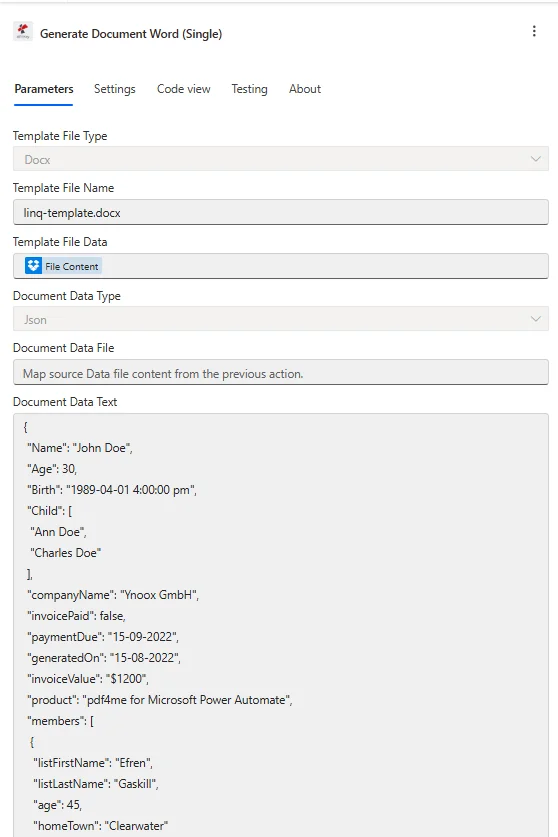
Hedef yapılandırması Google Docs dışa aktar: haritala .docx altında Şablon Dosya Verileri, ayarlamak Şablon Dosya Türü ile Docxve yapıştır JSON içine Document Data Metin.
Nedir bu? Google Docs şablon içinde Power Automate?
O Google Docs Aile, şablon oluşturmanıza olanak tanır. Google Docs, bunu şu şekilde dışa aktarın .docxve bunu verilerle birleştirin. Power Automate akış. Çünkü dışa aktarılan dosya bir .docx, içinden geçiyor Word Şablon motoru ve bıyık stili yer tutucuları destekler, örneğin: {{isim}}Bu, tercih eden takımlar için en basit seçenektir. Google Workspace üzerinde Microsoft Word Şablon tasarımı için.
Nasıl yapılandırırım? Google Docs şablon içinde Power Automate?
Eylem alanlarını aşağıdaki gibi ayarlayın. Tek Belge Oluştur seçeneği, dışa aktarılanı eşler. .docx Önceki "Dosya Al" adımından. Zaten kaydedilmiş bir şablon için. PDF4me hesap, kullanım Şablon Kullanarak Belge Oluştur yerine.
| Parametre | Gerekli | Ne işe yarar? | Örnek |
|---|---|---|---|
| Connection | Required | PDF4me connection for the flow. Create one with your API key, then reuse it across every PDF4me action. | My PDF4me connection |
| Template File Type | Required | Format of the template file. A Google Docs export is a .docx, so choose PDF4me Word Template (Docx). | PDF4me Word Template |
| Output Type | Required | Format of the generated document. PDF for a locked layout, or Word for an editable .docx. | PDF |
| Template Name | Required | Filename of the exported template including the .docx extension. Map from the prior Get file step. | google-docs-template.docx |
| Template | Required | Binary content of the Google Docs export. Map File Content from SharePoint, OneDrive, or Dropbox Get file content. | File Content |
| Document DataType | Required | Format of the data payload. Json maps cleanly from SharePoint columns and Forms. Xml is for XML source systems. | Json |
| Document Data Text | Conditional | Inline data payload built from dynamic content. Required when Document Data File is empty. | [{ "name": "Alice Johnson" }] |
| Document Data File | Conditional | A JSON or XML data file mapped from a prior step. Required when Document Data Text is empty. | 1. Data |
| Meta Data Json | Optional | Document metadata for fields in JSON format. Leave empty for most certificate and letter templates. | {"title":"Certificate"} |
Aşağıdaki örnek veriler, yer tutucularla eşleşmektedir. google-docs-template.docx. Bunu buraya yapıştırın. Document Data Metin olarak gönderin veya dosya olarak yükleyin. Document Data Dosya.
[
  {
    "name": "Alice Johnson",
    "course": "Intro to Automation",
    "date": "2026-03-10",
    "instructor": "Mr. Smith"
  }
]
Çıktı
Bu işlem, oluşturulan belgeyi dinamik içerik olarak döndürür. Dosya içeriğini kabul eden herhangi bir sonraki adıma eşleyebilirsiniz.
| Alan | Tip | İçeriğinde neler var? |
|---|---|---|
Doc Data | Binary | The merged document produced from the Google Docs export and your data. Map it into File Content of Create file (Dropbox, OneDrive, SharePoint) or into an Outlook attachment. |
File Name | String | Output filename derived from Template Name. Combine it with an expression such as guid() when you want unique filenames per run. |
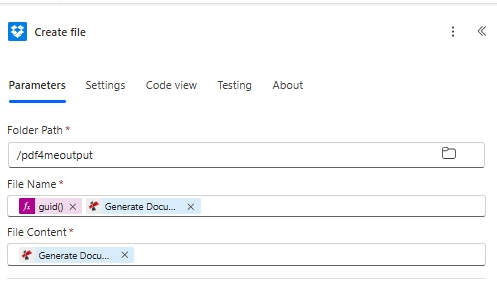
Sonucu kaydetme: oluşturulan belgeyi şuraya eşleyin: File Contentve kullanın kılavuz() içinde File Name Benzersiz bir çıktı adı için.
Üretim modelleri
Google Dokümanlar şablonları için yaygın Power Automate kalıplarıReplace the manual test with these once the sample works.
- Microsoft Formlar Yeni bir yanıt gönderildiğinde tetikleyici devreye girer.
- Belge Oluştur Tekli haritalar Google Docs sertifika .docx Dosya içeriğini al.
- Yanıt alanları şu şekilde iletilir: JSON içinde Document Data Metin.
- Dosya oluşturma işlemi sertifikayı kaydeder ve Outlook E-posta göndermek, içeriği iletir.
- SharePoint Bir öğe oluşturulduğunda listede bir tetikleyici çalışır.
- Tekli Belge Oluştur seçeneği, liste sütunlarını şablona birleştirir.
- Oluşturulan belge dinamik içerik olarak döndürülür.
- SharePoint Oluşturulan dosya, belge kitaplığında saklanır.
- Akışı manuel olarak tetiklemek, çalıştırmayı başlatır.
- Tekil harita içeren google-docs-template.docx belgesini satır içi metinle oluşturun. JSON.
- Dosya oluşturma işlemi, bir guid() dosya adı ile /pdf4meoutput klasörüne yazılır.
- Doğrulama işlemi tamamlandıktan sonra manuel tetiği gerçek bir tetikle değiştirin.
Sıkça Sorulan Sorular
İlgili Kılavuzlar
Temel şablon motoru için bkz. Varsayalım ki Words için .NET dokümantasyon ve Power Automate ifadeler referansı.