Dönüştürmek Visio içinde Power Automate
PDF4me Dönüştürmek Visio Bu işlem, profesyonel diyagram dönüştürme hizmeti sunar. Power Automate Microsoft'un otomatik dönüşümü ile Visio dosyalara PDF, PNG, SVGve diğer evrensel formatlar. Bu kapsamlı dönüştürme hizmeti, sorunsuz diyagram paylaşımı, web yayıncılığı ve platformlar arası uyumluluk sağlayarak diyagramları dönüştürür. Visio-bağımlı iş akışlarını erişilebilir belge otomasyonuna entegre etmek Microsoft 365 ekosistem.
Kimliğinizi Doğrulama API Rica etmek
Erişmek için PDF4me Web API başından sonuna kadar Power AutomateHer istek, uygun kimlik doğrulama bilgilerini içermelidir. Kimlik doğrulama, güvenli iletişimi sağlar ve yetkili bir kullanıcı olarak kimliğinizi doğrulayarak, uygulamalarınız arasında sorunsuz entegrasyon sağlar. Power Automate akışlar ve PDF4me'ın güçlü belge işleme hizmetleri.
Başlıca Özellikler
- Çoklu Çıktı Biçimleri: Dönüştürmek Visio ile PDF, PNG, SVG, JPGve diğer formatlar
- Visio Uyumluluk: .vsd, .vsdx, .vsdm formatları için destek Visio dosya formatları
- Kalite KorumaDönüştürme sırasında diyagram kalitesini ve düzenini koruyun.
- Otomatik İşleme: Dönüştürmek Visio İş akışlarında diyagramlar otomatik olarak oluşturulur.
- Akış EntegrasyonuDönüştürülen dosyaları daha sonraki işlemlerde kullanın. Power Automate eylemler
Parametreler
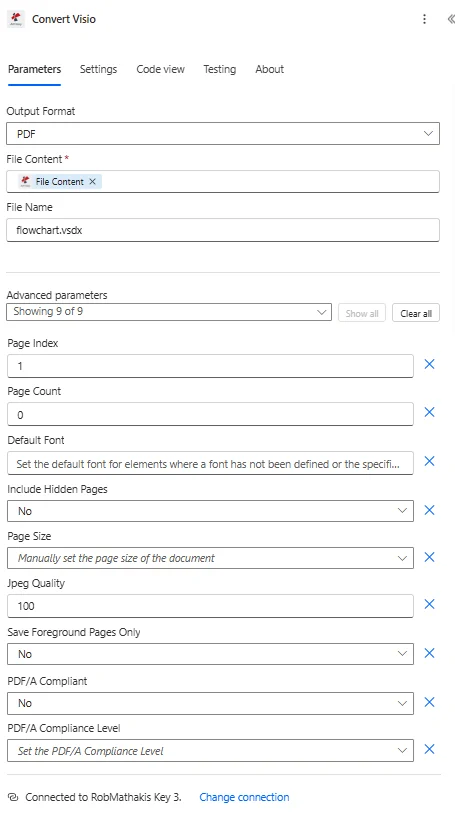
Convert fonksiyonu için tüm parametrelerin tam listesi Visio İşlem. Diyagram dönüştürmeyi kontrol etmek için bu parametreleri yapılandırın.
| Parametre | Gerekli | Ne işe yarar? | Örnek |
|---|---|---|---|
| Output Format | Optional | Format to convert the Visio file to. After you choose it, the fields for that format are loaded into the action card. Options: PDF, BMP, GIF, PNG, JPG, SVG, TIFF, HTML, VSDX. Defaults to `PDF`. | PDF |
| Page Index | Conditional | Page of the drawing to start converting from. Defaults to `1`. Shown when Output Format is BMP or Output Format is GIF or Output Format is HTML or Output Format is JPG or Output Format is PDF or Output Format is PNG or Output Format is SVG or Output Format is TIFF. | 1 |
| Page Count | Conditional | Set the number of pages to convert. Defaults to `0`. Shown when Output Format is HTML or Output Format is PDF or Output Format is TIFF. | 0 |
| Default Font | Optional | Set the default font for elements where a font has not been defined or the specified font is unavailable. | your value |
| Include Hidden Pages | Conditional | Set whether hidden pages should be converted, false by default. Defaults to `No`. Shown when Output Format is HTML or Output Format is PDF or Output Format is TIFF. | No |
| Page Size | Conditional | Manually set the page size of the document. Options: Inherit, A1, A2, A3, A4, A5, B4, B5, Envelope, Executive, Legal, Letter, Tabloid. Shown when Output Format is BMP or Output Format is GIF or Output Format is HTML or Output Format is JPG or Output Format is PDF or Output Format is PNG or Output Format is SVG or Output Format is TIFF. | Inherit |
| Jpeg Quality | Conditional | Quality of JPEG images in the result, from 0 (lowest) to 100 (highest). Defaults to `100`. Shown when Output Format is JPG or Output Format is PDF. | 100 |
| Save Foreground Pages Only | Conditional | If Yes, only the foreground pages are converted; background pages are left out. Defaults to `No`. Shown when Output Format is HTML or Output Format is PDF or Output Format is TIFF. | No |
| PDF/A Compliant | Conditional | Set whether the PDF document should be PDF/A compliant. Defaults to `No`. Shown when Output Format is PDF. | No |
| PDF/A Compliance Level | Conditional | PDF/A conformance level to use when PDF/A Compliant is Yes. Options: Pdf15, PdfA1a, PdfA1b. Shown when Output Format is PDF. | Pdf15 |
| File Content | Required | Content of the Visio file to convert. Map it from the file content returned by a previous action, such as SharePoint or OneDrive Get file content. | @{body('Get_file_content')?['$content']} |
| File Name | Optional | Name of the Visio file to convert, including its extension (for example `diagram.vsdx`). Map it from the file name returned by a previous action. | diagram.vsdx |
| Brightness | Conditional | Set image brightness. Shown when Output Format is BMP or Output Format is GIF or Output Format is JPG or Output Format is PNG or Output Format is TIFF. | 0 |
| Contrast | Conditional | Set image contrast. Shown when Output Format is BMP or Output Format is GIF or Output Format is JPG or Output Format is PNG or Output Format is TIFF. | 0 |
| Color Mode | Conditional | Set image colour mode. Options: None, Grayscale, BlackAndWhite. Defaults to `None`. Shown when Output Format is BMP or Output Format is GIF or Output Format is JPG or Output Format is PNG or Output Format is TIFF. | None |
| Compositing Quality | Conditional | Specify the quality level to use during compositing. Options: Invalid, Default, HighSpeed, HighQuality, GammaCorrected, AssumeLinear. Defaults to `Default`. Shown when Output Format is BMP or Output Format is GIF or Output Format is JPG or Output Format is PNG or Output Format is TIFF. | Default |
| Interpolation Mode | Conditional | Specify the algorithm that is used when images are scaled or rotated. Options: Invalid, Default, Low, High, Bilinear, Bicubic, NearestNeighbor, HighQualityBilinear, HighQualityBicubic. Defaults to `Default`. Shown when Output Format is BMP or Output Format is GIF or Output Format is JPG or Output Format is PNG or Output Format is TIFF. | Default |
| Pixel Offset Mode | Conditional | Set a value specifying how pixels are offset during conversion. Options: Invalid, Default, HighSpeed, HighQuality, None, Half. Defaults to `Default`. Shown when Output Format is BMP or Output Format is GIF or Output Format is JPG or Output Format is PNG or Output Format is TIFF. | Default |
| Resolution | Conditional | Set image resolution in dots per inch. The default value is 96. Defaults to `96`. Shown when Output Format is BMP or Output Format is GIF or Output Format is JPG or Output Format is PNG or Output Format is TIFF. | 96 |
| Scale | Conditional | Set image zoom factor. Defaults to `1.0`. Shown when Output Format is BMP or Output Format is GIF or Output Format is JPG or Output Format is PNG or Output Format is TIFF. | 1.0 |
| Smoothing Mode | Conditional | Specify whether smoothing (antialiasing) is applied to lines, curves and the edges of filled areas. Options: Invalid, Default, HighSpeed, HighQuality, None, AntiAlias. Defaults to `Default`. Shown when Output Format is BMP or Output Format is GIF or Output Format is JPG or Output Format is PNG or Output Format is TIFF. | Default |
| Compression | Conditional | Set the compression type. Options: None, Rle, Ccitt3, Ccitt4, Lzw. Defaults to `None`. Shown when Output Format is TIFF. | None |
| Save Toolbar | Conditional | Set whether to include the toolbar, default value is false. Defaults to `No`. Shown when Output Format is HTML. | No |
| Auto Fit | Conditional | If Yes, the diagram is fitted to the width of the page. Defaults to `No`. Shown when Output Format is VSDX. | No |
Çıktı
O PDF4me Dönüştürmek Visio Bu işlem, sorunsuz bir şekilde çalışmak üzere kapsamlı çıktı verileri döndürür. Power Automate akış entegrasyonu:
- Table
- JSON
- Flow Integration
Tablo Görünümü
Yanıt verileri yapılandırılmış tablo formatında:
| Alan | Tip | İçeriğinde neler var? |
|---|---|---|
| File Content | File content | Content of the converted file, in the chosen output format. Map it into the next action, for example the File Content field of SharePoint or OneDrive Create file. |
| File Name | Text | File name of the converted file, as returned by PDF4me. Use it as the file name when saving the file. |
| Page Count | Text | Page count reported by PDF4me for the processed document. Returned as text; wrap it in int() to use it as a number. |
JSON Yanıt Biçimi
İşlemin döndürdüğü alanlar, dinamik içerikte göründükleri şekliyle:
{
"File Content": "[Binary File Data]",
"File Name": "flowchart.pdf"
}
Power Automate Akış Kullanımı
Dönüştürülmüş olanı kullanın. Visio Sonraki işlemlerdeki dosyalar:
- E-posta DağıtımıDönüştürülen diyagramları ekleyin: Outlook e-postalar
- SharePoint Yayıncılık: Yüklemek PDF diyagramlardan belge kütüphanelerine
- Takımlar Arası İşbirliğiDönüştürülen diyagramları Teams kanallarında paylaşın.
- Web Yayıncılığı: Kullanmak PNG/SVG web sitelerinde veya portallarda yer alan diyagramlar
- Belge GömmeWord'e diyagram ekleme /PowerPoint belgeler
- Arşiv DepolamaDönüştürülen diyagramları OneDrive veya Azure'da saklayın.
İş Akışı Örnekleri
O PDF4me Dönüştürmek Visio eylemde Power Automate Gerçek dünya iş senaryoları için tasarlanmış kapsamlı iş akışı şablonları sunar:
- Process Documentation
- Web Publishing
- Client Deliverables
- Compliance Archival
Otomatik Süreç Diyagramı PDF Dönüştürme İş Akışı
Otomatikleştirilmiş çözümlerle süreç dokümantasyonunuzu dönüştürün. Visio ile PDF Paydaşlara dağıtım için dönüşüm:
İş Akışı Adımlarını Tamamlayın:
- TetiklemekGüncellenmiş süreç diyagramı kaydedildi. SharePoint Visio kütüphane
- Elde etmek VisioEn son bilgileri al Visio Belge kitaplığından akış şeması
- PDF'ye dönüştür: Dönüştür Visio evrensel diyagram PDF format
- Meta Veri EkleSürüm numarasını ve onay durumunu uygulayın PDF
- PDF olarak kaydet: Mağaza dönüştürüldü PDF süreç dokümantasyon kütüphanesinde
- E-posta Ekibi: Göndermek PDF paydaşlara yönelik diyagram aracılığıyla Outlook
- Kayıt Defterini Güncelle: Kayıt PDF işlem dokümantasyonunda sürüm kaydı
- ArşivÖncekini taşı PDF arşiv klasörüne sürüm
İşletme Faydaları:
- Aylık 100'den fazla süreç belgesi için diyagram dağıtımını otomatikleştirir.
- Paydaşların erişimini sağlar Visio lisans gereksinimleri
- Otomatik dönüştürme özelliğiyle diyagram paylaşım süresini %90 azaltır.
- Otomatikleştirilmiş yöntemlerle sürüm kontrolünü sağlar. PDF arşivsel
Otomatikleştirilmiş Diyagram Web Yayınlama İş Akışı
Otomatikleştirilmiş çözümlerle intranetinizi daha verimli hale getirin. Visio ile SVG Web yayıncılığı için dönüştürme:
İş Akışı Adımlarını Tamamlayın:
- TetiklemekYeni organizasyon şeması yüklendi. Visio kütüphane
- Elde etmek VisioOrganizasyon şemasını al Visio dosyadan SharePoint
- SVG'ye dönüştürWeb için ölçeklenebilir vektör grafiğine dönüştürün
- Optimize: Sıkıştır SVG hızlı web yüklemesi için
- YüklemekYayınla SVG intranet web sunucusuna veya Azure Blob'a
- Sayfayı GüncelleYeni diyagram bağlantısıyla intranet sayfasını yenile
- BildirGüncellenmiş organizasyon şeması hakkında iletişim ekibini bilgilendirin.
- İzlemekİçerik yönetim sisteminde yayınlama etkinliğini kaydetmek:
İşletme Faydaları:
- Her ay 50'den fazla diyagramı otomatik olarak intranet'e yayınlar.
- Tüm cihazlarda duyarlı diyagram görüntüleme olanağı sağlar. SVG
- Otomasyon sayesinde web yayınlama çabasını %85 oranında azaltır.
- Organizasyon şemalarını manuel güncellemelere gerek kalmadan güncel tutar.
Otomatik Müşteri Diyagramı Teslim İş Akışı
Otomatikleştirilmiş çözümlerle müşteri teslimatlarınızı optimize edin. Visio ile PDF Profesyonel sunum için dönüştürme:
İş Akışı Adımlarını Tamamlayın:
- TetiklemekProje şeması proje klasöründe tamamlandı ve onaylandı.
- Elde etmek VisioOnaylanmış teknik diyagramı şuradan alın: SharePoint
- PDF'ye dönüştür: Dönüştür Visio müşteri dostu PDF format
- Marka EkleŞirket filigranını ve altbilgisini uygulayın PDF
- SıkıştırOptimize Et PDF e-posta gönderimi için boyut
- E-posta İstemcisiProfesyonel gönderin PDF müşteriye yönelik diyagram
- Kopyasını Kaydet: Mağazaya teslim edildi PDF müşteri teslimatları klasöründe
- CRM'i güncelleyin: Log diyagramı teslimi Dynamics 365 proje kaydı
İşletme Faydaları:
- Müşterilere aylık olarak otomatik olarak 200'den fazla teknik diyagram sunar.
- Ortadan kaldırır Visio Müşteri görüntüleme için yazılım gereksinimleri
- Markalı ürünlerle profesyonel sunumu geliştirir. PDF çıktı
- Teslimat denetim kaydını eksiksiz olarak tutar. CRM sistem
Otomatik Diyagram Uyumluluk Arşivleme İş Akışı
Otomatikleştirilmiş çözümlerle uyumluluk işlemlerinizi geliştirin. Visio ile PDF Uzun süreli arşivleme için dönüştürme:
İş Akışı Adımlarını Tamamlayın:
- TetiklemekUyumluluk diyagramlarının aylık olarak planlanmış arşivlenmesi
- Elde etmek Visio DosyalarTüm uyumlulukları alın Visio kütüphaneden diyagramlar
- Döngü DönüşümüHer biri için Visio dosya, dönüştür PDF/Bir format
- Meta Veri EkleSaklama politikasını ve uyumluluk etiketlerini uygulayın.
- Arşiv: Mağaza PDF/Uyumluluk arşiv kütüphanesindeki diyagramlar
- İndeksArşivlenmiş diyagramların aranabilir dizinini oluşturun.
- Rapor OluşturArşivleme tamamlama raporu oluştur
- BildirArşivleme işleminin başarıyla tamamlandığını uyumluluk ekibine bildirin.
İşletme Faydaları:
- Yıllık olarak 500'den fazla uyumluluk diyagramını otomatik olarak arşivler.
- Şemaların uzun vadeli olarak korunmasını sağlar. PDF/Bir format
- Otomatik uyumluluk arşivlemesiyle düzenleyici gereksinimleri karşılar.
- Arama yapılabilir diyagram dizini ile denetim verilerinin alınmasını sağlar.
Sektör Kullanım Örnekleri ve Uygulamaları
- IT & Technology
- Project Management
- Business Process
- Engineering & Design
BT ve Teknoloji Kullanım Örnekleri
- Sistem MimarisiBT diyagramlarını dokümantasyon için PDF'ye dönüştürün.
- Ağ DiyagramlarıAğ topolojisini evrensel formatlar olarak paylaşın.
- Süreç Akışlarıİş akışı diyagramlarını intranetlerde yayınlayın
- Teknik ÖzelliklerMüşterilere teknik diyagramlar sunmak
Proje Yönetimi Kullanım Örnekleri
- Proje PlanlarıProje diyagramlarını paylaşılabilir PDF'lere dönüştürün
- Gantt GrafikleriVisio zaman çizelgelerini evrensel formatlara dönüştürün.
- Kaynak HaritalarıKaynak tahsis diyagramlarını paylaşın
- Dönüm Noktası TakibiProje durum diyagramlarını yayınla
İş Süreci Kullanım Senaryoları
- Süreç HaritalamaPaydaş incelemesi için BPM diyagramlarını dönüştürün
- İş Akışı DokümantasyonuSüreç akışlarını PDF olarak paylaşın
- Uyumluluk Diyagramları: Arşiv düzenleme süreci haritaları
- Eğitim MateryalleriŞema tabanlı eğitim dokümanları oluşturun
Mühendislik ve Tasarım Kullanım Örnekleri
- CAD DiyagramlarıTeknik çizimleri PDF'ye dönüştürün
- Kat PlanlarıMimari diyagramları evrensel olarak paylaşın
- Elektrik ŞemalarıKablolama şemalarını PDF olarak dağıtın.
- P&ID DiyagramlarıDokümantasyon için süreç diyagramlarını dönüştürün.