Kilidi aç PDF içinde n8n
Kilidi aç PDF bir PDF4me düğüm eylemi n8n Bu, parola korumasını kaldıran bir şeydir. PDF Doğru şifreyi girdiğinizde. Bu şifreyi, korumalı dosyaların daha sonraki iş akışı adımları tarafından okunabilir hale getirilmesi, sahip olduğunuz bir arşivin şifrelemesinin kaldırılması veya bir tedarikçinin gönderdiği her bir ekstrenin tek tek açılmasına gerek kalmadan kilidinin açılması için kullanabilirsiniz.
Bu düğüm ne işe yarıyor?
PDF4meKilidi aç PDF koruma altına alır PDF İkili Verilerden, bir Base64 Stringveya bir URLVerdiğiniz şifreyi uygular ve herhangi bir uyarı vermeden açılan bir kopyayı döndürür. Şifre Bu alan zorunludur, bu nedenle kayıp bir şifreyi kurtarmak yerine zaten açmaya yetkili olduğunuz belgelerin kilidini açar. Genellikle bir işlem hattının başında yer alır, çünkü çıkarma ve dönüştürme adımları şifrelenmiş bir dosyayı okuyamaz.
Kimliğinizi Doğrulama API Rica etmek
Her PDF4me düğümde n8n geçerli bir belge gerektirir Bağlantı kurmak için kimlik bilgisi. İçeriğinizi barındıran birini oluşturun veya seçin. PDF4me API Bu sayede iş akışı, kilit açma isteklerini güvenli bir şekilde doğrulayabilir.
Kaçırmamanız Gereken Önemli Bilgiler
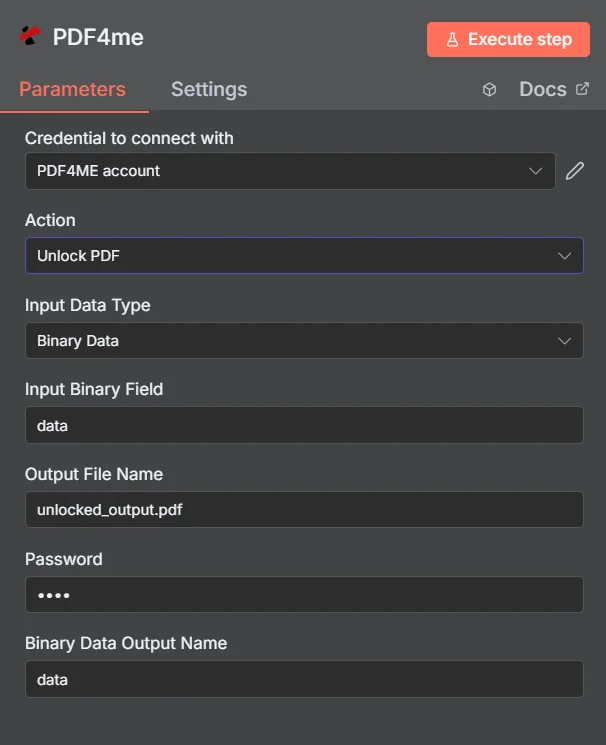
PDF4me Kilidi aç PDF parametreler panelinde n8n
Kilidi aç PDF vs Belgeyi Korumak
Bu iki işlem birbirinin zıttıdır ve iş akışlarında genellikle ikisi de kullanılır: gelen dosyayı okumak için kilidini açmak, ardından dosya tekrar gönderilmeden önce sonucu yeniden korumak.
| Bakış açısı | Kilidi aç PDF | Belgeyi Koru |
|---|---|---|
| What it does | Removes existing password protection | Applies password protection |
| Password you supply | The current password on the document | The new password you want to set |
| Typical position | First step, so later nodes can read the file | Last step, before the file is sent or stored |
| Prerequisite | You must already know the password | None beyond the source document |
Hangi Parametrelerin Kilidi Açılıyor? PDF İhtiyaç?
Gerekli: İşlem, Giriş Veri Türü, bu giriş türüyle eşleşen alan, Çıkış Dosya Adı ve Parola. İkili Veri Çıkış Adı ve Özel Profiller varsayılan çalışma değerlerini içerir.
| Parametre | Gerekli | Ne işe yarar? | Örnek |
|---|---|---|---|
| Action | Required | Selects the PDF4me node action to run. Choose Unlock PDF. | Unlock PDF |
| Input Data Type | Required | Format of the source PDF input. Choose Binary Data (from a previous node), Base64 String, or URL. | Binary Data |
| Input Binary Field | Conditional | Name of the binary property on the incoming n8n item that holds the protected PDF. Required when Input Data Type is Binary Data. Defaults to data. | data |
| Base64 Document Content | Conditional | Base64-encoded content of the protected PDF. Required when Input Data Type is Base64 String. | JVBERi0xLjQK... |
| File URL | Conditional | Publicly reachable HTTPS URL to the protected PDF. Required when Input Data Type is URL. | https://example.com/statement.pdf |
| Output File Name | Required | Filename for the unlocked PDF returned by the node. Include the .pdf extension. | unlocked_output.pdf |
| Password | Required | The current password on the document. Shown masked in the panel. Reference a credential or environment variable rather than typing the secret into a saved workflow. | {{ $env.PDF_PASSWORD }} |
| Binary Data Output Name | Optional | Name of the binary property the output item exposes. Defaults to data. | data |
| Custom Profiles | Optional | Advanced Options field for extra processing settings, supplied in a JSON-like format. Leave blank unless you have a specific profile to apply. | { "preserveMetadata": true } |
Çıkış Alanları
Başarılı bir koşu bir getiri sağlar. n8n kilidi açılmış eşyayı taşıyan PDF.
| Alan | Tip | İçeriğinde neler var? |
|---|---|---|
Binary (data) | Binary | The unlocked PDF, under Binary Data Output Name (default data). |
fileName | String | Generated filename, matching Output File Name. |
docName | String | Name of the processed document, for reference and tracking. |
mimeType | String | MIME type of the output, always application/pdf. |
fileSize | Number | Size of the returned PDF in bytes. |
isUnlocked | Boolean | Confirms the document was unlocked. A useful assertion before handing the file to an extraction step. |
securityRemoved | Boolean | Confirms password protection and access restrictions were removed. |
success | Boolean | True when the unlock completed, false on failure such as a wrong password. Use it to branch error handling. |
message | String | Human-readable status message, carrying success confirmation or error detail. |
Kilidi nasıl açarım? PDF içinde n8n?
- Eklemek PDF4me senin n8n iş akışını seçin ve Kilidi aç PDF aksiyon.
- İçinde Bağlantı kurmak için kimlik bilgisi, sizinkini seçin PDF4me kimlik bilgileri veya tıklayın Yeni Kimlik Bilgisi Oluştur ve yapıştırın API anahtar.
- Ayarlamak Giriş Veri Türü ile İkili Veri (varsayılan), Base64 String, veya URL ve eşleşen kaynağı sağlayın. PDF alan.
- Ayarlamak Çıktı Dosya Adı kilidi açılmış dosya için, şu şekilde sona eriyor:
.pdf. - Belgeyi girin Şifreİdeal olarak, bir kimlik bilgisini veya ortam değişkenini okuyan bir ifade olarak.
- Ayrılmak İkili Veri Çıkış Adı gibi
dataDaha sonraki bir düğüm farklı bir özellik beklemediği sürece. - Düğümü çalıştırın ve kilidi açılmış olanı yönlendirin. PDF Bir sonraki aşamaya, örneğin çıkarma, dönüştürme veya depolamaya.
Tipik Kurulumlar
İş Akışı ÖrnekleriCommon n8n workflow patterns using Unlock PDF.
- Bilinen bir şifreyle korunan bir e-posta yoluyla bir açıklama geliyor.
- Kilidi aç PDF Saklı tutulan bir gizli bilgi kullanarak korumayı kaldırır.
- Tablo çıkarma adımı, işlemleri bir tabloya okur.
- Paylaşılan sürücüdeki eski belgelerin tümü aynı eski parolayı kullanır.
- Kilidi aç PDF Taşıma işlemi sırasında her dosya üzerinde çalışır.
- Korunmasız kopyalar, aranabilir şekilde yeni belge sistemine kaydedilir.
- Kilidi aç PDF Gelen korumalı bir belgeyi açar.
- İş akışı, okunabilir dosyayı damgalar, birleştirir veya düzenler.
- "Dosyayı Koru" özelliği, belge tekrar gönderilmeden önce yeni bir parola uygular.
- Kilidi aç PDF Gelen her dosya için kayıtlı şifreyi denemeye çalışır.
- Bir IF düğümü, döndürülen değeri test eder. success ve isUnlocked alanları.
- Hatalar bir uyarıya yönlendirilir, böylece değiştirilen parola hemen fark edilir.
Pratik İpuçları
Kopya Kağıdı
| Alan | Değer |
|---|---|
| Action | Unlock PDF |
| Input Data Type | Binary Data |
| Input Binary Field | data |
| Output File Name | unlocked_output.pdf |
| Password | {{ $env.PDF_PASSWORD }} |
| Binary Data Output Name | data |
| Credentials | PDF4me API credential |