Görsele Filigran Ekle Word Belgede n8n
Görsele Filigran Ekle Word bir PDF4me düğüm eylemi n8n bir görüntüyü bir şeye damgalayan Word Bu belgeyi kullanarak, giden raporlara şirket logosu ekleyebilir, incelemeden önce taslakları işaretleyebilir veya bir iş akışının ürettiği her sözleşmeye gizlilik etiketi uygulayabilirsiniz; üstelik tek bir dosyayı bile açmanıza gerek kalmadan. Word.
Bu düğüm ne işe yarıyor?
PDF4me WordResme Filigran Ekle Word Tek bir girdi değil, iki girdi alır: .docx damgalanacak dosya ve resim Üzerine damga vurmak için. Her birinin kendi giriş yöntemi açılır menüsü vardır, bu nedenle belge ve filigran farklı yollardan gelebilir; örneğin, önceki bir düğümden gelen bir belge ve bir logonun alındığı bir yerden. URLBeden ölçüsü şu şekildedir: Ölçek açıkça belirtmediğiniz sürece Genişlik veya Yükseklik Puan olarak.
Kimliğinizi Doğrulama API Rica etmek
Her PDF4me düğümde n8n Geçerli bir kimlik belgesi gerektirir. Geçerli kimlik bilgilerinizi içeren bir belge oluşturun veya seçin. PDF4me API Bu sayede iş akışı, filigran isteklerini güvenli bir şekilde doğrulayabilir.
Kaçırmamanız Gereken Önemli Bilgiler
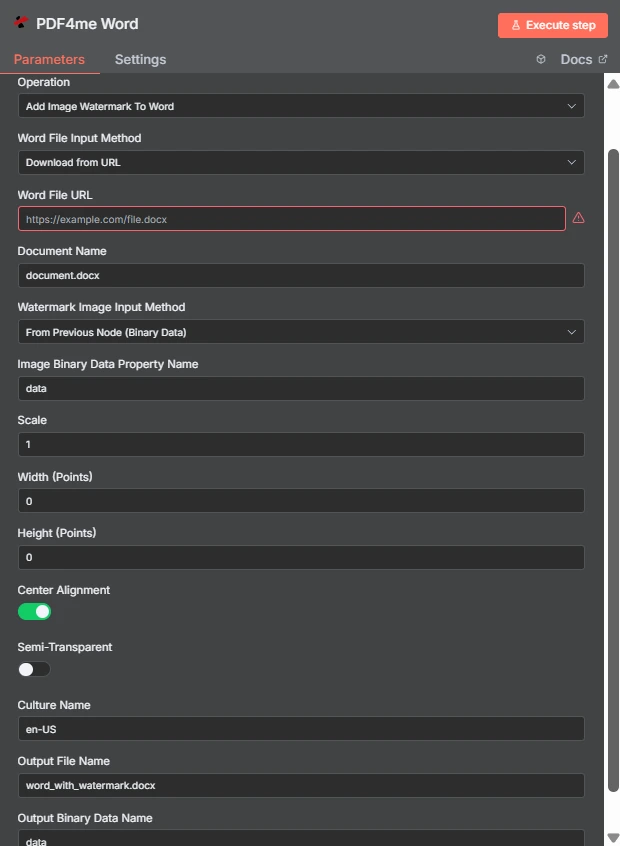
İki bağımsız giriş yöntemine dikkat edin: Word dosya şu şekilde gelir URL Filigran görüntüsü ise önceki düğümden geliyor. Genişlik ve Yükseklik 0'da olduğundan, Ölçek 1 boyutu kontrol ediyor.
Görsel Filigran ile Metin Filigran Arasındaki Fark Word
| Soru | Görsele Filigran Ekle Word | Metin Filigranı Ekle Word |
|---|---|---|
| What gets stamped | An image file such as a logo, seal, or badge | A word or phrase you type, such as DRAFT |
| Second input needed | Yes, the image file itself | No, only the text string |
| Changing it per run | Swap the image binary or URL | Change the text with an expression |
| Best for | Company branding and scanned marks | Status labels and per-document text |
| Transparency control | Semi-Transparent toggle plus PNG alpha | Handled through the text styling options |
Görüntüye Filigran Ekleme Parametreleri Nelerdir? Word İhtiyaç?
O Word Dosya ve filigran görüntüsünün her birinde bir giriş yöntemi açılır menüsü bulunur. Hangi yöntemi seçerseniz seçin, eşleşen kaynak alanı doğrudan altında görünür, bu nedenle aşağıdaki koşullu satırlar seçiminize bağlı olarak değişir.
| Parametre | Gerekli | Ne işe yarar? | Örnek |
|---|---|---|---|
| Credential to connect with | Required | The PDF4me API credential the node authenticates with. | PDF4me account |
| Operation | Required | The action this node performs. Select Add Image Watermark To Word. | Add Image Watermark To Word |
| Word File Input Method | Required | How the .docx reaches the node: from the previous node as binary data, as a Base64 string, or downloaded from a URL. | Download from URL |
| Word File URL | Conditional | Public URL of the .docx to stamp. Appears only when the Word file input method is set to download from a URL. | https://example.com/file.docx |
| Document Name | Required | Filename of the input document including the extension. Used for format detection, so keep the .docx suffix accurate. | document.docx |
| Watermark Image Input Method | Required | How the image reaches the node. Independent of the Word file input method, so the two can differ. | From Previous Node (Binary Data) |
| Image Binary Data Property Name | Conditional | Name of the binary property holding the watermark image. Appears when the image comes from the previous node. | data |
| Scale | Optional | Size multiplier applied to the image at its natural size. Ignored when a non-zero Width or Height is supplied. | 1 |
| Width (Points) | Optional | Exact watermark width in points. Leave at 0 to size by Scale. Setting only Width keeps the aspect ratio. | 0 |
| Height (Points) | Optional | Exact watermark height in points. Leave at 0 to size by Scale. Setting only Height keeps the aspect ratio. | 0 |
| Center Alignment | Optional | Toggle that centres the watermark on the page. Ships enabled; turn it off to align to the top left within the margins. | enabled |
| Semi-Transparent | Optional | Toggle that reduces watermark opacity so page text stays readable underneath. Ships disabled. | disabled |
| Culture Name | Optional | Culture code recorded for document processing, such as en-US or de-DE. | en-US |
| Output File Name | Optional | Filename of the returned document. Keep the .docx extension so downstream steps handle it correctly. | word_with_watermark.docx |
| Output Binary Data Name | Optional | Binary property the stamped document is written to. Leave as data unless a later node expects another name. | data |
Çıktı
| Alan | Tip | İçeriğinde neler var? |
|---|---|---|
| fileName | String | Name of the returned watermarked document, taken from Output File Name. |
| fileSize | Number | Size of the returned document in bytes. A useful sanity check that the image was embedded. |
| success | Boolean | Whether the watermark was applied. Branch on this so failures surface as alerts. |
| originalFileName | String | Name of the input document as supplied in Document Name. |
| scale | Number | The scale factor actually applied, echoed back for verification. |
| alignImage | Boolean | Whether centre alignment was used, reflecting the Center Alignment toggle. |
| semiTransparent | Boolean | Whether reduced opacity was applied, reflecting the Semi-Transparent toggle. |
| cultureName | String | The culture code recorded for the operation. |
| message | String | Human-readable status text describing the result of the operation. |
Damgalı belgenin kendisi, belirtilen özellik üzerinde ikili veri olarak döndürülür. Çıktı İkili Veri AdıDepolama alanına yazmaya, e-postaya eklemeye veya bir sisteme aktarmaya hazır. PDF dönüştürme adımı.
Resme Filigran Ekleme İşlemini Nasıl Yaparım? Word içinde n8n?
- Ekle PDF4me Word düğümü iş akışınıza ekleyin ve ayarlayın. Operasyon ile Görsele Filigran Ekle Word.
- Seçiminizi yapın PDF4me veya bir tane oluşturup oraya yapıştırabilirsiniz. API anahtar.
- Bir tane seçin Word Dosya Giriş Yöntemi ve tedarik etmek
.docxOnun altında beliren alan aracılığıyla. - Ayarlamak Belge Adı yani
.docxUzantı mevcut ve doğru. - Bir tane seçin Filigran Görüntüsü Giriş Yöntemisonra işaret et Görüntü İkili Veri Özellik Adı Görüntünün bulunduğu mülkte, genellikle
data. - Ayrılmak Genişlik (Puan) Ve Yükseklik (Puan) de
0ve ayarlayın ÖlçekYa da boyutun tam olarak belirlenmesi gerektiğinde açık nokta değerleri belirleyin. - Açın Yarı Saydam Filigran gövde metninin üzerindeyse ve bırakın Merkez Hizalama Üst sol köşede işaret istemiyorsanız açık bırakın.
- Ayarlamak Çıktı Dosya Adı sonlanan
.docxDüğümü çalıştırın ve sonucu ileriye doğru yönlendirin.
Tipik Kurulumlar
İş Akışı ÖrnekleriCommon n8n workflow patterns using Add Image Watermark To Word.
- Bir raporlama adımı şunu üretir: Word Belgeyi bir programa göre düzenleyin.
- Görsele Filigran Ekle Word Şirket logosunu üzerine basar.
- Markalı dosya, dağıtım listesine e-posta ile gönderilir.
- Sözleşme inceleme klasörüne düşüyor.
- Taslak rozet görüntüsü, yarı saydam özelliği etkinleştirilmiş olarak damgalanmıştır.
- İncelemeciler, çalışma kopyasını asla nihai kopyayla karıştırmamalıdır.
- Logo, dosya hala düzenlenebilir durumdayken uygulanır. Word.
- Dönüştürme adımı, damgalı belgeyi bir belgeye dönüştürür. PDF.
- O PDF İşaret, sonradan üzerine eklenmek yerine, baskının içine işlenmiş şekilde yayınlanır.
- Klasör listelemesi, eski .docx dosyaları için bir öğe oluşturur.
- Bu düğüm, aynı filigran görüntüsüne sahip her öğe için yalnızca bir kez çalışır.
- Damgalı kopyalar yeni dosya adlarıyla tekrar yazılır.
Pratik İpuçları
Kopya Kağıdı
| Alan | Değer |
|---|---|
| Operation | Add Image Watermark To Word |
| Word File Input Method | Download from URL |
| Word File URL | https://example.com/file.docx |
| Document Name | document.docx |
| Watermark Image Input Method | From Previous Node (Binary Data) |
| Image Binary Data Property Name | data |
| Scale | 1 |
| Width (Points) / Height (Points) | 0 / 0 |
| Center Alignment | enabled |
| Semi-Transparent | disabled |
| Culture Name | en-US |
| Output File Name | word_with_watermark.docx |
| Output Binary Data Name | data |