Metin Filigranı Ekle Excel içinde n8n
Metin Filigranı Ekle bir PDF4me Excel operasyonda n8n Bu eklenti, .xlsx çalışma kitabındaki çalışma sayfalarına GİZLİ veya TASLAK gibi özel bir metin etiketi ekler. Hassas elektronik tabloları işaretlemek, incelemeden önce taslakları işaretlemek veya şirket markalamasını otomatik olarak, manuel düzenlemeye gerek kalmadan uygulamak için kullanabilirsiniz. Excel.
Bu düğüm ne işe yarıyor?
PDF4me ExcelMetin Filigranı Ekle WordArt tarzında bir metin filigranı oluşturur. Excel Yazı tipi ailesi, metin boyutu (punto cinsinden), metin rengi, kalın ve italik stil, şeffaflık, döndürme açısı ve dokuz konumlu yerleştirme ızgarası üzerinde kontrol sağlayan çalışma sayfaları. Çalışma Sayfası Seçimi, filigranın her sayfaya mı yoksa yalnızca belirttiğiniz sayfalara mı yerleştirileceğine karar verir. Gizlilik etiketleri, taslak işaretleyiciler, telif hakkı bildirimleri ve otomatik elektronik tablo markalaması için idealdir.
Kimliğinizi Doğrulama API Rica etmek
Her PDF4me düğümde n8n geçerli bir belge gerektirir Bağlantı kurmak için kimlik bilgisi. İçeriğinizi barındıran birini oluşturun veya seçin. PDF4me API Bu sayede iş akışı, filigran ekleme isteklerini güvenli bir şekilde doğrulayabilir.
Kaçırmamanız Gereken Önemli Bilgiler
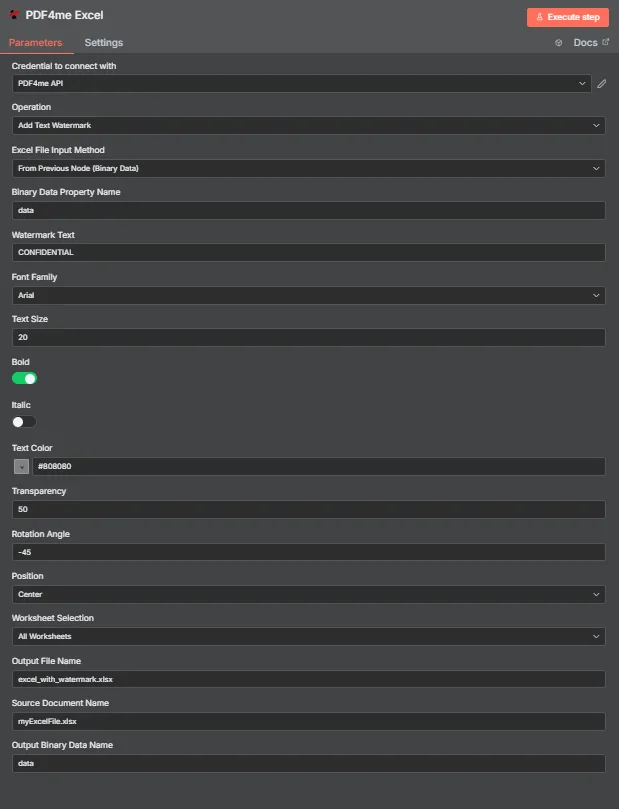
PDF4me Excel Metin Filigranı Ekle parametreleri panelinde n8n
Metin Filigranı Ekleme İşlemi Hangi Parametreleri Gerektirir?
Gerekli: Operasyon, Excel Dosya Giriş Yöntemi, bu yönteme karşılık gelen giriş alanı, Filigran Metni ve Çıkış Dosya Adı. Stil alanları (Yazı Tipi Ailesi, Metin Boyutu, Metin Rengi, Kalın, İtalik, Şeffaflık, Döndürme Açısı, Konum) varsayılan ayarlarla birlikte gelir ve Kaynak Belge Adı ile Çıkış İkili Veri Adı isteğe bağlı etiketlerdir.
| Parametre | Gerekli | Ne işe yarar? | Örnek |
|---|---|---|---|
| Operation | Required | Selects the PDF4me Excel action to run. Choose Add Text Watermark. | Add Text Watermark |
| Excel File Input Method | Required | How the workbook reaches the node. From Previous Node (Binary Data) reads it from an upstream item; the dropdown also offers base64 and file URL alternatives. | From Previous Node (Binary Data) |
| Binary Data Property Name | Conditional | Name of the binary property on the incoming n8n item that holds the .xlsx workbook. Applies when the input method is binary data. Defaults to data. | data |
| Watermark Text | Required | The text stamped across the worksheet. Accepts any string, including expressions mapped from earlier nodes. | CONFIDENTIAL |
| Font Family | Optional | Font used to render the watermark, chosen from the dropdown of available families. | Arial |
| Text Size | Optional | Watermark size in points, entered directly. The response echoes the same number back as textSize. | 20 |
| Bold | Optional | Toggle that applies bold weight to the watermark text. Off by default. | true |
| Italic | Optional | Toggle that applies italic styling to the watermark text. Off by default. | false |
| Text Color | Optional | Watermark colour, set through the colour picker or as a hex code. | #808080 |
| Transparency | Optional | Transparency from 0 (fully opaque) to 100 (fully invisible). Default 0. | 50 |
| Rotation Angle | Optional | Rotation in degrees. 0 is horizontal, negative values tilt anticlockwise for the classic diagonal watermark. | -45 |
| Position | Optional | Placement on the sheet, picked from a nine-cell grid running Top Left through Bottom Right. Returned as a numeric code in the response. | Center |
| Worksheet Selection | Optional | All Worksheets watermarks every sheet. Switching to a specific selection lets you target sheets by name or zero-based index. | All Worksheets |
| Output File Name | Required | Filename for the watermarked workbook the node returns. Include the .xlsx extension. | excel_with_watermark.xlsx |
| Source Document Name | Optional | Reference label for the incoming workbook. Echoed back as originalFileName for tracking; it does not change the output. | myExcelFile.xlsx |
| Output Binary Data Name | Optional | Name of the binary property the output item exposes. Defaults to data. | data |
Çıkış Alanları
Başarılı bir koşu bir getiri sağlar. n8n eşya taşıma JSON Meta veriler ve filigranlı çalışma kitabı ikili veri olarak.
| Alan | Tip | İçeriğinde neler var? |
|---|---|---|
success | Boolean | True when the watermark was applied successfully. Use it to route error-handling branches. |
fileName | String | Filename of the watermarked workbook, matching Output File Name. |
fileSize | Number | Size of the returned workbook in bytes. |
originalFileName | String | The value supplied in Source Document Name, echoed back for tracking. |
watermarkText | String | The text that was stamped onto the worksheets. |
fontFamily | String | Font family used to render the watermark. |
textSize | Number | Watermark size in points, matching the Text Size input. |
isBold | Boolean | Whether bold weight was applied. |
isItalic | Boolean | Whether italic styling was applied. |
textColor | String | Watermark colour as a hex value. |
transparency | Number | Transparency level applied, from 0 to 100. |
rotationAngle | Number | Rotation in degrees applied to the watermark. |
position | Number | Numeric code for the placement cell used on the nine-position grid. |
worksheetSelection | Number | 0 when every worksheet was watermarked, 1 when a specific selection was targeted. |
selectedWorksheetNames | Array | Worksheet names targeted, empty when all worksheets were processed. |
selectedWorksheetIndexes | Array | Zero-based worksheet indexes targeted, empty when all worksheets were processed. |
message | String | Human-readable result message for the operation. |
Binary (data) | Binary | The watermarked .xlsx under Output Binary Data Name (default data). Pass into Write Binary File, Email, or a cloud-storage upload. |
N8N Eylem Yanıtı
O PDF4me Metin Filigranı Ekle Bu işlem, içinde çeşitli formatlarda inceleyebileceğiniz bir yanıt döndürür. n8n:
- JSON
- Schema
- Binary
JSON Yanıt Formatı
[
  {
    "fileName": "excel_with_watermark.xlsx",
    "fileSize": 219605,
    "success": true,
    "originalFileName": "myExcelFile.xlsx",
    "watermarkText": "CONFIDENTIAL",
    "fontFamily": "Arial",
    "textSize": 20,
    "isBold": true,
    "isItalic": false,
    "textColor": "#808080",
    "transparency": 50,
    "rotationAngle": -45,
    "position": 1,
    "worksheetSelection": 1,
    "selectedWorksheetNames": [],
    "selectedWorksheetIndexes": [],
    "message": "Text watermark added to Excel file successfully"
  }
]
Şema Görünümü
1 item
fileName: T excel_with_watermark.xlsx
fileSize: # 219605
success: true
originalFileName: T myExcelFile.xlsx
watermarkText: T CONFIDENTIAL
fontFamily: T Arial
textSize: # 20
isBold: true
isItalic: false
textColor: T #808080
transparency: # 50
rotationAngle: # -45
position: # 1
worksheetSelection: # 1
selectedWorksheetNames: [] Array
selectedWorksheetIndexes: [] Array
message: T Text watermark added to Excel file successfully
Tip Göstergeleri: T = String, # = Number, [] = Array.
İkili Veri Görünümü
data
File Name: excel_with_watermark.xlsx
File Extension: xlsx
Mime Type: application/vnd.openxmlformats-officedocument.spreadsheetml.sheet
File Size: 219.6 kB
İkili Verilere Erişim: Çalışma kitabına şu adresten ulaşabilirsiniz: $binary.data.dataİndirilmeye, e-posta ile gönderilmeye veya depolanmaya hazır.
Metin Filigranı Ekleme Ayarlarını Nasıl Yaparım? n8n?
- Ekle PDF4me Excel düğümünüze n8n iş akışı ve ayarları Operasyon ile Metin Filigranı Ekle.
- İçinde Bağlantı kurmak için kimlik bilgisi, sizinkini seçin PDF4me API veya bir tane oluşturun ve oraya yapıştırın. API anahtar.
- Ayarlamak Excel Dosya Giriş Yöntemi ile Önceki Düğümden (İkili Veri) ve ayarla İkili Veri Özellik Adı Çalışma kitabını barındıran mülke, normalde
data. - Girmek Filigran Metni, Örneğin
CONFIDENTIAL. - Filigranı şu şekilde biçimlendirin: Yazı Tipi Ailesi, Metin Boyutu (puan olarak), Metin Rengi, Gözü pek, Ve İtalik.
- Görünürlüğü ve yerleşimi ayarlayın Şeffaflık, Dönme Açısı, Ve Konum.
- Ayarlamak Çalışma Sayfası Seçimi ile Tüm Çalışma Sayfaları veya belirli sayfaları hedefleyin.
- Ayarlamak Çıktı Dosya Adı sonlanan
.xlsxArdından düğümü çalıştırın ve filigranlı çalışma kitabını ileriye doğru yönlendirin.
Tipik Kurulumlar
İş Akışı ÖrnekleriCommon n8n workflow patterns using Add Text Watermark for Excel.
- Bir çalışma kitabı giden klasörüne yerleştirildiğinde Google Drive tetikleyicisi çalışır.
- PDF4me Excel "GİZLİ" filigran metni, kırmızı metin rengi ve %50 şeffaflık ile metin filigranı ekle.
- Filigranlı çalışma kitabı alıcıya e-posta ile gönderilir ve Drive'a arşivlenir.
- Zamanlama Tetikleyicisi, veritabanı dışa aktarımından haftalık rakamlar çalışma kitabı oluşturur.
- Metin Filigranı Ekle seçeneği, Filigran Metni TASLAK, Döndürme Açısı -45, Şeffaflık 50, Konum Merkez ayarlarıyla çalışır.
- Taslak, onaylanmadan önce Slack'teki bir inceleme kanalına gönderilir.
- Bir "Öğeler Üzerinde Döngü" düğümü, istemci satırlarını bir kaynaktan başlayarak yineler. CRM ihracat.
- Filigran metni bir ifadeden eşleştirilir, böylece her çalışma kitabı o müşterinin adını taşır.
- Her çıktı, dosya adı olarak istemci kimliği kullanılarak bulut depolama alanına yazılır.
- Bir webhook, dahili bir araçtan tamamlanmış bir raporlama çalışma kitabını alır.
- Çalışma sayfası seçimi özet sayfasına odaklanır, böylece ham veri sekmeleri işaretlenmeden kalır.
- Sonuç yükleniyor. SharePoint Dağıtım için.
Pratik İpuçları
Kopya Kağıdı
| Alan | Değer |
|---|---|
| Operation | Add Text Watermark |
| Excel File Input Method | From Previous Node (Binary Data) |
| Binary Data Property Name | data |
| Watermark Text | CONFIDENTIAL |
| Font Family | Arial |
| Text Size | 20 (points) |
| Text Color | #808080 |
| Transparency | 50 |
| Rotation Angle | -45 |
| Position | Center |
| Worksheet Selection | All Worksheets |
| Output File Name | excel_with_watermark.xlsx |
| Output Binary Data Name | data |
| Credentials | PDF4me API credential |