Bir tabloya satır ekle Excel Çalışma sayfası n8n
Satır Ekle bir PDF4me düğüm eylemi n8n yazan JSON kayıtları bir Excel Çalışma sayfası. Bunu kullanarak baskı yapın. API Sonuçları bir rapora dönüştürün, webhook yüklerini paylaşılan bir çalışma kitabına kaydedin veya ekleyin. CRM Sayılar ve tarihlerle birlikte takip sayfasına aktarılır, gerçek veriler olarak kaydedilir. Excel Metin yerine değerler.
Bu düğüm ne işe yarıyor?
PDF4me Excel: Satır Ekle mevcut bir şeyi alır .xlsx çalışma kitabı artı bir JSON dizi içinde JSON Satır Verilerive her nesne için bir satır yazar. iki yerleştirme modu: bir tabloya isim ver Hedef Excel Masa ve anahtarlar başlıklara eşleştirilir veya boş bırakılabilir. Satırdan Ekle artı Sütundan Ekle Başlangıç hücresini tam olarak ayarlayın. Sıfırdan bir çalışma kitabı oluşturmak yerine, sağladığınız bir çalışma kitabını düzenler.
Kimliğinizi Doğrulama API Rica etmek
Her PDF4me düğümde n8n geçerli bir belge gerektirir Bağlantı kurmak için kimlik bilgisi. İçeriğinizi barındıran birini oluşturun veya seçin. PDF4me API Bu sayede iş akışı, elektronik tablo isteklerini güvenli bir şekilde doğrulayabilir.
Kaçırmamanız Gereken Önemli Bilgiler
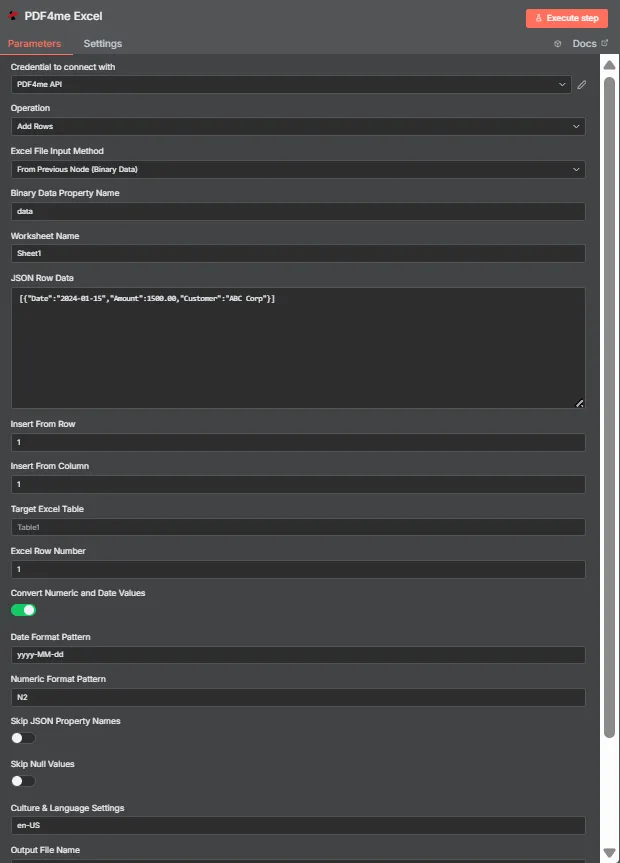
JSON Satır Verileri şunları içerir: JSON Düz nesnelerden oluşan dizi. Hedef Excel Tablo burada boş, bu nedenle "Satırdan Ekle" ve "Sütundan Ekle" seçenekleri verileri A1 hücresine yerleştiriyor.
Tablo Modu ve Koordinat Modu
| Soru | Tablo modu | Koordinat modu |
|---|---|---|
| How you switch to it | Name a table in Target Excel Table | Leave Target Excel Table blank |
| How columns are matched | JSON keys matched against table headers | Values written in key order from the start cell |
| Does column order matter | No, headers drive placement | Yes, position drives placement |
| Which fields control it | Target Excel Table and Excel Row Number | Insert From Row and Insert From Column |
| Best for | Structured sheets that already have a table | Blank sheets or a fixed reporting layout |
| Overwrite risk | Lower, rows follow the table structure | Higher, the start cell is written to directly |
Satır Ekleme İşlevi Hangi Parametrelere İhtiyaç Duyar?
| Parametre | Gerekli | Ne işe yarar? | Örnek |
|---|---|---|---|
| Credential to connect with | Required | The PDF4me API credential the node authenticates with. | PDF4me API |
| Operation | Required | The action this node performs. Select Add Rows. | Add Rows |
| Excel File Input Method | Required | How the workbook reaches the node: from the previous node as binary data, as a Base64 string, or from a URL. | From Previous Node (Binary Data) |
| Binary Data Property Name | Conditional | Name of the binary property holding the .xlsx. Appears when the workbook comes from the previous node. | data |
| Worksheet Name | Required | Sheet the rows are written to. Match the sheet tab name exactly. | Sheet1 |
| JSON Row Data | Required | JSON array of flat objects. Each object becomes one row and each key maps to a column. | [{"Date":"2024-01-15","Amount":1500.00}] |
| Insert From Row | Conditional | Row number the data starts at, counting from 1. Used in coordinate mode when no table is named. | 1 |
| Insert From Column | Conditional | Column number the data starts at, counting from 1 for column A. Used in coordinate mode. | 1 |
| Target Excel Table | Optional | Name of an existing table to write into. Filling this in switches the node to header matching instead of coordinates. | Table1 |
| Excel Row Number | Conditional | Row index inside the named table where insertion begins. Used in table mode. | 1 |
| Convert Numeric and Date Values | Optional | Toggle that turns numeric and date strings into real Excel values rather than text. Ships enabled. | enabled |
| Date Format Pattern | Optional | Pattern applied to converted dates. Match it to the shape of the dates in your JSON. | yyyy-MM-dd |
| Numeric Format Pattern | Optional | Format applied to converted numbers, such as two decimal places. | N2 |
| Skip JSON Property Names | Optional | Toggle that omits the JSON keys, writing only values. Ships disabled so headers are included. | disabled |
| Skip Null Values | Optional | Toggle that leaves cells untouched where a JSON value is null instead of clearing them. Ships disabled. | disabled |
| Culture and Language Settings | Optional | Culture code used when parsing numbers and dates, which decides separator handling. | en-US |
| Output File Name | Optional | Filename of the returned workbook. Keep a valid Excel extension. | excel_with_rows.xlsx |
Çıktı
| Alan | Tip | İçeriğinde neler var? |
|---|---|---|
| fileName | String | Name of the returned workbook after the rows were written. |
| fileSize | Number | Size of the returned workbook in bytes. |
| success | Boolean | Whether the insertion completed. Branch on this so failures surface as alerts. |
| originalFileName | String | Name of the input workbook as supplied to the node. |
| worksheetName | String | The worksheet the rows were written to. |
| rowsAdded | Number | How many rows were inserted. The most useful verification signal the node returns. |
| insertFromRow | Number | Starting row used, echoed back when running in coordinate mode. |
| insertFromColumn | Number | Starting column used, echoed back when running in coordinate mode. |
| tableName | String | The table written into, or null when coordinate mode was used. |
| excelRowNumber | Number | Row index inside the table where insertion began, in table mode. |
| convertNumericAndDate | Boolean | Whether numeric and date conversion was applied. |
| dateFormat | String | The date pattern applied during conversion. |
| numericFormat | String | The numeric format applied during conversion. |
| cultureName | String | The culture code used to parse numbers and dates. |
| message | String | Human-readable summary, including the row count and worksheet name. |
Güncellenen çalışma kitabı, depolama alanına yazılmaya, e-postaya eklenmeye veya başka bir işleme aktarılmaya hazır ikili veri olarak döndürülür. Excel adım.
Satır Ekleme İşlemini Nasıl Kurarım? n8n?
- Ekle PDF4me Excel düğümü iş akışınıza ekleyin ve ayarlayın. Operasyon ile Satır Ekle.
- Seçiminizi yapın PDF4me veya bir tane oluşturup oraya yapıştırabilirsiniz. API anahtar.
- Birini seçin Excel Dosya Giriş Yöntemi ve çalışma kitabını altında görünen alandan yükleyin.
- Ayarlamak Çalışma Sayfası Adı Tam olarak yazmakta olduğunuz sayfa sekmesine gidin.
- Bir tane koyun JSON düz nesneler dizisi JSON Satır VerileriHer satırda bir nesne.
- Tablo modunu kullanmak için tablo adını girin. Hedef Excel Masa ve ayarla Excel Sıra NumberKoordinatları kullanmak için tabloyu boş bırakın ve ayarlayın. Satırdan Ekle Ve Sütundan Ekle.
- Ayrılmak Sayısal ve Tarih Değerlerini Dönüştürme etkinleştirildiyse, ayarlayın. Tarih Biçimi Şablonu, Sayısal Biçim Kalıbı, Ve Kültür ve Dil Ortamları Verilerinize uyacak şekilde.
- Ayarlamak Çıktı Dosya AdıDüğümü çalıştırın ve kontrol edin.
rowsAddedÇalışma kitabının bir sonraki aşamaya yönlendirilmesinden önce verilen yanıtta.
Tipik Kurulumlar
İş Akışı ÖrnekleriCommon n8n workflow patterns using Add Rows.
- Bir webhook, form gönderimini şu şekilde alır: JSON.
- Satır Ekle, bu satırı paylaşılan çalışma kitabındaki adlandırılmış bir tabloya ekler.
- Ekip, verilerin yeniden girilmesine gerek kalmadan kağıdı okuyor.
- Planlanmış bir HTTP Bu istek, dahili bir sistemden kayıtları çekiyor. API.
- Bir Kod düğümü, yanıtı düz bir diziye dönüştürür.
- "Satır Ekle" işlevi, veriyi raporlama şablonuna sabit koordinatlarda yazar.
- Gece vardiyasında çalışmak yeni fırsatlar sunar çünkü JSON.
- Tablo modu, anahtarları mevcut başlıklara eşleştirir.
- Kaynak dosyadaki sütun sırası değişiklikleri tabloyu bozmaz.
- Satır Ekle işlevi, çalışma kitabına eklenen satır sayısını döndürür.
- Bir IF düğümü, bunu giriş dizisinin uzunluğuyla karşılaştırır.
- Uyumsuzluk durumunda kısa bir rapor göndermek yerine uyarı verilir.
Pratik İpuçları
Kopya Kağıdı
| Alan | Değer |
|---|---|
| Operation | Add Rows |
| Excel File Input Method | From Previous Node (Binary Data) |
| Binary Data Property Name | data |
| Worksheet Name | Sheet1 |
| JSON Row Data | [{"Date":"2024-01-15","Amount":1500.00}] |
| Insert From Row / Column | 1 / 1 |
| Target Excel Table | Table1 |
| Excel Row Number | 1 |
| Convert Numeric and Date Values | enabled |
| Date Format Pattern | yyyy-MM-dd |
| Numeric Format Pattern | N2 |
| Culture and Language Settings | en-US |
| Output File Name | excel_with_rows.xlsx |