AI-Sağlık Kartını İşleme Alın n8n
AI-Sağlık Kartı İşlemi bir PDF4me düğüm eylemi n8n Sağlık sigorta kartını okuyan ve bilgilerini yapılandırılmış şekilde geri döndüren bir sistem. JSONÜye kimliği, grup numarası, plan türü ve reçete yönlendirme kodlarını karttan elle yazmak yerine, tarama veya fotoğraftan otomatik olarak yakalamak için kullanın.
Bu düğüm ne işe yarıyor?
PDF4me: AI-Sağlık Kartı İşlemi bir kart görüntüsü alır veya PDF ve bir sonuç döndürür. sağlık verileri Dosya yerine nesne okur. Üye kimliğini, plan ayrıntılarını ve rxBin, rxPcn, Ve rxGrubu reçete yönlendirme kodları ve raporları saha başına güven puanı Bu sayede belirsiz okumalar bir insana yönlendirilebilir. Verileri çıkarır; bu verilerin daha sonra nasıl saklanacağı ve işleneceğine karar vermek size kalmıştır.
Kimliğinizi Doğrulama API Rica etmek
Her PDF4me düğümde n8n geçerli bir belge gerektirir Bağlantı kurmak için kimlik bilgisi. İçeriğinizi barındıran birini oluşturun veya seçin. PDF4me API Bu sayede iş akışı, veri çıkarma isteklerini güvenli bir şekilde doğrulayabilir.
Kaçırmamanız Gereken Önemli Bilgiler
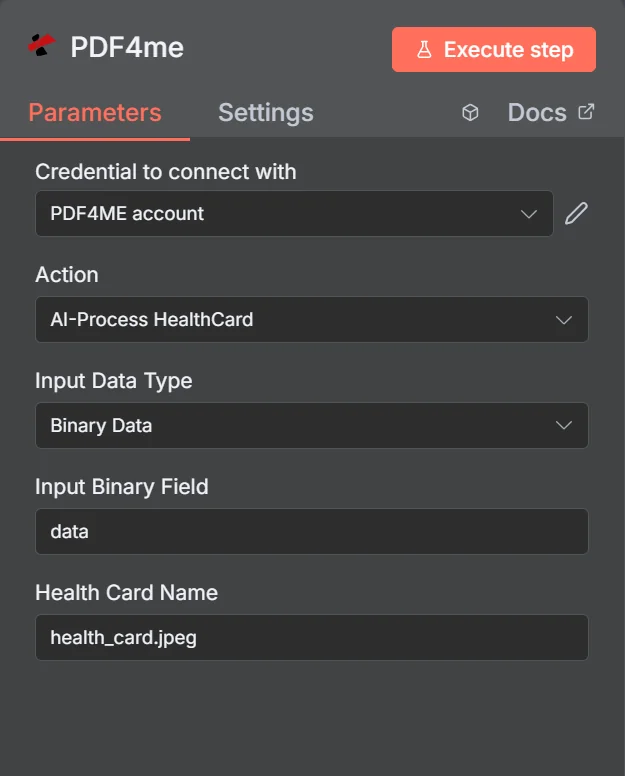
Söz konusu işlem şu şekilde listelenmiştir: AI-Sağlık Kartını İşle. İkili Veri seçildiğinde, panel yalnızca İkili Giriş Alanı ve Sağlık Kartı Adı'na ihtiyaç duyar; bu nedenle dosya adındaki uzantı, biçim algılamayı yönlendirir.
Sağlık Kartı Ayrıştırması vs. Genel OCR
| Soru | AI-Sağlık Kartı İşlemi | Genel metin çıkarma |
|---|---|---|
| What you get back | Named fields such as memberId and rxBin | A block of unstructured text |
| Layout differences | Handled, fields are identified by meaning | Not handled, position shifts break parsing |
| Quality signal | Per-field confidence scores | None beyond whether text was found |
| Work needed after | Map fields and check confidence | Write and maintain regex per insurer |
| Best for | Cards from many different insurers | One fixed, unchanging document layout |
Parametreler Ne İşe Yarar? AI-Sağlık Kartı İşlemi Gerekli mi?
Üç kaynak alanı birbirini dışlar. Yalnızca sizinle eşleşen alan gösterilecektir. Giriş Veri Türü Panelde göründükleri için zorunlu değil, koşullu olarak işaretlenmişlerdir.
| Parametre | Gerekli | Ne işe yarar? | Örnek |
|---|---|---|---|
| Credential to connect with | Required | The PDF4me account credential the node authenticates with. | PDF4ME account |
| Action | Required | The action this node performs. Select AI-Process HealthCard. | AI-Process HealthCard |
| Input Data Type | Required | How the card image reaches the node: binary data from a previous node, a Base64 string, or a URL. | Binary Data |
| Input Binary Field | Conditional | Name of the binary property holding the card image. Appears when Input Data Type is Binary Data. | data |
| Base64 Health Card Content | Conditional | The card image encoded as a Base64 string. Appears when Input Data Type is Base64 String. | JVBERi0xLjQKJ... |
| Health Card URL | Conditional | Publicly reachable URL of the card image. Appears when Input Data Type is URL. | https://example.com/card.jpeg |
| Health Card Name | Required | Filename of the submitted card including the extension. Drives format detection, so keep it accurate. | health_card.jpeg |
Çıktı
Bu işlem dosya değil, veri döndürür. Üst düzey yanıt alanları:
| Alan | Tip | İçeriğinde neler var? |
|---|---|---|
| success | Boolean | Whether the extraction completed. Branch on this before reading any field. |
| message | String | Human-readable status text describing the result. |
| processedData | Object | Wrapper holding healthData, status, errors, and the job identifiers. |
| processedData.status | String | Overall processing status for the run. |
| processedData.errors | Array | Errors encountered during extraction. Empty when the read was clean. |
| processedData.jobId | String | Unique identifier for the processing job, useful when reporting an issue. |
| processingTimestamp | String | ISO 8601 timestamp for when processing completed. |
İçeri processedData.healthData:
| Alan | Tip | İçeriğinde neler var? |
|---|---|---|
| memberId | String | The member identification number printed on the card. |
| memberName | String | Full name of the insured member. |
| dateOfBirthStr | String | Member date of birth as read from the card. |
| insuranceProvider | String | Name of the insurer that issued the card. |
| groupNumber | String | Group or policy number for the plan. |
| planType | String | Plan category such as PPO, HMO, or EPO. |
| effectiveDateStr | String | Date the coverage takes effect. |
| rxBin | String | Prescription BIN routing code, usually printed on the reverse. |
| rxPcn | String | Prescription processor control number, usually on the reverse. |
| rxGroup | String | Prescription group identifier, usually on the reverse. |
| copayInfo | Array | Copay amounts per service type where the card lists them. |
| confidence | Object | Per-field confidence scores. Use these to gate automatic acceptance. |
Nasıl Kurulum Yaparım? AI-Sağlık kartını işleme al n8n?
- Ekle PDF4me düğümü iş akışınıza ekleyin ve ayarlayın. Aksiyon ile AI-Sağlık Kartı İşlemi.
- Seçiminizi yapın PDF4me veya bir tane oluşturup oraya yapıştırabilirsiniz. API anahtar.
- Ayarlamak Giriş Veri Türü ve kartı ilgili alana yerleştirin.
- Ayarlamak Sağlık Kartı Adı doğru uzantıyla, örneğin
health_card.jpeg. - Düğümü çalıştırın ve inceleyin.
processedData.healthDataÇıktıda. - Kontrol eden bir IF düğümü ekleyin.
successve ilgiliconfidencepuanlar. - Güvenilir şekilde çıkarılan verileri ileriye yönlendirin ve geri kalanını insan inceleme kuyruğuna gönderin.
- İşlem sürecinin sonunda nelerin saklanacağına bilinçli olarak karar verin ve yalnızca sürecinizin gerçekten ihtiyaç duyduğu alanları saklayın.
Tipik Kurulumlar
İş Akışı ÖrnekleriCommon n8n workflow patterns using AI-Process HealthCard.
- Yeni bir hasta, bir form aracılığıyla kimlik kartının fotoğrafını yüklüyor.
- AI-Process HealthCard, üye ve plan bilgilerini okur.
- Bu alanlar, personelin onaylaması için giriş kaydını önceden doldurur.
- Kartın arka yüzü düğüme gönderilir.
- rxBin, rxPcn ve rxGroup ayrı alanlar olarak geri döner.
- Kodların herhangi bir şekilde yazıya geçirilmesine gerek kalmadan talep yönlendiriliyor.
- Her veri çıkarma işlemi, alan başına güvenilirlik puanları döndürür.
- Bir IF düğümü, bunları kabul ettiğiniz eşik değerle karşılaştırır.
- Kişiye yalnızca belirsiz kartlar ulaşır, bu nedenle inceleme çabası az kalır.
- Planlar yenilendikçe yedek kartlar gönderilir.
- Bu düğüm effectiveDateStr ve plan alanlarını okur.
- Eski bilgilerin ret nedenine yol açmaması için kayıtlar güncellenir.
Pratik İpuçları
Kopya Kağıdı
| Alan | Değer |
|---|---|
| Action | AI-Process HealthCard |
| Input Data Type | Binary Data |
| Input Binary Field | data |
| Health Card Name | health_card.jpeg |
| Credentials | PDF4ME account |
| Key output path | processedData.healthData |
| Quality gate | processedData.healthData.confidence |