Sayfaları Şuradan Çıkarın PDF içinde n8n
Sayfaları Şuradan Çıkarın PDF bir PDF4me düğüm eylemi n8n yeni bir şey inşa eden PDF yalnızca şunları içeriyor pages Listelediğiniz maddeleri kullanarak bir sözleşmeden imza sayfasını çıkarabilir, bir kılavuzdan tek bir bölümü ayırabilir veya sonraki aşamalara sadece özetini iletebilirsiniz. pages Belgenin tamamı yerine.
Bu düğüm ne işe yarıyor?
PDF4me: Sayfaları Şuradan Çıkar PDF bir alır PDF İkili Verilerden, bir Base64 Stringveya bir URL ve yalnızca içeriği barındıran yeni bir dosya döndürür. pages adı geçen Sayfa NumaralarıBu alan tüm işlemi kapsar: tek bir değeri kabul eder. pagesTirelenmiş aralıklar, karışık listeler ve belgenin sonuna kadar uzanan açık aralıklar da dahil olmak üzere, bu işlem bir iş akışı adımı olarak çalıştığı için, herhangi bir düzenleyici açılmadan gelen her dosyaya aynı ayıklama kuralı uygulanır.
Kimliğinizi Doğrulama API Rica etmek
Her PDF4me düğümde n8n geçerli bir belge gerektirir Bağlantı kurmak için kimlik bilgisi. İçeriğinizi barındıran birini oluşturun veya seçin. PDF4me API Bu sayede iş akışı, veri çıkarma isteklerini güvenli bir şekilde doğrulayabilir.
Kaçırmamanız Gereken Önemli Bilgiler
10- Bu, 10. sayfadan sonuna kadar olan kısmı ifade eder, dolayısıyla tek bir ayar farklı uzunluktaki belgeler için geçerlidir.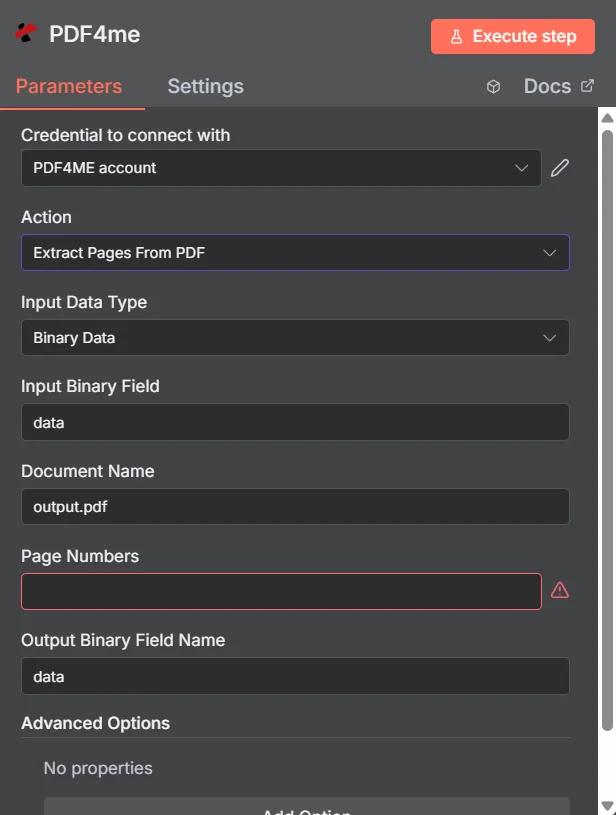
PDF4me Sayfaları Şuradan Çıkarın PDF parametreler panelinde n8n
Sayfaları Ayıklama vs. Bölme PDF
Her ikisi de daha küçük belgeler üretir, ancak farklı sorulara cevap verirler. Çıkarma işlemi hangisinin sorulacağını sorar. pages Saklamak istediğiniz kısmı ayırmak; bölme işlemi ise tüm belgenin nasıl bölüneceğini sorar.
| Soru | Sayfaları Şuradan Çıkarın PDF | Bölmek PDF |
|---|---|---|
| How many files come back | One PDF holding the pages you listed | Several PDFs covering the whole document |
| What happens to unlisted pages | They are absent from the output | They still appear, in another output file |
| Typical use | Pull the signature page, one chapter, or a summary section | Break a bundle into per-invoice or per-section files |
| Driven by | An explicit page list you supply | A split rule such as page count, text, or barcode |
Sayfaları Hangi Parametrelerden Çıkarır? PDF İhtiyaç?
Gerekli: İşlem, Giriş Veri Türü, bu giriş türüyle eşleşen alan, Belge Adı ve Sayfa Numaraları. Çıkış İkili Alan Adı, varsayılan bir çalışma değeri taşır. veriGelişmiş Seçenekler ise boş olarak başlar.
| Parametre | Gerekli | Ne işe yarar? | Örnek |
|---|---|---|---|
| Action | Required | Selects the PDF4me node action to run. Choose Extract Pages From PDF. | Extract Pages From PDF |
| Input Data Type | Required | Format of the source PDF input. Choose Binary Data (from a previous node), Base64 String, or URL. | Binary Data |
| Input Binary Field | Conditional | Name of the binary property on the incoming n8n item that holds the PDF. Required when Input Data Type is Binary Data. Defaults to data. | data |
| Base64 Document Content | Conditional | Base64-encoded content of the source PDF. Required when Input Data Type is Base64 String. | JVBERi0xLjQK... |
| File URL | Conditional | Publicly reachable HTTPS URL to the source PDF. Required when Input Data Type is URL. | https://example.com/report.pdf |
| Document Name | Required | Filename used for the document on the request, for reference and tracking. Include the .pdf extension. | output.pdf |
| Page Numbers | Required | The pages to keep. Accepts a comma-separated list, a hyphenated range, a mixed list, or an open range that runs to the end of the document. Pages are numbered from 1. | 1,3,5-8 |
| Output Binary Field Name | Optional | Name of the binary property the output item exposes. Defaults to data. | data |
| Advanced Options | Optional | A collection that starts empty, shown as No properties with an Add Option button. Leave it alone unless you have a specific option to add. | No properties |
Sayfa Numaraları Alanı Nasıl Yazılır?
| Model | Örnek | Geri dönen şey |
|---|---|---|
| Single page | 5 | Just page 5, as a one page PDF. |
| Comma-separated list | 1,3,5 | Pages 1, 3, and 5 in one PDF, with pages 2 and 4 absent. |
| Hyphenated range | 2-5 | Pages 2, 3, 4, and 5, with both ends included. |
| Mixed list | 1,3,5-8 | Page 1, page 3, then the block from 5 to 8. |
| Open range | 10- | Page 10 through the last page, whatever the document length turns out to be. |
Çıkış Alanları
Başarılı bir koşu bir getiri sağlar. n8n çıkarılan maddeyi taşıyan öğe PDF.
| Alan | Tip | İçeriğinde neler var? |
|---|---|---|
Binary (data) | Binary | The extracted PDF, under Output Binary Field Name (default data). |
fileName | String | Generated filename of the extracted PDF. |
mimeType | String | MIME type of the output, always application/pdf. |
fileSize | Number | Size of the returned PDF in bytes. |
pagesExtracted | Number | How many pages ended up in the output. Compare it against the length of your requested list as a cheap sanity check. |
originalPageCount | Number | Page count of the source document before extraction. |
extractedPageNumbers | Array | The page numbers that were actually extracted, useful for verifying the result against what you asked for. |
success | Boolean | True when the extraction completed, false on failure. Use it to branch error handling. |
message | String | Human-readable status message, carrying success confirmation or error detail. |
Sayfaları nasıl ayıklayabilirim? PDF içinde n8n?
- Eklemek PDF4me senin n8n iş akışını seçin ve Sayfaları Şuradan Çıkarın PDF aksiyon.
- İçinde Bağlantı kurmak için kimlik bilgisi, sizinkini seçin PDF4me kimlik bilgileri veya tıklayın Yeni Kimlik Bilgisi Oluştur ve yapıştırın API anahtar.
- Ayarlamak Giriş Veri Türü ile İkili Veri (varsayılan), Base64 String, veya URL ve eşleşen kaynağı sağlayın PDF alan.
- Ayarlamak Belge Adı kaynak dosya için, aşağıdakiler dahil:
.pdfeklenti. - Girmek Sayfa Numaraları Liste, aralık, karma liste veya açık aralık kullanarak.
- Ayrılmak Çıktı İkili Alan Adı gibi
dataDaha sonraki bir düğüm farklı bir özellik beklemediği sürece. - Düğümü çalıştırın ve döndürülen sonucu yönlendirin. PDF Bir sonraki aşamaya, örneğin depolama, e-posta veya inceleme kuyruğuna.
Tipik Kurulumlar
İş Akışı ÖrnekleriCommon n8n workflow patterns using Extract Pages From PDF.
- İmzalı sözleşme e-posta eki olarak geliyor.
- Sayfaları Şuradan Çıkarın PDF Son sayfayı açık bir aralık kullanarak alıyor.
- Bu tek sayfalık belge, hızlı erişim için müşteri kaydının yanına arşivlenir.
- Uzun bir rapor, planlı bir şekilde oluşturulmaktadır.
- Sayfaları Şuradan Çıkarın PDF ilk birkaçını saklıyor pages Örneğin, çeşitli seçeneklerle
1-3. - Değerlendirme yapanlar özeti alırken, raporun tamamı arşive gönderilir.
- Destek talebi, ürün kılavuzunun bir bölümüne atıfta bulunuyor.
- Sayfaları Şuradan Çıkarın PDF Bu bölümü tireli bir aralıkla çekiyor.
- Müşteri ilgili bilgiyi alır. pages büyük bir eklenti yerine.
- Çeşitli kaynak belgelerin her birinde saklanmaya değer bir sayfa bulunmaktadır.
- Sayfaları Şuradan Çıkarın PDF Sayfayı çekmek için belge başına çalıştırılan işlem sayısı.
- Birden Fazlasını Birleştir PDFs Sonuçları tek bir özet halinde birleştirir.
Pratik İpuçları
Kopya Kağıdı
| Alan | Değer |
|---|---|
| Action | Extract Pages From PDF |
| Input Data Type | Binary Data |
| Input Binary Field | data |
| Document Name | output.pdf |
| Page Numbers | 1,3,5-8 |
| Output Binary Field Name | data |
| Advanced Options | No properties |
| Credentials | PDF4me API credential |