Üst üste bindirme PDFs içinde n8n
Üst üste bindirme PDFs bir PDF4me düğüm eylemi n8n bu da birini yerleştirir PDF üst üste, ikisini aynı şekilde birleştirerek pages Bunları eklemek yerine, tasarlanmış bir antetli kağıdı oluşturulmuş içeriğin üzerine damgalamak, bir sertifika çerçevesi uygulamak veya onaylanmış bir şablonu gelen bir belgeye tek bir sayfa eklemeden yerleştirmek için kullanın.
Bu düğüm ne işe yarıyor?
PDF4me: Katman PDFs iki tane alıyor PDFs, A temel arka plan görevi gören ve katman En üstte yer alan ve her ikisinin de aynı sayfada göründüğü tek bir belge döndüren bir yapı. pagesHer dosyanın kendine özgü bir giriş türü vardır; bu nedenle temel veri, önceki bir düğümden İkili Veri olarak gelebilirken, katman da bir başka düğümden çekilir. URLBirleştirmeden farklı olarak, sayfa sayısı artmaz; bu da onu antetli kağıtlar, çerçeveler ve şablon damgaları için doğru araç haline getirir.
Kimliğinizi Doğrulama API Rica etmek
Her PDF4me düğümde n8n geçerli bir belge gerektirir Bağlantı kurmak için kimlik bilgisi. İçeriğinizi barındıran birini oluşturun veya seçin. PDF4me API Bu sayede iş akışı, yer paylaşımı isteklerini güvenli bir şekilde doğrulayabilir.
Kaçırmamanız Gereken Önemli Bilgiler
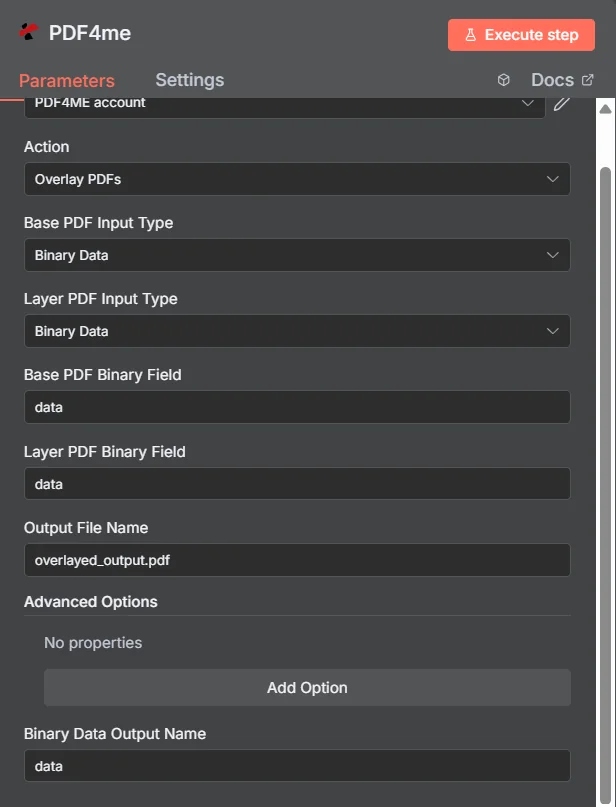
PDF4me Üst üste bindirme PDFs parametreler panelinde n8nHer iki giriş türü de İkili Veri olarak ayarlanmıştır.
Üst Üste Bindirme, Birleştirme ve Filigran Karşılaştırması
Bir içeriğe daha fazla içerik eklemenin üç yolu PDFHer biri farklı bir belge üretiyor.
| Yaklaşmak | Etkisi pages | En uygun olan |
|---|---|---|
| Overlay PDFs | Both documents appear on the same pages, page count unchanged | Branding that already exists as a designed PDF, such as a letterhead or certificate frame |
| Merge PDFs | Documents follow one another, page counts add up | Content that genuinely belongs in sequence as one longer document |
| Add watermark | Simple text or a single image drawn onto the existing pages | A short notice such as DRAFT or CONFIDENTIAL, where no designed PDF layer exists |
Üst Üste Bindirme Hangi Parametreleri İçerir? PDFs İhtiyaç?
Gerekli: İşlem, her iki giriş türü, her giriş türüne karşılık gelen kaynak alanı ve Çıkış Dosya Adı. İkili Veri Çıkış Adı ve Gelişmiş Seçenekler altındaki her şey varsayılan çalışma değerlerini taşır.
| Parametre | Gerekli | Ne işe yarar? | Örnek |
|---|---|---|---|
| Action | Required | Selects the PDF4me node action to run. Choose Overlay PDFs. | Overlay PDFs |
| Base PDF Input Type | Required | Format of the background PDF. Choose Binary Data, Base64 String, or URL. Independent of the layer setting. | Binary Data |
| Layer PDF Input Type | Required | Format of the PDF placed on top. Choose Binary Data, Base64 String, or URL. Independent of the base setting. | Binary Data |
| Base PDF Binary Field | Conditional | Name of the binary property holding the base PDF. Required when Base PDF Input Type is Binary Data. | data |
| Layer PDF Binary Field | Conditional | Name of the binary property holding the layer PDF. Required when Layer PDF Input Type is Binary Data. | data |
| Base PDF Base64 Content | Conditional | Base64-encoded content of the base PDF. Required when Base PDF Input Type is Base64 String. | JVBERi0xLjQK... |
| Layer PDF Base64 Content | Conditional | Base64-encoded content of the layer PDF. Required when Layer PDF Input Type is Base64 String. | JVBERi0xLjQK... |
| Base PDF File URL | Conditional | Publicly reachable HTTPS URL to the base PDF. Required when Base PDF Input Type is URL. | https://example.com/base.pdf |
| Layer PDF File URL | Conditional | Publicly reachable HTTPS URL to the layer PDF. Required when Layer PDF Input Type is URL. | https://example.com/letterhead.pdf |
| Output File Name | Required | Filename for the combined PDF. Include the .pdf extension. | overlayed_output.pdf |
| Binary Data Output Name | Optional | Name of the binary property the output item exposes. Defaults to data. | data |
| Advanced Options | Optional | Collection for extra processing settings, added with Add Option. Leave empty unless you have a specific requirement. | No properties |
Çıkış Alanları
Başarılı bir koşu bir getiri sağlar. n8n birleşik öğeyi taşıyan PDF.
| Alan | Tip | İçeriğinde neler var? |
|---|---|---|
Binary (data) | Binary | The combined PDF with the layer placed over the base, under Binary Data Output Name (default data). |
fileName | String | Generated filename, matching Output File Name. |
mimeType | String | MIME type of the output, always application/pdf. |
fileSize | Number | Size of the combined PDF in bytes. |
docName | String | Document name reference for the processed file, matching fileName. |
overlayCompleted | Boolean | Confirms the overlay operation finished, useful as an explicit check that the layer was applied. |
layersProcessed | Number | Count of PDF layers combined into the final document. |
success | Boolean | True when the operation completed, false on failure. Use it to branch error handling. |
message | String | Human-readable status message, carrying success confirmation or error detail. |
Katmanı Nasıl Kurarım? PDFs içinde n8n?
- Eklemek PDF4me senin n8n iş akışını seçin ve Üst üste bindirme PDFs aksiyon.
- İçinde Bağlantı kurmak için kimlik bilgisi, sizinkini seçin PDF4me kimlik bilgileri veya tıklayın Yeni Kimlik Bilgisi Oluştur ve yapıştırın API anahtar.
- Ayarlamak Temel PDF Giriş Türü Ve Katman PDF Giriş TürüDosyalar birbirinden bağımsızdır, bu nedenle her dosya farklı şekilde gelebilir.
- Örneğin, ilgili kaynak alanlarını doldurun. Temel PDF İkili Alan Ve Katman PDF İkili Alanher ikisi de varsayılan olarak
data. - Ayarlamak Çıktı Dosya Adı (şununla bitmeli)
.pdf). - Düğümü çalıştırın ve birleştirilmiş işlemi yönlendirin. PDFaltında açığa çıkarıldı İkili Veri Çıkış AdıBir sonraki adıma geçiyoruz.
Tipik Kurulumlar
İş Akışı ÖrnekleriCommon n8n workflow patterns using Overlay PDFs.
- Şablon kullanılarak, üzerinde herhangi bir marka logosu bulunmayan bir belge oluşturulmuştur.
- Üst üste bindirme PDFs onaylı antetli kağıdı kullanır. PDF bir yerden alındı URL katman olarak.
- Marka kimliği oluşturulmuş ürün, tasarımcının eli değmeden piyasaya sürülüyor.
- Kurs tamamlama verileri sade bir sonuç üretir. PDF Alıcının adıyla birlikte.
- Üst üste bindirme PDFs Tasarlanan sertifika çerçevesini üzerine yerleştirir.
- Tamamlanan her sertifika, alıcısına e-posta ile gönderilir.
- Bir belge, iş akışındaki bir onay adımını tamamlar.
- Üst üste bindirme PDFs Önceden tasarlanmış ve onaylanmış bir damga katmanı uygular.
- Damgalı kopya kayıt sistemine işlenir.
- "Loop Over Items" düğümü, gelen tedarikçi belgelerinin bulunduğu bir klasörde döngü oluşturur.
- Üst üste bindirme PDFs aynı katmanı uygular PDF bir URL her birine.
- Her belge, tutarlı bir çerçeveleme ile arşive girer.
Pratik İpuçları
Kopya Kağıdı
| Alan | Değer |
|---|---|
| Action | Overlay PDFs |
| Base PDF Input Type | Binary Data |
| Layer PDF Input Type | Binary Data |
| Base PDF Binary Field | data |
| Layer PDF Binary Field | data |
| Output File Name | overlayed_output.pdf |
| Binary Data Output Name | data |
| Advanced Options | No properties |
| Credentials | PDF4me API credential |