Metni Resimle Değiştir n8n
Metni Resimle Değiştir bir n8n düğüm tarafından PDF4me tam olarak bir metin yer tutucusunun içinde bulunan metni bulan PDF ve bunu eşleşen boyutlarda bir logo, imza veya ürün görseliyle değiştirir. Şablon markalaması, imza ekleme veya manuel düzenleme yapmadan otomatik görsel kişiselleştirme için kullanın. PDF.
Bu düğüm ne işe yarıyor?
PDF4meMetni Resimle Değiştir taramalar PDF Belirtilen metin dizesini tam olarak arar ve hedeflediğiniz sayfalarda eşleşen her bir örneği, seçtiğiniz yükseklik ve genişliğe göre ölçeklendirilmiş bir resimle değiştirir. Hem kaynak metni hem de diğer metin türlerini kabul eder. PDF ve ikili veri yoluyla yedek görüntü, Base64 Dize veya URLBağımsız olarak. Şablonlara logo, imza, damga veya ürün fotoğrafları eklemek için idealdir. PDFs.
Kimliğinizi Doğrulama API Rica etmek
Her PDF4me düğümde n8n geçerli bir belge gerektirir Bağlantı kurmak için kimlik bilgisi. İçeriğinizi barındıran birini oluşturun veya seçin. PDF4me API Bu sayede iş akışı, değiştirme talebini güvenli bir şekilde doğrulayabilir.
Kaçırmamanız Gereken Önemli Bilgiler
[LOGO_BURAYA] Yalnızca belirtilen tam dizeyle eşleşir, kısmi veya büyük/küçük harf farklılığı olan bir sürümle eşleşmez.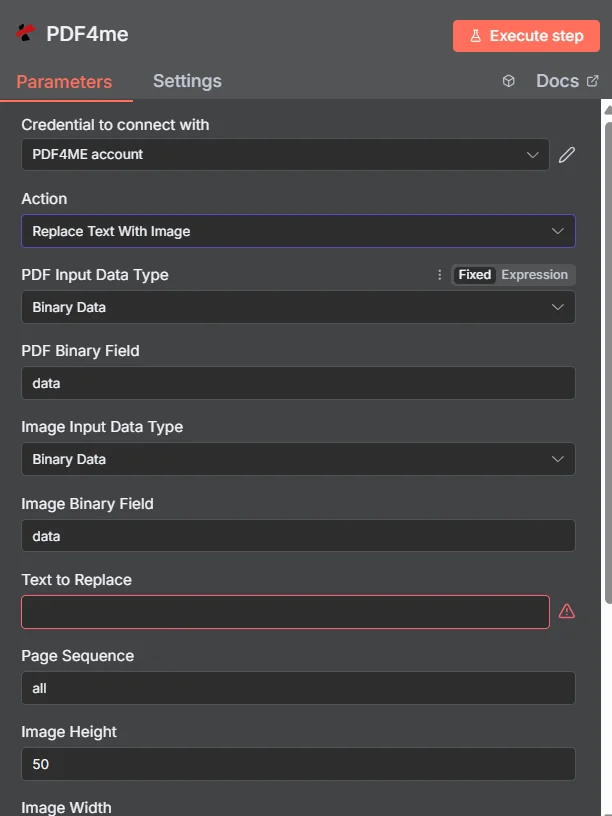
PDF4me Metni Görüntüyle Değiştir düğümünün parametreler panelinde n8n
Metni Görüntüyle Değiştirme İşlevi Hangi Parametreleri Gerektirir?
Gerekli: PDF Giriş Veri Türü, Görüntü Giriş Veri Türü, Değiştirilecek Metin, Görüntü Yüksekliği, Görüntü Genişliği ve Çıkış Dosya Adı. Koşullu alanlar yalnızca üst Giriş Veri Türü seçildiğinde görünür. Sayfa Sırası, Asyncve İkili Veri Çıkış Adı seçenekleri isteğe bağlıdır ve varsayılan değerlerle çalışır.
| Parametre | Gerekli | Ne işe yarar? | Örnek |
|---|---|---|---|
| PDF Input Data Type | Required | Format of the source PDF input. Choose Binary Data (from a previous node), Base64 String, or URL. | Binary Data |
| PDF Binary Field | Conditional | Name of the binary property on the incoming n8n item that holds the source PDF. Required when PDF Input Data Type is Binary Data. | data |
| Base64 PDF Content | Conditional | Base64-encoded source PDF content. Required when PDF Input Data Type is Base64 String. | JVBERi0xLjQK... |
| PDF URL | Conditional | Publicly reachable HTTPS URL to the source PDF. Required when PDF Input Data Type is URL. | https://example.com/sample.pdf |
| Image Input Data Type | Required | Format of the replacement image input. Choose Binary Data, Base64 String, or URL, independent of the PDF input type. | Binary Data |
| Image Binary Field | Conditional | Name of the binary property on the incoming n8n item that holds the replacement image. Required when Image Input Data Type is Binary Data. | data |
| Base64 Image Content | Conditional | Base64-encoded replacement image content. Required when Image Input Data Type is Base64 String. | /9j/4AAQSkZJRgAB... |
| Image URL | Conditional | Publicly reachable HTTPS URL to the replacement image. Required when Image Input Data Type is URL. | https://example.com/logo.png |
| Text to Replace | Required | The exact text string to find and replace with the image, matched precisely including case and punctuation. | [LOGO_HERE] |
| Page Sequence | Optional | Pages to search for the placeholder. Use all, specific pages (1,3,5), or a range (1-5). Default all. | all |
| Image Height | Required | Height in pixels to scale the replacement image to, maintaining aspect ratio. | 50 |
| Image Width | Required | Width in pixels to scale the replacement image to, maintaining aspect ratio. | 100 |
| Output File Name | Required | Filename for the resulting PDF, must include the .pdf extension. | replace_text_with_image.pdf |
| Async | Optional | Enables background processing for large PDFs. Default false. | false |
| Binary Data Output Name | Optional | Name of the binary property the output item exposes. Default is data. | data |
Çıkış Alanları
Başarılı bir koşu bir getiri sağlar. n8n eşya taşıma JSON meta veriler ve güncellenmiş ikili dosya PDF.
| Alan | Tip | İçeriğinde neler var? |
|---|---|---|
success | Boolean | True when the replacement succeeded. Use to route error-handling branches. |
message | String | Human-readable status message for the replacement result. |
fileName | String | Generated filename, matching Output File Name. |
mimeType | String | MIME type of the output, always application/pdf. |
fileSize | Number | Size of the resulting PDF in bytes. |
pagesProcessed | Number | Number of pages searched for the placeholder text. |
Binary (data) | Binary | The updated PDF under Binary Data Output Name (default data). Pass into Write Binary File, Email, or any cloud-storage upload. |
Metni Resimle Değiştirme Özelliğini Nasıl Kurarım? n8n?
- Eklemek PDF4me senin n8n iş akışını seçin ve Metni Resimle Değiştir aksiyon.
- İçinde Bağlantı kurmak için kimlik bilgisi, sizinkini seçin PDF4me kimlik bilgileri veya tıklayın Yeni Kimlik Bilgisi Oluştur ve yapıştırın API anahtar.
- Ayarlamak PDF Giriş Veri Türü ve kaynağı sağlayın PDF aracılığıyla PDF İkili Alan, Base64 PDF İçerik, veya PDF URL.
- Ayarlamak Görüntü Giriş Veri Türü ve yedek görüntüyü şu yolla sağlayın: Görüntü İkili Alanı, Base64 Görüntü İçeriği, veya Görüntü URL.
- Girmek Değiştirilecek Metin tam olarak göründüğü gibi PDFve ayarla Sayfa Sırası Eğer belirli sayfaları hedeflemeniz gerekiyorsa.
- Ayarlamak Görüntü Yüksekliği Ve Görüntü Genişliği Değiştirilecek görüntüyü ölçeklendirmek ve ayarlamak için Çıktı Dosya Adı.
- Olanak vermek Async büyük için PDFs Gerekirse düğümü çalıştırın ve güncellenmiş yönlendirmeyi gerçekleştirin. PDF Bir sonraki adıma geçiyoruz.
Tipik Kurulumlar
İş Akışı ÖrnekleriCommon n8n workflow patterns using Replace Text With Image.
- Bir müşteri için yeni bir teklif oluşturulduğunda CRM webhook'u tetiklenir.
- PDF4me "Metni Resimle Değiştir" işlevi, "Değiştirilecek Metin" ayarıyla birlikte çalışır.
[MÜŞTERİ_LOGOSU]ve Görüntü Giriş Veri Türü URL Müşterinin logosunu işaret ederek. - Markalı teklif, son inceleme için satış temsilcisine e-posta ile gönderilir.
- Sözleşme şu yolla oluşturulur: PDF4me Belgeyi şu şekilde oluşturun:
[İMZA]Yer tutucu. - PDF4me Metni Görüntüyle Değiştir özelliği, imzalayanın imza görüntüsüyle ve Sayfa Sıralaması özelliğiyle yalnızca son sayfayı hedefleyerek çalışır.
- İmzalanmış gibi görünen sözleşme arşivlenmiştir. SharePoint.
- Bir "Öğeler Üzerinde Döngü" düğümü, envanter veritabanındaki ürün kayıtları üzerinde yineleme yapar.
- PDF4me Metni Resimle Değiştir işlemi, öğe başına çalışır ve bir resmi değiştirir.
[ÜRÜN_RESMİ]Bulut depolamadan alınan her ürünün fotoğrafını içeren yer tutucu. - Her kişiselleştirilmiş katalog sayfası, aşağı akışta tek bir dağıtılabilir dosyada birleştirilir. PDF.
- Bir yönetici, dahili bir araçta bir belgeyi onaylanmış olarak işaretlediğinde bir onay webhook'u tetiklenir.
- PDF4me "Metni Resimle Değiştir" işlemi şu şekilde çalışır:
[ONAY_DAMGASI]Yer tutucu, onay grafiğiyle değiştirildi. - Son halini alan PDF Dosya adında onay tarihi de yer alarak arşivlenir.
Pratik İpuçları
Kopya Kağıdı
| Alan | Değer |
|---|---|
| Action | Replace Text With Image |
| PDF Input Data Type | Binary Data |
| PDF Binary Field | data |
| Image Input Data Type | Binary Data |
| Image Binary Field | data |
| Text to Replace | [LOGO_HERE] |
| Page Sequence | all |
| Image Height | 50 |
| Image Width | 100 |
| Output File Name | replace_text_with_image.pdf |
| Credentials | PDF4me API credential |