Ek dosyaya ekle PDF içinde n8n
Ek dosyaya ekle PDF bir PDF4me düğüm eylemi n8n bir veya daha fazla dosyayı içine yerleştiren PDFYani bir elektronik tablo, resim, arşiv veya ikinci bir dosya. PDF Belgeyle birlikte değil, onunla birlikte seyahat eder. Destekleyici kanıtları bir sözleşmeyle birlikte paketlemek, ham verileri bir raporun yanına göndermek veya sertifikaları bir uyumluluk dosyasıyla birlikte paketlemek için kullanın.
Bu düğüm ne işe yarıyor?
PDF4me: Ek Dosya Ekle PDF ev sahibini alır PDF İkili Verilerden, bir Base64 Stringveya bir URLArdından, listelediğiniz her dosyayı altına yerleştirir. Ekler İçinde ayrı bir nesne olarak yer alır. Birleştirmeden farklı olarak, eklenen dosyalar kendi biçimlerini ve dosya adlarını korur ve alıcı tarafından ayrı ayrı açılabilir veya kaydedilebilir. Her ek farklı bir kaynaktan gelebilir, bu nedenle önceki bir düğümden gelen ikili bir dosya ve bir sonraki düğümden alınan bir dosya olabilir. URL Aynı çalıştırma içine yerleştirilebilirler.
Kimliğinizi Doğrulama API Rica etmek
Her PDF4me düğümde n8n geçerli bir belge gerektirir Bağlantı kurmak için kimlik bilgisi. İçeriğinizi barındıran birini oluşturun veya seçin. PDF4me API Bu sayede iş akışı, ek dosya isteklerini güvenli bir şekilde doğrulayabilir.
Kaçırmamanız Gereken Önemli Bilgiler
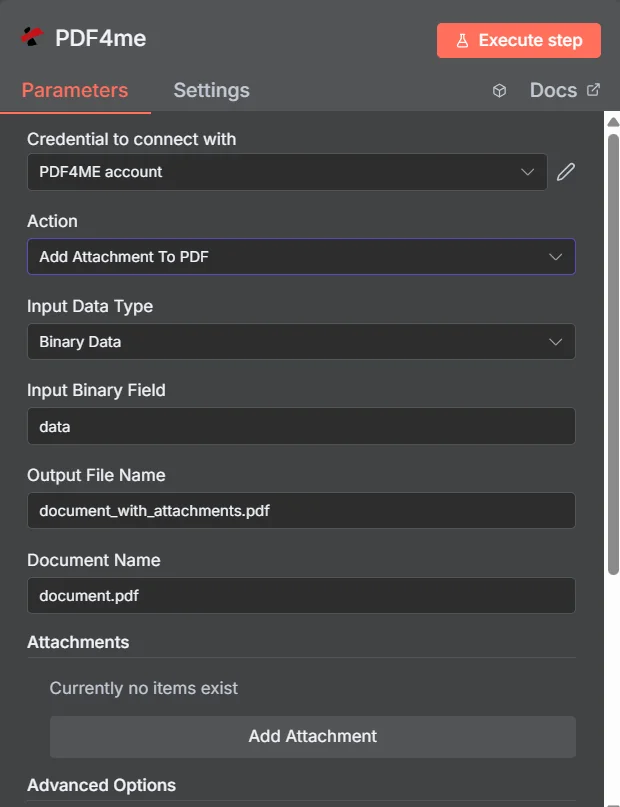
PDF4me Ek Dosya Ekle PDF parametreler panelinde n8nİlk giriş eklenmeden önce Ekler koleksiyonu boştur.
Ekleme, Birleştirme ve Fermuarla Birleştirme
Birden fazla dosyayı tek bir dosya olarak göndermenin, alıcı için farklı sonuçlar doğuracak üç yolu.
| Yaklaşmak | Alıcının elde ettiği şey | En uygun olan |
|---|---|---|
| Add Attachment to PDF | One PDF that opens normally, with the extra files available in the attachments panel | Supporting material that must stay in its original format, such as a spreadsheet or an archive |
| Merge PDFs | One continuous document where all pages read in sequence | Content that genuinely belongs together as a single readable document |
| Zip the files together | An archive that must be unpacked before anything can be read | Bulk transfer where nothing needs to be readable without extracting first |
Ek dosya ekleme işlemi hangi parametrelere uygulanır? PDF İhtiyaç?
Gerekli: İşlem, Giriş Veri Türü, bu giriş türüyle eşleşen alan, Çıkış Dosya Adı, Belge Adı ve Ekler altında en az bir giriş. İkili Veri Çıkış Adı ve Özel Profiller varsayılan çalışma değerlerini içerir.
| Parametre | Gerekli | Ne işe yarar? | Örnek |
|---|---|---|---|
| Action | Required | Selects the PDF4me node action to run. Choose Add Attachment To PDF. | Add Attachment To PDF |
| Input Data Type | Required | Format of the host PDF input. Choose Binary Data (from a previous node), Base64 String, or URL. | Binary Data |
| Input Binary Field | Conditional | Name of the binary property on the incoming n8n item that holds the host PDF. Required when Input Data Type is Binary Data. Defaults to data. | data |
| Base64 Document Content | Conditional | Base64-encoded content of the host PDF. Required when Input Data Type is Base64 String. | JVBERi0xLjQK... |
| File URL | Conditional | Publicly reachable HTTPS URL to the host PDF. Required when Input Data Type is URL. | https://example.com/contract.pdf |
| Output File Name | Required | Filename for the PDF returned with the files embedded. Include the .pdf extension. | document_with_attachments.pdf |
| Document Name | Required | Filename of the source PDF, used for reference and tracking on the request. | document.pdf |
| Attachments | Required | Collection of files to embed. Click Add Attachment once per file, then fill in the per-attachment fields listed below. | One entry per embedded file |
| Binary Data Output Name | Optional | Name of the binary property the output item exposes. Defaults to data. | data |
| Custom Profiles | Optional | Advanced Options field for extra processing settings, supplied in a JSON-like format. Leave blank unless you have a specific profile to apply. | { "preserveMetadata": true } |
Her Ek Girişinin İçindeki Alanlar
Oluşturduğunuz her girişle ilgili olarak Ek dosya ekle Kendi alanlarını ortaya koyar.
| Parametre | Gerekli | Ne işe yarar? | Örnek |
|---|---|---|---|
| Attachment Content Type | Required | How this particular attachment is supplied. Choose Binary Data, Base64 Content, or File URL. Each entry can differ. | Binary Data |
| Attachment Name | Required | Filename the embedded file will carry inside the PDF. Include the correct extension so readers can open it after extraction. | supporting_data.xlsx |
| Binary Field Name | Conditional | Name of the binary property holding this attachment. Required when Attachment Content Type is Binary Data. | data |
| Base64 Content | Conditional | Base64-encoded content of this attachment. Required when Attachment Content Type is Base64 Content. | SGVsbG8gV29ybGQ= |
| File URL | Conditional | Publicly reachable HTTPS URL to this attachment. Required when Attachment Content Type is File URL. | https://example.com/certificate.pdf |
Çıkış Alanları
Başarılı bir koşu bir getiri sağlar. n8n eşyayı taşıyan PDF Gömülü dosyalarıyla birlikte.
| Alan | Tip | İçeriğinde neler var? |
|---|---|---|
Binary (data) | Binary | The PDF with all listed files embedded, under Binary Data Output Name (default data). |
fileName | String | Generated filename, matching Output File Name. |
mimeType | String | MIME type of the output, always application/pdf. |
fileSize | Number | Size of the returned PDF in bytes, including the embedded files. |
attachmentCount | Number | Number of attachments successfully embedded. Compare it against your expected count to catch a silently skipped file. |
success | Boolean | True when the attachment operation completed, false on failure. Use it to branch error handling. |
message | String | Human-readable status message, carrying success confirmation or error detail. |
Ek dosya ekleme işlemini nasıl ayarlayabilirim? PDF içinde n8n?
- Eklemek PDF4me senin n8n iş akışını seçin ve Ek Dosya Ekle PDF aksiyon.
- İçinde Bağlantı kurmak için kimlik bilgisi, sizinkini seçin PDF4me kimlik bilgileri veya tıklayın Yeni Kimlik Bilgisi Oluştur ve yapıştırın API anahtar.
- Ayarlamak Giriş Veri Türü ile İkili Veri (varsayılan), Base64 String, veya URL ve uygun ev sahibini sağlayın PDF alan.
- Altında Ekler, tıklamak Ek dosya ekle Her dosya için bir kez, ardından ayarını yapın. Ek İçerik Türü, Ek Adıve eşleşen kaynak alanı.
- Ayarlamak Çıktı Dosya Adı (şununla bitmeli)
.pdf) Ve Belge Adı Kaynak dosya için. - Düğümü çalıştırın ve döndürülen sonucu yönlendirin. PDF ileriye, kontrol et
attachmentCountBeklediğiniz dosya sayısına karşılık.
Tipik Kurulumlar
İş Akışı ÖrnekleriCommon n8n workflow patterns using Add Attachment to PDF.
- Bir fatura PDF Faturalama verilerinden oluşturulmuştur.
- Ek dosyaya ekle PDF İlgili makbuzları ve onay kaydını içerir.
- Dosyalardan biri, tüm kanıt iziyle birlikte muhasebe departmanına gönderilir.
- Planlanmış bir analiz raporu şu amaçla oluşturulur: PDF.
- Ek dosyaya ekle PDF altta yatanı yerleştirir CSV Adlandırılmış bir ek olarak dışa aktarın.
- Okuyucular anlatıyı anlıyor ve istedikleri zaman doğruluğunu teyit etmek için ham sayıları çıkarabiliyorlar.
- İmza talebi üzerine bir şablon kullanılarak sözleşme oluşturulur.
- Ek dosyaya ekle PDF Sertifikaları ve programları şuradan çekerek yerleştirir: URLs.
- Karşı taraf imzalamak üzere tek ve eksiksiz bir belge alır.
- "Öğeler Üzerinde Döngü" düğümü, bir dosyalama dönemi için kanıt dosyalarını toplar.
- Ek dosyaya ekle PDF Her birini dosyalama belgesinin içine yerleştirir.
- Paket arşivlendi ve Ek Dosyayı Çıkarma işlemi gerçekleştirildi. PDF İsteğiniz üzerine daha sonra paketinden çıkarabiliriz.
Pratik İpuçları
Kopya Kağıdı
| Alan | Değer |
|---|---|
| Action | Add Attachment To PDF |
| Input Data Type | Binary Data |
| Input Binary Field | data |
| Output File Name | document_with_attachments.pdf |
| Document Name | document.pdf |
| Attachments | One entry per file, added with Add Attachment |
| Attachment Content Type | Binary Data |
| Attachment Name | supporting_data.xlsx |
| Binary Data Output Name | data |
| Credentials | PDF4me API credential |