Yaratmak ZUGFeRD Fatura Make
Yaratmak ZUGFeRD Fatura bir Make modül tarafından PDF4me hibrit üreten ZUGFeRD/Factur-X e-faturalar CSV, JSON, veya XML Fatura verileri. Bunu kullanarak bir fatura oluşturun. PDF/A-3 makine tarafından okunabilir belge XML İçine yerleştirilmiş, hizalanmış EN 16931 Avrupa e-fatura standardı. Alıcınızın veya tedarikçinizin ihtiyaçlarına uygun uyumluluk seviyesini ve spesifikasyon sürümünü seçin. ERP Sistem gerektiriyor.
Bu modülün işlevi
PDF4meBir tane oluşturun. ZUGFeRD fatura Hibrit e-faturaları doğrudan sisteminiz içinde oluşturur. Make Senaryo. Fatura verilerini şu şekilde sağlayın: CSV, JSON, veya XMLBu modül bir sonuç üretir. PDF/A-3 makine tarafından okunabilir bir belgeye sahip ZUGFeRD XML içine gömülü dosyaveya bir XML-sadece şu çıktı için ERP Kendi görüntü oluşturma işlemlerini yöneten sistemler. Sonuç, şunlarla uyumludur: EN 16931 Avrupa e-fatura standardı olarak kabul edilmektedir. Factur-X Fransa'da ve AB pazarlarında. Uygunluk seviyeleri ve spesifikasyon sürümü, alıcınızın veya kamu sektörü alıcınızın gereksinimlerine tam olarak uyacak şekilde yapılandırılabilir.
Kimliğinizi Doğrulama API Rica etmek
Her PDF4me modül içinde Make geçerli bir belge gerektirir Bağlantı. İçeriğinizi barındıran birini oluşturun veya seçin. PDF4me API Bu sayede senaryo, fatura oluşturma hizmetini güvenli bir şekilde çağırabilir.
Kaçırmamanız Gereken Önemli Bilgiler
Hibrit çıktı bir PDF/A-3 belge. ZUGFeRD XML Dosyanın içine uyumlu bir ek olarak yerleştirilmiştir. ERP sistemler çıkarır XML otomatik olarak; insanlar yine de açıp okuyabilirler. PDF herhangi bir standart görüntüleyicide. Ayarlayın. Faturayı PDF olarak oluştur Fatura kalemlerinin sayfada görsel olarak çizilmesini istiyorsanız "Evet" seçeneğini işaretleyin.
Sürüm 1.0 destekliyor TEMEL, KONFORLU, GENİŞLETİLMİŞ. Sürüm 2+ genişletilebilir MİNİMUM, TEMEL, TEMEL, EN16931, UZATILMIŞ, XRECHNUNG. XRECHNUNG Ve EN16931 Almanya'da kamu sektörü faturalaması için gereklidir. Sürüm ve seviyeyi her zaman alıcı sistemin beklediğiyle eşleştirin.
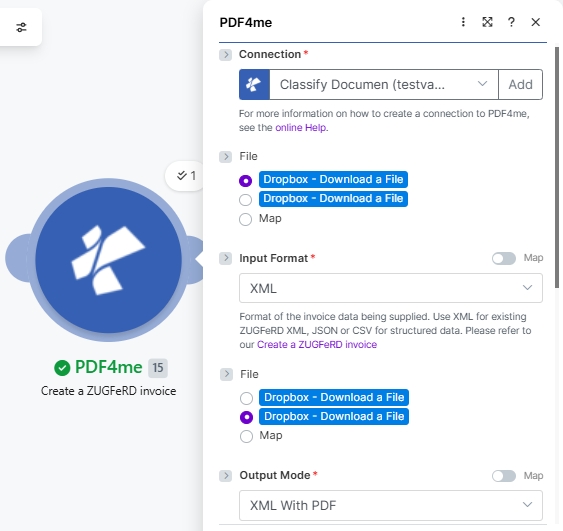
Seçmek XML gösterir Fatura XML Verileri alan; JSON Fatura JSON verilerini gösterir; CSV Fatura CSV verilerini gösterir. Yalnızca seçtiğiniz formata uyan alanı doldurun. Kullanırken XML Bu modül aynı zamanda bir format da sunar. Dosya radyoyu çekebilesiniz XML Dropbox'tan doğrudan veya önceki bir modülden eşleştirerek kullanabilirsiniz.
Hangi ZUGFeRD Hangi sürümü kullanmalıyım?
Bu modül iki spesifikasyon sürümünü desteklemektedir. Yeni entegrasyonların çoğu 2.0 ve üzeri sürümleri kullanmalıdır; 1.0 sürümü ise eski sürümlerle birlikte çalışabilirlik için saklanmıştır.
ZUGFeRD 2.0+ TAVSİYE EDİLEN
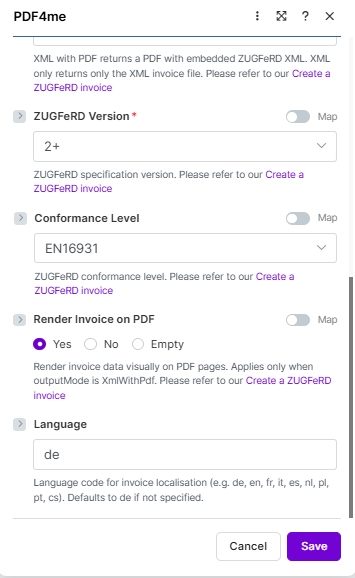
Mevcut teknik özellikler. Uygunluk seviyeleri: MİNİMUM, TEMELWL, TEMEL, EN16931 (Rahatlık, Alman hukukunda varsayılan değerdir.) UZATILMIŞ, XRECHARGEÇapraz uyumlu Factur-XŞununla eşleştirin: 2.0 XML örnek, 2.0 EN16931 JSON örnek, veya 2.0 CSV örnekAşağıdaki ekran görüntüleri, 2.0+ kullanıcı arayüzünün bugün nasıl göründüğünü tam olarak göstermektedir.
ZUGFeRD 1.0 MİRAS
ÖncesiEN 16931 Teknik özellikler. Uygunluk seviyeleri: TEMEL, KONFOR, UZATILMIŞYalnızca alıcının olduğu durumlarda kullanın. ERP veya alıcı sistemi açıkça 1.0 sürümünü gerektiriyor (2022'den sonra nadir). Şununla eşleştirin: 1.0 XML örnek, o temel JSON örnekveya 1.0 CSV örnekDiğer tüm alanlar aynı şekilde çalışır; yalnızca uyumluluk düzeyi açılır menüsü değişir.
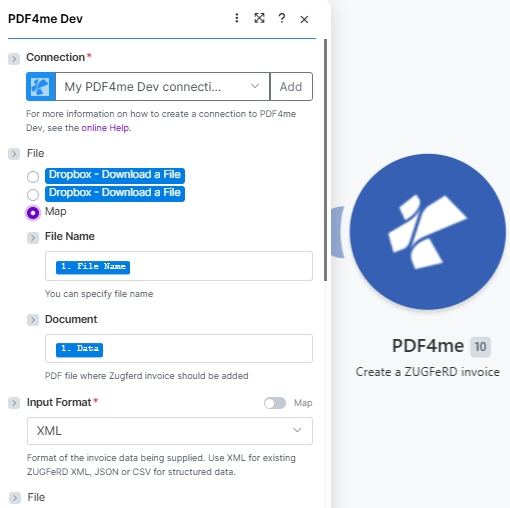
Şununla başlayın: Bağlantıdaha sonra tabanı haritalandırın PDF (Dosya adı, Belge) ve ayarla Giriş Formatı (Burada XML).
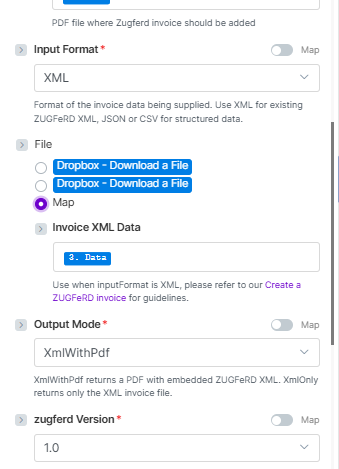
İle Dosya = Harita, harita Fatura XML Verileri, ayarlamak Çıkış Modu (XmlWithPdf veya Yalnızca XML), ardından seçin zugferd Sürüm (Burada 1.0).
Parametreler
Gerekli: Bağlantı, Giriş Formatı, Çıkış Modu, ZUGFeRD SürümFatura veri alanı (Fatura XML Verileri, Fatura JSON Verileri, veya Fatura CSV VerileriBu alan, Giriş Biçimi seçimlerinize bağlı olarak dinamik olarak görünür. Sadece eşleşen alanın doldurulması gerekir.
Neden Dosya 2.0+ ekran görüntülerinde iki kez mi görünüyor? Giriş Biçimi şu olduğunda XML ve Dosya şu şekilde ayarlanmıştır: HaritaBu modül, hem (a) temel hem de (b) dosya seçiciyi eşleştirebilmeniz için ikinci bir dosya seçici oluşturur. PDF o ZUGFeRD faturanın içine yerleştirilmesi ve (b) kaynağın belirtilmesi gerekmektedir. ZUGFeRD XML Dosya. Her iki seçici de aynı radyo seçeneklerini sunar. Giriş Biçimi şu olduğunda: JSON veya CSV İkinci seçici, karşılık gelen seçiciyle değiştirilir. Fatura JSON Verileri veya Fatura CSV Verileri metin alanı.
| Parametre | Gerekli | Ne işe yarar? | Örnek / Seçenekler |
|---|---|---|---|
| Connection | Required | PDF4me API connection used to authenticate invoice generation requests. Click Add and paste your API key if connecting for the first time. | Your PDF4me connection |
| File | Conditional | Source of the base PDF where the ZUGFeRD invoice will be embedded (when Output Mode is XmlWithPdf). Radio button with two options: Dropbox - Download a File (pulls directly from a Dropbox account without a prior download step) or Map (supplies the PDF from a prior module. Dropbox, Google Drive, OneDrive, HTTP, etc.). Choose Map for the most flexible workflow. When Map is selected, the two sub-fields below appear. | Map |
| File → File Name | Conditional | Sub-field of File (visible when Map is selected). Filename of the base PDF including the .pdf extension. Map from the prior module's filename output. for example, the File Name field of a Dropbox or Google Drive Download module. | 1. File Name |
| File → Document | Conditional | Sub-field of File (visible when Map is selected). Binary PDF content where the ZUGFeRD XML will be embedded. Map from the prior module's binary data field. typically the Data field of Dropbox, Google Drive, or OneDrive download modules. Hint shown in module: "PDF file where Zugferd invoice should be added". | 1. Data |
| Input Format | Required | Format of the invoice data being supplied. Use XML for existing ZUGFeRD XML; JSON or CSV for structured data. Hint: "Format of the invoice data being supplied. Use XML for existing ZUGFeRD XML, JSON or CSV for structured data." | XML sampleXML 2.0 sampleJSON 2.0 EN16931 sampleJSON (basic)CSV sampleCSV 2.0 sample |
| Invoice XML Data | Conditional | The ZUGFeRD XML invoice content to embed. Appears when Input Format = XML and File = Map. Hint: "Use when inputFormat is XML, please refer to our Create a ZUGFeRD invoice for guidelines." Map from a prior Dropbox download or HTTP module output. | XML sampleXML 2.0 sample3. Data (mapped) |
| Invoice JSON Data | Conditional | Structured invoice data in JSON format. Appears when Input Format = JSON. Map a JSON string from a Google Sheets, Airtable, or HTTP module. See sample JSON below. | JSON 2.0 EN16931 sampleJSON (basic)(mapped JSON string) |
| Invoice CSV Data | Conditional | Invoice row data in CSV format. Appears when Input Format = CSV. Map a CSV row from an iterator, Google Sheets, or file download module. See sample CSV below. | CSV sampleCSV 2.0 sample(mapped CSV row) |
| Output Mode | Required | XML With PDF (a.k.a XmlWithPdf in API requests) returns a PDF/A-3 file with the ZUGFeRD XML embedded inside, the standard hybrid e-invoice. XML Only (XmlOnly) returns just the XML invoice file without a PDF wrapper. Hint shown in module: "XML with PDF returns a PDF with embedded ZUGFeRD XML. XML only returns only the XML invoice file." | XML With PDF |
| ZUGFeRD Version | Required | ZUGFeRD specification version. Set to match what the recipient ERP or buyer system expects. Latest is 2+; legacy 1.0 also supported. The two have different conformance level sets (see table below). | 2+ |
| Conformance Level | Optional | ZUGFeRD conformance profile. Available levels differ by version. For 2+, EN16931 (Comfort) is the default for German legal e-invoicing compliance. See the Conformance Level Reference table below. Defaults to BASIC if not specified. | EN16931 |
| Render Invoice on PDF | Optional | When set to Yes, invoice line items are drawn visually on the PDF pages. Applies only when Output Mode is XmlWithPdf. Options: Yes, No, Empty. Hint: "Render invoice data visually on PDF pages. Applies only when outputMode is XmlWithPdf." | Yes |
| language | Optional | Two-letter locale code for invoice label localisation. Supported: de, en, fr, it, es, nl, pl, pt, cs. Hint: "Language code for invoice localisation (e.g. de, en, fr, it, es, nl, pl, pt, cs). Defaults to de if not specified." | de |
Uygunluk Seviyesi Referansı
Mevcut uygunluk seviyeleri farklılık göstermektedir. zugferd SürümSeviyeyi her zaman alıcınızın veya müşterinizin seviyesine göre ayarlayın. ERP Sistem gerektiriyor.
| Seviye | Kullanım alanları: |
|---|---|
BASIC | Mandatory EN 16931 fields only. Widest compatibility, safe default. |
COMFORT | Adds optional fields for line-item detail and additional references. |
EXTENDED | Full field set for complex B2B invoices with delivery, allowances, and charges. |
| Seviye | Kullanım alanları: |
|---|---|
MINIMUM | Absolute minimum fields. Buyer reference and totals only. |
BASICWL | BASIC without line items. Header-level data only. |
BASIC | Mandatory EN 16931 fields. Recommended starting point. |
EN16931 | Full EN 16931 compliance for cross-border and public sector. |
EXTENDED | Full field set including German-specific extensions. |
XRECHNUNG | German public-sector e-invoice mandate (XRechnung profile). |
Örnek Fatura Dosyaları
Canlı veri kaynağınızı bağlamadan önce modülü her giriş formatıyla test etmek için bu örnek dosyaları kullanın. Alman B2B üretim iş akışları için şunlarla başlayın: örnek-fatura-zugferd-2.0-en16931.json (ZUGFeRD 2.0, EN16931 uygunluk).
ZUGFeRD-fatura-örneği.xmlZUGFeRD-fatura-örneği-2.0.xmlörnek-fatura-zugferd-2.0-en16931.jsonörnek-fatura.jsontest-fatura.csvzugferd-fatura-2.0.csvCSV Sütun Referansı
O CSV Girişler tam olarak bu sütun sırasına uymalıdır. Her satır bir fatura oluşturur.
| Kolon | Tanım | Örnek |
|---|---|---|
InvoiceId | Unique invoice identifier | INV-2025-001 |
IssueDate | Invoice issue date (YYYY-MM-DD) | 2025-01-15 |
SellerName | Seller company name | Test Company |
SellerStreet | Seller street address | 123 Main St |
SellerCity | Seller city | Test City |
SellerPostalCode | Seller postal / ZIP code | 12345 |
SellerCountry | ISO 3166-1 alpha-2 country code | DE |
SellerVatId | Seller VAT registration number | DE123456789 |
BuyerName | Buyer company or person name | Customer Inc |
BuyerStreet | Buyer street address | 456 Oak Ave |
BuyerCity | Buyer city | Customer City |
BuyerPostalCode | Buyer postal / ZIP code | 67890 |
BuyerCountry | ISO 3166-1 alpha-2 country code | DE |
ProductName | Line item product or service name | Test Product |
Quantity | Quantity of the line item | 10.0 |
UnitPrice | Net unit price | 9.90 |
TaxPercent | VAT / tax percentage | 19.0 |
Currency | ISO 4217 currency code | EUR |
PaymentReference | Payment reference string | PAY-REF-001 |
IBAN | Payee IBAN for bank transfer | DE08700901001234567890 |
BIC | Payee bank BIC / SWIFT code | GENODEF1M04 |
JSON Fatura Yapısı
Kullanırken Giriş Formatı: JSONYük, aşağıdaki üst düzey anahtarları içermelidir. Tüm iç içe nesneler ve diziler, örnek dosyada gösterilen yapıyı takip eder.
| Anahtar | Tip | Tanım |
|---|---|---|
InvoiceId | String | Unique invoice number, e.g. "471102" |
IssueDate | String (ISO 8601) | Invoice date, e.g. "2013-03-05T00:00:00" |
InvoiceType | String | Document type label, e.g. "RECHNUNG" |
TypeCode | String | UN/EDIFACT document type code. 380 for standard invoice |
IsTest | Boolean | true for test runs, false / omit for production |
Notes | Array of strings | Free-text notes shown in the invoice header (payment terms, GLN, etc.) |
Seller | Object | Seller party: Name, Address (Street, City, PostalCode, Country), TaxId, VatId, GLN |
Buyer | Object | Buyer party: Name, Address (Street, City, PostalCode, Country, LineTwo), GLN |
Payment | Object | Payment details: PaymentReference, Currency, IBAN, BIC |
DeliveryDate | String (ISO 8601) | Actual delivery date, e.g. "2013-03-05T00:00:00" |
LineItems | Array of objects | Invoice lines. each with Quantity, UnitCode, UnitPrice, LineTotal, ProductName, GTIN, SellerProductId |
Totals | Object | Monetary totals: LineTotal, ChargeTotal, AllowanceTotal, TaxBasisTotal, TaxTotal, GrandTotal, TaxPercent, Currency |
Nasıl oluştururum? ZUGFeRD faturada Make?
- Eklemek PDF4me → Bir tane oluşturun ZUGFeRD fatura Senaryonuza göre.
- Seçme Bağlantı (veya tıklayın) Eklemek sizinle bir tane oluşturmak için API anahtar).
- Seçmek Giriş Formatı. XML, JSON, veya CSVGörüntülenecek veri alanı bu seçime bağlıdır.
- Ayarlamak Dosya ile Harita ve önceki modül çıktısından fatura veri alanını (Fatura XML Verisi / JSON Verisi / CSV Verisi) bağlayın. Veya seçin. Dropbox - Dosya İndir Dosyayı doğrudan Dropbox'tan çekmek.
- Ayarlamak Çıkış Modu ile XmlWithPdf hibrit için PDF/A-3 fatura veya Yalnızca XML için XML sadece.
- Ayarlamak zugferd Sürüm (1.0 veya 2+) ise seçin Uygunluk Seviyesi Sürüme uygun setten. ile başlayın TEMEL.
- XmlWithPdf kullanıyorsanız: ayarlayın Faturayı PDF olarak oluştur ile Evet Çizgi öğelerini görsel olarak çizmek ve ayarlamak dil hedef yerel ayarınıza (örneğin,
de,en,fr). - Kaydetmek ve tıklayın Bir kez çalıştırRotayı belirleyin. Belge Verileri Dropbox, Google Drive ve diğer platformlara çıktı gönder ERP Web kancası veya e-posta modülü.
Çıkış Alanları
| Alan | Tip | İçeriğinde neler var? |
|---|---|---|
Document Name | String | Filename of the generated invoice file. e.g. invoice-471102.pdf or invoice-471102.xml. |
Document Data | Buffer | Binary content of the ZUGFeRD hybrid PDF/A-3 or XML file. Map into an upload, email attachment, or ERP HTTP module for the next step in your scenario. |
İş Akışı Örnekleri
İş Akışı ÖrnekleriCommon Make scenario patterns using Create ZUGFeRD Invoice for automated e-invoicing.
- Siparişiniz sizin sisteminizde gönderildi olarak işaretlendi. ERP veya Airtable. senaryo tetiklenir.
- Ürün kalemleri, fiyatlandırma, alıcı adresi ve vergi verileri alınarak bir araya getirilir. JSON yük.
- Yaratmak ZUGFeRD fatura Giriş Biçimi ile çalışır JSONÇıkış Modu XmlWithPdf, sürüm 2+Uygunluk Seviyesi TEMEL, dil
ile ilgili. - Hibrit PDF Alıcıya Gmail üzerinden e-posta ile gönderilir ve bir kopyası da Google Drive'daki fatura arşivine yüklenir.
- Muhasebe bir şeyi düşürüyor CSV Aylık faturaların dosyasını Dropbox'a yükleyin.
- Dosya İzleme tetikleyicisi yeni dosyayı algılar ve bir Yineleyici her satırı işler.
- Yaratmak ZUGFeRD fatura Giriş Biçimi ile satır başına çalıştırılır CSVbir hibrit üreterek PDF fatura başına.
- Tüm PDFs Veriler yapılandırılmış bir arşiv klasörüne yüklenir ve finans ekibine tamamlanma özeti içeren bir e-posta gönderilir.
- Bir Airtable kaydından devlet sözleşmesi faturası tetiklenir.
- Yaratmak ZUGFeRD fatura Giriş Biçimi ile çalışır JSONÇıkış Modu Yalnızca XML, sürüm 2+Uygunluk Seviyesi XRECH.
- O XML Dosya, alıcının Peppol uyumlu cihazına doğrudan POST yöntemiyle gönderilir. ERP API aracılığıyla bir HTTP modül.
- Başarılı veya başarısız yanıt, finans ekibinin incelemesi için bir Google Sheets tablosuna kaydedilir.