Görüntü - Döndürme EXIF Veri - Otomatik Yönlendirme Make
Döndürme EXIF Veri bir Make modül tarafından PDF4me bu şunu okuyor EXIF Bir yönlendirme etiketi JPG veya PNG Görüntüyü düzeltir ve otomatik olarak doğru dikey konuma döndürür. Fotoğraflarınızı galeriye, baskı işine veya başka bir yere göndermeden önce yan dönmüş hallerini düzeltmek için kullanabilirsiniz. PDFManuel döndürme açısı gerektirmeden.
Bu modülün işlevi
PDF4me Döndürme EXIF Veri Görüntü döndürme işlemini otomatik olarak gerçekleştirir. EXIF yönlendirme meta verileri içinde Make senaryoları okuyor. EXIF Görüntülerden (akıllı telefon ve fotoğraf makinelerinde sıkça görülen) yönlendirme etiketini alır ve doğru döndürmeyi uygulayarak fotoğrafın doğru şekilde görüntülenmesini, baskı hazırlığını, web yayıncılığını ve otomatik yönlendirme düzeltme iş akışlarını mümkün kılar.
Kimliğimi nasıl doğrularım? Make Senaryo?
Erişmek için PDF4me Web API başından sonuna kadar MakeHer talep geçerli bir bilgi içermelidir. Bağlantı elinizde tuttuğunuz PDF4me API Bu, sizin ve sizin aranızda güvenli ve kimlik doğrulamalı iletişimi sağlar. Make senaryo ve PDF4me'ın görüntü döndürme hizmeti.
Kaçırmamanız Gereken Önemli Bilgiler
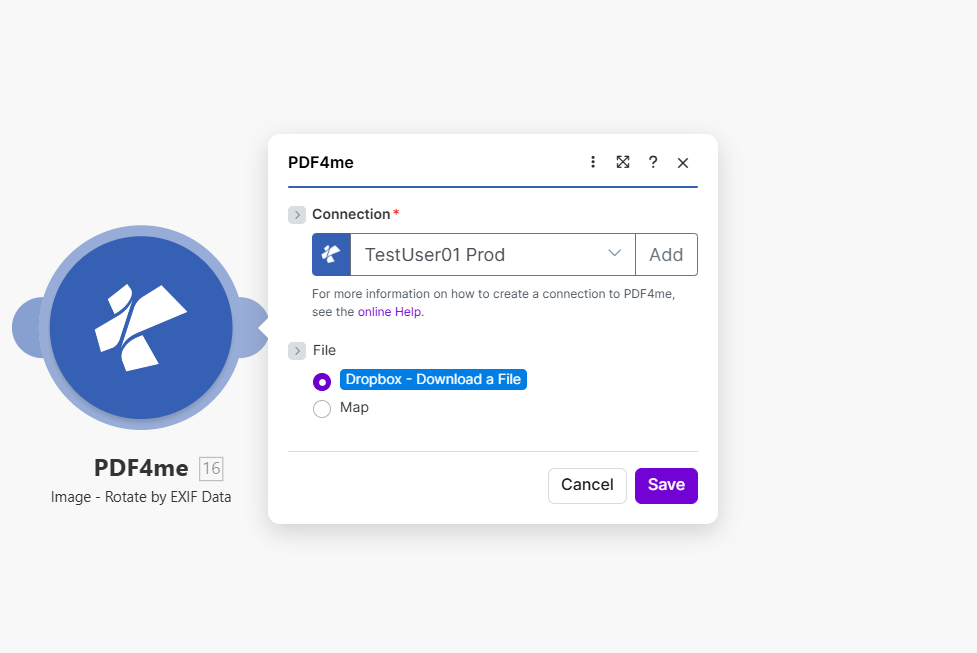
Kaynak görüntüyü eşleştirin, Görüntü Dosya Adını ve Görüntü Türünü ayarlayın. Modül, dosyayı okur. EXIF Yönlendirme etiketi ekler ve görüntüyü otomatik olarak döndürür.
Döndürme işlemi hangi parametrelere göre yapılır? EXIF Veriye mi ihtiyacınız var?
Gerekli: Bağlantı, Dosya, Görüntü Dosya Adı ve Görüntü Türü bilgilerinin tümü belirtilmelidir.
| Parametre | Gerekli | Ne işe yarar? | Örnek |
|---|---|---|---|
| Connection | Required | PDF4me API connection. Click Add and paste your API key the first time. Reused automatically across all PDF4me modules in your scenarios. | My PDF4me connection |
| File | Required | Binary content of the source image. Map from Dropbox, Google Drive, HTTP, or any previous module that outputs image binary data. | 1. Data |
| Image File Name | Required | Filename of the image with extension. Map from the previous module output or set explicitly. | photo.jpg |
| Image Type | Required | Format of the source image. Must match the actual file: JPG for JPEG images, PNG for PNG images. | JPG |
Çıktı
| Alan | Tip | İçeriğinde neler var? |
|---|---|---|
Image Name | String | Output image filename with corrected orientation. |
Image Data | Buffer | The image with EXIF-based rotation already applied, ready for upload or downstream processing. |
Tipik Kurulumlar
İş Akışı ÖrnekleriCommon Make scenario patterns using Rotate by EXIF Data.
- Dropbox Dosya İzleme tetikleyicisi, yüklemeler klasörüne yeni bir fotoğraf eklendiğinde devreye girer.
- Yükleme toplu halde yapılıyorsa, yineleyici her yeni görüntüyü işler.
- EXIF Verilerine Göre Döndürme özelliği, görüntünün kendi EXIF etiketini kullanarak yönünü düzeltir.
- Dropbox'a yükleme adımı, düzeltilmiş görüntüyü ana fotoğraf kütüphanesi klasörüne kaydeder.
- Katalog dizini güncelleme adımı, düzeltilmiş dosya ile kütüphane listesini yeniler.
- Mağaza sayfasına yeni bir ürün fotoğrafı yüklendiğinde bir tetikleyici devreye girer.
- EXIF verilerine göre döndürme özelliği, daha sonraki aşamalarda herhangi bir yeniden boyutlandırma veya sıkıştırma işlemi gerçekleşmeden önce yönlendirmeyi düzeltir.
- İsteğe bağlı olarak, "Görüntüyü Sıkıştır" adımı, daha hızlı sayfa yüklemeleri için dosya boyutunu küçültür.
- CDN'ye Yükleme adımı, düzeltilmiş ve optimize edilmiş görüntüyü yayınlar.
- Ürün kaydı güncelleme adımı, düzeltilmiş resim URL'sini ürün listesine bağlar.
- Mobil bir denetim uygulaması, sahada çekilen fotoğrafları paylaşılan bir klasöre yüklüyor.
- EXIF verilerine göre döndürme özelliği, bir alanda hareket halindeyken çekilen yan veya baş aşağı fotoğrafları düzeltir.
- Düzeltilmiş görüntüler, bir belge oluşturma modülü kullanılarak PDF raporuna yerleştirilir.
- Tamamlanan rapor, ortak bir denetim arşivine yüklenir.
- Raporun hazır olduğu, incelemeyi yapan yöneticiye e-posta yoluyla bildirilir.
Pratik İpuçları
Kopya Kağıdı
| Alan | Değer |
|---|---|
| Module | Rotate by EXIF Data |
| Connection | PDF4me API key |
| File | Binary image content from a previous module |
| Image File Name | filename.jpg or filename.png |
| Image Type (JPEG) | JPG |
| Image Type (PNG) | PNG |
| Rotation angle input | None needed, read from EXIF tag automatically |
| Output fields | Image Name, Image Data |
Sıkça Sorulan Sorular
Sektör Kullanım Örnekleri ve Uygulamaları
- Photography & Media
- E-Commerce & Retail
- Real Estate & Property
- Document Processing
- Fotoğraf KütüphaneleriFotoğraf koleksiyonlarında doğru yönlendirme
- Stok FotoğraflarStok kütüphaneleri için görseller hazırlayın.
- Etkinlik FotoğrafçılığıEtkinlik fotoğrafı gruplarında yönlendirmeyi düzeltin.
- Portre DüzeltmeDoğru dikey yönlendirmeyi sağlayın.
- Ürün Fotoğrafları: Ürün görselinin doğru yönlendirilmesi
- Katalog GörselleriKataloglar için görseller hazırlayın.
- İlan Fotoğrafları: Pazar yeri listelemeleri için yönlendirmeyi düzeltin
- Galeri ResimleriGalerilerde doğru görüntülemeyi sağlayın.
- Mülk Fotoğrafları: Doğru ilan fotoğrafı yönü
- Sanal TurlarTur görüntüsünün yönünü düzeltin
- İnceleme Fotoğraflarıİnceleme görüntülerini hazırlayın
- Pazarlama MateryalleriDoğru pazarlama fotoğrafı yönlendirmesi
- PDF YaratılışGörüntüleri düzeltmeden önce: PDF gömme
- Rapor GörüntüleriRapor grafiklerindeki yönlendirmeyi düzeltin.
- Sunum GrafikleriSunumlar için görseller hazırlayın.
- DokümantasyonEkran görüntüleri ve diyagramların düzeltilmesi