Make'de Word şablonu
PDF4me Word Şablon en esnek şablon ailesidir. Make Tek bir belge oluşturun. Standart bir yöntem gerektirir. .docx Şablon yer tutucularıyla eşleşen dosya JSON veya XML tuşlara basar ve kişiselleştirilmiş bir çıktı üretir. PDF veya Word Bu belgeyi faturalar, sözleşmeler, sertifikalar ve mektuplar için manuel posta birleştirme işlemine gerek kalmadan kullanabilirsiniz.
Başlamadan Önce
şablon.docx Veri dosyanızdaki anahtarlara karşılık gelen yer tutucular içerir. Yer tutucu adları, veri dosyanızdaki anahtarlarla eşleşmelidir. JSON veya XML Alan adlarını, iç içe geçme durumları da dahil olmak üzere, tam olarak belirtin.veri.json (tavsiye edilen), test.xml, veya test.csvŞablon, biçimden bağımsız olarak aynı değerlere sahip olur.Örnek Dosya Paketi
Aşağıdaki dosyaları indirin. Bir Word şablon artı eşleşen veriler JSON, XML, Ve CSV.
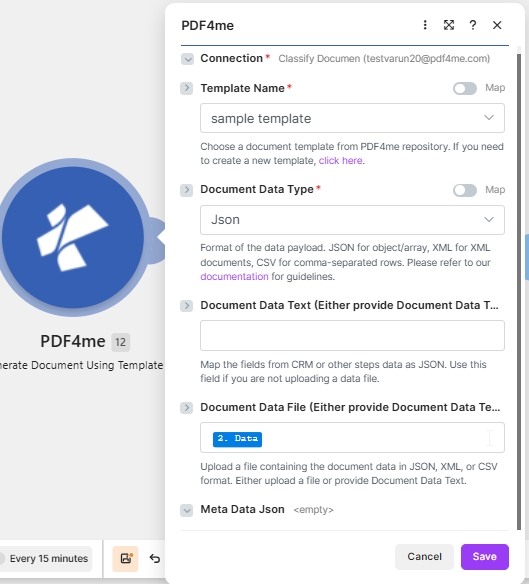
Hedef yapılandırması: PDF4me Word Şablon + JSON içinde Belge Verileri Metni + PDF çıktı.
Nedir bu? PDF4me Word Şablon şablonu içinde Make?
O PDF4me Word Şablon ailesi birleştirir Microsoft Word .docx Çalışma zamanında verilerinizi içeren dosya. .docx Bu modül, tamamen tasarlanmış bir düzen (logolar, tablolar, stiller) görevi görür ve yer tutucuları veri dosyasındaki değerlerle değiştirir. Belgenizin hassas biçimlendirmeye ve yeniden kullanılabilir marka kimliğine ihtiyaç duyduğu durumlarda önerilen seçenektir.
Nasıl yapılandırırım? PDF4me Word Şablon içinde Make?
Modül alanlarını aşağıdaki gibi ayarlayın. Zorunlu alanlar kırmızı yıldız işaretiyle belirtilmiştir. Make Kullanıcı arayüzü.
| Parametre | Gerekli | Ne işe yarar? | Örnek |
|---|---|---|---|
| Connection | Required | PDF4me connection for the scenario. Click Add to create one with your API key. | My PDF4me connection |
| Template File Type | Required | Set to PDF4me Word Template for this template family. | PDF4me Word Template |
| Output Type | Required | Format of the generated document. Word for editable output, PDF for a locked layout (most common). | PDF |
| Template Name | Required | Template file name including extension. Map from the prior module file name output. | template.docx |
| Template | Required | Template file binary. Map from the prior module data output (for example 1. Data from Dropbox Download a File). | 1. Data |
| Document DataType | Required | Choose Json for JSON payloads (most common) or Xml when the upstream system returns XML. | Json |
| Document Data Text | Conditional | Inline JSON or XML data. Use when Document Data File is empty. | data.json |
| Document Data File | Conditional | Mapped data file from a prior module. Use when Document Data Text is empty. | 1. Data |
Çıktı
Bu modül, her çalıştırmada bir paket döndürür. Oluşturulan dosya şu konuma yerleştirilir: Belge Tarihi Çıkış alanı.
| Alan | Tip | İçeriğinde neler var? |
|---|---|---|
Doc Data | Binary | The generated PDF document. Map into a downstream Upload File or Send Email Attachment module. |
File Name | String | Output filename based on Template Name with the extension matching Output Type. |
Mime Type | String | MIME type of the generated document. |
Üretim modelleri
Word şablonları için yaygın kullanılan kalıplarReplace the manual test with these once the sample works.
- Dropbox veya Google Drive depolama alanları
şablon.docx. - Dosya İndir seçeneği şablonu ikili veri olarak yükler.
- Belge Oluştur Tek harita Şablon Adı ve Şablon.
- Veriler, Sheets veya bir webhook aracılığıyla oluşturulur. JSON.
- Webhook, kayıt yükünü alır.
- Tekli Belge Oluştur seçeneği, belgeyi şablonla birleştirir.
- Çıktı Türü PDF.
- E-posta Gönder veya Dosya Yükle seçeneği Belge Verilerini iletir.
- Arama kayıtları birçok satır döndürür.
- Yineleyici, her seferinde yalnızca bir kaydı döngüye alır.
- Belge Oluşturma Tekli işlemi, her kayıt için yalnızca bir kez çalışır.
- Her dosya, kayıt başına ayrı bir klasöre yüklenir.
Sıkça Sorulan Sorular
İlgili Kılavuzlar
Temel şablon motoru için bkz. Aspose Words for .NET dokümantasyonu ve Make veri yapıları referansı.