HTML şablon içinde Make
O HTML şablon ailesi bir Make Belge Oluştur Tek seçenek, bir belge oluşturur .html Düzeni bitmiş bir belgeye dönüştürür. Alıcı adı alanı ve satır öğesi döngüsü gibi bıyık etiketlerini, düzeninizle birleştirir. JSON veri ve çıktılar a PDF veya HTML Dosyayı zaten yöneten ekipler için uygundur. Bu, halihazırda dosyayı yöneten ekipler için idealdir. HTML veya e-posta şablonları.
Başlamadan Önce
fatura_örneği_1.html İç içe geçmiş yollara sahip eksiksiz bir fatura düzenidir ve altbilgi Satır öğesi döngüsü. Yollar sizinle eşleşmelidir. JSON Yapı tam olarak böyle.fatura_örnek_veri_1.json (tavsiye edilen), test.xml, veya test.csv. JSON iç içe nesneler ve bir altbilgi sıralamak.Örnek Dosya Paketi
Aşağıdaki dosyaları indirin. Bir HTML şablon artı eşleşen veriler JSON, XML, Ve CSV.
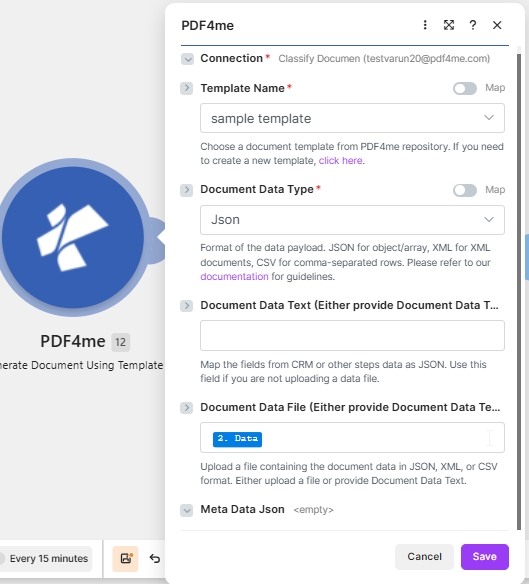
Hedef yapılandırması: PDF4me HTML Şablon + JSON içinde Belge Verileri Metni + PDF çıktı.
Nedir bu? HTML şablon şablon içinde Make?
O HTML Şablon ailesi, tarayıcı tarzında bir görünüm oluşturur. .html satır içi düzen CSS Bir belgeye dönüştürülür. Mustache sözdizimiyle yazılmış yer tutucular verilerinizden alınır ve döngü bloğu... {{#each subInfo}} Her satır öğesi için tablo satırını tekrarlar. Pazarlama için seçin. PDFs ve ekibinizin halihazırda tuttuğu marka stiline uygun faturalar HTML.
Nasıl yapılandırırım? HTML şablon içinde Make?
Modül alanlarını aşağıdaki gibi ayarlayın. Zorunlu alanlar kırmızı yıldız işaretiyle belirtilmiştir. Make UI.
| Parametre | Gerekli | Ne işe yarar? | Örnek |
|---|---|---|---|
| Connection | Required | PDF4me connection for the scenario. Click Add to create one with your API key. | My PDF4me connection |
| Template File Type | Required | Set to PDF4me HTML Template for this template family. | PDF4me HTML Template |
| Output Type | Required | Format of the generated document. PDF for a print-ready file, or HTML for an email body or web preview. | PDF |
| Template Name | Required | Template file name including extension. Map from the prior module file name output. | invoice_sample_1.html |
| Template | Required | Template file binary. Map from the prior module data output (for example 1. Data from Dropbox Download a File). | 1. Data |
| Document DataType | Required | Choose Json for JSON payloads (most common) or Xml when the upstream system returns XML. | Json |
| Document Data Text | Conditional | Inline JSON or XML data. Use when Document Data File is empty. | invoice_sample_data_1.json |
| Document Data File | Conditional | Mapped data file from a prior module. Use when Document Data Text is empty. | 1. Data |
Çıktı
Bu modül, her çalıştırmada bir paket döndürür. Oluşturulan dosya şu konuma yerleştirilir: Belge Tarihi Çıkış alanı.
| Alan | Tip | İçeriğinde neler var? |
|---|---|---|
Doc Data | Binary | The generated PDF document. Map into a downstream Upload File or Send Email Attachment module. |
File Name | String | Output filename based on Template Name with the extension matching Output Type. |
Mime Type | String | MIME type of the generated document. |
Üretim modelleri
HTML şablonları için yaygın kullanılan Make kalıplarıReplace the manual test with these once the sample works.
- Dropbox veya Google Drive mağazalar
fatura_örneği_1.html. - Dosya İndir seçeneği şablonu ikili veri olarak yükler.
- Belge Oluştur Tek harita Şablon Adı ve Şablon.
- Veriler şunlardan oluşturulur: Sheets veya bir webhook olarak JSON.
- Webhook, kayıt yükünü alır.
- Tekli Belge Oluştur seçeneği, belgeyi şablonla birleştirir.
- Çıktı Türü PDF.
- E-posta Gönder veya Dosya Yükle seçeneği Belge Verilerini iletir.
- Arama kayıtları birçok satır döndürür.
- Yineleyici, her seferinde yalnızca bir kaydı döngüye alır.
- Belge Oluşturma işlemi, her kayıt için yalnızca bir kez çalışır.
- Her dosya, kayıt başına ayrı bir klasöre yüklenir.
Sıkça Sorulan Sorular
İlgili Kılavuzlar
Temel şablon motoru için bkz. Sözcük Türleri .NET dokümantasyon ve Make veri yapıları referansı.