Tek bir belge oluştur Make
Tek Belge Oluştur bir PDF4me modül için Make Bu, bir şablonu bir veri kümesiyle birleştirir ve her çalıştırmada tek bir bitmiş belge döndürür. Beş şablon ailesini destekler (Word, HTML, PDF form, Posta Birleştirme ve Google Docsve iki veri formatı (JSON Ve XML) ve çıktılar PDF, Word, Excel, veya HTMLKod yazmanıza gerek kalmadan faturalar, sözleşmeler, sertifikalar ve kişiselleştirilmiş mektuplar için kullanabilirsiniz.
Bu modülün işlevi
PDF4me Tek Belge Oluştur birleştirir Word, HTML, PDFPosta Birleştirme veya Google Docs şablon ile JSON veya XML verileri kullanır ve kişiselleştirilmiş bir sonuç üretir. PDF, Word, Excel, veya HTML bir dosyada Make Bu modül, çok adımlı posta birleştirme senaryolarını tek bir yapılandırılabilir işlemle değiştirir. Şablon dosyasını herhangi bir bulut depolama modülünden eşleştirin (Dropbox, Google Drive, OneDriveVerilerinizi satır içi olarak veya eşlenmiş bir dosya olarak sağlayın ve oluşturulanı yönlendirin. Belge Tarihi Çıktı doğrudan Dosya Yükle, E-posta Gönder veya herhangi bir sonraki işleme aktarılabilir. Make modül.
Şablon türünüzü seçin.
Size uygun olan rehberi seçin. Şablon Dosya TürüHer sayfada örnek şablonun tam hali ve veri dosyaları listelenmiştir (JSON, XML, CSV), önerilen alan değerleri ve hızlı bir test senaryosu için Make.
.docx Bıyık yer tutucularıyla birlikte. Çıktı PDF veya Wordİçerir. şablon.docx + veri.json.şablon.pdf + formdata.json.simple_mail_merge_template.docx..docxÇıktı PDF veya Wordİçerir. google-docs-template.docx.Kimliğinizi Doğrulama API Rica etmek
Her PDF4me modül içinde Make geçerli bir belge gerektirir Bağlantı. İçeriğinizi barındıran birini oluşturun veya seçin. PDF4me API Bu sayede senaryo, belge oluşturma isteklerini güvenli bir şekilde doğrulayabilir.
Kaçırmamanız Gereken Önemli Bilgiler
.docx bir ile eşleştirilmiş HTML Seçilen tür çalışma zamanında başarısız oluyor. Her şablon ailesinin kullandığı tam yer tutucu sözdizimi için yukarıdaki ilgili kılavuzu açın.Belge Tarihi Çıktı alanı. Doğrudan Dosya Yükle ( ) bölümüne yönlendirin.Dropbox, Sürmek, OneDrive), E-posta Eki Gönder veya ikili dosyayı kabul eden herhangi bir alt modül. Dosya adı, Şablon Adı alanından korunur.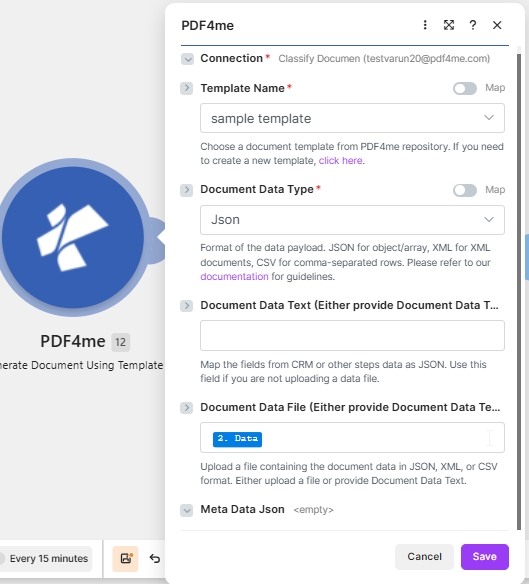
Bir tane seçin Şablon Adı sizden PDF4me depo, küme Belge Veri Türü JSON'a dönüştür ve eşle Belge Veri Dosyası önceki indirme adımından (veya yapıştır) JSON içine Belge Verileri Metni yerine).
Tekli Belge Oluştur seçeneği hangi parametreleri kullanır? Make?
Gereklidir Make UI: Bağlantı, Şablon Dosya Türü, Çıktı Türü, Şablon Adı, Şablon ve Belge Veri Türü (tümü kırmızı yıldızlarla işaretlenmiştir). Şartlı: Belge Veri Metni VEYA Belge Veri Dosyası (ikisinden biri veri yükünü taşımalıdır). İsteğe bağlı: Meta Veri JSON.
| Parametre | Gerekli | Ne işe yarar? | Örnek |
|---|---|---|---|
| Connection | Required | PDF4me connection for the scenario. Click Add to create a connection with your API key, or select an existing connection from the dropdown. | My PDF4me connection |
| Template File Type | Required | Select the template family: Word Template (.docx), HTML (.html), Pdf Form (fillable .pdf), Mail Merge (.docx merge fields), or Google Docs export (.docx). Open the matching guide for placeholder syntax. | PDF4me Word Template |
| Output Type | Required | Format of the generated document. Word for editable .docx, PDF for print-ready locked layout (most common), Excel for .xlsx, HTML for web embedding. | PDF |
| File Selection | Required | How the template file is supplied. Choose a storage module shortcut (for example Dropbox Download a File) or select Map to wire Template Name and Template from any prior step. | Map |
| Template Name | Required | Template file name including extension. Map from the previous module filename output (shown as 1. File Name when Dropbox Download a File is upstream). | 1. File Name |
| Template | Required | Template file binary for document generation. Map from the previous module data output (shown as 1. Data when Dropbox Download a File is upstream). | 1. Data |
| Document Data File | Conditional | Map source document file content from a previous action when your data payload is a file rather than inline text. Use when Document Data Text is empty. | 1. Data |
| Document DataType | Required | Choose document data type. Json for JSON payloads (most common), Xml when the upstream system returns XML. | Json |
| Document Data Text | Conditional | Input data text to generate the document. Paste JSON or XML inline or build it with Make expressions. Use when Document Data File is empty. | { "Name": "John", "Age": 16 } |
| Meta Data Json | No | Optional metadata for template fields (title, author, subject, custom properties). Shown without an asterisk in the Make UI. Leave empty for most templates. | |
Çıktı türünü nasıl seçerim? Make?
Sonraki aşamalara uygun formatı seçin. Make Modüllerin beklediği budur. Çıktı formatı şablon türünden bağımsızdır, bu nedenle Word şablon bir şey üretebilir PDF.
PDFPrint-ready, locked layoutWordEditable .docx outputExcelSpreadsheet .xlsx outputHTMLWeb-ready HTMLÇıktı
Modül bir değer döndürür. Paket Her çalıştırmada. Oluşturulan dosya şu konuma yerleştirilir: Belge Tarihi Çıkış alanı, standart yöntemle sonraki modüllerin alabileceği şekilde hazır. Make Veri eşleme.
| Alan | Tip | İçeriğinde neler var? |
|---|---|---|
Doc Data | Binary | The generated document in the format chosen under Output Type. Map this into a downstream Upload File, Send Email Attachment, or any module that accepts binary input. |
File Name | String | Output filename based on Template Name with the extension matching Output Type. |
Mime Type | String | MIME type of the generated document (application/pdf, application/vnd.openxmlformats-officedocument.wordprocessingml.document, and so on). |
Senaryo örnekleri
Yaygın Üretim senaryo kalıplarıTypical ways to chain Generate Document Single into a Make flow.
- Webhook alır JSON Yeni bir fatura için.
- Dropbox Dosya İndir, faturayı yükler. Word şablon.
- Belge Oluştur Tek harita Şablon Adı ve Şablondan Dropbox Bu adımda, Veri Türünü Json olarak ayarlar ve webhook'u okur. JSON Belge Veri Metnine.
- E-posta Gönder seçeneği, faturayı müşteriye göndermek için belge verilerini ekler.
- Planlanmış tetikleyici her gün saat 09:00'da devreye girer.
- Airtable Arama Kayıtları, yeni kurs tamamlamalarını getirir.
- Yineleyici her kaydı tek tek inceler.
- Belge Oluştur Tekli birleştirmeler Word Kayıt verileri ve çıktıları içeren sertifika şablonu PDF.
- Google Drive Dosya Yükle seçeneği, her sertifikayı alıcının adıyla adlandırılmış paylaşılan bir klasöre kaydeder.
- Her ayın ilk günü için planlı ateş yakılması.
- Google Sheets Arama Satırları, aylık toplam verileri çeker.
- Dönüştürme modülü, satırları şekillendirir. JSON Şablonun beklediği yapı.
- Tek Belge Oluştur seçeneği, rapor şablonunu verilerle birlikte oluşturur, Çıktı Türü PDF.
- OneDrive Dosya yükle arşivleri PDF Ve Slack "Mesaj Gönder" seçeneği indirme bağlantısı gönderir.
Sıkça Sorulan Sorular
İlgili işlemler
Yardım Alın
Her şablon ailesini destekleyen şablon motoru ve Mustache sözdizimi için bkz. Sözcük Türleri .NET dokümantasyon ve Make veri yapıları referansı.