SwissQR faturası oluşturun. Make
Bu modülün işlevi
PDF4me SwissQR Faturası Oluşturun İsviçre standartlarına uygun bir eklenti ekler. QR fatura ödeme fişi mevcut bir hesaba PDF Bu belge, İsviçre Ödeme Standartları tarafından istenen tam standartlaştırılmış bölümü ekler (ISO 20022(İsviçre ve Lihtenştayn'da faturalama için.) Faturanızı gönderin. PDFAlacaklı ve borçluya ait bilgiler, IBANMiktar ve referans bilgilerini girdiğinizde, modül ödeme makbuzunu eklenmiş şekilde aynı belgeyi döndürür. Tüm İsviçre bankaları, mobil bankacılık uygulaması aracılığıyla ödeme başlatmak için bu çıktıyı kabul eder.
Kimliğinizi Doğrulama API Rica etmek
Her PDF4me modül içinde Make geçerli bir belge gerektirir Bağlantı. İçeriğinizi barındıran birini oluşturun veya seçin. PDF4me API Senaryonun İsviçre'yi doğrulayabilmesi için anahtar QR Fatura oluşturma işlemini güvenli bir şekilde gerçekleştirin.
Kaçırmamanız Gereken Önemli Bilgiler
Parametreler
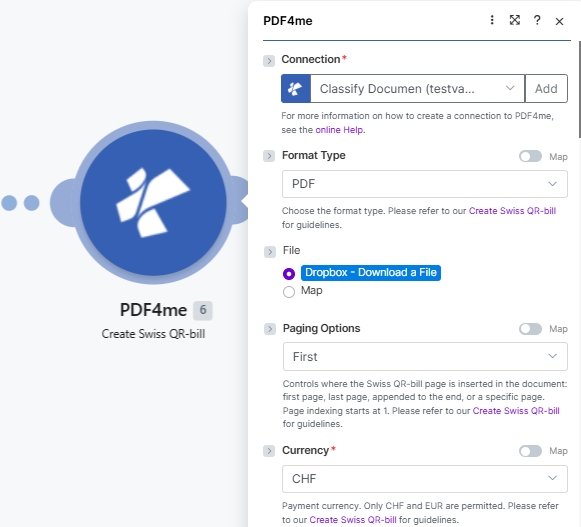
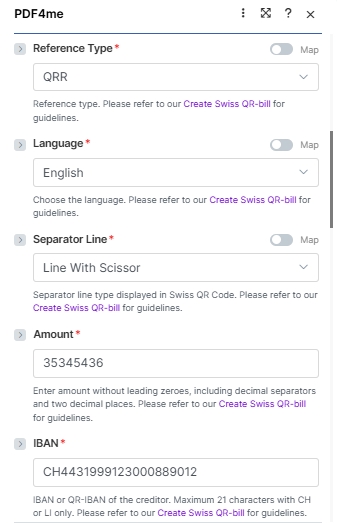
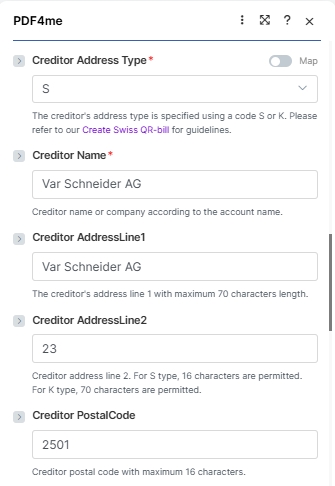
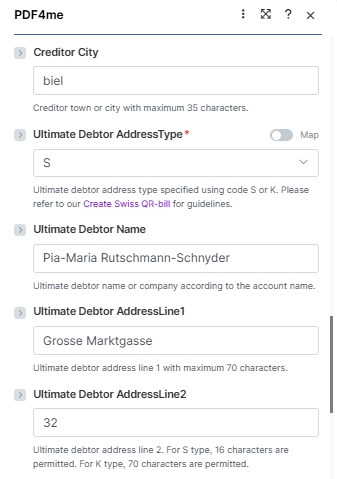
Bu modül, dört mantıksal bloğa gruplandırılmış 26 alanı ortaya koymaktadır: bağlantı + kaynak dosya, ödeme esasları, alacaklı bloğu, borçlu bloğu, Ve ödeme referansıAşağıdaki ekran görüntüleri, alanların tam sırasını yansıtmaktadır. Make UI.
Zorunlu (kırmızı yıldız işaretiyle belirtilmiştir) UI): Bağlantı, Biçim Türü, Sayfalama Seçenekleri, Para Birimi, Referans Türü, Dil, Ayırıcı Çizgi, Miktar, IBANAlacaklı Adres Türü, Alacaklı Adı, Nihai Borçlu AddressType. Şartlı: Dosya adı + Belge (Dosya şu şekilde ayarlandığında): Map; Sayfa Numarası yalnızca Sayfalama Seçenekleri ayarlandığında Özel (sayfa numarası). İsteğe bağlı: Geriye kalan tüm alacaklı/borçlu adres alanları artı Referans, Yapılandırılmamış Mesaj, Faturalama Bilgileri ve AV1/AV2 Parametreler.
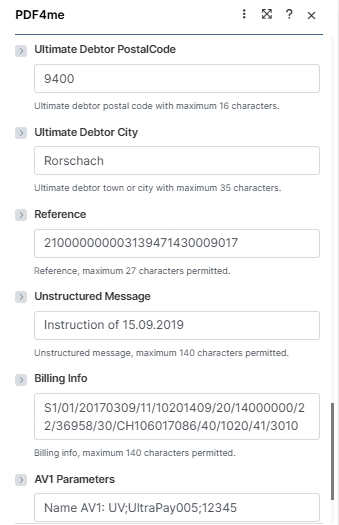
| Parametre | Gerekli | Ne işe yarar? | Örnek |
|---|---|---|---|
| Connection | Yes | PDF4me connection. Click Add and paste your API key the first time, then reuse the connection across every PDF4me module. | test prod account |
| Format Type | Yes | Output container format. PDF for printable invoices and email attachments; PNG, JPEG, or TIFF for image output (no Paging Options applies in image modes). Empty falls back to the connector default. See the dropdown reference card below. | PDF |
| File | Conditional | How the source PDF arrives. Radio: Dropbox - Download a File (or any other storage module), PDF4me Dev - Create Swiss QR Bill (chain from a prior PDF4me action), or Map (bind File Name and Document from a prior module manually). Skip the source file entirely for a standalone payment slip. | Map |
| File Name | Conditional | Filename of the source PDF including .pdf extension. Required when File is set to Map. Mapped from the prior module File Name output. | 1. File Name |
| Document | Conditional | Binary content of the source PDF. Required when File is set to Map. Mapped from the prior module Data / binary output. | 1. Data |
| Paging Options | Yes | Where the Swiss QR-bill page is inserted (PDF Format Type only). Options: Empty (default), First (new page 1), Last (appended), Add page at the end (alias for Last), Custom (page number) (insert at the page number you supply in the Page Number field). See the dropdown reference card below. | Custom (page number) |
| Page Number | Conditional | The 1-based page number where the Swiss QR-bill is inserted. Required when Paging Options is Custom (page number); ignored for every other Paging Options value. Page indexing starts at 1. | 3 |
| Currency | Yes | Payment currency. Only CHF and EUR are permitted by the Swiss Payment Standards. | CHF |
| Reference Type | Yes | Format of the payment reference. QRR (Swiss QR Reference, 27-digit numeric, used with QR-IBAN), SCOR (ISO 11649 creditor reference), NON (no reference). | QRR |
| Language | Yes | Language for the printed QR-bill text (Payment part labels: Account / Payable to, Reference, Currency, Amount). German, French, Italian, English. | English |
| Separator Line | Yes | Separator line style displayed in the QR-bill section. Line With Scissor (line + scissor pictogram, standard print), Only Line (line, no pictogram), or No Line (eBill / e-invoice). Note: the Make UI labels the field "Seperator Line" (the engine accepts either spelling. | Line With Scissor |
| Amount | Yes | Payment amount in two decimal places without leading zeroes. Use the locale decimal separator your Culture & Language Settings expect. | 35345436 |
| IBAN | Yes | IBAN or QR-IBAN of the creditor. Maximum 21 characters with CH or LI country codes only. QR-IBAN required when Reference Type is QRR. | CH4431999123000889012 |
| Creditor Address Type | Yes | Address format for the creditor: S (Structured, separate PostalCode and City fields) or K (Combined, two free-text AddressLine fields). | S |
| Creditor Name | Yes | Creditor name or company according to the bank account. Maximum 70 characters. | Var Schneider AG |
| Creditor AddressLine1 | No | Creditor primary address line. Maximum 70 characters. | Var Schneider AG |
| Creditor AddressLine2 | No | Creditor secondary address line. 16 characters when address type is S; 70 characters when type is K. | 23 |
| Creditor PostalCode | No | Creditor postal code. Maximum 16 characters. | 2501 |
| Creditor City | No | Creditor town or city. Maximum 35 characters. | biel |
| Ultimate Debtor AddressType | Yes | Address format for the debtor: S (Structured) or K (Combined). Same rules as Creditor Address Type. | S |
| Ultimate Debtor Name | No | Debtor name or company according to the bank account. Maximum 70 characters. | Pia-Maria Rutschmann-Schnyder |
| Ultimate Debtor AddressLine1 | No | Debtor primary address line. Maximum 70 characters. | Grosse Marktgasse |
| Ultimate Debtor AddressLine2 | No | Debtor secondary address line. 16 characters (S) or 70 characters (K). | 32 |
| Ultimate Debtor PostalCode | No | Debtor postal code. Maximum 16 characters. | 9400 |
| Ultimate Debtor City | No | Debtor town or city. Maximum 35 characters. | Rorschach |
| Reference | No | Payment reference number. Maximum 27 characters. Format depends on Reference Type (QRR: 27-digit numeric with mod-10 check; SCOR: ISO 11649; NON: leave empty). | 210000000003139471430009017 |
| Unstructured Message | No | Free-text payment description shown in the Additional information block. Maximum 140 characters. | Instruction of 15.09.2019 |
| Billing Info | No | Structured billing information (Swico, etc) shown alongside the Unstructured Message. Maximum 140 characters. | S1/01/20170309/11/10201409/20/14000000/22/36958/30/CH106017086/40/1020/41/3010 |
| AV1 Parameters | No | Alternative scheme parameter 1 (e.g. eBill identifier). Maximum 100 characters. Convention: "Name AV1: UV;…". | Name AV1: UV;UltraPay005;12345 |
| AV2 Parameters | No | Alternative scheme parameter 2. Maximum 100 characters. Same convention as AV1 when a second alternative scheme is required. | Name AV2: XY;Service002;67890 |
Biçim Türü seçenekleri
O Make UI 5 değer ortaya çıkarır. Seçin PDF Yazdırılabilir faturalar ve e-posta ekleri için; resim formatları, içeriği yerleştirirken kullanışlıdır. QR şablonlu bir şekilde içeri girin PDF Daha sonra veya e-posta gövdesinde satır içi olarak görüntüleyebilirsiniz.
PDFPNGJPEGTIFFEmptySayfalama Seçenekleri referansı
Yalnızca Biçim Türü şu olduğunda geçerlidir: PDF. Görüntü Format Türleri (PNG, JPEG, TIFFÇok sayfalı bir belge eklenmediği için Sayfalama Seçeneklerini dikkate almayın.
FirstLastAdd page at the endCustom (page number)EmptyHızlı Kurulum
- Eklemek PDF4me ile SwissQR Faturası Oluşturun sizin Make senaryo.
- Seçme Bağlantı (veya tıklayın) Eklemek sizinle bir tane oluşturmak için API anahtar).
- Ayarlamak Biçim Türü ile
PDF(veyaPNG/JPEG/TIFF(Görüntü çıktısı için). Ayarla Sayfalama Seçenekleri ileFirst,Last,Add page at the end, veyaCustom (page number)Eğer seçerseniz Özel (sayfa numarası)Ayrıca doldurun Sayfa Numarası 1 tabanlı endeks ile kaymanın düşmesi gereken yer (örneğin)3). - Ayarlamak Dosya bir depolama modülüne Dropbox - Dosya İndirveya seçin Map ve bağla Dosya adı Ve Belge Önceki adımdan. Bağımsız bir işlem için Dosya grubunu tamamen atlayın. QR kaymak.
- Lütfen gerekli ödeme alanlarını yukarıdaki ekran görüntülerindeki değerlerle doldurun: Para birimi (
CHFveyaEUR), Referans Türü (QRR), Dil (English), Ayırıcı Çizgi (Line With Scissor), Miktar, IBAN (en fazla 21 karakter, CH veya LI), Alacaklı Adres Türü (SveyaK), Alacaklının Adı, Ve Nihai Borçlu AddressType. - Alacaklı ve borçlu adres alanlarını ekleyin, ardından isteğe bağlı olarak doldurun. Referans, Yapılandırılmamış Mesaj, Fatura Bilgileri, Ve AV1 / AV2 Parametreler Daha kapsamlı ödeme verileri için.
- Kaydedin ve çalıştırın. Modül çıktısı.
Doc Datakaynağı içerir PDF İsviçre ile QR-3. adımda seçilen konuma yerleştirilen fatura sayfası (veya bağımsız bir sayfa) QR Kaynak dosya sağlanmadığında oluşan hata).
İş Akışı Örnekleri
İş Akışı ÖrnekleriCommon Make scenario patterns using Create SwissQR Bill.
- Google Sheets fatura kayıt defterine yeni bir satır eklenmesi bu senaryoyu tetikliyor.
- Google Drive boş faturayı indiriyor. PDF şablon.
- SwissQR fatura oluşturma işlemi, tutar dahil tüm ödeme alanlarını eşleştirir. IBANReferans, Alacaklı ve Borçlu bilgilerine doğrudan tablonun ilgili sütunlarından ulaşabilirsiniz.
- Gmail, tamamlanmış faturayı İsviçre ile birlikte gönderiyor. QR Fatura, sayfadaki bilgiler doğrultusunda müşterinin e-posta adresine eklenmiştir.
- Planlanmış bir tetikleyici her ayın 1'inde çalışır.
- Airtable tüm aktif abonelik kayıtlarını döndürür.
- Yineleyici, her aboneyi ayrı ayrı işler. SwissQR Fatura Oluşturma işlevi, abonelik tutarı, nihai borçlu olarak eşleştirilmiş müşteri bilgileri ve her kayıt için benzersiz bir Referans içeren kişiselleştirilmiş bir fatura oluşturur.
- Gmail her müşteriye faturasını gönderir. Airtable, gönderim zaman damgasıyla güncellenir.
- Bir fatura onaylandığında bir webhook tetiklenir. ERP sistem.
- HTTP Onaylanmış faturayı indirir. PDF.
- Create SwissQR Bill, ödeme makbuzunu aşağıdaki yöntemle ekler: ERP-tedarik edildi IBANMiktar ve referans numarası.
- Tamamlanan fatura sisteme yüklenmiştir. SharePoint Alacaklar klasörü ve muhasebe ekibi şu şekilde bilgilendirilir: Microsoft Teams.