Make kullanarak ZUGFeRD 2.0+ E-Faturası Oluşturma: 4 Modüllü Dropbox İş Akışı
ZUGFeRD 2.0+ (diğer adıyla Faktör-X Fransa'da ve XRechnung (Alman kamu sektöründe) bir hibrit PDF/A-3 fatura PDF'nin içine yerleştirilmiş makine tarafından okunabilir XML ile. Hem insanlar hem de ERP sistemleri tarafından kullanılabilen tek bir dosya. Bu kılavuz, ekran görüntülerinde gösterilen işlemi adım adım açıklıyor: Dropbox'taki temel bir fatura PDF'si ve ZUGFeRD 2.0+ XML dosyası, EN16931 uyumlu hibrit bir e-faturaya dönüşüyor. /pdf4meoutput/, içinde 4. Modüller oluşturun, sıfır kod..
Dört adet Make modülü uçtan uca birleştirildi. İki adet Dropbox kutusu. Dosya İndir Adımlar temel PDF dosyasını ve ZUGFeRD 2.0+ XML dosyasını çekiyor (ekran görüntüleri gösteriyor). YnooxTestone bağlantı artı yollar /pdf4metest/Zugfred Faturası/SimplePdf.pdf Ve /pdf4metest/Zugfred Fatura/versiyon2.xmlPDF4me ZUGFeRD faturası oluşturun XML dosyasını PDF'ye şu şekilde yerleştirir: Çıkış Modu XML ve PDF, ZUGFeRD Versiyonu 2+, Uygunluk Seviyesi EN16931, Faturayı PDF olarak oluştur Evet, Dil ile ilgiliDropbox Dosya Yükle sonucu yazıyor hibrit PDF/A-3 ile /pdf4meoutput/ Dosya ayarı ile Harita, Dosya adı 15. İsim, Veri 15. BelgeÇıktı herhangi bir PDF okuyucuda açılır ve ZUGFeRD / Factur-X / XRechnung'u destekleyen herhangi bir ERP sisteminde sorunsuz bir şekilde ayrıştırılır.
İlk olarak, Uygunluk Seviyesi Alıcınızın veya hedeflediğiniz ERP sisteminin beklentileriyle eşleşmelidir. EN16931 (Comfort), Almanya'da yasal olarak varsayılan değerdir ve AB'de B2B için güvenli bir tercihtir; XRECHARGE Almanya'da B2G (kamu sektörü) faturalaması için gereklidir; TEMEL Diğer birçok alıcı için işe yarıyor. İkincisi, ZUGFeRD Versiyonu olmalıdır 2+ EN 16931 standardına uygun her şey için. Eski sürüm. 1.0 BASIC / COMFORT / EXTENDED seçeneklerini kullanır ve EN 16931 alıcılarıyla uyumlu değildir. Seçiniz. 2+ Alıcı açıkça 1.0 sürümünü talep etmediği sürece.
Bu, gerçek dünyada sıkça karşılaşılan soruları çözüyor.
İnsanlar bu sorunu şu gibi ifadelerle arıyorlar:
- "Make kullanarak gömülü XML içeren bir ZUGFeRD faturası nasıl oluşturabilirim?" Bu 4 modüllü senaryo, baştan sona işlemi gerçekleştiriyor: PDF şablonu ve XML fatura girişi, hibrit PDF/A3 çıkışı.
- "ZUGFeRD ile Factur-X aynı şey mi?" Evet. Farklı isimler altında aynı teknik format. ZUGFeRD 2.x dosyası, Factur-X bekleyen sistemler tarafından kabul edilir ve bunun tersi de geçerlidir.
- "Hangi uyumluluk seviyesini seçmeliyim?" B2B için EN16931 (Alman yasal standardı ve AB EN 16931 ile uyumlu), Alman kamu sektörü (B2G) için XRECHNUNG, en geniş eski sistem uyumluluğu için BASIC.
- "XML kodunu kendim mi yazmalıyım?" Hayır, ancak bu senaryoda ekran görüntülerinde mevcut bir XML faturası kullanılıyor. Modül ayrıca JSON veya CSV girdilerini de kabul ediyor ve sizin için XML'i oluşturuyor.
- "Ya alıcım sadece XML dosyasına ihtiyaç duyarsa, PDF'ye ihtiyacı yoksa?" Çıkış Modunu Ayarla
XML Onlyve modül hibrit dosya yerine yalnızca XML fatura dosyasını döndürüyor.
Ne inşa ediyorsunuz?
PDF ve XML fatura dosyalarından tam uyumlu ZUGFeRD 2.0+ hibrit e-fatura üreten, yeniden kullanılabilir bir Make senaryosu. Tetikleyici manuel, zamanlanmış (gösterildiği gibi), Dropbox dosya izleme veya HTTP webhook olabilir. Çıktı, AB e-fatura zorunlulukları için hem insan tarafından okunabilir PDF gereksinimini hem de makine tarafından okunabilir XML gereksinimini karşılayan tek bir dosyadır.
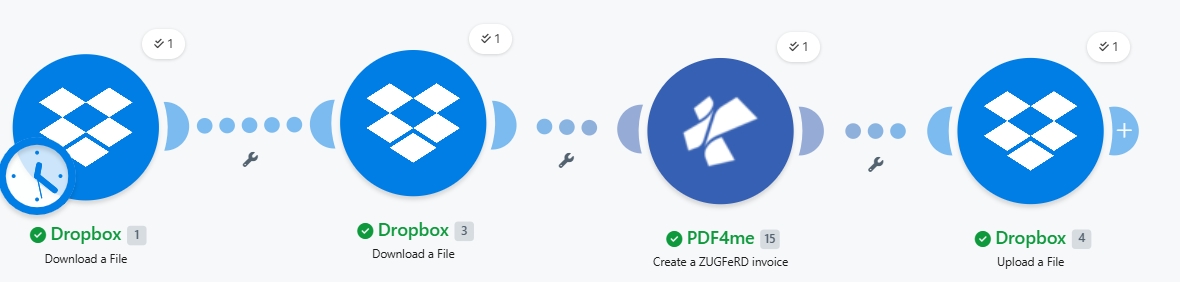
Uçtan uca dört modül. İki indirme, bir PDF4me işlemi, bir yükleme. 1. Modüldeki saat simgesi, planlanmış bir tetikleyiciyi gösterir; kullanım durumunuza uyacak şekilde manuel / dosya izleme / webhook'a geçin.
İhtiyacınız olan şey
- Yapmak Senaryo açık olan hesap. Make hesabı oluşturun İhtiyacınız varsa.
- PDF4me API anahtarı. API anahtarınızı alın ve ilk PDF4me modülüne bağlanın. Bakınız. PDF4me'yi Oluşturmak İçin Bağlayın.
- Dropbox Kaynak klasörüyle birlikte (örneğin,
/pdf4metest/Zugfred Faturası/PDF şablonunu ve XML faturasını içeren, ayrıca bir çıktı klasörü de bulunan bir dosya./pdf4meoutput/). - Temel bir PDF (ekran görüntüleri kullanılıyor)
SimplePdf.pdfHerhangi bir düzenleme işaretlemesine ihtiyaç duymaz. Modül, XML dosyasını PDF/A-3 eki olarak gömer. - ZUGFeRD 2.0+ XML faturasıKendi ekipmanınızı kullanın veya bir tane alın. 2.0 XML örneği takip etmek için.
Hızlı referans: Her parametrenin ne işe yaradığı
Senaryoyu oluşturun
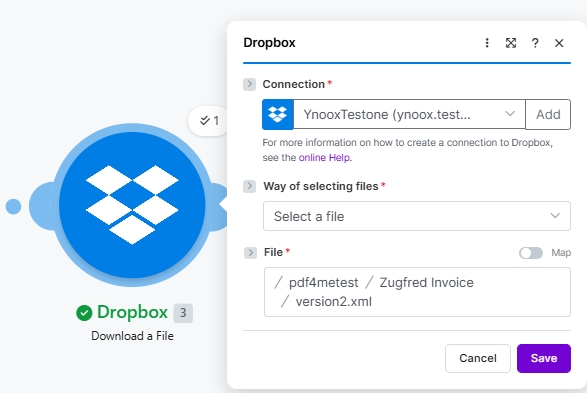
Modül 1: Dropbox'tan Dosya İndirme (temel PDF)
ZUGFeRD XML dosyasının PDF/A-3 eki olarak ekleneceği kaynak PDF dosyasını indirin.
| Alan | Bu çalıştırmada kullanılan değer |
|---|---|
| Connection | YnooxTestone (ynoox.test...). your Dropbox connection |
| Way of selecting files | Select a file |
| File | /pdf4metest/Zugfred Invoice/SimplePdf.pdf |
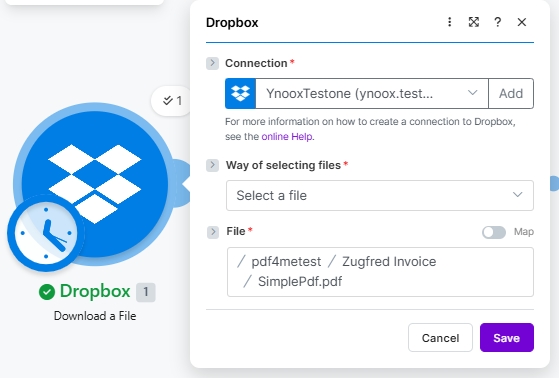
Modül 2: Dropbox'tan Dosya İndirme (ZUGFeRD 2.0+ XML)
ZUGFeRD XML fatura dosyasını çekin. XML dosyası faturanın tüm detaylarını içerir; PDF ise sadece görsel bir çerçevedir.
| Alan | Bu çalıştırmada kullanılan değer |
|---|---|
| Connection | YnooxTestone (ynoox.test...). same Dropbox connection |
| Way of selecting files | Select a file |
| File | /pdf4metest/Zugfred Invoice/version2.xml |
Modül 3: PDF4me ZUGFeRD faturası oluşturma
Asıl gömme işlemini gerçekleştiren eylem budur. İndirilen her iki dosyayı da girdi olarak eşleştirin, uyumluluk ayarlarınızı seçin ve çalıştırın.
| Grup | Alan | Değer |
|---|---|---|
| Auth | Connection | Classify Documen (testva...). PDF4me connection |
| Source | File (PDF template) | Map → Module 1 File Name + Data |
| Source | Input Format | XML |
| Source | File (XML invoice) | Map → Module 2 File Name + Data (a second File picker appears when Input Format is XML) |
| Output | Output Mode | XML With PDF (hybrid PDF/A-3) |
| Output | ZUGFeRD Version | 2+ |
| Output | Conformance Level | EN16931 |
| Output | Render Invoice on PDF | Yes |
| Output | Language | de |
Modül 4: Dropbox'a Dosya Yükleme
Hibrit PDF/A-3 elektronik faturayı çıktı klasörüne kaydedin.
| Alan | Bu çalıştırmada kullanılan değer |
|---|---|
| Connection | YnooxTestone (ynoox.test...) |
| Folder | /pdf4meoutput/ |
| File | Map (so File Name and Data come from the PDF4me step) |
| File Name | 15. Name (dynamic content from PDF4me Module 3) |
| Data | 15. Document (dynamic content from PDF4me Module 3) |
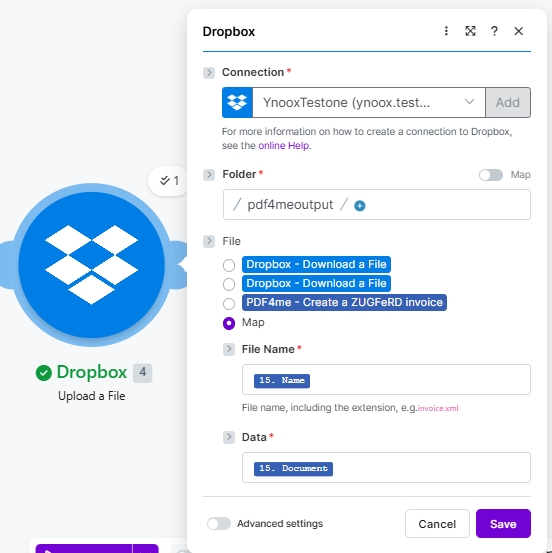
Kaydet ve tıkla Bir kez çalıştırHibrit PDF/A-3 iniş yapıyor. /pdf4meoutput/ birkaç saniye içinde.
Örnek dosyalar (XML, JSON, CSV)
Bu girdilerden herhangi birinin yerine Modül 2'yi (XML) koyabilir ve değişiklik yapabilirsiniz. Giriş Formatı buna göre.
sürüm2.xml Yukarıdaki koşuda.