Zapier'da Herhangi Bir Fatura PDF'ine İsviçre QR Faturası Ekleme: 4 Adımlı Dropbox İş Akışı
Her İsviçre faturasında şu unsur bulunmalıdır: İsviçre QR Banknotu Böylece bankalar ve muhasebe yazılımları ödemeyi otomatik olarak tarayabilir ve işleyebilir. Zapier ve PDF4me ile bu ekleme şu şekildedir: dört adımlı ZapDropbox Klasörde Yeni DosyaDropbox Dosyayı BulPDF4me İsviçre QR Faturası OluşturunDropbox Dosya YükleAşağıdaki ekran görüntüleri, tuvalde yakalanan tam süreci adım adım göstermektedir: 10 sayfalık bir fatura. /pdf4metest/Swiss-RP Ödeme makbuzu eklenmiş ve kaydedilmiş olarak İsviçre mevzuatına uygun bir fatura haline gelir. /pdf4meoutput10 dakikadan kısa sürede üretime hazır.
Dört Zap adımı. Dropbox Klasörde Yeni Dosya saatler /pdf4metest/Swiss-RP (Varsayılan alan, Alt klasörlerdeki dosyaları dahil et) YANLIŞDosya içeriğini ve paylaşım bağlantısını da ekleyin. EvetDropbox Dosyayı Bul yukarı bakıyor 10 sayfa.pdf içinde /pdf4metest/Dosyalar ve ikili veriyi döndürür. PDF4me İsviçre QR Faturası Oluşturun İsviçre Ödeme Standartlarına uygun bir QR fatura sayfası ekler (Biçim Türü) PDFSayfalama Seçenekleri Birinci, Para birimi CHFReferans Türü QRR, Dil İngilizceAyırıcı Makasla çizgi çekmek, Miktar 1923.67IBAN CH4431999123000889012Alacaklı: Var Schneider AG, Nihai Borçlu: Pia-Maria Rutschmann-Schnyder, Referans 210000000003139471430009017Dropbox Dosya Yükle Doldurulmuş PDF dosyasını şuraya yazar: /pdf4meoutput kullanarak 3. Dosya URL'si, ile 3. Dosya Adı Ve 3. Dosya Uzantısı Çıktı adı olarak bu şekilde belirtilir. Sonuç olarak, arşiv klasöründe İsviçre bankaları tarafından taranabilir bir PDF dosyası elde edilir.
İlk olarak, IBAN numarası CH veya LI ile başlamalıdır. ve en fazla 21 karakter olmalıdır. QRR Referans Türü için IBAN şu şekilde olmalıdır: QR-IBANİkinci olarak, standart bir IBAN değil. Referans Türü QRR'dir., o Referans alanı, mod-10 kontrol basamağına sahip 27 basamaklı sayısal bir dizedir.; eğer yoksa, Referans Türünü değiştirin. PUAN (ISO 11649) veya OLMAYAN Referans alanını boş bırakın. Bankalar QR kodunu değil, yanlış yazılmış referans değerlerini reddeder.
Bu, gerçek dünyada sıkça karşılaşılan soruları çözüyor.
İnsanlar bu sorunu şu gibi ifadelerle arıyorlar:
- "Zapier'de PDF faturama otomatik olarak İsviçre QR kodlu faturayı nasıl ekleyebilirim?" Bu 4 adımlı Zap işlemi şu şekilde gerçekleşiyor: dosya Dropbox'a yükleniyor, Zap çalışıyor, QR kodlu fatura içeren PDF dosyası çıktı klasörüne kaydediliyor.
- "Zapier mevcut bir faturadan İsviçre QR kodlu fatura oluşturabilir mi?" Evet, PDF4me'nin İsviçre QR Faturası Oluşturma özelliği aracılığıyla. Çıktı, seçtiğiniz sayfaya (ilk, son veya belirli bir sayfa) ödeme makbuzunun eklendiği aynı PDF dosyasıdır.
- "QR kod kütüphanesine veya İsviçre QR kod oluşturucu aboneliğine ihtiyacım var mı?" Hayır. PDF4me işlemi, QR kod oluşturmayı, mod-10 referans matematiğini ve İsviçre Ödeme Standartları'nın tam düzenini tek bir Zapier adımının arkasına gizler.
- "Eğer elimde kaynak PDF dosyası yoksa, bağımsız bir QR kod oluşturabilir miyim?" Evet. 2. Adımı (Dosya Bul) ve 3. Adımdaki Dosya / Dosya URL'si alanlarını atlayın. Bu işlem, yalnızca ödeme verilerinden bağımsız bir İsviçre QR fatura PDF'si döndürür.
- "İsviçre bankaları bu çıktıyı kabul edecek mi?" Bu işlem, ISO 20022 İsviçre Ödeme Standartlarına uygun bir ödeme belgesi üretir. Her İsviçre bankasının mobil bankacılık uygulaması, ödeme başlatmak için bu belgeyi tarayabilir.
Ne inşa ediyorsunuz?
Yeniden kullanılabilir 4 adımlı bir Zapier Zap'ı. Tetikleyici, bir Dropbox klasörünü izler, Zap en son faturayı bulur, alacaklı + borçlu + ödeme bilgilerinizle PDF4me Swiss QR Bill işlemini çalıştırır ve geliştirilmiş PDF'yi bir çıktı klasörüne yükler. Aynı model, giden müşteri faturaları, planlanmış toplu işlemler veya tamamen olay odaklı alacak işlemleri için de geçerlidir.
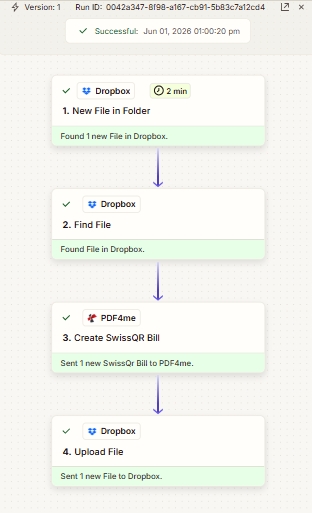
Yukarıdan aşağıya dört adım. 1. Adımdaki 2 dakikalık aralık, Zapier'ın Dropbox tetikleyicileri için varsayılan sorgulama sıklığıdır; yükseltme planları daha sık sorgulama yapabilir.
İhtiyacınız olan şey
- Zapier hesap. Zapier hesabı oluşturun İhtiyacınız varsa.
- PDF4me API anahtarı. API anahtarınızı alın ve PDF4me Zap düzenleyicisinde hesap istediğinde ekleyin. Bkz. PDF4me'yi Zapier'e bağlayın.
- Dropbox Kaynak klasörüyle birlikte (örneğin,
/pdf4metest/Swiss-RP) ve bir çıktı klasörü (/pdf4meoutput). - Fatura PDF'si (ekran görüntüleri kullanılıyor)
10 sayfa.pdfİsteğe bağlı: Yalnızca ödeme verilerinden oluşan bağımsız bir QR fişi için kaynak dosyayı atlayın. - İsviçre ödeme verileri: A CH veya LI IBAN, miktar, para birimi (
CHFveyaEUR), ve alacaklı + borçlu adı/adres blokları. Tam alan referansı şurada yer almaktadır: eylem belgeleri.
Hızlı referans: temel parametreler
Zap'ı oluşturun
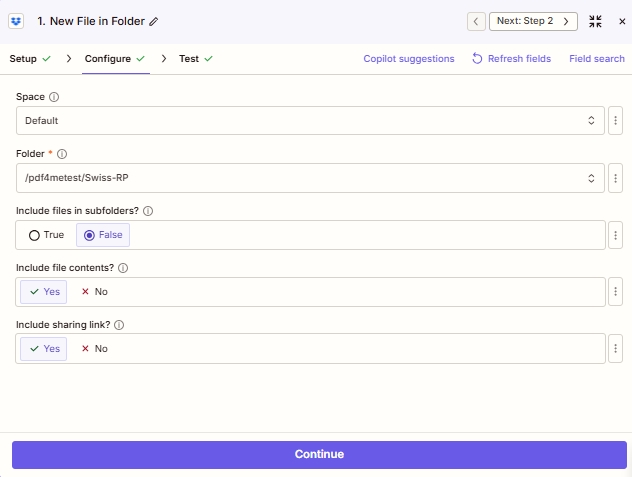
Adım 1: Dropbox - Klasöre Yeni Dosya (tetikleyici)
Yeni faturalar için kaynak klasörünü kontrol edin.
| Alan | Bu çalıştırmada kullanılan değer |
|---|---|
| Space | Default |
| Folder | /pdf4metest/Swiss-RP |
| Include files in subfolders? | False |
| Include file contents? | Yes |
| Include sharing link? | Yes |
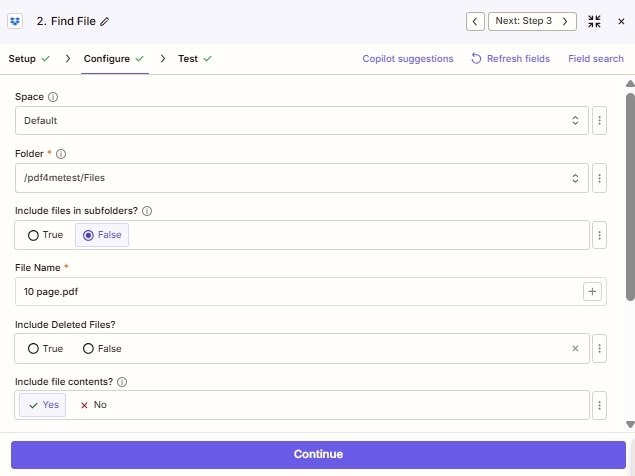
Adım 2: Dropbox - Dosya Bul
Dosyayı adına göre çözümleyin. Bu, 3. adım için istikrarlı, eşlenebilir bir dosya referansı sağlar.
| Alan | Bu çalıştırmada kullanılan değer |
|---|---|
| Space | Default |
| Folder | /pdf4metest/Files |
| Include files in subfolders? | False |
| File Name | 10 page.pdf |
| Include Deleted Files? | False |
| Include file contents? | Yes |
Adım 3: PDF4me - SwissQR Faturası Oluşturma
İşi yapan eylem. Araştır. PDF4me Eylem seçicisinde, seçin İsviçre QR Faturası OluşturunArdından, alanları ekran görüntülerindeki gibi aynen doldurun. eylem referansı göster. Bu çalıştırmaya uyması için gereken minimum gereksinim:
| Grup | Alan | Değer |
|---|---|---|
| Source | Format Type | PDF |
| Source | File | 2. File: (Exists but not shown) |
| Source | File Name | 2. File Name: 10 page + 2. File Ext: .pdf |
| Source | paging Options | first |
| Payment | Currency | CHF |
| Payment | Reference Type | QRR |
| Payment | Language Type | English |
| Payment | Separator Line | Line with Scissor |
| Payment | Amount | 1923.67 |
| Payment | IBAN | CH4431999123000889012 |
| Creditor | Creditor Address Type | S |
| Creditor | Creditor Name | Var Schneider AG |
| Creditor | Creditor:Street / Address Line 1 | Var Schneider AG |
| Creditor | Creditor:Building No. / Address Line 2 | 23 |
| Creditor | Creditor City | biel |
| Creditor | Creditor Postal Code | 2501 |
| Debtor | Ultimate Debtor Address Type | S |
| Debtor | Ultimate Debtor Name | Pia-Maria Rutschmann-Schnyder |
| Debtor | Ultimate Debtor:Address Line 1 | Grosse Marktgasse |
| Debtor | Ultimate Debtor:Address Line 2 | 32 |
| Debtor | Ultimate Debtor City | Rorschach |
| Debtor | Ultimate Debtor Postal Code | 9400 |
| Ref/Msg | Reference | 210000000003139471430009017 |
| Ref/Msg | Unstructured Message | Instruction of 15.09.2019 |
| Ref/Msg | Billing Info | S1/01/20170309/11/10201409/20/14000000/22/36958/30/CH106017086/40/1020/41/3010 |
| Ref/Msg | AV1 Parameters | Name AV1: UV;UltraPay005;12345 |
| Ref/Msg | AV2 Parameters | Name AV2: XY;XYService;54321 |
Adım 4: Dropbox - Dosya Yükleme
Oluşturulan PDF dosyasını çıktı klasörüne kaydedin.
| Alan | Bu çalıştırmada kullanılan değer |
|---|---|
| Space | Default |
| Folder | /pdf4meoutput |
| File | 3. File Url (from PDF4me Step 3) |
| Overwrite | no |
| Specify File Name | 3. File Name: 10 page (from PDF4me Step 3) |
| Specify File Extension | 3. File Extension: .pdf (from PDF4me Step 3) |
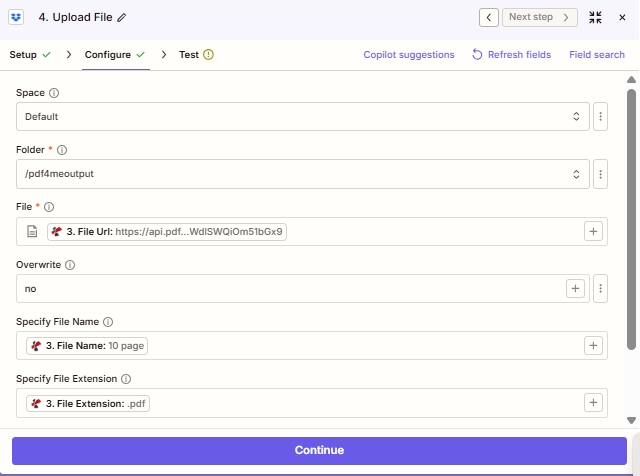
Harita Dosya PDF4me'ye Dosya URL'si çıktı (Adım 3); ayrı Dosya Adını Belirtin Ve Dosya Uzantısını Belirtin Alanlar orijinal adı korur.
Kaydet ve tıkla YayınlaZap yayında; yeni bir fatura bırakın. /pdf4metest/Swiss-RP ve QR kodlu fatura ile zenginleştirilmiş PDF dosyası şu adrese ulaşıyor: /pdf4meoutput bir sonraki seçim döneminde.