Безопасный Word Документ в n8n
Безопасный Word Документ является PDF4me действие узла в n8n который блокирует .docx Файл с паролем, ограничением на редактирование или и тем и другим. Используйте его для защиты конфиденциальных отчетов перед отправкой, предотвращения изменения подписанного шаблона или для того, чтобы рецензенты могли комментировать контракт, не изменяя его текст.
Что делает этот узел?
PDF4me Word: Безопасный Word Документ применяется два независимых вида защиты. Безопасно при открытии плюс Открыть пароль Определяет, откроется ли файл вообще. Тип защиты плюс Пароль защиты Определяет, что можно изменять после открытия файла: от полностью режима только для чтения до комментариев, полей форм или только отслеживаемых изменений. Используйте любой из этих режимов или оба одновременно.
Аутентификация вашего API Запрос
Каждый PDF4me узел в n8n требуется действительный Учетные данные для подключения кСоздайте или выберите тот, который содержит ваши данные. PDF4me API ключевой элемент, позволяющий рабочему процессу аутентифицировать запросы на обеспечение безопасности документов.
Важные факты, которые нельзя пропустить
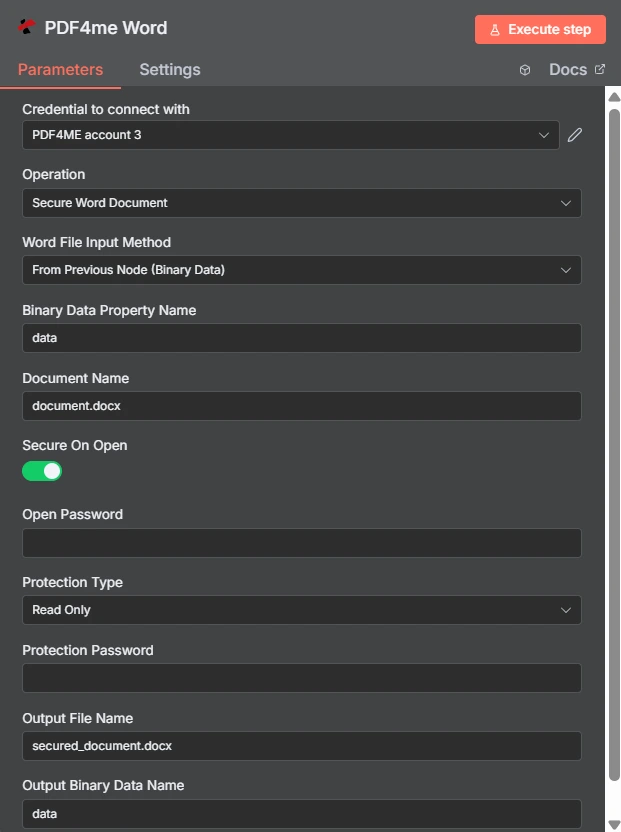
Функция «Защита при открытии» переключается, а тип защиты — это отдельный выпадающий список, в котором здесь установлено значение «Только для чтения». Два поля для ввода пароля, расположенные ниже, независимы друг от друга.
Открытие пароля против ограничения редактирования
| Вопрос | Откройте пароль | Ограничение на редактирование |
|---|---|---|
| Which fields set it | Secure On Open and Open Password | Protection Type and Protection Password |
| What it blocks | Opening the document at all | Changing the document once open |
| Can the recipient read it | Only with the password | Yes, reading is always allowed |
| Typical recipient | A named person receiving something confidential | A reviewer or a form filler |
| Use it when | The content must not be seen by others | The content may be seen but not altered |
Какие параметры обеспечивает безопасность? Word Необходимые документы?
| Параметр | Необходимый | Что это делает | Пример |
|---|---|---|---|
| Credential to connect with | Required | The PDF4me account credential the node authenticates with. | PDF4ME account |
| Operation | Required | The action this node performs. Select Secure Word Document. | Secure Word Document |
| Word File Input Method | Required | How the .docx reaches the node: from the previous node as binary data, as a Base64 string, or from a URL. | From Previous Node (Binary Data) |
| Binary Data Property Name | Conditional | Name of the binary property holding the document. Appears when the file comes from the previous node. | data |
| Document Name | Required | Filename of the input document including the extension. Drives format detection. | document.docx |
| Secure On Open | Optional | Toggle that requires a password before the document will open. Leave off if you only want an editing restriction. | enabled |
| Open Password | Conditional | The password needed to open the file. Required once Secure On Open is enabled. Supply it through an expression, not as literal text. | {{ $env.DOC_OPEN_PW }} |
| Protection Type | Optional | Editing restriction applied to the document: Read Only, Allow Comments, Allow Form Fields, or Allow Revisions. | Read Only |
| Protection Password | Conditional | The password that lifts the editing restriction. Required once a Protection Type is chosen, and should differ from Open Password. | {{ $env.DOC_EDIT_PW }} |
| Output File Name | Optional | Filename of the returned secured document. Keep the .docx extension. | secured_document.docx |
| Output Binary Data Name | Optional | Binary property the secured document is written to. Leave as data unless a later node expects another name. | data |
Варианты типа защиты
| Вариант | Что может сделать получатель |
|---|---|
Read Only | View the document only. No edits of any kind are accepted. |
Allow Comments | Add and edit comments, but not change the document text itself. |
Allow Form Fields | Fill in form fields while the surrounding content stays locked. |
Allow Revisions | Edit, but only with tracked changes recorded so every alteration is visible. |
Выход
| Поле | Тип | Что в нём содержится |
|---|---|---|
| fileName | String | Name of the returned secured document. |
| fileSize | Number | Size of the secured document in bytes. |
| success | Boolean | Whether protection was applied. Branch on this so failures surface as alerts. |
| originalFileName | String | Name of the input document as supplied in Document Name. |
| secureOnOpen | Boolean | Whether an open password was applied, echoed back for verification. |
| protectionType | String | The editing restriction applied, such as ReadOnly, or empty when none was set. |
| message | String | Human-readable status text describing the result of the operation. |
Проверка protectionType В ответе содержится самый дешевый способ подтвердить, что именно то ограничение, которое вы хотели установить, и было применено.
Как настроить безопасность? Word Документ в n8n?
- Добавить PDF4me Word добавьте узел к вашему рабочему процессу и установите Операция к Безопасный Word Документ.
- Выберите свой PDF4me учетные данные или создайте их и вставьте свои. API ключ.
- Выберите Word Метод ввода файла и поставлять
.docxчерез поле под ним. - Набор Название документа с правильным расширением.
- Для открытия ворот включите Безопасно при открытии и установить Открыть пароль из учетных данных или переменной среды.
- Для редактирования шлюза установите Тип защиты и предоставить другой Пароль защиты.
- Набор Имя выходного файла заканчивающийся в
.docx. - Запустите узел, подтвердите.
secureOnOpenиprotectionTypeВ ответном сообщении перенаправьте защищенный файл дальше.
Типичные конфигурации
Примеры рабочих процессовCommon n8n workflow patterns using Secure Word Document.
- На этапе составления отчета создается документ, содержащий конфиденциальные данные.
- Функция Secure On Open применяет пароль, хранящийся в переменной среды.
- Файл отправляется по электронной почте, а пароль передается по отдельному каналу связи.
- Для параметра «Тип защиты» установлено значение «Разрешить комментарии».
- Рецензенты вносят пометки, не изменяя текст ни одного пункта.
- Обратная связь поступает без последующего согласования изменений.
- Функция «Разрешить поля формы» сохраняет окружающий текст неизменным.
- Получатели заполняют только те поля, которые для них предназначены.
- Возвращаемые формы достаточно согласованы для автоматического анализа.
- Шаблон утверждается и публикуется на общем диске.
- Защита «Только для чтения» предотвращает скрытое локальное редактирование.
- Все работают, опираясь на одну и ту же авторитетную формулировку.
Практические советы
Шпаргалка
| Поле | Ценить |
|---|---|
| Operation | Secure Word Document |
| Word File Input Method | From Previous Node (Binary Data) |
| Binary Data Property Name | data |
| Document Name | document.docx |
| Secure On Open | enabled |
| Open Password | {{ $env.DOC_OPEN_PW }} |
| Protection Type | Read Only |
| Protection Password | {{ $env.DOC_EDIT_PW }} |
| Output File Name | secured_document.docx |
| Output Binary Data Name | data |