Добавить строки в Excel Рабочий лист в n8n
Добавить строки является PDF4me действие узла в n8n тот, кто пишет JSON записи в Excel Рабочий лист. Используйте его для толкания. API результаты в отчет, записи содержимого веб-перехватчиков в общую рабочую книгу или добавление CRM экспортируется в таблицу отслеживания, при этом числа и даты отображаются в реальном времени. Excel Значения, а не текст.
Что делает этот узел?
PDF4me ExcelДобавить строки берет существующий .xlsx рабочая тетрадь плюс JSON массив в JSON Данные строки записывает по одной строке для каждого объекта. У него есть два режима размещения: назвать таблицу в Цель Excel Стол Ключи сопоставляются с заголовками, или же поле можно оставить пустым. Вставить из строки плюс Вставить из столбца Укажите точную начальную ячейку. Программа редактирует предоставленную вами рабочую книгу, а не создает ее с нуля.
Аутентификация вашего API Запрос
Каждый PDF4me узел в n8n требуется действительный Учетные данные для подключения кСоздайте или выберите тот, который содержит ваши данные. PDF4me API ключевой элемент, позволяющий рабочему процессу безопасно аутентифицировать запросы к электронным таблицам.
Важные факты, которые нельзя пропустить
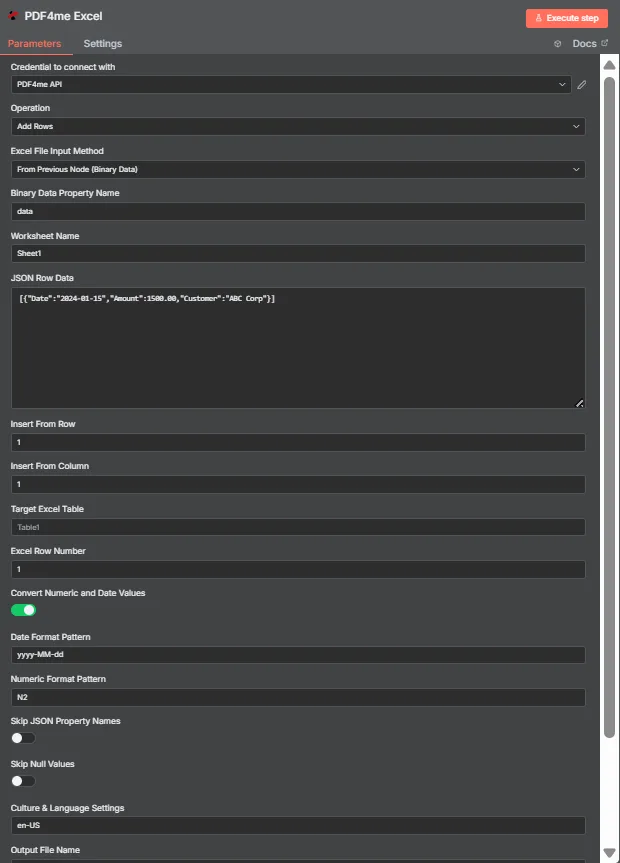
JSON Данные строки содержат JSON Массив плоских объектов. Цель Excel В этой таблице нет данных, поэтому команды «Вставить из строки» и «Вставить из столбца» помещают данные в ячейку A1.
Табличный режим против координатного режима
| Вопрос | Режим таблицы | Режим координат |
|---|---|---|
| How you switch to it | Name a table in Target Excel Table | Leave Target Excel Table blank |
| How columns are matched | JSON keys matched against table headers | Values written in key order from the start cell |
| Does column order matter | No, headers drive placement | Yes, position drives placement |
| Which fields control it | Target Excel Table and Excel Row Number | Insert From Row and Insert From Column |
| Best for | Structured sheets that already have a table | Blank sheets or a fixed reporting layout |
| Overwrite risk | Lower, rows follow the table structure | Higher, the start cell is written to directly |
Какие параметры необходимы для добавления строк?
| Параметр | Необходимый | Что это делает | Пример |
|---|---|---|---|
| Credential to connect with | Required | The PDF4me API credential the node authenticates with. | PDF4me API |
| Operation | Required | The action this node performs. Select Add Rows. | Add Rows |
| Excel File Input Method | Required | How the workbook reaches the node: from the previous node as binary data, as a Base64 string, or from a URL. | From Previous Node (Binary Data) |
| Binary Data Property Name | Conditional | Name of the binary property holding the .xlsx. Appears when the workbook comes from the previous node. | data |
| Worksheet Name | Required | Sheet the rows are written to. Match the sheet tab name exactly. | Sheet1 |
| JSON Row Data | Required | JSON array of flat objects. Each object becomes one row and each key maps to a column. | [{"Date":"2024-01-15","Amount":1500.00}] |
| Insert From Row | Conditional | Row number the data starts at, counting from 1. Used in coordinate mode when no table is named. | 1 |
| Insert From Column | Conditional | Column number the data starts at, counting from 1 for column A. Used in coordinate mode. | 1 |
| Target Excel Table | Optional | Name of an existing table to write into. Filling this in switches the node to header matching instead of coordinates. | Table1 |
| Excel Row Number | Conditional | Row index inside the named table where insertion begins. Used in table mode. | 1 |
| Convert Numeric and Date Values | Optional | Toggle that turns numeric and date strings into real Excel values rather than text. Ships enabled. | enabled |
| Date Format Pattern | Optional | Pattern applied to converted dates. Match it to the shape of the dates in your JSON. | yyyy-MM-dd |
| Numeric Format Pattern | Optional | Format applied to converted numbers, such as two decimal places. | N2 |
| Skip JSON Property Names | Optional | Toggle that omits the JSON keys, writing only values. Ships disabled so headers are included. | disabled |
| Skip Null Values | Optional | Toggle that leaves cells untouched where a JSON value is null instead of clearing them. Ships disabled. | disabled |
| Culture and Language Settings | Optional | Culture code used when parsing numbers and dates, which decides separator handling. | en-US |
| Output File Name | Optional | Filename of the returned workbook. Keep a valid Excel extension. | excel_with_rows.xlsx |
Выход
| Поле | Тип | Что в нём содержится |
|---|---|---|
| fileName | String | Name of the returned workbook after the rows were written. |
| fileSize | Number | Size of the returned workbook in bytes. |
| success | Boolean | Whether the insertion completed. Branch on this so failures surface as alerts. |
| originalFileName | String | Name of the input workbook as supplied to the node. |
| worksheetName | String | The worksheet the rows were written to. |
| rowsAdded | Number | How many rows were inserted. The most useful verification signal the node returns. |
| insertFromRow | Number | Starting row used, echoed back when running in coordinate mode. |
| insertFromColumn | Number | Starting column used, echoed back when running in coordinate mode. |
| tableName | String | The table written into, or null when coordinate mode was used. |
| excelRowNumber | Number | Row index inside the table where insertion began, in table mode. |
| convertNumericAndDate | Boolean | Whether numeric and date conversion was applied. |
| dateFormat | String | The date pattern applied during conversion. |
| numericFormat | String | The numeric format applied during conversion. |
| cultureName | String | The culture code used to parse numbers and dates. |
| message | String | Human-readable summary, including the row count and worksheet name. |
Обновленная рабочая книга возвращается в виде двоичных данных, готовых к записи в хранилище, прикреплению к электронному письму или передаче в дальнейшее приложение. Excel шаг.
Как настроить добавление строк в n8n?
- Добавить PDF4me Excel добавьте узел к вашему рабочему процессу и установите Операция к Добавить строки.
- Выберите свой PDF4me учетные данные или создайте их и вставьте свои. API ключ.
- Выберите Excel Метод ввода файла и укажите название рабочей книги в поле, которое появится под ней.
- Набор Название рабочего листа точно на ту вкладку листа, куда вы записываете данные.
- Вставьте JSON массив плоских объектов в JSON Данные строкпо одному объекту в каждой строке.
- Для использования табличного режима введите название таблицы в поле Цель Excel Стол и установить Excel Ряд NumberЧтобы использовать координаты, оставьте таблицу пустой и задайте значение. Вставить из строки и Вставить из столбца.
- Оставлять Преобразование числовых значений и дат включено, затем установить Шаблон формата даты, Шаблон числового формата, и Культурные и языковые условия для сопоставления с вашими данными.
- Набор Имя выходного файлазапустите узел и проверьте
rowsAddedв ответе перед дальнейшей переадресацией рабочей книги.
Типичные конфигурации
Примеры рабочих процессовCommon n8n workflow patterns using Add Rows.
- Веб-хук получает отправленную форму в качестве JSON.
- Функция «Добавить строки» добавляет их в именованную таблицу в общей рабочей книге.
- Команда читает таблицу, не требуя повторного ввода данных.
- запланированный HTTP Запрос извлекает записи из внутреннего источника. API.
- Узел Code преобразует ответ в простой массив.
- Функция «Добавить строки» записывает данные в шаблон отчета в фиксированных координатах.
- Ночная работа открывает новые возможности, поскольку JSON.
- В табличном режиме ключи сопоставляются с существующими заголовками.
- Изменение порядка столбцов в исходных данных не приводит к нарушению работы листа.
- Функция «Добавить строки» возвращает значение rowsAdded рядом с рабочей книгой.
- Узел IF сравнивает это значение с длиной входного массива.
- При возникновении несоответствия вместо отправки краткого отчета выдается предупреждение.
Практические советы
Шпаргалка
| Поле | Ценить |
|---|---|
| Operation | Add Rows |
| Excel File Input Method | From Previous Node (Binary Data) |
| Binary Data Property Name | data |
| Worksheet Name | Sheet1 |
| JSON Row Data | [{"Date":"2024-01-15","Amount":1500.00}] |
| Insert From Row / Column | 1 / 1 |
| Target Excel Table | Table1 |
| Excel Row Number | 1 |
| Convert Numeric and Date Values | enabled |
| Date Format Pattern | yyyy-MM-dd |
| Numeric Format Pattern | N2 |
| Culture and Language Settings | en-US |
| Output File Name | excel_with_rows.xlsx |