Расколоть PDF с помощью штрихкода n8n действие
PDF4me Расколоть PDF по штрихкоду разделяет PDF документы на основе обнаруженного содержимого штрихкода n8n Автоматизация рабочих процессов. Процесс PDFs с помощью n8n триггеры, двоичные данные, строки base64 или публичные URLs для автоматического обнаружения штрихкодов (QR Code, Code 128, Data MatrixЭто решение идеально подходит для автоматизации обработки почты, пакетной обработки документов, разделения счетов-фактур, автоматической архивации, сортировки документов и рабочих процессов организации на основе штрихкодов, требующих точного распознавания штрихкодов с интеллектуальным разделением документов и бесшовной интеграции.
Настраивать
Добавить PDF4me "Расколоть PDF узел «по штрихкоду» для вашего n8n Осуществите настройку рабочего процесса и необходимых параметров. Инструкции по первоначальной настройке см. в нашем разделе. n8n Руководство по интеграции.
Предварительные требования:
- PDF4me API реквизиты для входа
- n8n доступ к рабочему процессу
Конфигурация:
- Добавлять PDF4me узел к рабочему процессу
- Выберите "Разделить" PDF действие "по штрихкоду"
- Настройте входные параметры (см. ниже).
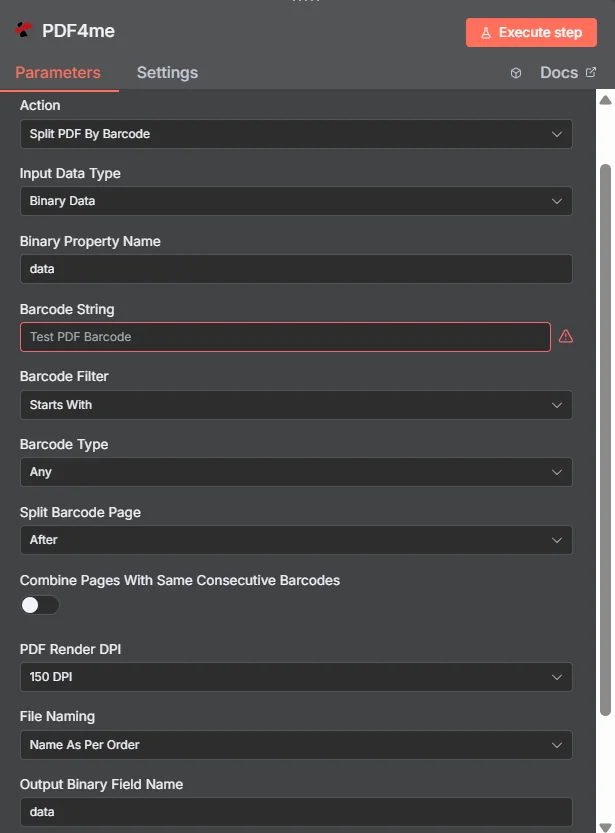
Параметры
Полный список параметров для разделения PDF Управление на основе штрихкода. Настройте эти параметры для управления на основе штрихкодов. PDF разделение.
Важный: Параметры, отмеченные звездочкой (***), являются обязательными и должны быть предоставлены для корректной работы действия.
| Параметр | Необходимый | Что это делает | Пример |
|---|---|---|---|
| Input Data Type | Required | Choose how to provide the PDF data. Options: Base64 String, Binary Data, URL. Default is `Binary Data`. | Binary Data |
| Base64 Content | Conditional | Base64 encoded content of the PDF file. Shown when Input Data Type is Base64 String. | UEsDBBQABgAI... |
| Input File Name | Conditional | Name of the input file (including extension). Shown when Input Data Type is Base64 String. | |
| Binary Property | Conditional | Name of the binary property containing the PDF file. Shown when Input Data Type is Binary Data. Default is `data`. | data |
| Input File Name | Conditional | Name of the input file (including extension). If not provided, will use the filename from binary data. Shown when Input Data Type is Binary Data. | |
| File URL | Conditional | URL of the PDF file. Shown when Input Data Type is URL. | https://abc.com/sample.pdf |
| Input File Name | Conditional | Name of the input file (including extension). Shown when Input Data Type is URL. | |
| Barcode String | Required | Barcode string to search for. | Test PDF Barcode |
| Barcode Filter | Required | Filter type for barcode matching. Options: Starts With, Ends With, Contains, Exact Match. Default is `Starts With`. | Starts With |
| Barcode Type | Required | Type of barcode to detect. Options: Any, Data Matrix, QR Code, PDF417. Default is `Any`. | Any |
| Split Barcode Page | Required | Where to split relative to the barcode page. Options: After, Before, Remove. Default is `After`. | After |
| Combine Pages With Same Consecutive Barcodes | Required | Whether to combine consecutive pages with the same barcode. Default is `No`. | No |
| PDF Render DPI | Required | PDF render DPI for processing. Options: 100 DPI, 150 DPI, 200 DPI, 250 DPI. Default is `150 DPI`. | 150 DPI |
| File Naming | Required | File naming convention for split files. Options: Name As Per Order, Name As Per Page. Default is `Name As Per Order`. | Name As Per Order |
| Output Binary Field Name | Optional | Name of the binary property to store the output PDF file. Default is `data`. | data |
| Advanced Options | Optional | Optional settings, collapsed behind Add Option. | Add Option |
| Custom Profiles | Optional | Use "JSON" to adjust custom properties. Review Profiles at https://dev.pdf4me.com/apiv2/documentation/ to set extra options for API calls. | { "outputDataFormat": "base64", "preserveMetadata": true, "optimizeForPrinting": false, "compressionLevel": "medium" } |
Выход
Выходные параметры
| Поле | Тип | Что в нём содержится |
|---|---|---|
success | Boolean | True when the operation succeeded. |
message | String | Status message, `PDF split into <n> file(s) successfully`. |
folderName | String | Input file name without `.pdf`, followed by `_split_barcode_outputs`. Informational only. |
outputDirectory | String | `/tmp/` followed by folderName. Informational only: the node does not write any files there. |
totalFiles | Number | Number of split files returned. |
sourcePdf | String | Name of the input file as sent to PDF4me. |
responseType | String | Which PDF4me response format the node read, for example `Multiple PDFs (splitedDocuments)`. |
files | String | One entry per split file: fileName, pageIndex (position of the part, from 1), binaryProperty (name of the binary property that holds it), mimeType, fileType (`PDF file`) and fileSize (bytes). |
data | Binary | One PDF per split part, all on the single output item, in binary properties named after Output Binary Field Name with a counter (`data_1`, `data_2`, ...). No ZIP file is returned; if PDF4me answers with a ZIP the node stops with an error. |
N8N Действие Ответ
Он PDF4me Расколоть PDF по штрихкоду API Возвращает ответ, который можно просмотреть в нескольких форматах. Выберите тот формат, который лучше всего соответствует вашим потребностям:
- JSON
- Table
- Schema
- Binary
JSON Формат ответа
Сырье JSON ответ от API:
[
  {
    "success": true,
    "message": "PDF split by barcode successfully",
    "fileName": "split_barcode_output.pdf",
    "mimeType": "application/pdf",
    "fileSize": 125430,
    "docName": "split_barcode_output.pdf",
    "barcodeSplitCompleted": true,
    "barcodesDetected": 3,
    "filesGenerated": 4
  }
]
Табличный вид
Данные ответов представлены в структурированном табличном формате:
| Параметр | Ценить |
|---|---|
| success | true |
| message | PDF split by barcode successfully |
| fileName | split_barcode_output.pdf |
| mimeType | application/pdf |
| fileSize | 125430 |
| docName | split_barcode_output.pdf |
| barcodeSplitCompleted | true |
| barcodesDetected | 3 |
| filesGenerated | 4 |
Схема представления
Структура данных и типы ответов:
1 item
success: ☑ true
message: AB PDF split by barcode successfully
fileName: AB split_barcode_output.pdf
mimeType: AB application/pdf
fileSize: # 125430
docName: AB split_barcode_output.pdf
barcodeSplitCompleted: ☑ true
barcodesDetected: # 3
filesGenerated: # 4
Типовые индикаторы:
AB= String#= Число☑= Boolean
Представление двоичных данных
Фактические данные и метаданные разделенного PDF-файла:
data
─────────────────────────────
File Name: split_barcode_output.pdf
File Extension: pdf
Mime Type: application/pdf
File Size: 122.5 KB
Доступ к двоичным данным:
- n8n Двоичный объект:
$binary.data.data - Base64 СодержаниеДоступно для непосредственного использования
- Операции с файламиГотово к загрузке, отправке по электронной почте или хранению.
Варианты использования
Автоматизированная обработка и сортировка документов
- Разделение входящего PDF Документы, основанные на штрихкодах, для автоматической маршрутизации в различные отделы или процессы.
- Обрабатывайте отсканированные документы с разделителями в виде штрихкодов для автоматической организации их в отдельные файлы.
- Автоматизируйте разделение партий документов, содержащих несколько документов, на основе уникальных идентификаторов штрихкодов для оптимизации обработки.
Управление счетами-фактурами и квитанциями
- Разделение объединенного счета-фактуры PDFs с помощью штрихкодов для создания отдельных файлов счетов-фактур для каждой транзакции.
- Обрабатывайте партии чеков, разделяя их по штрихкодам, чтобы упорядочить чеки по дате, магазину или типу транзакции.
- Автоматизируйте разделение финансовых документов на основе штрихкодов для целей бухгалтерского учета и ведения документации.
Производство и контроль качества
- Разделение производственных отчетов и документов контроля качества на основе штрихкодов для различных производственных линий или партий.
- Обработка отчетов о проверке путем разделения по штрихкодам для создания отдельных файлов для каждой проверки.
- Автоматизируйте организацию технической документации на основе штрихкодов для различных компонентов или процессов.